
Introduction
The SHOKZ OpenRun Pro 2 Mini headphones are designed for sports enthusiasts, offering a unique open-ear listening experience. Utilizing advanced bone conduction technology, these headphones deliver high-quality audio while allowing you to remain aware of your surroundings. The comfortable and secure fit, combined with long battery life and clear call quality, makes them ideal for active lifestyles.
What's in the Box
- SHOKZ OpenRun Pro 2 Mini Headphones
- Magnetic Charging Cable
- Carrying Case
- User Manual
- Customer Service Card

Image: All items included in the SHOKZ OpenRun Pro 2 Mini package.
Setup
Charging Your Headphones
Before first use, fully charge your OpenRun Pro 2 Mini headphones. Use the provided magnetic charging cable. Connect the magnetic end to the charging port on the headphones and the USB-A end to a compatible USB power adapter (0.5-2.5W recommended, not included).
- Battery Life: Up to 12 hours of continuous audio playback.
- Quick Charge: A 5-minute charge provides approximately 1.5 hours of listening time.

Image: Detail of the magnetic charging port on the headphones.
Power On/Off
- To Power On: Press and hold the Volume+ button until the LED indicator flashes blue and the voice prompt says "Welcome to Shokz."
- To Power Off: Press and hold the Volume+ button until the LED indicator flashes red and the voice prompt says "Power off."
Bluetooth Pairing
- Start with the headphones powered off.
- Press and hold the Volume+ button for 5-7 seconds until the LED indicator flashes red and blue alternately, and the voice prompt says "Pairing."
- Open the Bluetooth settings on your device (smartphone, tablet, etc.) and select "OpenRun Pro 2 Mini" from the list of available devices.
- Once connected, the LED indicator will flash blue once, and the voice prompt will say "Connected."
Multipoint Pairing: The OpenRun Pro 2 Mini supports multipoint pairing, allowing you to connect to two devices simultaneously. Refer to the Shokz App or the full user guide for detailed instructions on enabling and managing multipoint pairing.
Operating Instructions
Wearing Your Headphones
Place the headphones with the transducers resting on your cheekbones, just in front of your ears. The neckband should rest comfortably behind your head. Ensure the transducers are in full contact with your skin for optimal sound quality.
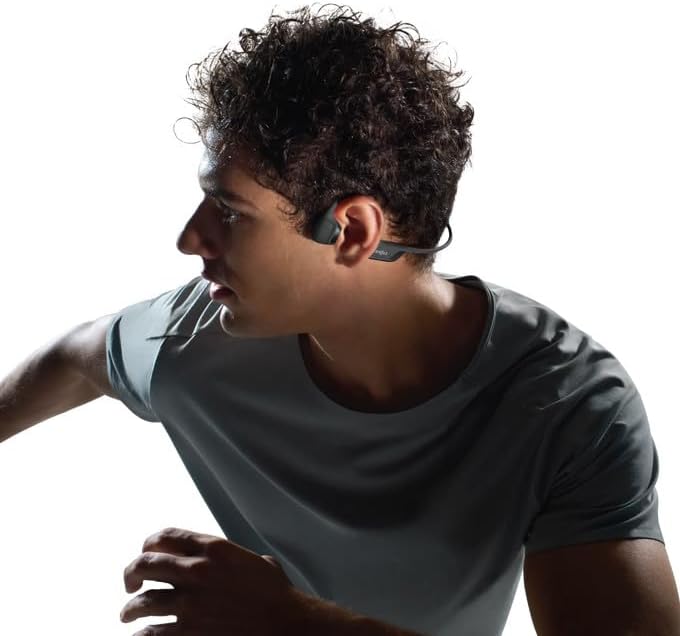
Image: Proper wearing position of the OpenRun Pro 2 Mini headphones.
The open-ear design ensures you remain aware of your surroundings, enhancing safety during outdoor activities.
Controls
- Volume Up/Down: Use the Volume+ and Volume- buttons located on the right side of the neckband.
- Play/Pause: Press the Multifunction button (on the left transducer) once.
- Skip Track Forward: Double-press the Multifunction button.
- Skip Track Backward: Triple-press the Multifunction button.
- Answer/End Call: Press the Multifunction button once during an incoming call or active call.
- Activate Voice Assistant: Press and hold the Multifunction button for 2 seconds.
EQ Modes
Customize your audio experience using the Shokz App. Available EQ modes include:
- Standard Mode: For balanced daily listening.
- Vocal Mode: Enhances vocals for podcasts and audiobooks.
- Bass Boost Mode: Increases bass for a more powerful sound.
- Treble Boost Mode: Enhances high frequencies for clearer details.
- Custom Mode: Allows manual adjustment of the 5-band EQ.
Call Quality
The headphones feature strategically positioned dual wind-resistant microphones and an AI noise reduction algorithm. This technology filters out up to 96.5% of background noise, including wind at speeds up to 15 miles per hour, ensuring crystal-clear phone calls.
Maintenance
Cleaning
Wipe the headphones with a soft, damp cloth. Avoid using harsh chemicals or abrasive materials. Ensure the charging port is dry before charging.
Water Resistance
The OpenRun Pro 2 Mini headphones have an IP55 water resistance rating, making them resistant to sweat, light rain, and dust. They are not designed for submersion in water. Always ensure the charging port cover is securely closed to maintain water resistance.
Troubleshooting
- No Power: Ensure the headphones are fully charged.
- No Sound: Check Bluetooth connection, device volume, and headphone volume. Ensure transducers are correctly placed on cheekbones.
- Poor Sound Quality: Adjust EQ settings in the Shokz App. Ensure transducers are clean and properly positioned.
- Connectivity Issues: Try unpairing and re-pairing the headphones with your device. Ensure no other devices are interfering with the Bluetooth signal.
Specifications
| Model Name | OpenRun Pro 2 Mini |
| Model Number | SZ-HEA-0120 |
| Connectivity Technology | Bluetooth 5.3 |
| Audio Driver Type | Bone Conduction Driver (DualPitch™ Technology) |
| Battery Life | Up to 12 Hours |
| Charging Time | Approx. 1 hour (for full charge) |
| Water Resistance Level | IP55 (Sweat and water resistant) |
| Item Weight | 10.9 ounces (0.31 Kilograms) |
| Material | Nickel-titanium alloy, plastic/silicone |
| Ear Placement | Open Ear |

Image: Size comparison between Standard and Mini versions.
Warranty & Support
SHOKZ OpenRun Pro 2 Mini headphones come with a 2-year warranty. For detailed warranty information, product support, or to register your product, please refer to the included Customer Service Card or visit the official SHOKZ website.


