
NOUYAN BA31
NOUYAN BA31 Blood Pressure Monitor User Manual
Model: BA31 | Brand: NOUYAN
1. Introduction
Thank you for choosing the NOUYAN BA31 Blood Pressure Monitor. This device is designed for convenient and accurate measurement of blood pressure and pulse rate at home. It features a large LED display, dual-user memory, intelligent voice broadcast, and an adjustable cuff for comfortable use. Please read this manual thoroughly before using the device to ensure proper operation and accurate readings.

The NOUYAN BA31 Blood Pressure Monitor, showcasing its large LED display and intuitive button layout.
2. Important Safety Information
- Consult your physician before using this device if you have any medical conditions.
- Do not use this device for diagnosis or treatment of any health problem or disease.
- Keep out of reach of children.
- Do not use the device in a moving vehicle.
- Avoid strong electromagnetic fields during use.
3. Product Components
The NOUYAN BA31 Blood Pressure Monitor package includes the following items:
- NOUYAN BA31 Blood Pressure Monitor Unit
- Adjustable Upper Arm Cuff (8.7"-16.5")
- Storage Bag
- USB Cable (for plug-in use)
- User Manual

Visual representation of the items included in the product package.
4. Setup
4.1 Power Supply
The NOUYAN BA31 monitor can be powered by either 3 AA batteries (not included) or via the included USB cable for plug-in use. Do not insert batteries when using the USB power supply.
- Battery Installation: Open the battery compartment cover on the back of the device. Insert 3 AA batteries, ensuring correct polarity (+/-). Close the cover securely.
- USB Power: Connect the USB cable to the monitor's USB port and plug the other end into a compatible USB power adapter (e.g., phone charger, computer USB port).

The monitor supports both USB plug-in power and AA battery operation for flexibility.
4.2 Connecting the Cuff
Insert the air tube connector of the cuff firmly into the air jack on the side of the monitor unit.
5. Operating Instructions
5.1 Applying the Cuff
The adjustable cuff fits arm circumferences from 8.7 inches to 16.5 inches. Ensure the cuff is applied correctly for accurate readings.
- Place the cuff on your bare upper left arm, approximately 1-2 cm above the elbow joint.
- The air tube should run down the center of your arm.
- Wrap the cuff snugly around your arm, ensuring it is not too tight or too loose. The cuff features a self-check function to help confirm correct positioning.

Proper cuff placement is crucial for accurate blood pressure measurement. The cuff's adjustable range accommodates various arm sizes.
5.2 Correct Measurement Posture
For reliable results, follow these guidelines:
- Relax before measurement: Rest for at least 5 minutes before taking a reading.
- Wear on Left arm: Always use the left arm unless advised otherwise by a medical professional.
- Keep at the heart level: Ensure your arm is supported and the cuff is at the same level as your heart.
- Keep quiet during measurement: Avoid talking or moving during the measurement process.

Following these posture guidelines helps ensure the accuracy of your blood pressure readings.
5.3 Starting Measurement
Once the cuff is correctly applied and you are in the proper posture, press the START/STOP button. The cuff will automatically inflate, and the measurement will begin. The display will show your systolic (SYS), diastolic (DIA), and pulse readings upon completion.

The clear LED display shows all essential measurement data, including systolic, diastolic, and pulse readings.
5.4 Understanding Your Readings (Indicator Bar)
The monitor features an indicator bar on the left side of the display, which visually categorizes your blood pressure reading according to WHO (World Health Organization) standards. This provides a quick reference for your health condition.
| Category | Systolic (SYS) mmHg | Diastolic (DIA) mmHg | Indicator Color |
|---|---|---|---|
| Optimal Blood Pressure | <120 | <80 | Green |
| Normal Blood Pressure | <130 | <85 | Green |
| High Normal Value | <140 | <90 | Yellow |
| Mild Hypertension | <160 | <100 | Orange |
| Moderate Hypertension | <180 | <110 | Dark Orange |
| Severe Hypertension | ≥180 | ≥110 | Red |

The indicator bar provides a quick visual assessment of your blood pressure category.
6. Memory Functions
The NOUYAN BA31 monitor supports dual-user storage, with each user able to store up to 120 readings, totaling 240 memories. This feature is ideal for tracking health trends over time for two individuals.
- Switching Users: Press the User/Confirm button (icon with two people) to switch between User 1 and User 2.
- Viewing Memories: After selecting a user, press the Memory/Switch button (icon with a document) to scroll through past readings.
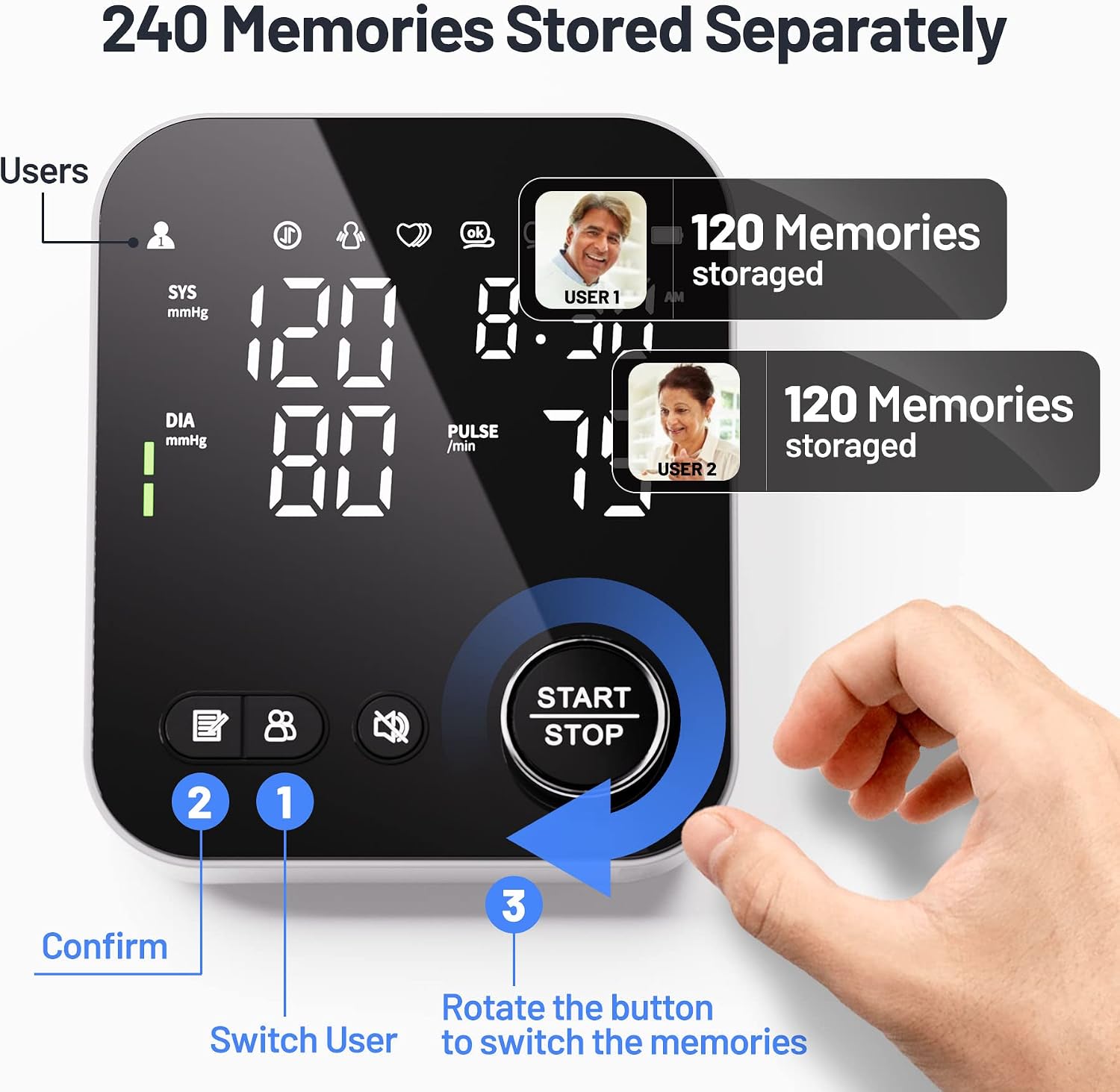
The dual-user memory allows two individuals to track their blood pressure history independently.
7. Voice Broadcast Feature
The monitor includes an intelligent voice broadcast function that provides audio prompts during measurement and announces the results. This feature can be turned on or off as needed.
- Toggle Voice: Press the Mute Button (speaker icon) to activate or deactivate the voice broadcast.

The voice broadcast feature enhances usability, especially for individuals with visual impairments.
8. Maintenance
- Clean the monitor and cuff with a soft, dry cloth. Do not use abrasive cleaners or immerse in water.
- Store the device in the provided storage bag in a cool, dry place, away from direct sunlight and extreme temperatures.
- Remove batteries if the device will not be used for an extended period.
9. Troubleshooting
| Problem | Possible Cause | Solution |
|---|---|---|
| No display when powered on | Batteries are low or incorrectly inserted; USB cable not connected properly. | Replace batteries or ensure correct polarity. Check USB cable connection. |
| Inaccurate readings | Improper cuff placement; movement or talking during measurement; incorrect posture. | Re-apply cuff correctly. Remain still and silent. Follow correct posture guidelines. |
| Cuff does not inflate | Air tube disconnected; cuff leakage. | Ensure air tube is firmly connected. Check cuff for any damage or leaks. |
| Voice broadcast not working | Voice feature is muted. | Press the Mute button to unmute the voice broadcast. |
10. Specifications
| Feature | Detail |
|---|---|
| Product Dimensions | 5.27"L x 1.85"W x 4.33"Th |
| Item Model Number | BA31 |
| Manufacturer | Shenzhen Jamr Technology Co., Ltd. |
| Power Source | Battery Powered (3x AA) / USB Plug-in |
| Use For | Upper Arm |
| Display Type | LED |
| Cuff Size | Adjustable 8.7"-16.5" |
| Memory Storage | 2 x 120 readings (240 total) |
| Weight | 14.39 ounces (approx. 408g) |

Detailed dimensions of the NOUYAN BA31 monitor.
11. Warranty and Support
For warranty information or technical support, please refer to the contact details provided with your product packaging or visit the official NOUYAN website. Keep your purchase receipt as proof of purchase for warranty claims.
Ask a question about this manual
Ask about setup, troubleshooting, compatibility, parts, safety, or missing instructions. Manuals+ will review the question and use this page’s manual context to help answer it.