
1. Product Overview
The Hohem iSteady M7 is an advanced 3-axis gimbal stabilizer designed for smartphones, offering superior stabilization for video recording and photography. It integrates an AI tracking module, a detachable remote control with a touchscreen, and an extendable pole for versatile shooting scenarios.

The Hohem iSteady M7 Gimbal Stabilizer, showcasing its main components including the gimbal, smartphone mount, AI tracking module, detachable remote, mini tripod, and carrying case.
2. What's in the Box
Verify that all items are present in your package:
- Hohem iSteady M7 Gimbal Stabilizer
- Advanced AI Tracker with Fill Light
- Detachable Touchscreen Remote Controller
- Mini Tripod
- USB Type-C Charging Cable
- Quick Start Guide
- Warranty Card
- Safety Guidelines
- Carrying Case

All components included in the Hohem iSteady M7 package, neatly arranged.
3. Product Components
Familiarize yourself with the key parts of your iSteady M7 gimbal:
- Gimbal Handle: Main grip with integrated controls.
- Smartphone Clamp: Securely holds your phone.
- Roll, Pan, and Tilt Axes: Motorized axes for stabilization.
- Axis Locks: For securing each axis during transport or storage.
- AI Tracking Module: Detachable module for intelligent subject tracking and fill light.
- Detachable Remote Control: Features a 1.4-inch full-color touchscreen for remote operation and real-time preview.
- Extension Pole: Built-in extendable rod for higher or lower angle shots.
- Trigger Button: For quick mode changes and recentering.
- Side Roller: Controls motor rotation, focus, and fill light settings.
- A/B Buttons: Customizable function buttons.
- Joystick: For manual control of gimbal movement.

The Hohem iSteady M7, highlighting its main body, detachable remote, and tripod attachment point.
4. Setup Guide
4.1 Charging the Gimbal and Remote
Before first use, fully charge both the gimbal and the detachable remote control using the provided USB Type-C cable. The gimbal supports reverse charging, allowing it to act as a power bank for your smartphone.
4.2 Mounting Your Smartphone
- Unlock all three axis locks on the gimbal.
- Extend the smartphone clamp and carefully place your phone in it. Ensure the phone is centered and securely held.
- Attach the AI tracking module to the top of your smartphone if desired.
4.3 Balancing the Gimbal
Proper balancing is crucial for optimal performance and battery life. Adjust the phone's position in the clamp until it remains level when the gimbal is powered off. The iSteady M7 is designed to balance without a phone, but fine-tuning with your specific device is recommended.
4.4 Power On/Off
Press and hold the power button on the gimbal handle for a few seconds to power on or off. The remote control will automatically connect once powered on.

The Hohem iSteady M7 with a smartphone mounted, ready for use on its mini tripod.
5. Operating Instructions
5.1 Basic Controls
- Joystick: Controls the pan and tilt movements of the gimbal.
- Trigger Button: Double-press to recenter the gimbal. Triple-press to switch between horizontal and vertical shooting modes.
- Side Roller: Provides precise control for motor rotation, focus adjustment, and CCT & RGB fill light settings.
- A/B Buttons: Can be customized for various functions, such as setting timelapse paths.
5.2 AI Tracking Module
The AI tracking module allows the gimbal to automatically track a subject without needing the Hohem Joy app. It features enhanced AI lens resolution and an automatic safety lock mechanism. Use hand gestures to initiate and stop tracking.

The advanced AI tracking module with its safety lock design.
5.3 Detachable Remote Control
The remote control features a 1.4-inch full-color touchscreen, providing intuitive control and real-time preview. It allows for remote framing and composition, setting parameters, checking shooting status, and framing tracked subjects from up to 10 meters away.

The detachable remote control with its full-color touchscreen for remote operation and preview.
5.4 Using the Fill Light
The integrated RGB and CCT fill light can illuminate your shots. It supports 360 lighting colors (RGB) and adjustable color temperature from 2700K to 6500K (CCT). Brightness and color temperature can be controlled remotely via the side roller or the Hohem Joy app.

The magnetic fill light providing illumination, capable of RGB and CCT lighting.
5.5 Extension Pole Usage
The built-in extension pole extends up to 193mm, allowing for creative high-angle or low-angle shots, and is ideal for selfies and vlogging.
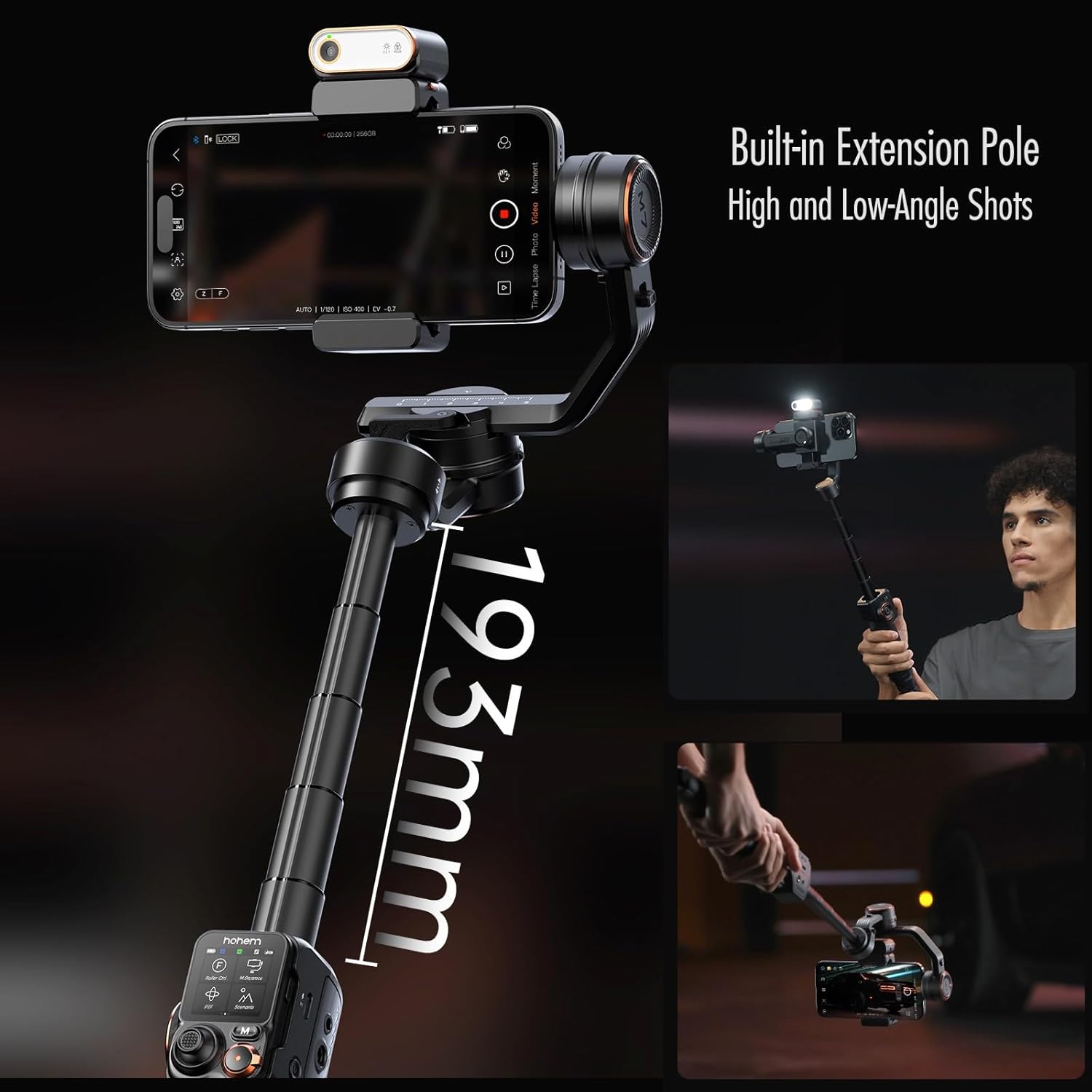
The iSteady M7 with its built-in extension pole, enabling diverse shooting angles.
5.6 Gimbal Modes
The iSteady M7 offers various operating modes to suit different shooting needs:
- Pan Follow (PF): The camera pans left/right following your hand movements, while tilt and roll axes are locked.
- Pan & Tilt Follow (PTF): The camera pans and tilts following your hand movements, while the roll axis is locked.
- All Lock (AL): All three axes are locked, keeping the camera pointing in a fixed direction.
- POV (Point of View): All three axes follow your hand movements, providing a first-person perspective.
- Sport Mode: Increases the motor speed for quick transitions and fast-moving subjects.
- Inception Mode: Rotates the phone 360 degrees along the roll axis for a spinning effect.

The gimbal performing a 360-degree infinite pan rotation.

Visual representation of Standard Mode versus Ultra-Wide-Angle Mode.
5.7 App Integration (Hohem Joy App)
For extended functionality and advanced features, download the Hohem Joy app. The app provides additional shooting modes, parameter settings, and firmware updates. It is compatible with iOS, Android, and HarmonyOS.
6. Maintenance
6.1 Cleaning
Wipe the gimbal body with a soft, dry cloth. Do not use liquid cleaners or solvents. Keep the AI tracking module lens clean for optimal performance.
6.2 Storage
When not in use, lock all three axes of the gimbal to prevent damage during transport or storage. Store the gimbal in its provided carrying case in a cool, dry place away from direct sunlight.

Axis locks provide double stability and enable quick storage of the gimbal.
7. Troubleshooting
7.1 Common Issues and Solutions
| Issue | Possible Cause | Solution |
|---|---|---|
| Gimbal vibrates or shakes | Improper balancing; Phone not securely mounted; Overloaded payload. | Ensure phone is balanced and securely mounted. Check phone weight against maximum payload (500g). |
| AI tracking not working | Lens obstructed; Poor lighting; Subject too far/close. | Clean AI module lens. Ensure adequate lighting. Maintain optimal distance from subject. |
| Remote control not connecting | Low battery; Out of range; Pairing issue. | Charge remote. Ensure remote is within 10m. Re-pair if necessary (refer to quick start guide). |
| Gimbal not powering on | Low battery. | Charge the gimbal fully. |
8. Specifications
- Product Dimensions: 14.57 x 8.27 x 3.15 inches (Folded Size: 335×57×159mm)
- Item Weight: 1.39 pounds (629 Grams)
- Maximum Payload: 500 Grams (1.1 lbs)
- Battery Life: Up to 12 hours (Gimbal only); 8 hours (with AI tracking); 4 hours (with AI tracking and fill light)
- Extension Pole Length: 193mm
- Remote Control Screen: 1.4-inch Full-Color Touchscreen
- Fill Light: Integrated RGB and CCT (2700K-6500K)
- Compatibility: Optimized for phone clamp fitting widths of 58mm to 90mm. Compatible with 95% of smartphones, including foldable phones (folded thickness of ≤12.5mm).

The Hohem iSteady M7 is compatible with a wide range of smartphones, including foldable models.

The gimbal supports an upgraded payload of up to 500g, allowing for additional accessories.
9. Warranty and Support
Your Hohem iSteady M7 Gimbal Stabilizer comes with a standard manufacturer's warranty. Please refer to the included Warranty Card for specific terms and conditions.
For technical support, troubleshooting assistance, or warranty claims, please contact Hohem customer service through their official website or the contact information provided in your product packaging.
You can also find additional resources and FAQs on the Hohem Store on Amazon.


