
1. Introduction
The PlusAcc Battery Base E07 is designed to provide portable power for your Show 8 3rd Gen device, allowing for extended use without a direct power outlet. It also features a USB-C output port for charging other compatible devices. This manual provides essential information for the safe and efficient use of your battery base.
2. Package Contents
Please check the package for the following items:
- PlusAcc Battery Base E07
- Instruction Manual
Note: The Show 8 3rd Gen device, its original power adapter, and charging cables are not included with this product.

Figure 2.1: Contents of the package, including the battery base and manual.
3. Compatibility
This battery base is specifically designed for the Show 8 3rd Gen (2023 Release). It is also compatible with other USB-powered devices such as smartphones, earbuds, smartwatches, and tablets via its USB-C output port.
Important: This battery base is NOT compatible with the Show 8 (1st Gen), Show 8 (2nd Gen), or the Show 8 (newest model, 2025 Release).

Figure 3.1: Compatibility chart for the PlusAcc Battery Base E07.
4. Setup Instructions
4.1 Attaching the Show 8 3rd Gen
- Ensure your Show 8 3rd Gen device is powered off or in standby mode.
- Align the bottom of your Show 8 3rd Gen with the top surface of the PlusAcc Battery Base E07. The base features strong magnets for secure attachment.
- Gently place the Show 8 3rd Gen onto the battery base. The magnetic connection will hold it firmly in place.
- Connect the integrated power cable from the battery base to the power input port on your Show 8 3rd Gen.

Figure 4.1: Magnetic attachment of the Show 8 3rd Gen to the battery base.
4.2 Initial Charging of the Battery Base
Before first use, fully charge the battery base. Use the original power adapter that came with your Show 8 3rd Gen device to charge the battery base. Connect the adapter to the input port on the battery base.

Figure 4.2: Use of the original Show 8 3rd Gen adapter for charging the battery base.
5. Operating Instructions
5.1 Powering On/Off
- To power on the battery base, press and hold the power button located on the front of the base until the LED indicators light up.
- To power off, press and hold the power button again until the LED indicators turn off.
5.2 Charging the Battery Base
Connect the original Show 8 3rd Gen power adapter to the input port on the battery base. The LED indicators will show the charging status. When all four LEDs are solid, the battery base is fully charged.
5.3 Charging External Devices via USB-C Output
The battery base includes a USB-C output port. You can use this port to charge other compatible devices such as smartphones, earbuds, or smartwatches. Connect your device's USB-C charging cable to this port.

Figure 5.1: Input and USB-C output ports on the battery base.
5.4 Battery Level Indicator
The battery base features LED indicators on the front to display the remaining battery charge:
- 4 LEDs: 75-100% charge
- 3 LEDs: 50-75% charge
- 2 LEDs: 25-50% charge
- 1 LED: 0-25% charge (recharge soon)
A full charge provides approximately 4 hours of portable playtime at 100% volume, 6 hours at 50% volume, and up to 10 hours of standby time.

Figure 5.2: Battery life and charging time overview.
5.5 Adjusting the Viewing Angle
The battery base allows for a maximum of 36 degrees tilt forward and backward. Gently adjust your Show 8 3rd Gen to achieve your desired viewing angle.
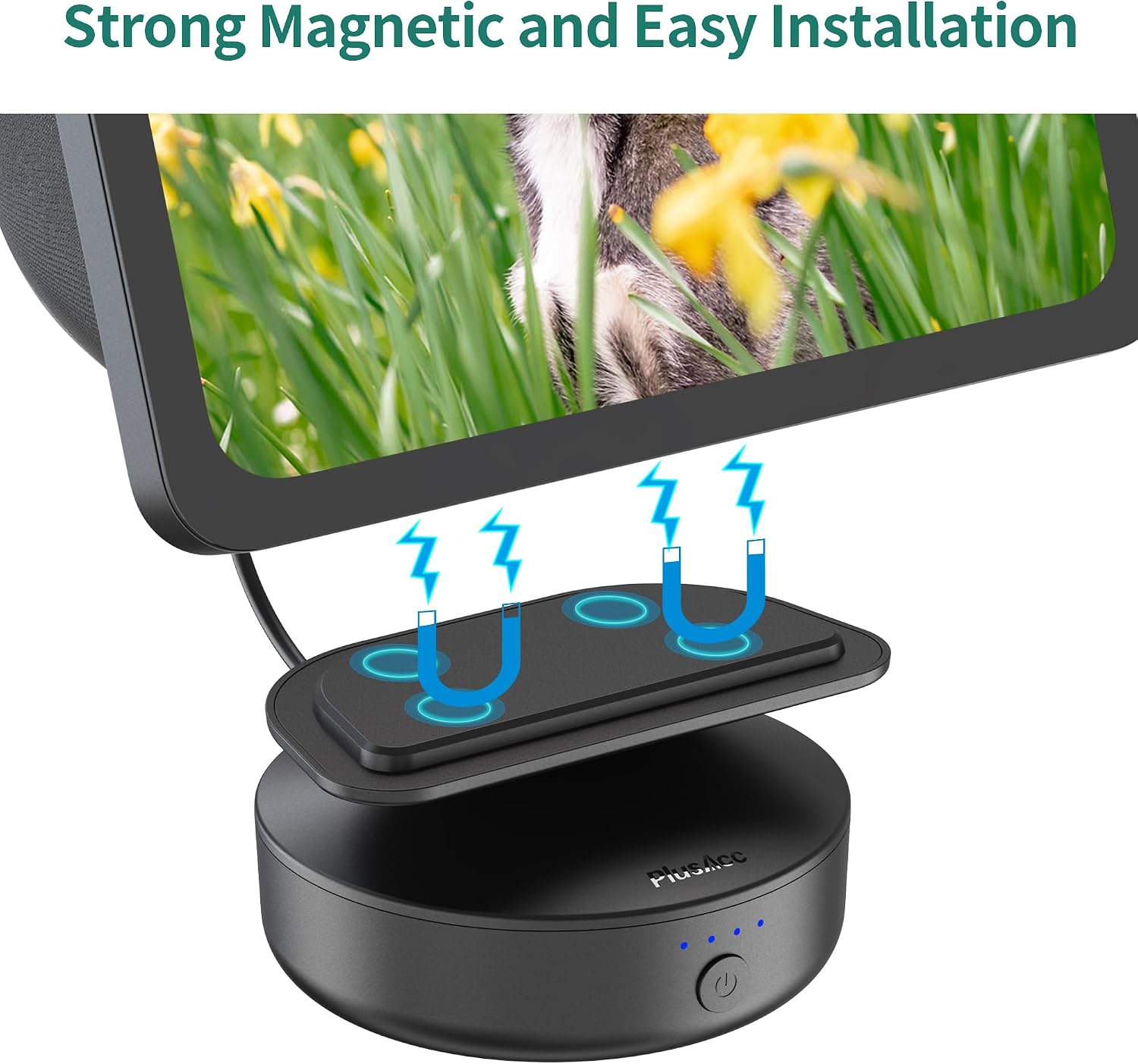
Figure 5.3: Adjustable tilt function of the battery base.
6. Maintenance
- Keep the battery base clean by wiping it with a soft, dry cloth.
- Avoid exposing the device to extreme temperatures, direct sunlight, or moisture.
- Do not attempt to disassemble or repair the battery base yourself. This may void the warranty and cause damage.
- Store the battery base in a cool, dry place when not in use for extended periods.
7. Troubleshooting
| Problem | Possible Cause | Solution |
|---|---|---|
| Battery base not charging. | Incorrect adapter used; cable not properly connected; faulty adapter/cable. | Ensure you are using the original Show 8 3rd Gen power adapter. Check all cable connections. Try a different power outlet. |
| Show 8 3rd Gen not receiving power from the base. | Integrated cable not connected; battery base is off; battery base is depleted. | Ensure the integrated power cable is securely connected to the Show 8. Turn on the battery base. Recharge the battery base if necessary. |
| External device not charging via USB-C. | USB-C cable not connected; device incompatible; battery base is off/depleted. | Ensure the USB-C cable is properly connected. Verify your device is compatible with USB-C charging. Turn on the battery base or recharge it. |
| Magnetic attachment feels loose. | Show 8 not properly aligned. | Re-align the Show 8 3rd Gen on the battery base to ensure the magnets engage correctly. |
8. Specifications
| Feature | Detail |
|---|---|
| Model Number | E07 |
| Battery Capacity | 10000 mAh (2 Lithium Ion batteries included) |
| Input Port | Compatible with Show 8 3rd Gen original adapter |
| Output Port | 1 x USB-C (for external devices) |
| Tilt Function | Up to 36 degrees forward and backward |
| Attachment Type | Magnetic |
| Material | ABS + Ternary Lithium Battery + Magnet |
| Dimensions | 12.9 x 12.5 x 7.1 cm |
| Weight | 390 g |
| Country of Origin | China |
9. Warranty and Support
9.1 Warranty Information
This PlusAcc Battery Base E07 comes with a 1-year manufacturer's warranty from the date of purchase. This warranty covers defects in materials and workmanship under normal use. It does not cover damage caused by misuse, accidents, unauthorized modifications, or improper installation.
9.2 Customer Support
For technical support, warranty claims, or any questions regarding your PlusAcc Battery Base E07, please contact the manufacturer:
Manufacturer: Shenzhen Zhiyuantongtai Technology Co.,LTD
Please refer to your purchase documentation for specific contact details or visit the official PlusAcc website for further assistance.

