1. Introduction
Thank you for choosing the LIGE Military Smart Watch. This rugged and versatile smartwatch is designed for outdoor enthusiasts and daily users alike, offering advanced features such as built-in GPS, a compass, altimeter, barometer, and a powerful LED flashlight. With its 10ATM waterproof rating, long-lasting battery, and comprehensive health and fitness tracking capabilities, it is built to withstand challenging environments while keeping you connected.
This manual provides detailed instructions on how to set up, operate, and maintain your smartwatch to ensure optimal performance and longevity.

Figure 1.1: LIGE Military Smart Watch (Model A230+)
2. What's in the Box
Verify that all components are present in your package:
- LIGE Military Smart Watch (Model A230+)
- Black Leather Strap (1)
- Black Silicone Strap (1)
- Charging Cable (1)
- User Manual (1)
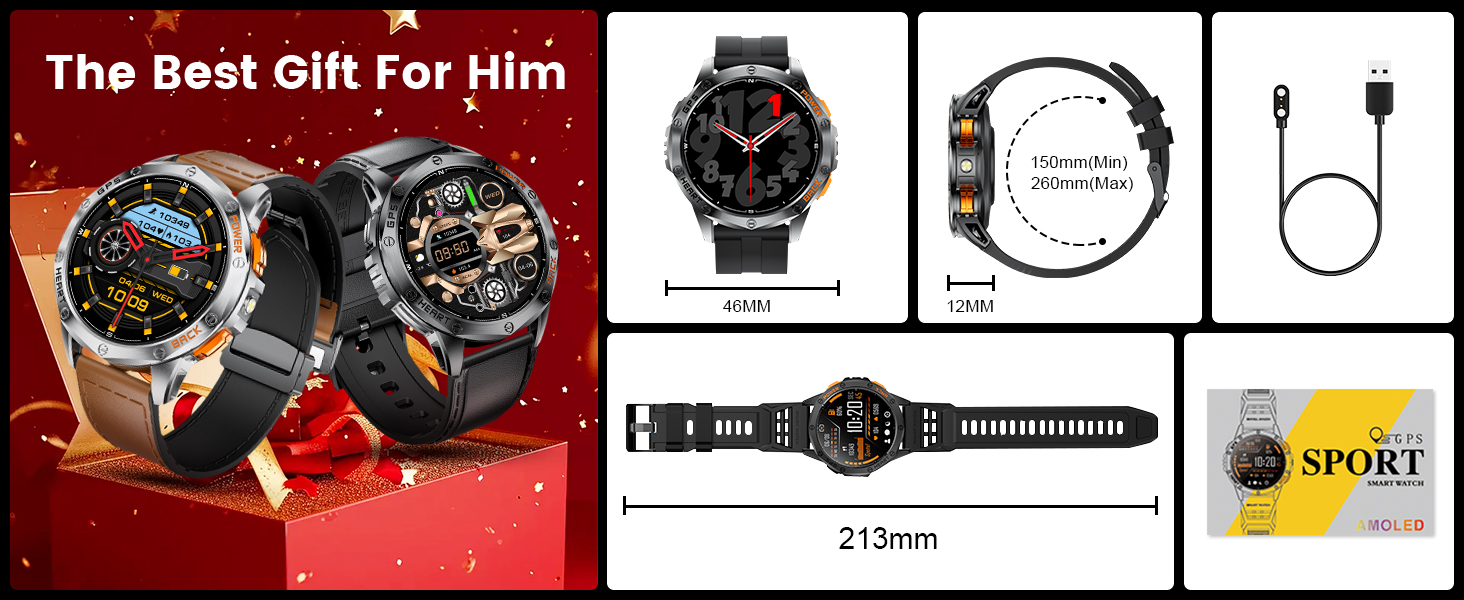
Figure 2.1: Included components and watch dimensions
3. Setup Guide
3.1 Charging the Smart Watch
Before first use, fully charge your LIGE Military Smart Watch. The watch is equipped with a 530mAh battery, providing 5-7 days of daily use and up to 30 days of standby time. A full charge typically takes approximately 2.5 hours.
- Connect the magnetic charging cable to the charging contacts on the back of the watch.
- Plug the USB end of the charging cable into a standard USB power adapter (5V/1A recommended) or a computer USB port.
- The watch display will show a charging indicator.

Figure 3.1: Charging the smartwatch and battery life overview
3.2 App Installation and Pairing
To unlock the full functionality of your smartwatch, download and install the GloryFitPro app on your smartphone. The app is compatible with Android 5.0+ and iOS 11.0+ devices.
- Scan the QR code provided in the watch packaging or search for "GloryFitPro" in your smartphone's app store (Google Play Store for Android, Apple App Store for iOS).
- Install the app and open it.
- Follow the on-screen instructions to create an account and set up your personal profile.
- In the app, navigate to the device section and select "Add Device" or "Scan for Device".
- Ensure Bluetooth is enabled on your smartphone. The app will search for your LIGE A230+ watch.
- Select your watch from the list of discovered devices to initiate the pairing process. Confirm the pairing request on both your phone and the watch if prompted.
3.3 Strap Installation
Your watch comes with two interchangeable straps: a black leather strap and a black silicone strap. To attach or detach a strap:
- Locate the quick-release pin on the back of the strap.
- Slide the pin inwards to release the strap from the watch lug.
- Align the new strap with the watch lugs, slide the pin inwards, and position it until it clicks into place. Ensure both ends of the pin are securely seated in the lug holes.
4. Operating Instructions
4.1 Basic Navigation
The LIGE Military Smart Watch features a 1.43-inch AMOLED touchscreen and multiple physical buttons for navigation.
- Touchscreen: Swipe left/right, up/down to navigate through menus and notifications. Tap to select.
- Side Buttons: Use the physical buttons on the side of the watch to access specific functions or return to the home screen. Refer to the watch's on-screen prompts for specific button assignments.
4.2 Bluetooth Calls & Messages
Once paired with your smartphone, the watch supports Bluetooth calling and message notifications.
- Making Calls: Access the dial pad or contact list (up to 100 contacts can be stored via the app) on your watch to make calls directly.
- Receiving Calls: Answer or reject incoming calls directly from your watch. The built-in speaker allows for hands-free communication.
- Message Notifications: Receive real-time notifications from various apps (e.g., WhatsApp, Facebook, Twitter, Instagram, Skype) directly on your watch display.

Figure 4.1: Bluetooth call and message alert features
4.3 GPS and Outdoor Functions
The watch features a built-in GPS with L1+L5 dual-frequency ultra-high precision positioning, supporting 6 satellite systems for enhanced accuracy. It also includes a compass, altimeter, and barometer.
- GPS Tracking: Track your movement trajectory and workout activities. The watch can independently record GPS data.
- Track Return Function: Utilize the track return feature to quickly navigate back to your starting point.
- Compass: Use the integrated compass to determine your direction.
- Altimeter & Barometer: Monitor real-time altitude and air pressure changes, useful for outdoor adventures.

Figure 4.2: High-precision GPS tracking in action
4.4 Health Monitoring
The smartwatch provides 24-hour health management, monitoring various vital signs.
- Heart Rate: Continuously monitor your heart rate throughout the day.
- Blood Oxygen: Measure your blood oxygen saturation levels.
- Stress Monitoring: Track your stress levels.
- Sleep Tracking: Analyze your sleep patterns, including deep sleep, light sleep, REM, and awake times.

Figure 4.3: 24-hour health management features
4.5 Sports Modes
The watch supports over 100 sports modes and features automatic recognition for 5 common activities.
- 100+ Sports Modes: Select from a wide range of activities to track your performance, including distance, calories burned, and steps.
- 5 Sports Recognition: Automatically detects walking, cycling, running, elliptical, and rowing machine activities.
- Professional Swimming Mode: Specifically designed for tracking swimming performance.

Figure 4.4: IP68 Waterproof and 100+ sport modes
4.6 Display and Customization
The 1.43-inch HD AMOLED screen offers vibrant colors and clear visibility, even in bright sunlight. You can customize the watch face to suit your style.
- Always-On Display: Keep the time visible without needing to raise your wrist.
- Watch Faces: Choose from 12 built-in watch faces or download over 200 additional styles from the GloryFitPro app.
- Custom Dials: Personalize your watch face using your own photos.

Figure 4.5: Over 200 watch faces available for customization
4.7 LED Flashlight
The watch includes a small, powerful LED flashlight on the side, useful for outdoor activities or in low-light conditions.
- Activation: Turn on or switch light modes with a single click of the designated side button.
4.8 Other Functions
The LIGE Military Smart Watch offers a variety of additional smart features:
- Music Control: Control music playback on your smartphone directly from your watch.
- Camera Control: Use your watch as a remote shutter for your smartphone camera.
- Weather Forecast: Get real-time weather updates.
- Sedentary Reminders: Receive alerts to encourage movement after periods of inactivity.
- Alarm Clock: Set alarms directly on your watch.
- Stopwatch & Timer: Utilize built-in timing functions.
- Voice Assistant: Interact with your smartphone's voice assistant.
- Find Phone: Locate your misplaced smartphone by triggering an alert from your watch.

Figure 4.6: Overview of multi-function smartwatch features
5. Maintenance
5.1 Water Resistance
The LIGE Military Smart Watch is 10ATM waterproof, meaning it is resistant to water pressure equivalent to a depth of 100 meters. This makes it suitable for swimming, showering, and other water-related activities. However, it is not recommended for deep-sea diving or high-pressure water activities.
- Do not operate the watch buttons underwater.
- Avoid exposing the watch to hot water or steam, as this can compromise the seals.
- After exposure to saltwater, rinse the watch with fresh water and dry it thoroughly.
Figure 5.1: 10ATM Waterproof capability
5.2 Cleaning and Storage
- Cleaning: Wipe the watch and straps regularly with a soft, damp cloth. For silicone straps, mild soap and water can be used. Ensure the watch is completely dry before charging.
- Storage: Store the watch in a cool, dry place away from direct sunlight and extreme temperatures. If storing for an extended period, ensure the battery is partially charged (around 50%) to preserve battery health.
6. Troubleshooting
If you encounter issues with your LIGE Military Smart Watch, refer to the following common solutions:
| Problem | Possible Cause | Solution |
|---|---|---|
| Watch does not turn on or respond. | Low battery; system crash. | Charge the watch for at least 30 minutes. If unresponsive, perform a force restart (refer to app or online resources for specific button combination). |
| Cannot pair with smartphone. | Bluetooth off; app issue; watch not discoverable. | Ensure Bluetooth is on for both devices. Restart both watch and phone. Clear app cache or reinstall GloryFitPro. Ensure watch is in pairing mode. |
| Inaccurate GPS tracking. | Weak satellite signal; environmental interference. | Ensure you are in an open area with clear sky view. Allow watch to acquire satellite signals before starting activity. Update watch firmware via app. |
| Short battery life. | Frequent use of power-intensive features (GPS, calls, AOD); aging battery. | Reduce use of GPS, Always-On Display, and frequent calls. Adjust screen brightness. Ensure watch firmware is up to date. If battery degradation is significant after normal use, contact support. |
| Notifications not received. | App permissions; Do Not Disturb mode; app not running in background. | Check app permissions for notifications on your phone. Disable Do Not Disturb mode on watch/phone. Ensure GloryFitPro app is running in the background and not optimized for battery saving. |
If the problem persists after attempting these solutions, please contact LIGE customer support for further assistance.
7. Specifications
Detailed technical specifications for the LIGE Military Smart Watch (Model A230+):
| Feature | Description |
|---|---|
| Brand | LIGE |
| Model Name | A230+ |
| Display Type | AMOLED |
| Screen Size | 1.43 Inches |
| Resolution | 466 x 466 |
| Battery Capacity | 530 mAh (Lithium Polymer) |
| Battery Life (Average) | 5-7 days (daily use), 30 days (standby) |
| Charging Time | Approx. 2.5 hours |
| Waterproof Rating | 10ATM |
| Connectivity | Bluetooth |
| GPS | Built-in GPS (L1+L5 dual-frequency) |
| Memory Storage Capacity | 256 MB |
| Compatible Devices | Smartphones (Android 5.0+, iOS 11.0+) |
| Product Dimensions | 4 x 4.5 x 0.11 cm; 60 g |
| Special Features | Compass, Altitude, Air Pressure, LED Flashlight, Bluetooth Calls, Voice Assistant, 100+ Sport Modes, Health Monitoring (Heart Rate, Blood Oxygen, Stress, Sleep), Music/Camera Control, Weather Forecast, Alarm, Stopwatch, Timer, Find Phone. |
8. Warranty and Support
LIGE offers a refund or free replacement within 12 months of purchase for any product issues. If you experience any problems with your LIGE Military Smart Watch, please contact our customer support team.
For assistance, please reach out to us via the contact information provided on the product packaging or through the seller's contact page on the platform where you purchased the watch. When contacting support, please provide your purchase details and a clear description of the issue.


