
Introduction
This manual provides detailed instructions for the assembly, operation, and maintenance of your ModernMate 2 Drawer Wood File Cabinet, Model F1. This cabinet is designed for home office use, offering versatile storage solutions for documents and office supplies.
Key features include two drawers for organizing letter or A4-sized documents, a built-in power strip with AC sockets and USB ports, and adjustable shelves for flexible storage.
Safety Information
Please read and understand all safety warnings before assembly and use to prevent injury or damage to the product.
- Always keep the cabinet away from heat sources.
- Do not overload the drawers.
- Use the power strip with caution, ensuring cords are not damaged or overloaded.
- Keep the cabinet away from areas where it could be easily knocked over.
- Follow all assembly instructions carefully to ensure the cabinet is stable and secure.
Setup
Assembly
Your ModernMate file cabinet comes with detailed and clear instructions for assembly. It is recommended to have a second person assist during assembly for faster and easier setup. Ensure all parts are present before beginning assembly. A cordless drill with a low torque setting can expedite the process, but manual tools are also provided.
Placement
Place the cabinet on a flat, stable surface. Consider proximity to power outlets for convenient use of the integrated power strip. The cabinet features adjustable leveling screws for minor height adjustments on uneven floors.

Figure 1: Product Dimensions. Overall dimensions are 19.5"D x 31.5"W x 29.4"H.

Figure 2: Enhanced Stability. The cabinet features a 1.18-inch thick top panel for stability, supporting up to 300 lbs.
Operating Instructions
Drawer Usage
The cabinet includes two drawers of different sizes. The bottom drawer is designed for hanging files, accommodating both Letter and A4 sizes. The top drawer is suitable for stationery and smaller office items.
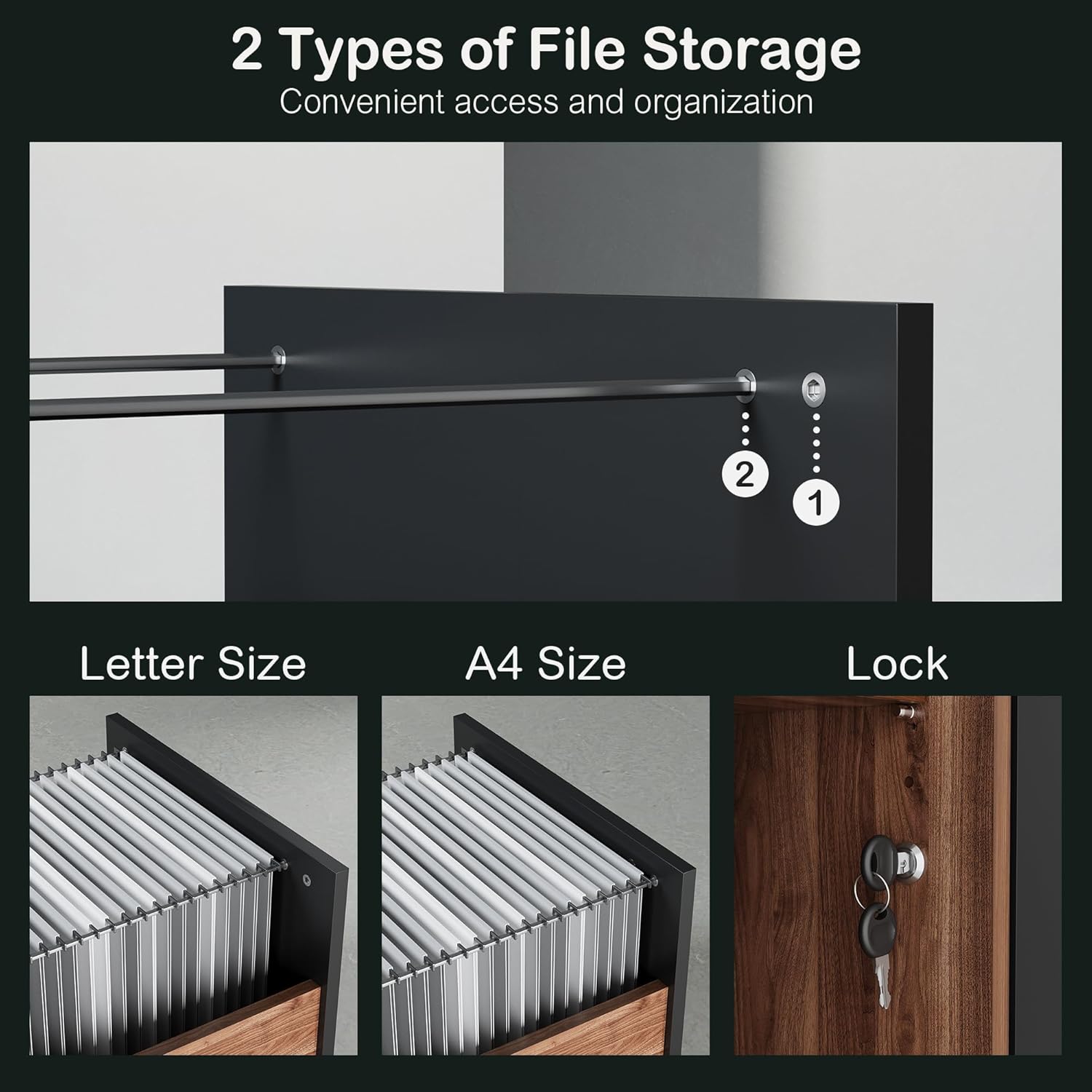
Figure 3: File Storage Options. The bottom drawer supports both Letter and A4 sized hanging files.
Integrated Power Strip
The top surface of the cabinet features a built-in power strip. This includes two AC sockets and two USB ports (one standard USB, one Type-C) for convenient charging of electronic devices such as laptops, tablets, and phones. A 6.5-foot cord is provided for connection to a wall outlet. Ensure the power cord is not pinched or damaged.
Adjustable Shelves
The open storage compartments feature adjustable shelves. You can easily modify the shelf height to accommodate various items, maximizing storage potential and accessibility. The shelves can be adjusted in 1.26-inch increments.
Lock Mechanism
The cabinet is equipped with a lock for the bottom drawer. Insert the key into the lock on the side of the cabinet and turn to secure or unlock the bottom drawer. Note that the lock is designed to secure only the bottom drawer.

Figure 4: Power Strip, Adjustable Shelf, and Lock Details. Features include a side lock, adjustable shelves, and a cable management hole.

Figure 5: Integrated Storage System. The cabinet offers diverse storage for office essentials.
Maintenance
Cleaning
To clean the melamine board surfaces, use a soft, damp cloth. Avoid abrasive cleaners or harsh chemicals, as these can damage the finish. Wipe spills immediately to prevent staining.
General Care
Periodically check all fasteners and connections to ensure they remain tight. If any part becomes loose, tighten it immediately. Avoid placing excessively hot or cold items directly on the surface without protection.
Troubleshooting
- Cabinet Instability: Ensure all assembly steps were followed correctly and all screws are tightened. Verify the cabinet is placed on a level surface; use the adjustable leveling feet if necessary.
- Drawer Not Closing Smoothly: Check for any obstructions in the drawer slides. Ensure the drawer is properly aligned on its rails.
- Lock Not Functioning: Confirm the key is fully inserted and turned correctly. Remember that the lock is designed to secure only the bottom drawer.
- Power Strip Not Working: Check if the cabinet's power cord is securely plugged into a functional wall outlet. Ensure devices are properly connected to the AC sockets or USB ports.
Specifications
| Feature | Detail |
|---|---|
| Brand | ModernMate |
| Model Name | F1 |
| Color | Black Walnut |
| Material | Melamine Board, Walnut Wood |
| Product Dimensions (D x W x H) | 19.5" x 31.5" x 29.4" |
| Item Weight | 83 Pounds |
| Number of Drawers | 2 |
| Number of Shelves | 3 |
| Special Feature | File storage, Power Strip, Lock |
| Assembly Required | Yes |
Warranty
For information regarding warranty coverage, please refer to the purchase documentation or contact ModernMate customer support directly. Keep your proof of purchase for any warranty claims.
Customer Support
If you encounter any issues during assembly or operation, or if you have questions about your ModernMate 2 Drawer Wood File Cabinet, please contact ModernMate customer service. Refer to the contact information provided with your product or visit the official ModernMate website for support.
We are committed to providing assistance and ensuring your satisfaction with our products.
