
Tamron AFF072S700
Tamron 90mm F/2.8 Di III VXD 1:1 Macro Lens Instruction Manual
Brand: Tamron | Model: AFF072S700
1. Introduction
The Tamron 90mm F/2.8 Di III VXD 1:1 Macro lens is designed for Sony E Mount full-frame and APS-C mirrorless cameras, offering exceptional sharpness and a beautiful bokeh effect. This manual provides essential information for setting up, operating, and maintaining your new lens to ensure optimal performance and longevity.

Figure 1: Tamron 90mm F/2.8 Di III VXD 1:1 Macro Lens
2. What's in the Box
Upon opening the package, please ensure all the following items are present:
- Tamron 90mm F/2.8 Di III VXD 1:1 Macro Lens
- Front Lens Cap
- Rear Lens Cap
- Lens Hood (HF072)
3. Key Features
- High Optical Performance: Delivers unparalleled sharpness from center to edge with outstanding flat-field performance.
- 12-Blade Circular Aperture: Tamron's first lens to feature a 12-blade circular aperture, ensuring perfectly circular bokeh and stunning 12-ray starburst effects when stopped down.
- VXD AF (Voice-coil eXtreme-torque Drive): Equipped with a high-speed and high-precision linear motor focus mechanism for superb subject tracking performance, even in macro photography.
- Focus Limiter Switch: Allows restriction of the autofocus range for faster focusing, especially useful in close-range AF photography to prevent focus hunting.
- Moisture-Resistant Construction: Designed with seals at various points to prevent moisture and dust ingress, enhancing durability in diverse shooting conditions.
- BBAR-G2 and Fluorine Coating: Advanced coatings reduce ghosting and flare, while the fluorine coating on the front element repels oil and water, making cleaning easier.
- TAMRON Lens Utility Compatibility: Features a USB Type-C port for direct connection to a computer (PC/Mac) or Android device, allowing users to customize lens settings, assign camera functions, and update firmware.
- Compact and Lightweight Design: Measuring just 126.5mm (5 inches) long and weighing 630g (22.2oz.), this lens is comfortable to handle for extended periods.
- Innovative Lens Hood: The included lens hood (HF072) features a sliding window for easy adjustment of filters without removal.

Figure 2: Side view of the lens showing the focus limiter switch and custom button.
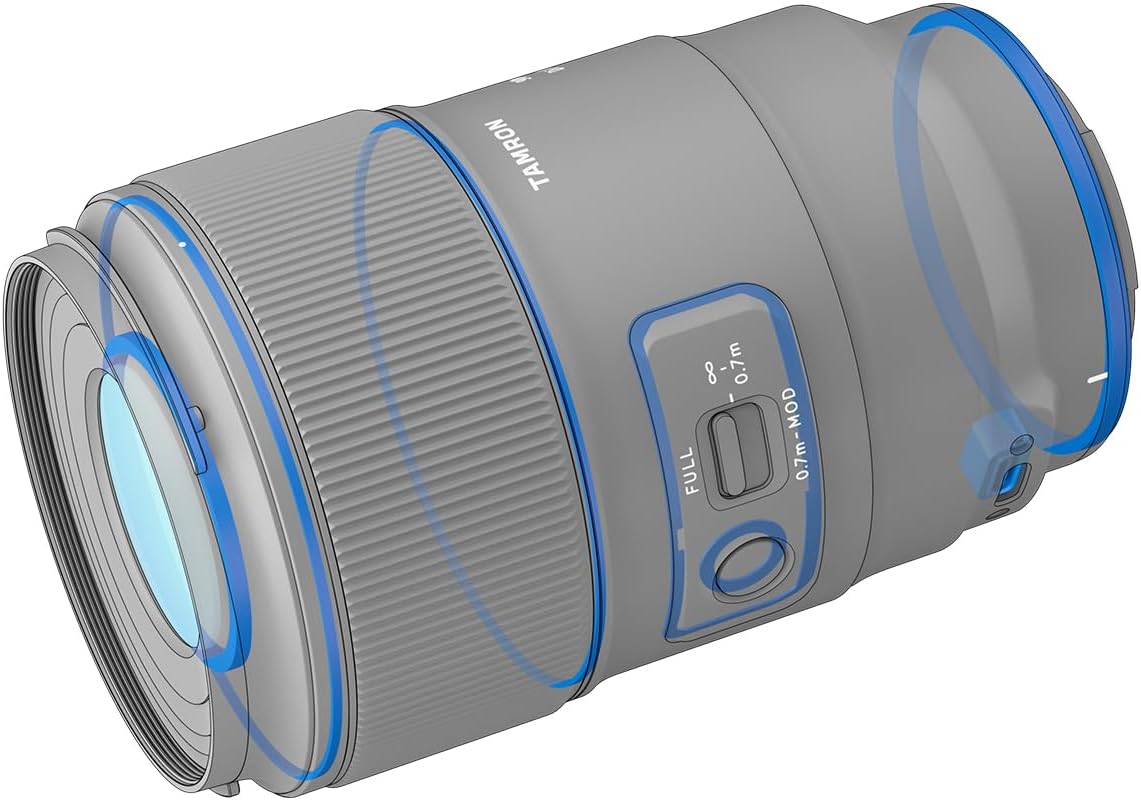
Figure 3: Weather-resistant construction details.

Figure 4: Lens hood with convenient filter access window.
4. Setup
4.1 Attaching the Lens to Your Camera
- Remove the rear lens cap from the lens and the body cap from your camera.
- Align the mounting index (white dot) on the lens barrel with the corresponding index on your camera's lens mount.
- Insert the lens into the camera mount and rotate it clockwise until it clicks into place.
4.2 Attaching the Lens Hood
- Align the lens hood's mounting index with the index on the front of the lens.
- Twist the hood clockwise until it locks securely.
5. Operating the Lens
5.1 Autofocus (AF) Operation
The Tamron 90mm F/2.8 Di III VXD features a fast and precise VXD linear motor for autofocus. Ensure your camera's focus mode is set to AF. The lens will automatically focus when the shutter button is half-pressed.
5.2 Manual Focus (MF) Operation
To use manual focus, set your camera's focus mode to MF. The focus ring on the lens barrel is carefully calibrated to assist with precise manual focus operation, providing moderate torque for fine-tuning.
5.3 Using the Focus Limiter Switch
The focus limiter switch on the side of the lens allows you to restrict the autofocus range, which can significantly speed up focusing in specific scenarios:
- FULL: Allows the lens to focus across its entire range (from minimum focusing distance to infinity).
- 0.7m - ∞: Restricts focus to subjects from 0.7 meters (2.3 feet) to infinity. Ideal for general photography and portraits.
- 0.7m - MOD: Restricts focus to subjects from the minimum object distance (MOD) up to 0.7 meters. Perfect for dedicated macro shooting to prevent the lens from hunting beyond the close-up range.
5.4 Customizing with TAMRON Lens Utility
Connect the lens to your computer (PC/Mac) or Android device via the USB Type-C port to access the TAMRON Lens Utility software. This software allows you to:
- Customize the function of the Focus Set Button.
- Adjust the MF Ring Rotation (Default/Reverse).
- Select MF Method (Non-Linear/Linear) for manual focus.
- Update lens firmware.
6. Maintenance and Care
- Cleaning the Lens: Use a soft, lint-free cloth and a specialized lens cleaning solution. For dust, use a blower brush first. Avoid touching the lens elements directly.
- Storage: Store the lens in a cool, dry place away from direct sunlight and extreme temperatures. Use lens caps when not in use.
- Moisture and Dust: While the lens features moisture-resistant construction, avoid prolonged exposure to heavy rain or dusty environments. If exposed, wipe dry immediately.
7. Troubleshooting
- Autofocus Hunting: Ensure sufficient light and contrast in your subject. Utilize the focus limiter switch to narrow the AF range.
- Lens Not Recognized by Camera: Ensure the lens is securely mounted. Check for any firmware updates for both the lens and your camera body using the TAMRON Lens Utility.
- Image Quality Issues: Ensure lens elements are clean. Check camera settings (aperture, ISO, shutter speed). For optimal sharpness, consider stopping down the aperture slightly (e.g., F4 or F5.6).
8. Specifications
| Feature | Detail |
|---|---|
| Brand | Tamron |
| Model Number | AFF072S700 |
| Camera Lens Description | Tamron 90mm F/2.8 Di III VXD 1:1 Macro |
| Focal Length Description | 90mm Macro |
| Lens Type | Macro |
| Compatible Mountings | Sony FE, Sony E |
| Product Dimensions | 5 x 3.1 x 3.1 inches |
| Item Weight | 2.25 pounds (approx. 1020g) |
| Manufacturer | Tamron |

Figure 5: MTF (Modulation Transfer Function) Chart.
9. Warranty and Support
For detailed warranty information, product registration, and technical support, please visit the official Tamron website or contact their customer service. Keep your purchase receipt as proof of purchase for warranty claims.
Tamron Official Website: www.tamron.jp/en/
Related documentsAFF072S700


Ask a question about this manual
Ask about setup, troubleshooting, compatibility, parts, safety, or missing instructions. Manuals+ will review the question and use this page’s manual context to help answer it.