
Mibro C4
Mibro C4 Smartwatch User Manual
Model: C4
1. Introduction
Welcome to the Mibro C4 Smartwatch User Manual. This guide provides detailed instructions on how to set up, operate, and maintain your Mibro C4 smartwatch. Please read this manual carefully to ensure optimal performance and a seamless user experience.
2. Product Overview
The Mibro C4 Smartwatch is a sleek and powerful wearable device designed to enhance your daily life and fitness journey. It features a large display, comprehensive health monitoring, and various smart functions.
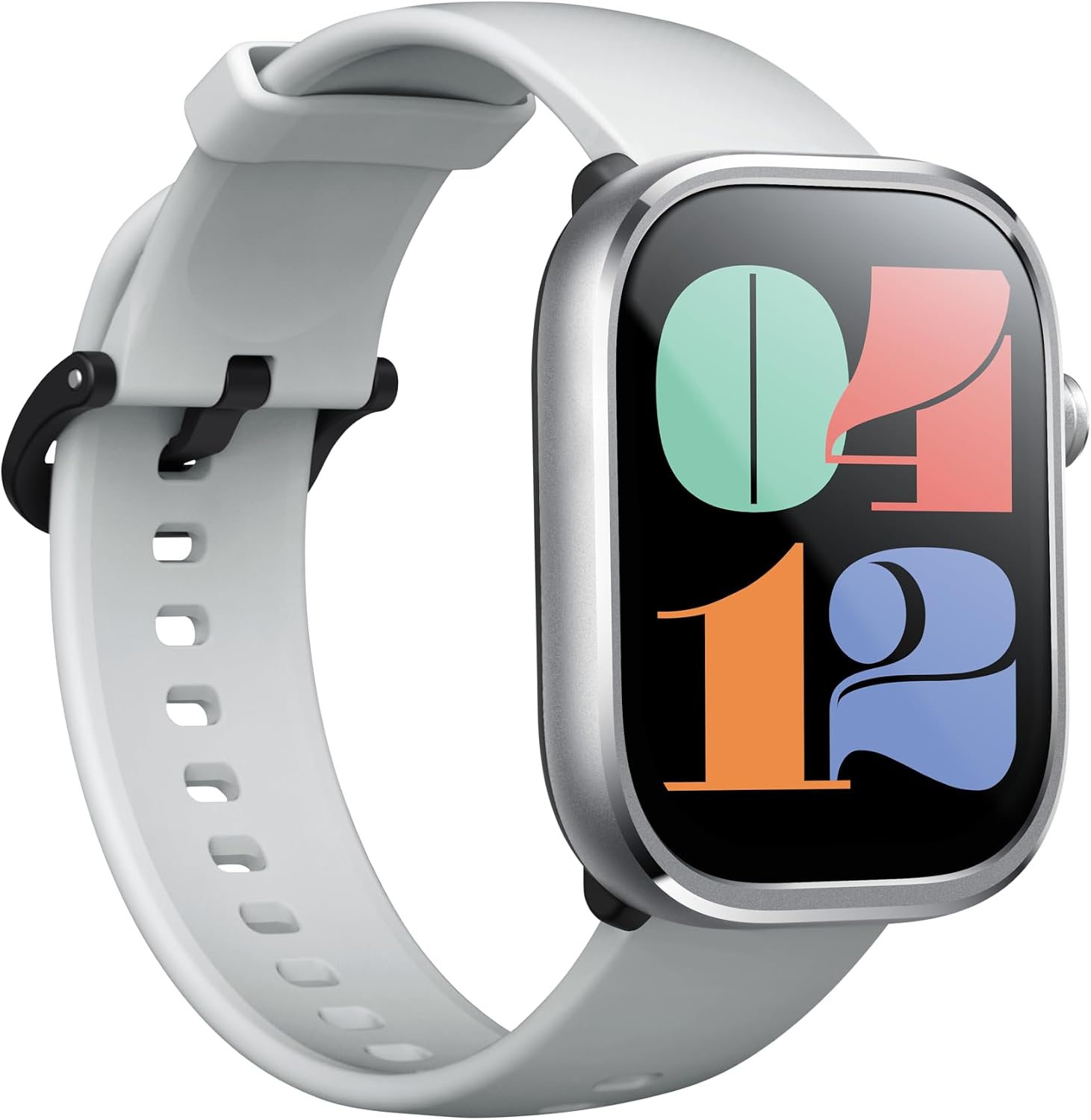
Front view of the Mibro C4 Smartwatch, showcasing its large display and white silicone strap.
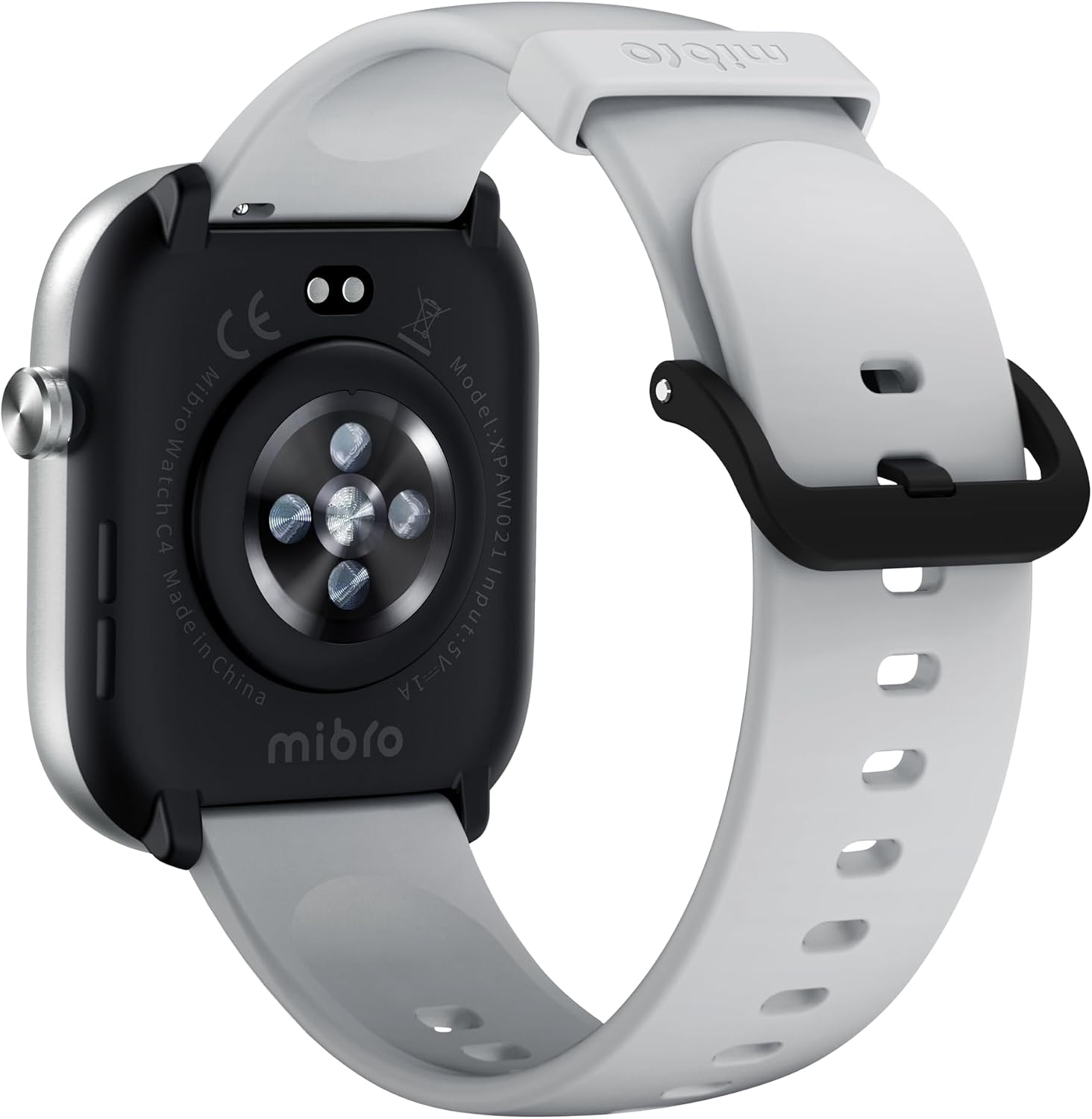
Rear view of the Mibro C4 Smartwatch, highlighting the optical heart rate sensors and charging contacts.
Key Features:
- Large 2.01-inch HD Display: Enjoy a clear and expansive view with an 81.7% screen-to-body ratio and a smooth 60Hz refresh rate.
- Ultra-Thin & Lightweight Design: At just 9.8mm thin and 29g light, the watch offers comfortable wear throughout the day.
- Bluetooth Calling: Make and receive calls directly from your wrist, providing convenience during activities.
- 24-Hour Health Management: Monitor heart rate, sleep patterns, stress levels, and track menstrual cycles.
- 100+ Sports Modes: Track a wide range of activities with dedicated sports modes, including automatic recognition for walking and running.
- 2ATM Water Resistance: Suitable for daily splashes, sweat, and short-term swimming.
- Long Battery Life: Up to 10 days of battery life in daily mode.

An overview of the Mibro C4 Smartwatch's main features, including its large screen, watch faces, Bluetooth calling, health tracking, sports modes, and water resistance.
3. Setup
3.1 Charging the Device
Before first use, fully charge your Mibro C4 Smartwatch. Connect the magnetic charging cable to the charging contacts on the back of the watch and plug the USB end into a power adapter (5V/1A recommended) or a computer USB port.
3.2 App Installation
To unlock the full potential of your Mibro C4, download and install the companion app on your smartphone. Search for "Mibro Fit" in the App Store (iOS) or Google Play Store (Android), or scan the QR code provided in the quick start guide.
3.3 Pairing with Your Smartphone
- Ensure your watch is charged and powered on.
- Enable Bluetooth on your smartphone.
- Open the Mibro Fit app and follow the on-screen instructions to create an account or log in.
- In the app, select "Add Device" or similar option and choose "Mibro C4" from the list of available devices.
- Confirm the pairing request on both your watch and smartphone.
4. Operating Instructions
4.1 Basic Navigation
- Swipe Up/Down: Scroll through menus and notifications.
- Swipe Left/Right: Access quick functions or widgets (e.g., heart rate, weather, music control).
- Tap: Select an item or confirm an action.
- Press Side Button: Wake up the screen, return to the home screen, or access the app list.

The Mibro C4 features a large 2.01-inch display, providing an expansive field of view for easy interaction.
4.2 Watch Faces
Personalize your Mibro C4 with a variety of watch faces. You can download numerous beautiful watch faces from the Mibro Fit app to match your style.

A selection of personalized watch faces available for the Mibro C4 Smartwatch, allowing users to customize their display.
4.3 Notifications
Once paired, your Mibro C4 can receive notifications from your smartphone, including calls, messages, and app alerts. Ensure notification permissions are enabled in both your phone settings and the Mibro Fit app.
4.4 Bluetooth Calling
The Mibro C4 supports Bluetooth calling, allowing you to answer incoming calls directly from your wrist. This feature is convenient when your phone is not immediately accessible.

The Mibro C4 Smartwatch demonstrating its stylish Bluetooth calling capability, allowing users to answer calls directly from their wrist.
4.5 Music Control
Control music playback on your smartphone directly from your watch. You can play, pause, skip tracks, and adjust volume without taking out your phone.
5. Health Management Features
The Mibro C4 provides comprehensive health monitoring features to help you stay informed about your well-being. Please note: This product is designed for daily exercise and health management purposes and is not a medical device. Data from this product should not be used for medical diagnoses or professional measurements requiring high accuracy.
5.1 Heart Rate Monitoring
The watch continuously monitors your heart rate throughout the day. You can view your real-time heart rate on the watch or in the app. The device can also alert you to abnormal high or low heart rates.

The Mibro C4 Smartwatch displaying heart rate data, illustrating its continuous health monitoring capabilities.
5.2 Sleep Tracking
The Mibro C4 automatically tracks your sleep patterns, including deep sleep, light sleep, and REM sleep stages. It also monitors daytime naps. Review your sleep data in the app to understand your sleep quality.

The Mibro C4 Smartwatch tracking sleep, with a corresponding app display showing sleep stages and duration.
5.3 Stress Monitoring
Monitor your stress levels throughout the day. The watch can provide alerts if high stress levels are detected, prompting you to take a break or engage in relaxation techniques.

A user wearing the Mibro C4 Smartwatch during exercise, illustrating its capability for continuous monitoring, including stress levels.
5.4 Menstrual Cycle Tracking
For female users, the Mibro C4 supports menstrual cycle tracking, helping you predict and manage your cycles.
6. Sports Modes
The Mibro C4 Smartwatch offers over 100 professional sports modes to accurately track your workouts and provide detailed data. It also features automatic recognition for walking and running.

A visual representation of the Mibro C4 Smartwatch's extensive range of over 100 sports modes, designed to accompany users in various athletic activities.
6.1 Automatic Sports Recognition
For walking and running, the watch can automatically detect your activity and prompt you to start the corresponding sports mode. Ensure this feature is enabled in the Mibro Fit app settings.
7. Daily Life Functions
Beyond health and fitness, the Mibro C4 integrates seamlessly into your daily routine with several convenient features:
- Weather Forecast: Get real-time weather updates directly on your wrist.
- Alarm Clock: Set alarms to wake you up or remind you of important tasks.
- Timer & Stopwatch: Useful tools for various activities.
- Sedentary Reminder: Receive alerts when you've been inactive for too long, encouraging you to move.

An illustrative image showing various daily functions of the Mibro C4 Smartwatch, including weather, messages, music control, and more.
8. Battery Life
The Mibro C4 Smartwatch is equipped with a long-lasting battery, providing up to 10 days of usage in daily mode. In basic mode, it can last up to 30 days. Bluetooth calling can provide up to 4 hours of talk time, and music playback up to 5 hours.
Note: Battery life is calculated under manufacturer's specified test conditions. Actual battery life may vary significantly depending on function settings, usage frequency, operating conditions, and other factors.

Details on the Mibro C4 Smartwatch's battery performance, showing durations for basic mode, daily mode, Bluetooth calls, and music playback.
9. Water Resistance
The Mibro C4 Smartwatch features 2ATM water resistance. This means it can withstand sweat during exercise, light water splashes from daily activities, and short-term swimming in a pool.
Important: The watch is not completely waterproof. Please refrain from activities such as bathing, showering, or diving where the watch would be submerged in hot water or exposed to high-pressure water jets. Water resistance performance is based on Mibro's internal tests and may vary depending on specific product conditions, user habits, and environmental factors.

The Mibro C4 Smartwatch demonstrating its water resistance, suitable for splashes and light water exposure.
10. Specifications
| Feature | Specification |
|---|---|
| Model | C4 |
| Color | Silver |
| Product Dimensions | 5.1 x 4.1 x 0.98 cm |
| Item Weight | 45 g |
| Display Size | 2.01 inches |
| Water Resistance | 2ATM |
| Bluetooth Calling | Supported |
| Battery Included | No (refers to user-replaceable, internal battery is included) |
| Battery Usage | No (refers to user-replaceable, internal battery is used) |
11. Troubleshooting
11.1 Watch Not Turning On
- Ensure the watch is fully charged. Connect it to the charger for at least 30 minutes.
- Press and hold the side button for 5-10 seconds to force a restart.
11.2 Unable to Pair with Phone
- Make sure Bluetooth is enabled on your phone and the watch is within range.
- Restart both your phone and the watch.
- Clear the Bluetooth cache on your phone (Android) or forget the device in Bluetooth settings (iOS/Android) and try pairing again.
- Ensure the Mibro Fit app is updated to the latest version.
11.3 Notifications Not Appearing
- Check if notification permissions are granted for the Mibro Fit app in your phone's settings.
- Verify that app notifications are enabled within the Mibro Fit app itself.
- Ensure the watch is connected to your phone via Bluetooth.
12. Maintenance
- Cleaning: Regularly clean the watch and strap with a soft, dry cloth. For stubborn dirt, use a slightly damp cloth and dry thoroughly.
- Charging Contacts: Keep the charging contacts on the back of the watch clean and free of debris to ensure proper charging.
- Avoid Extreme Temperatures: Do not expose the watch to extremely high or low temperatures, as this can affect battery life and performance.
- Storage: If storing the watch for an extended period, charge it to about 50% and store it in a cool, dry place.
13. Warranty and Support
Your Mibro C4 Smartwatch comes with a standard manufacturer's warranty. For specific warranty terms and conditions, please refer to the warranty card included in your product packaging or visit the official Mibro website.
For technical support, troubleshooting assistance, or any other inquiries, please contact Mibro customer service through their official channels or the Mibro Fit app's support section.
Related documentsC4


Ask a question about this manual
Ask about setup, troubleshooting, compatibility, parts, safety, or missing instructions. Manuals+ will review the question and use this page’s manual context to help answer it.