
1. Introduction
The DBEIXIWEI NanoVNA-H4 is a compact and durable antenna vector network analyzer designed for measuring RF characteristics up to 1.5GHz. It features a 4-inch full-view LCD screen with DC dimming for clear visibility in various lighting conditions. This device is optimized for accurate reflection measurements and includes an improved power management circuit to reduce noise.
2. Package Contents
Please verify that all items listed below are included in your package:
- 1 x NanoVNA-H4 Unit
- 2 x 15cm SMA Male to Male RG316 RF Cables
- 1 x SMA Female to Female Connector
- 1 x SMA Simple Calibration Kit SHORT
- 1 x SMA Simple Calibration Kit OPEN
- 1 x SMA Simple Calibration Kit LOAD
- 1 x USB Type-C Data Cable
- 1 x Type-C to Type-C Cable (for Android mobile phone connection)
3. Key Features
- 4-inch Full-View LCD Screen: Enhanced visibility outdoors with DC dimming.
- Optimized Electric Bridge: Utilizes Si5351 harmonics for measurements up to 1.5GHz.
- Improved Reflection Measurement: CH0 output level increased to 0dBm when fundamental wave is used.
- Enhanced Stability: Addresses previous operational abnormalities around 6MHz.
- Redesigned Power Management: Reduces power noise, USB power interference, and optimizes charging current.
- Improved PCB Layout: For reliable performance.
4. Setup
4.1 Powering the Device
Connect the NanoVNA-H4 to a power source using the provided USB Type-C Data Cable. The device can be powered via a standard USB port (e.g., computer, USB wall adapter).
4.2 Initial Connections
For basic operation, connect the RF cables to the CH0 and CH1 ports as required for your measurement setup. The SMA Female to Female Connector can be used to adapt connections if necessary.

Figure 4.2.1: NanoVNA-H4 device showing CH0 and CH1 ports for RF connections.
5. Operating Instructions
5.1 Device Overview and Navigation
The NanoVNA-H4 features a multi-functional switch for navigation and a touch-sensitive screen. The switch typically allows for left, right, and OK (press) actions to navigate menus and confirm selections.

Figure 5.1.1: Overview of the NanoVNA-H4, highlighting the multi-functional switch and screen layouts.
Main Screen Elements:
- START frequency
- STOP frequency
- Marker
- Calibration status
- Reference position
- Marker status
- Battery status
- CENTER frequency
- Span
Keypad Screen Elements:
- Numeric keys
- Back key
- Unit key
- Input field
5.2 Calibration
Calibration is essential for accurate measurements. It should be performed whenever the frequency range to be measured is changed. If an error is detected and corrected, the calibration status display on the screen will show 'CnDRSTX', where 'n' indicates the data number being loaded.
Use the provided SHORT, OPEN, and LOAD calibration kits for precise calibration. Connect each kit to the device's port (typically CH0) as prompted by the calibration procedure on the screen.
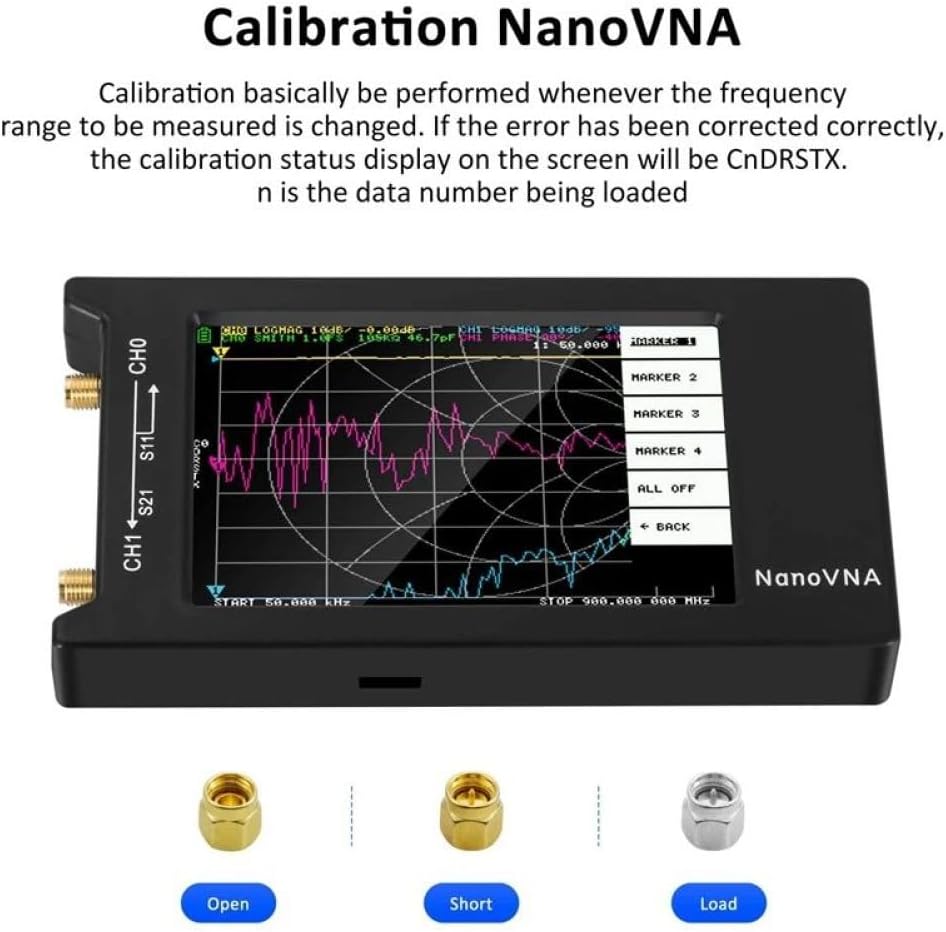
Figure 5.2.1: Calibration process with the NanoVNA-H4, showing the screen display and the three calibration standards: Open, Short, and Load.
5.3 Measurement Types
The NanoVNA-H4 supports various measurement types for comprehensive antenna and RF component analysis:
- Transmission Measure S21: Measures the forward transmission coefficient, indicating how much power passes through a device.
- Reflection Measure S11: Measures the input reflection coefficient, indicating how much power is reflected from a device.
- Antenna Analyzer: Provides specific parameters relevant to antenna performance.

Figure 5.3.1: NanoVNA-H4 displaying various measurement types and their typical performance ranges.
5.4 PC Control via Nano Saver
The NanoVNA-H4 can be connected to a computer for advanced control and data analysis using software like Nano Saver. This multiplatform tool allows you to save Touchstone files, sweep frequency spans in segments, and analyze resulting data with more than 101 data points.
Connect the NanoVNA-H4 to your computer using the provided USB Type-C Data Cable. Refer to the Nano Saver software documentation for detailed instructions on its use.

Figure 5.4.1: NanoVNA-H4 connected to a laptop for PC control and data analysis using Nano Saver software.
6. Maintenance
To ensure the longevity and optimal performance of your NanoVNA-H4, follow these maintenance guidelines:
- Cleaning: Use a soft, dry cloth to clean the device. Avoid using abrasive cleaners or solvents that could damage the screen or casing.
- Storage: Store the device in a cool, dry place away from direct sunlight and extreme temperatures.
- Handling: Handle the device with care to prevent physical damage. Avoid dropping or subjecting it to strong impacts.
- Connectors: Keep the SMA connectors clean and free from dust or debris. Use protective caps when not in use.
7. Troubleshooting
- Device Not Powering On: Ensure the USB Type-C cable is securely connected to both the device and a working power source. Check the power source for functionality.
- Inaccurate Measurements: Perform a full calibration whenever the frequency range is changed or if you suspect measurement inaccuracies. Ensure all cables and connectors are clean and properly seated.
- Screen Issues: If the screen is dim or unreadable, adjust the brightness settings. The DC dimming method is designed for improved outdoor visibility.
- Connection Issues with PC: Ensure the USB Type-C cable is functioning correctly and that the Nano Saver software is properly installed and configured on your computer.
8. Specifications
| Feature | Specification |
|---|---|
| Frequency Range | Up to 1.5GHz (using 5th harmonic of Si5351) |
| Display | 4-inch Full-View LCD with DC Dimming |
| CH0 Output Level | 0dBm (when fundamental wave is used) |
| Transmission Measure S21 | 70dB (50kHz-300MHz), 60dB (300M-900MHz), 40dB (900MHz-1.5GHz) |
| Reflection Measure S11 | 50dB (300M-900MHz), 30dB (900MHz-1.5GHz) |
| Antenna Analyzer | 1.005 (50kHz-300MHz), 1.02 (300M-900MHz), 1.06 (900MHz-1.5GHz) |
| Connectivity | USB Type-C |
| Item Weight | 13.1 ounces |
| Package Dimensions | 1.18 x 1.18 x 1.18 inches |
9. Warranty and Support
For warranty information and technical support, please refer to the documentation provided with your purchase or contact the seller directly. Keep your proof of purchase for any warranty claims.