
Dowinx LS-66BG1-04C
Dowinx Gaming Chair LS-66BG1-04C User Manual
Model: LS-66BG1-04C | Brand: Dowinx
1. Introduction
Thank you for purchasing the Dowinx Gaming Chair LS-66BG1-04C. This manual provides essential information for the proper assembly, operation, and maintenance of your new chair. Please read it thoroughly before use to ensure safety and optimal performance.

Figure 1: The Dowinx Gaming Chair LS-66BG1-04C in white, featuring a high back, adjustable armrests, and a lumbar pillow.
2. Product Features
The Dowinx Gaming Chair LS-66BG1-04C is designed for ultimate comfort and support during long hours of use, whether for gaming, office work, or relaxation. Key features include:
- Premium PU Leather: High-quality, durable faux leather material for comfort and easy maintenance.
- Individual Support Concept: Utilizes varying cushion densities from head to seat for tailored support.
- Pocket Coil Seat: High-quality pocket coils embedded in the seat provide soft elasticity and stability.
- Adjustable Armrests: Armrests can be adjusted up and down, extending almost to the seat surface for comprehensive arm support.
- 165-Degree Reclining: The backrest can recline up to 165 degrees, allowing for near-flat relaxation.
- Height Adjustment: Easily adjust the overall height of the chair to suit your desk and preference.
- Retractable Ottoman: A convenient footrest that can be pulled out for relaxation and stored away when not in use.
- 360-Degree Swivel: Smooth 360-degree rotation for easy movement.
- Lumbar Support: Includes a lumbar pillow for enhanced lower back comfort.
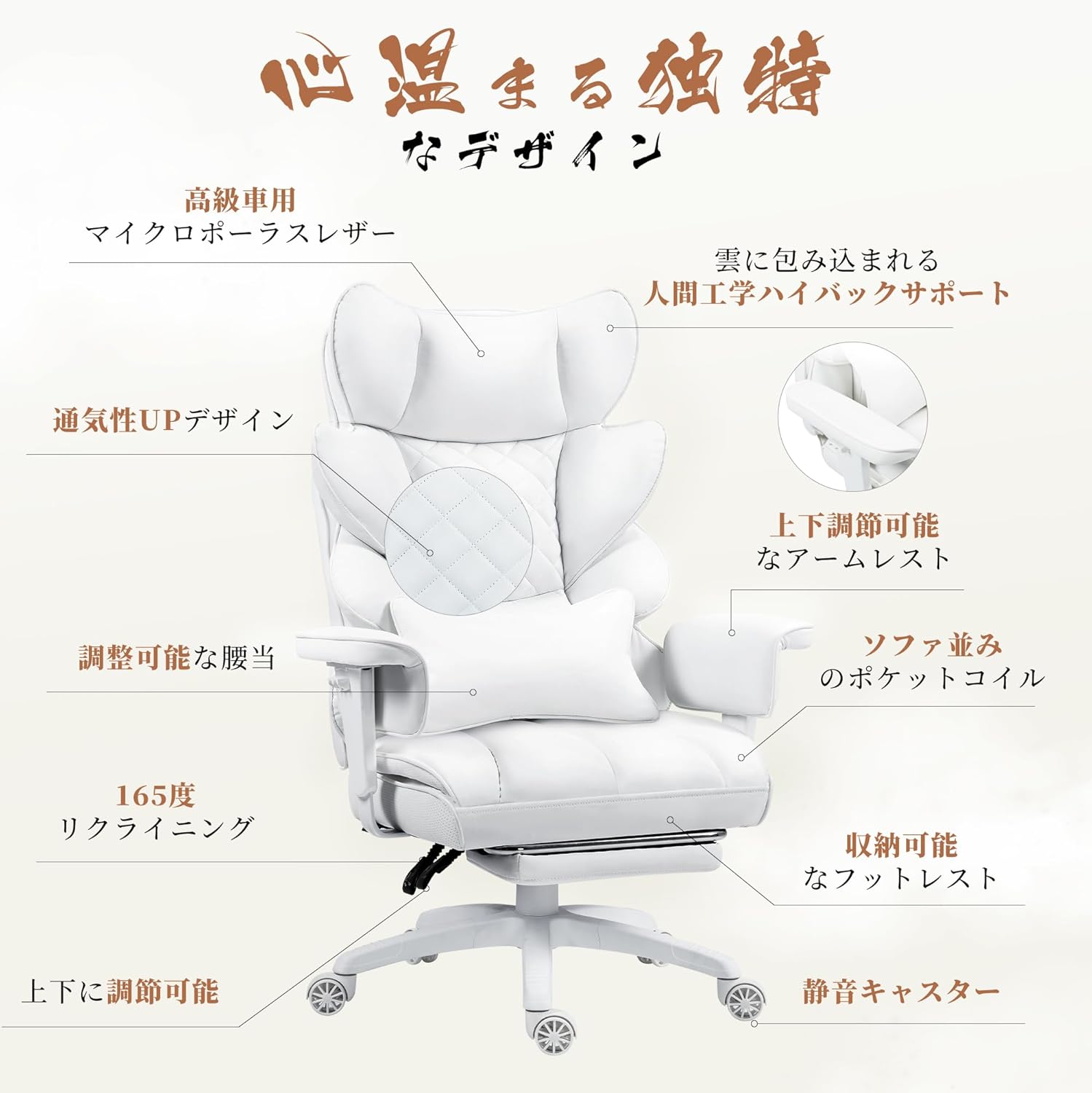
Figure 2: Overview of the chair's ergonomic design and adjustable features, including the high-back support, adjustable armrests, and retractable footrest.
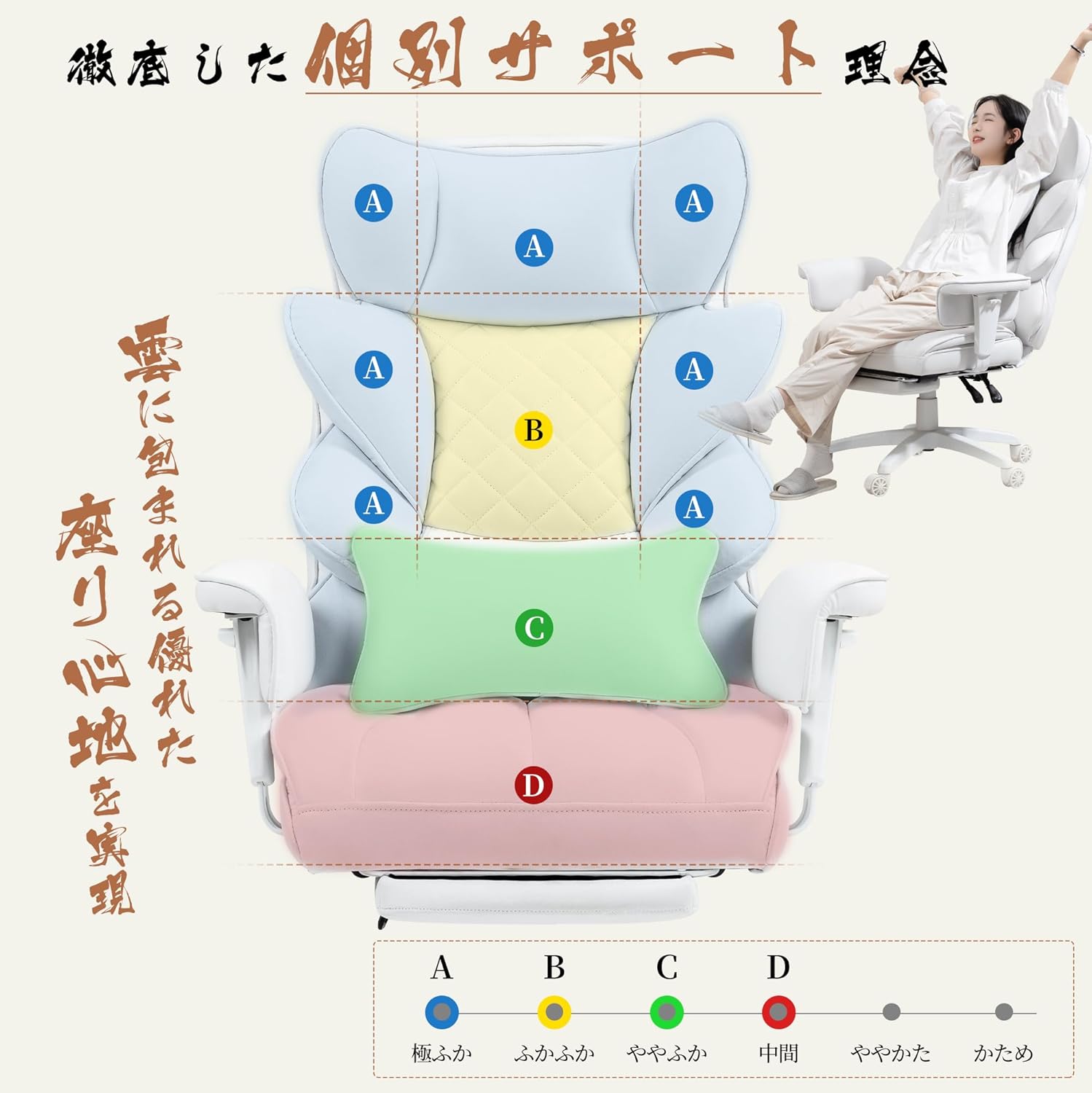
Figure 3: Illustration of the individual support concept, showing different cushioning zones (A, B, C, D) designed to provide optimal comfort from head to seat.
3. Setup and Assembly
The Dowinx Gaming Chair LS-66BG1-04C is designed for straightforward assembly. Special tools and detailed assembly instructions in both Japanese and English are included in the package to facilitate easy setup, even for a single person.
3.1 Unpacking
- Carefully open the packaging and remove all components.
- Check the parts list against the included manual to ensure all components are present and undamaged.
- Lay out all parts on a clean, flat surface to prepare for assembly.
3.2 Assembly Steps
Refer to the dedicated assembly manual included in your product package for detailed, step-by-step instructions and diagrams. General steps typically involve:
- Attaching the casters to the chair base.
- Inserting the gas lift cylinder into the base.
- Assembling the seat and backrest components.
- Connecting the assembled seat and backrest to the gas lift.
- Attaching armrests and any additional accessories like the lumbar pillow and headrest.
Ensure all screws are tightened securely but do not overtighten to avoid damaging the components. If you encounter any difficulties, consult the troubleshooting section or contact customer support.
4. Operating Instructions
Familiarize yourself with the various adjustment mechanisms to customize your seating experience.
4.1 Height Adjustment
To adjust the chair's height, locate the lever on the right side, beneath the seat. While seated, pull the lever up to lower the chair. To raise the chair, stand up slightly and pull the lever up. Release the lever at your desired height.

Figure 4: A user demonstrating the 165-degree reclining function and the use of the retractable ottoman for relaxation. The image also highlights the chair's height adjustment capability.
4.2 Reclining Function
To recline the backrest, pull the recline lever located on the left side of the chair. Lean back to your desired angle (up to 165 degrees) and release the lever to lock it in place. To return to an upright position, pull the lever again and lean forward.
4.3 Armrest Adjustment
The armrests are adjustable in height. Locate the button or lever on the side of each armrest. Press or lift it and move the armrest up or down to your preferred height. Release the button/lever to lock the armrest in position. The armrests are designed to provide support almost to the seat surface when lowered.

Figure 5: A close-up view of the adjustable armrest, illustrating its up and down movement for customized support.
4.4 Retractable Ottoman
To use the ottoman, pull it out from underneath the seat. Extend it fully for leg support. To store it, push it back underneath the seat until it is fully retracted.
4.5 Lumbar Pillow
The chair comes with an adjustable lumbar pillow. Position it along your lower back for optimal ergonomic support. It can be moved up or down to fit your body's contours.
5. Maintenance and Care
Proper maintenance will extend the life and appearance of your Dowinx Gaming Chair.
5.1 Cleaning the Faux Leather
The chair is upholstered with high-quality faux leather, which is durable and easy to clean.
- For general cleaning, wipe the surface with a soft, damp cloth.
- For stubborn stains, use a mild soap solution and wipe gently. Immediately dry the area with a clean, dry cloth.
- Avoid using harsh chemicals, abrasive cleaners, or solvents, as these can damage the faux leather.
- Do not expose the chair to direct sunlight for prolonged periods, as this can cause fading and material degradation.

Figure 6: A detailed view of the chair's faux leather material, highlighting its texture and breathable design, which helps prevent stuffiness during extended use.
5.2 General Maintenance
- Periodically check all screws and bolts to ensure they are tight. Retighten if necessary, but do not overtighten.
- Keep the casters clean from dust and debris to ensure smooth movement.
- Avoid standing on the chair or using it for purposes other than seating.
6. Troubleshooting
If you encounter any issues with your Dowinx Gaming Chair, refer to the following common troubleshooting tips:
6.1 Chair Squeaks or Wobbles
- Loose Screws: Check all assembly screws and bolts. Tighten any that are loose.
- Uneven Floor: Ensure the chair is on a flat, even surface.
- Caster Issues: Clean any debris from the casters. If a caster is damaged, it may need replacement.
6.2 Backrest Does Not Lock or Reclines Unexpectedly
- Recline Mechanism: Ensure the recline lever is fully engaged. Sometimes, the mechanism may not fully lock if the lever is not pushed completely into position.
- Internal Issue: If the backrest continues to recline unexpectedly even when locked, there might be an internal issue with the reclining mechanism. In such cases, contact customer support for assistance.
6.3 Gas Lift Not Functioning
- Lever Position: Ensure the height adjustment lever is in the correct position.
- Gas Lift Damage: If the gas lift does not respond, it may be faulty and require replacement. Contact customer support.
For issues not covered here, or if troubleshooting steps do not resolve the problem, please contact Dowinx customer support.
7. Specifications
| Attribute | Detail |
|---|---|
| Brand | Dowinx |
| Model Number | LS-66BG1-04C |
| Material | Faux Leather |
| Color | White |
| Size | Large |
| Product Dimensions (D x W x H) | 60 cm x 52 cm x 130.5 cm |
| Product Weight | 21 kg |
| Package Dimensions | 77 cm x 60 cm x 33 cm |
| Package Weight | 23.7 kg |
| Maximum Load Capacity | 150 kg |
| Battery Use | No |
8. Warranty and Support
Dowinx stands behind the quality of its products. Your Dowinx Gaming Chair LS-66BG1-04C comes with a 1-year quality guarantee from the date of delivery.
If you experience any issues or defects with your product within this warranty period, please do not hesitate to contact our customer support team. We are committed to providing assistance and ensuring your satisfaction.
8.1 Contacting Support
For warranty claims, technical assistance, or any other inquiries, please refer to the contact information provided in your product packaging or visit the official Dowinx website. When contacting support, please have your model number (LS-66BG1-04C) and proof of purchase readily available.
Related documentsLS-66BG1-04C


Ask a question about this manual
Ask about setup, troubleshooting, compatibility, parts, safety, or missing instructions. Manuals+ will review the question and use this page’s manual context to help answer it.