
1. Introduction
This manual provides detailed instructions for the AMIR WA143BKM-AMUS Indoor Outdoor Thermometer with 3 Wireless Sensors. Please read this manual thoroughly before use to ensure proper operation and to maximize the product's lifespan. This device allows you to monitor temperature and humidity in up to four different locations simultaneously (one main unit, three remote sensors).

Image: The AMIR Indoor Outdoor Thermometer main display unit and three wireless remote sensors.
2. What's in the Box
Verify that all components are present upon unpacking:
- Thermometer Main Unit x1
- Wireless Sensor x3
- Operation Manual x1

Image: The package contents, showing the main thermometer unit, three remote sensors, and the instruction manual.
3. Product Features
- Wide Range & High Accuracy: The thermometer features a 3-channel system with three transmitters for monitoring temperature and humidity in multiple locations. It offers an indoor temperature range of 0°C to 60°C (32°F to 140°F) and an outdoor temperature range of -40°C to 60°C (-40°F to 140°F). Humidity is measured from 10% to 99%. Accuracy is ±1°C (±1.8°F) for temperature and ±5% for humidity. The wireless transmission range between the main unit and sensors is up to 100 meters (328 feet).
- Max & Min Record: The device records maximum and minimum temperature and humidity values for the main unit and all three remote sensors. Data updates every 60 seconds. Users can switch between Celsius and Fahrenheit display modes. The main unit also includes time, alarm clock, calendar, and snooze/light functions.
- Clear LCD Screen: The LCD screen provides clear readability. A humidity comfort indicator uses smiley icons to represent environmental conditions: 'DRY' for humidity below 45%, 'COMFORT' for humidity between 45% and 65%, and 'WET' for humidity above 65%.
- Backlight Function: The display features a backlight for enhanced visibility in low-light conditions. Pressing the backlight button activates the illumination, which automatically turns off after 5 seconds.
- Easy to Operate: The main unit can be placed on a surface using its integrated stand or mounted on a wall. Each remote sensor also supports wall mounting or standing. The main unit requires 3 AAA batteries, and each sensor requires 2 AAA batteries (batteries not included). A low battery indicator will appear on the display when sensor batteries need replacement.

Image: Visual representation of the thermometer's high precision and sensitivity, highlighting temperature and humidity accuracy.
4. Setup
4.1 Battery Installation
- Main Unit: Open the battery compartment on the back of the main unit. Insert 3 AAA batteries, ensuring correct polarity (+/-). Close the compartment.
- Remote Sensors: Open the battery compartment on the back of each remote sensor. Insert 2 AAA batteries into each sensor, observing correct polarity. Close the compartments.
Note: Batteries are not included and must be purchased separately.
4.2 Sensor Pairing
After battery installation, the main unit will automatically begin searching for sensor signals. The receiving icon on the main unit will flash. To pair the sensors:
- Ensure all sensors have batteries installed and are powered on.
- The main unit will attempt to connect to the sensors for approximately 3 minutes.
- If a sensor does not connect automatically, press the 'CHANNEL' button on the main unit to cycle through channels until the desired sensor's data appears.
- For manual re-pairing, press and hold the 'CHANNEL' button on the main unit until the receiving icon flashes again, then press the 'TX' button inside the battery compartment of the remote sensor you wish to pair.
Video: Demonstrates the pairing process of the main unit with remote sensors, showing how to select channels and view MAX/MIN values.
4.3 Placement Options
The main unit and remote sensors offer flexible placement:
- Main Unit: Features an integrated kickstand for desktop placement and a mounting hole for wall hanging.
- Remote Sensors: Can be placed on a flat surface, mounted on a wall, or hung using the integrated hook.

Image: Illustrates different ways to place the main unit (desktop, wall mount) and remote sensors (stand, wall mount, hanging).
5. Operating Instructions
5.1 Display Overview
The LCD screen displays various information:
- Indoor Temperature & Humidity: Shown at the top of the display.
- Channel 1, 2, 3 Temperature & Humidity: Displayed for each remote sensor.
- Comfort Indicator: Smiley icons indicating humidity levels (Dry, Comfort, Wet).
- Trend Arrow: Indicates whether temperature/humidity is rising, falling, or stable.
- Low Battery Indicator: Appears when sensor batteries need replacement.
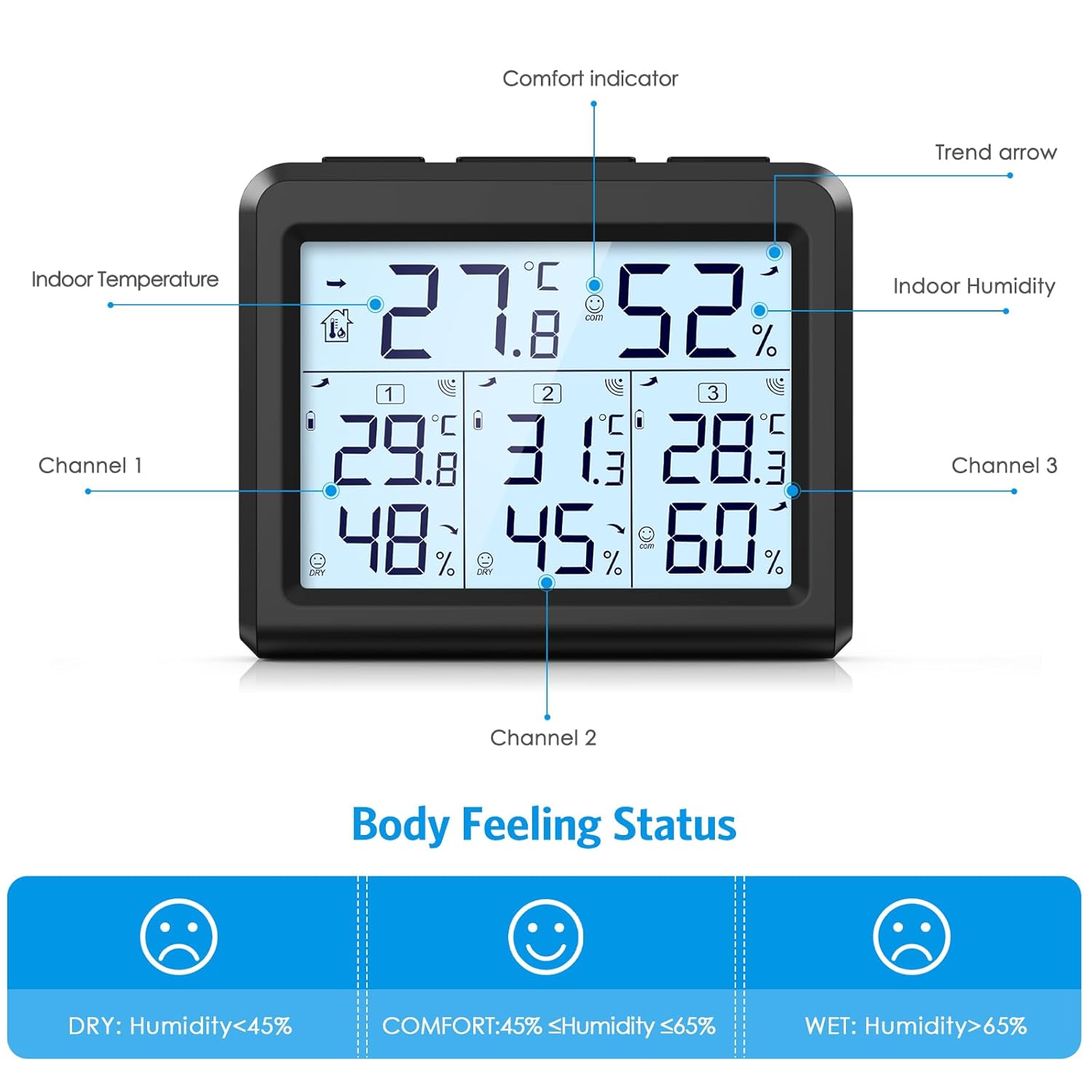
Image: A detailed view of the LCD screen, labeling the indoor temperature, indoor humidity, comfort indicator, trend arrow, and data for channels 1, 2, and 3.
5.2 Temperature Unit Selection (°C/°F)
Press the °C/°F button on the main unit to toggle between Celsius and Fahrenheit temperature displays.
5.3 MAX/MIN Record Function
The device stores maximum and minimum temperature and humidity readings. To access these records:
- While in normal display mode, press the MAX/MIN button once to view the maximum indoor and outdoor temperature/humidity values. The screen will show "MAX".
- Press the MAX/MIN button a second time to view the minimum indoor and outdoor temperature/humidity values. The screen will show "MIN".
- Press the MAX/MIN button a third time to return to the current temperature and humidity values.
- To manually clear the recorded MAX/MIN values, press and hold the MAX/MIN button for approximately 3 seconds.
5.4 Backlight Function
To activate the display backlight, press the LIGHT button. The backlight will illuminate for 5 seconds and then automatically turn off.

Image: Shows the LCD screen's visibility in both bright and dark environments, demonstrating the effect of the backlight.
5.5 Comfort Indicator
The comfort indicator provides a quick visual reference for humidity levels:
- DRY: Humidity below 45%
- COMFORT: Humidity between 45% and 65%
- WET: Humidity above 65%
6. Maintenance
6.1 Battery Replacement
When the low battery indicator appears on the main unit's display for a specific sensor, it is time to replace the batteries for that sensor. For the main unit, replace batteries when the display dims or functions become erratic.
- Open the battery compartment.
- Remove the old batteries.
- Insert new AAA batteries, ensuring correct polarity.
- Close the battery compartment.
Always dispose of used batteries responsibly according to local regulations.
6.2 Cleaning
Wipe the main unit and sensors with a soft, dry cloth. Do not use abrasive cleaners or immerse the devices in water.
7. Troubleshooting
If you encounter issues with your AMIR thermometer, refer to the following common problems and solutions:
- No Reading from Remote Sensor:
- Check if the sensor batteries are installed correctly and are not depleted. Replace if necessary.
- Ensure the sensor is within the 100m (328ft) transmission range of the main unit.
- Reduce obstacles between the sensor and the main unit (e.g., thick walls, electronic devices).
- Re-pair the sensor by pressing the 'CHANNEL' button on the main unit and the 'TX' button on the sensor.
- Inaccurate Readings:
- Ensure sensors are not exposed to direct sunlight, rain, or extreme temperature fluctuations.
- Place sensors away from heat sources or vents.
- Allow the devices to stabilize for 15-30 minutes after initial setup or relocation.
- Display is Dim or Blank:
- Replace the batteries in the main unit.
8. Specifications
| Feature | Specification |
|---|---|
| Product Dimensions | 3.5 x 3.5 x 3.9 inches; 9.44 ounces |
| Item Model Number | WA143BKM-AMUS |
| Manufacturer | AMIR |
| Brand | AMIR |
| Power Source | Battery Powered (Main unit: 3x AAA, Sensors: 2x AAA each) |
| Special Features | LCD Backlight, Large Display, Wireless, Max/Min Record, Comfort Indicator |
| Connectivity Technology | Radio Frequency |
| Color | Black |
| Temperature Accuracy | ±1 °C (±1.8 °F) |
| Humidity Accuracy | ±5% |
| Indoor Temperature Range | 0 °C to 60 °C (32 °F to 140 °F) |
| Outdoor Temperature Range | -40 °C to 60 °C (-40 °F to 140 °F) |
| Humidity Range | 10% to 99% |
| Wireless Transmission Range | 100 meters (328 feet) |
9. Warranty and Support
For warranty information or technical support, please refer to the contact details provided with your purchase or visit the official AMIR website. Keep your purchase receipt as proof of purchase for any warranty claims.


