
1. Introduction
Thank you for purchasing the AODK Gaming Desk. This manual provides essential information for the safe and efficient assembly, operation, and maintenance of your new desk. Please read these instructions carefully before beginning assembly and retain them for future reference.
The AODK Gaming Desk is designed to offer ample storage and a spacious work surface, suitable for both gaming and office use. Its robust construction ensures stability and durability.
2. Product Overview and Features
2.1 Key Features
- Spacious Design: The desk provides a wide tabletop (160cm x 53cm) for comfortable work or gaming setups, accommodating multiple monitors and accessories.
- Integrated Storage Racks: Features three shelves in total. One side includes two shelves, with the upper shelf being reversible (left or right placement) and both capable of storing A4 files. The opposite side has one larger shelf, ideal for PC cases or other substantial items.
- Robust Construction: Equipped with three cross-bars for enhanced stability and sway prevention. The frame is made of high-strength steel for durability.
- Adjustable Feet: Includes adjustable foot pads to compensate for uneven floors, ensuring a stable and wobble-free experience.
- Durable Surface: The tabletop is made from melamine resin processed board, making it resistant to scratches and easy to clean.
2.2 Product Dimensions
The desk measures 160cm (width) x 53cm (depth) x 74.7cm (height). The foot space is approximately 100cm wide.

Image: Detailed dimensions of the AODK Gaming Desk, illustrating the overall size and internal shelf measurements.

Image: The AODK Gaming Desk in use, demonstrating its capacity for multiple devices and accessories.
3. Setup Instructions
Assembly is required for this product. A wrench is included in the package, so no additional tools are necessary. Please follow these steps carefully.
3.1 Unpacking and Component Check
- Carefully open the packaging and remove all components.
- Verify that all parts listed in the included assembly manual are present and undamaged.
- Lay out all components on a clean, soft surface (e.g., a blanket or cardboard) to prevent scratches during assembly.

Image: Various components of the desk laid out, including metal frames and wooden panels, ready for assembly.
3.2 Assembly Steps
- Attach the side frames to the main tabletop sections. Ensure all screws are finger-tightened initially.
- Install the cross-bars at the back of the desk. These are crucial for stability. Ensure all three cross-bars are securely fastened.
- Assemble the storage shelves. Note that the upper shelf on one side can be installed on either the left or right, depending on your preference for PC case placement or other storage needs.
- Securely attach the CPU stand shelf if applicable.
- Once all components are in place, gradually tighten all screws using the provided wrench. Do not overtighten.
- Attach the adjustable foot pads to the bottom of the desk legs.

Image: Illustration of the cross-bar reinforcement, highlighting its role in preventing desk sway.

Image: Diagram illustrating the flexibility of installing the upper shelf on either the left or right side.
4. Operating Instructions
4.1 Utilizing Storage Racks
The desk features integrated storage racks designed for optimal organization:
- Two-Tier Shelf Side: This side offers two shelves. The upper shelf can be positioned on either the left or right during assembly to suit your layout. Both shelves are suitable for storing A4 files, books, or small accessories.
- Single Large Shelf Side: The opposite side provides a single, larger shelf. This area is specifically designed to accommodate larger items suchs as a PC tower, gaming consoles, or larger storage bins.
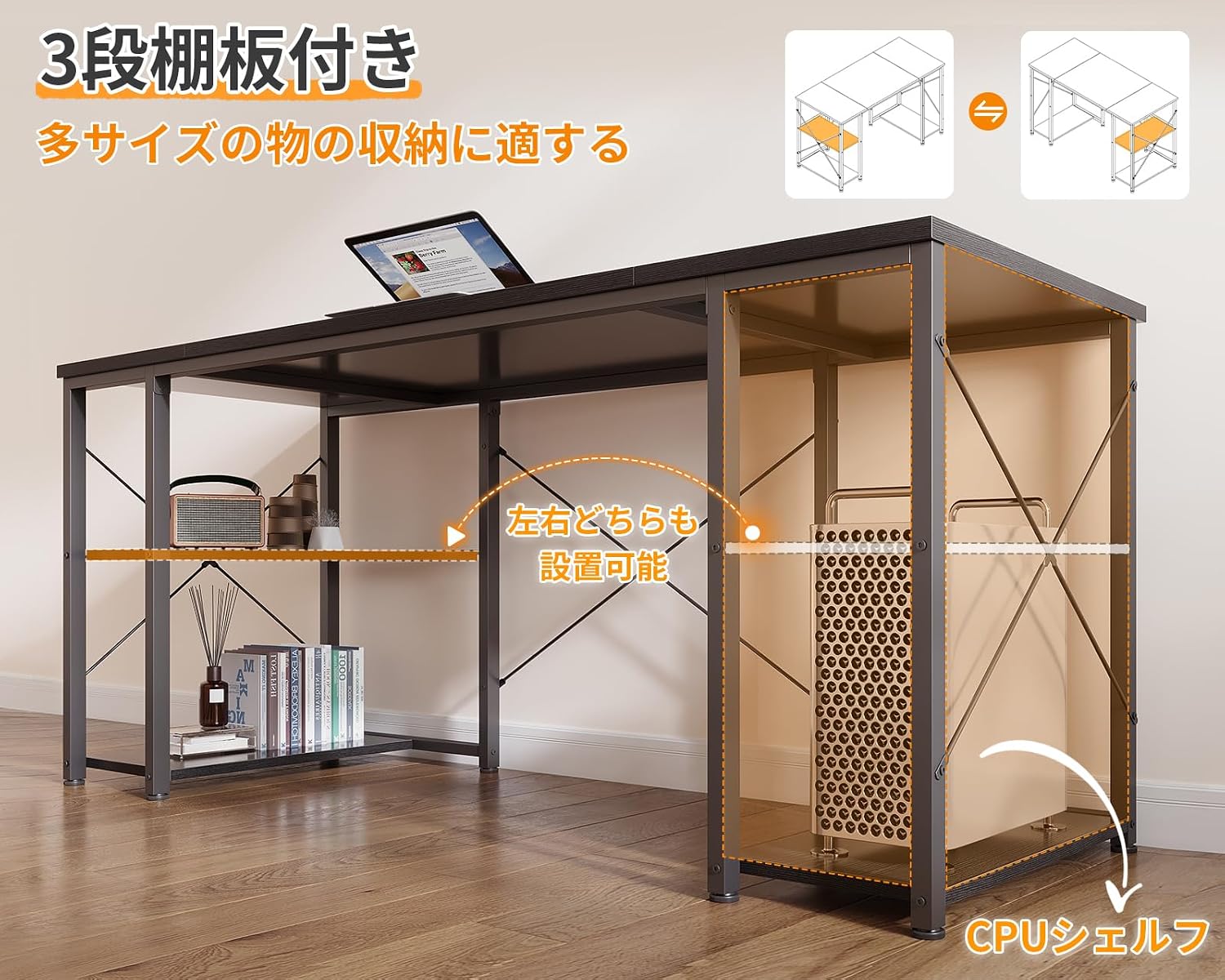
Image: The desk's storage shelves in use, demonstrating how various items can be organized.
4.2 Adjusting for Stability
After assembly, place the desk in its desired location. Use the adjustable foot pads on each leg to level the desk and eliminate any wobbling. Turn the pads clockwise or counter-clockwise until the desk is stable on the floor.
5. Maintenance
To ensure the longevity and appearance of your AODK Gaming Desk, follow these simple maintenance guidelines:
- Cleaning: The tabletop is made of melamine resin processed board, which is easy to clean. Wipe spills or dirt immediately with a soft, damp cloth. Avoid abrasive cleaners or harsh chemicals that could damage the surface.
- Dusting: Regularly dust the desk surface and frame with a dry, soft cloth.
- Inspection: Periodically check all screws and connections to ensure they remain tight. Retighten if necessary to maintain stability.
- Avoid Excessive Weight: Do not place excessively heavy items on the desk or shelves beyond their intended capacity to prevent damage.

Image: Close-up view of the melamine desktop, emphasizing its durable and easy-to-clean surface.
6. Troubleshooting
If you encounter any issues with your AODK Gaming Desk, please refer to the following common solutions:
6.1 Desk Wobbles After Assembly
- Check Cross-bars: Ensure all three cross-bars at the back of the desk are securely installed and tightened. These are essential for preventing lateral movement.
- Adjust Foot Pads: Use the adjustable foot pads on each leg to compensate for uneven flooring. Turn them until the desk is level and stable.
- Tighten All Screws: Re-check and tighten all assembly screws. Loose connections can lead to instability.
6.2 Damaged or Missing Parts
If you received the product with initial defects, damaged parts, or missing components, please contact customer support immediately for assistance. Do not attempt to force assembly with damaged parts.
7. Specifications
| Attribute | Value |
|---|---|
| Brand | AODK |
| Model Number (ASIN) | B0DL9V6ZJC |
| Dimensions (W x D x H) | 160 cm x 53 cm x 74.7 cm |
| Product Weight | 15.4 kg |
| Package Dimensions | 109 x 61.5 x 7 cm |
| Package Weight | 17.1 kg |
| Color | Black |
| Base Material | Metal (Steel Frame) |
| Finish Type | Laminate (Melamine Resin Processed Board) |
| Special Feature | Ample Storage Capacity, Adjustable Feet, Reversible Shelves |
8. Warranty and Support
AODK is committed to providing quality products. While specific warranty details are not provided in this document, we offer support for our products.
- Initial Defects: In the event of any initial defects upon receipt of your product, please contact our customer support team immediately for assistance.
- Customer Support: For any questions, concerns, or support needs regarding your AODK Gaming Desk, please refer to the contact information provided with your purchase or visit the official AODK store on Amazon.
Link to AODK Store: AODK Official Store


