
1. Introduction
The AIYIMA A80 is an all-in-one digital DAC amplifier designed to deliver exceptional audio performance. It integrates a high-performance ES9038Q2M decoder chip with a powerful TPA3255 Class D amplifier chipset, supporting DSD512 and PCM ultra-high-resolution audio. Featuring PFFB technology, the A80 ensures low distortion and a high signal-to-noise ratio, providing a rich and detailed sound experience. Its versatile input options and user-friendly interface make it suitable for various home audio setups.
2. What's in the Box
- 1 PC A80 Stereo Amplifier
- 1 PC DC48V 5A Power Adapter
- 1 PC User Manual
3. Product Overview
3.1. Front Panel
The front panel of the AIYIMA A80 features a clear electronic display screen, an encoder knob for control, and an infrared (IR) receiving window for remote operation. The display provides real-time information on input status, volume, and offers multiple visual modes including VU meters and spectrum analyzers.

Figure 3.1: Detailed view of the AIYIMA A80 front panel, showing the display screen, encoder knob, and IR receiver.

Figure 3.2: The colorful screen display of the AIYIMA A80, illustrating multi-mode visual menus and real-time function control.
3.2. Rear Panel
The rear panel provides a comprehensive array of input and output interfaces to connect various audio devices. These include Bluetooth, USB-C, Optical, Coaxial, TRS, and RCA inputs. For outputs, it supports speaker terminals and a 3.5mm AUX/RCA output for connecting to other amplifiers or a 2.1-channel system with an active subwoofer. A 12V Trigger input is also available for system integration.

Figure 3.3: Overview of the AIYIMA A80 rear panel, detailing the various audio input and output ports.
3.3. Design and Cooling
The A80 features a sleek, compact design with a full aluminum alloy body. Multiple ventilation holes are strategically arranged at the bottom and sides of the unit to ensure optimal airflow and efficient cooling performance, contributing to its stable operation and longevity.
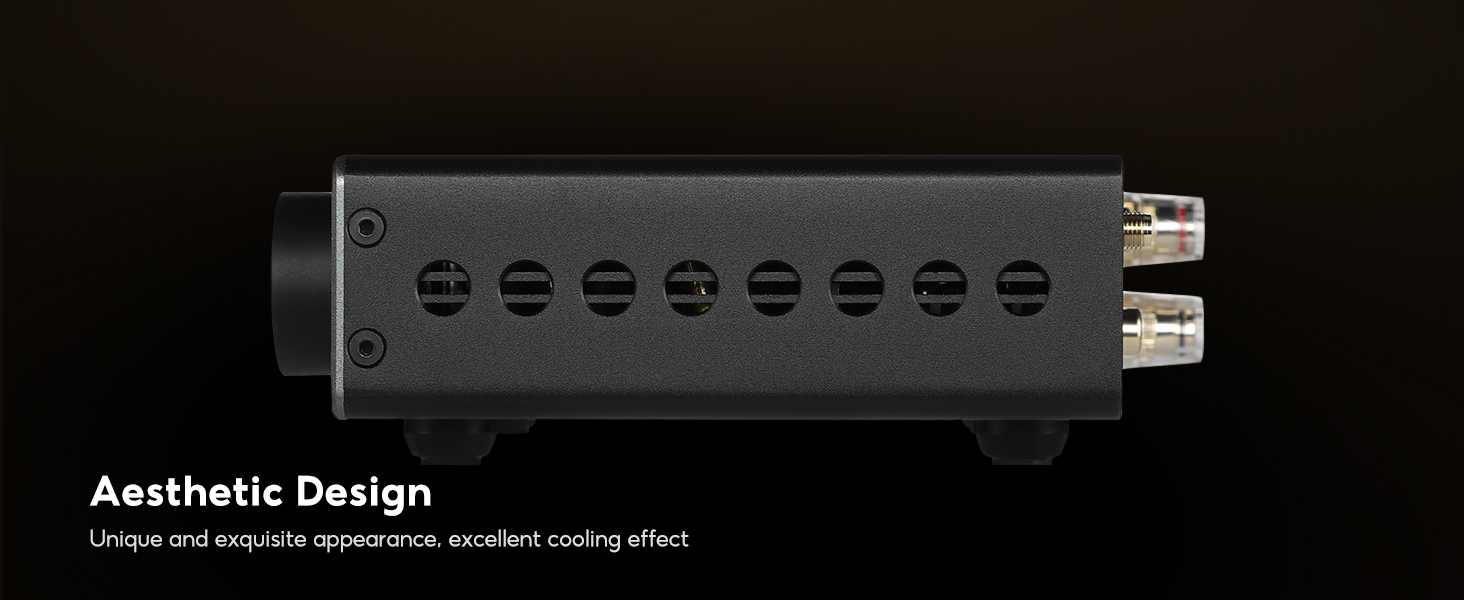
Figure 3.4: Side view of the AIYIMA A80, highlighting its aesthetic design and ventilation holes for effective cooling.
4. Setup
4.1. Connecting Speakers
Connect your passive speakers to the speaker output terminals on the rear panel. Ensure correct polarity (positive to positive, negative to negative) for optimal sound quality. The A80 supports 2.0-channel stereo output.
4.2. Connecting Audio Sources
The A80 offers multiple input options:
- Bluetooth: Pair your Bluetooth-enabled device (smartphone, tablet) with the A80. Ensure the Bluetooth antenna is connected for stable signal reception.
- USB-C: Connect your PC or laptop using a USB-C cable for high-resolution audio playback. Drivers may be required for PC operation (refer to the user manual for detailed PC-USB operating instructions).
- Optical (OPT): Connect digital audio sources like TVs or CD players using an optical cable.
- Coaxial (COA): Connect digital audio sources using a coaxial cable.
- TRS: Use TRS balanced ports for professional audio equipment.
- RCA: Connect analog audio sources such as CD players or phono preamps.

Figure 4.1: The AIYIMA A80 supports various input methods including Bluetooth, USB-C, Optical, Coaxial, TRS, and RCA.
4.3. Power Connection
Connect the provided DC48V 5A power adapter to the power input port on the rear panel of the A80. Plug the power adapter into a suitable wall outlet.
5. Operating Instructions
5.1. Power On/Off
- Power On: Short press the encoder knob on the front panel.
- Power Off: Long press the encoder knob.
5.2. Input Selection
Rotate the encoder knob to navigate through the input options displayed on the screen. Short press the knob to confirm your selection. Alternatively, use the INPUT button on the remote control to cycle through inputs.
5.3. Volume Control
Rotate the encoder knob to adjust the volume. The volume level will be displayed on the screen. You can also use the volume up/down buttons on the remote control.
5.4. Display Modes
The A80 features an electronic VU display screen with three different display styles to choose from: two VU meter styles and one spectrum analyzer mode. These modes provide a visual representation of the audio input status and volume, enhancing the user experience.
Video 5.1: Demonstrates the unboxing and various features of the AIYIMA A80, including its display modes and connectivity options.
5.5. Tone Control
The A80 includes bass and treble adjustment controls. Use the remote control to access the 'TONE' menu and adjust these settings to customize your sound preference.
5.6. Brightness Adjustment
The display screen offers three brightness levels. Use the remote control to adjust the brightness to suit different lighting environments.
5.7. 12V Trigger Function
The 12V Trigger input allows the amplifier to be integrated with other control systems or automation equipment. This feature simplifies the operation process by enabling linked power control with other home audio components.
6. Maintenance
To ensure the longevity and optimal performance of your AIYIMA A80, follow these maintenance guidelines:
- Keep the unit clean by wiping it with a soft, dry cloth. Avoid using liquid cleaners or solvents.
- Ensure proper ventilation around the amplifier. Do not block the ventilation holes on the sides and bottom of the unit.
- Avoid placing the unit in direct sunlight, near heat sources, or in environments with high humidity.
- Disconnect the power adapter if the unit will not be used for an extended period.
7. Troubleshooting
If you encounter issues with your AIYIMA A80, consider the following common troubleshooting tips:
- Unit runs hot: While the A80 has an excellent cooling system, prolonged use at high volumes may cause it to warm up. Ensure adequate ventilation and avoid enclosing the unit in tight spaces.
- No subwoofer output: The A80's 3.5mm AUX output can be configured for 2.0/2.1-channel home audio receiver systems. If you intend to connect an active subwoofer, ensure it is connected to the 3.5mm AUX output and configured correctly.
- No sound from TV via Optical/Coaxial: Ensure your TV's audio output settings are configured to output via Optical/Coaxial and not internal speakers. Some TVs may require setting the digital audio output format to PCM.
- Bluetooth connection issues: Ensure the Bluetooth antenna is securely connected. Clear previous pairings on your device and the A80, then attempt to re-pair.
8. Specifications
| Feature | Specification |
|---|---|
| Product Dimensions | 6.1 x 4.84 x 1.61 inches |
| Item Weight | 3.65 pounds (1.66 Kilograms) |
| Model Number | A80 |
| Manufacturer | YIMA TECH |
| Connectivity Technology | Auxiliary, Bluetooth, USB, XLR (TRS) |
| Special Features | Built-In Bluetooth, Compact Design, Digital Display Screen, Subwoofer Output, Volume Control |
| Compatible Devices | Amplifier, Smartphone, Speaker, Tablet, Television |
| Connector Type | Coaxial, Optical |
| Audio Output Mode | Stereo |
| Surround Sound Channel Configuration | 2.1 |
9. Warranty and Support
The AIYIMA A80 comes with a 2-year warranty from the date of purchase. For technical support, troubleshooting assistance, or warranty claims, please contact the manufacturer, YIMA TECH, through their official support channels.