
SALLOOT DT015 Pro
SALLOOT IPL Laser Hair Removal Device User Manual
Model: DT015 Pro
Introduction
The SALLOOT IPL Laser Hair Removal Device is designed for effective and comfortable at-home hair removal. It utilizes advanced IPL technology with dual lights and sapphire ice-cooling to provide a safe and efficient treatment experience for various body areas.

Image: SALLOOT IPL Laser Hair Removal Device with included razor and safety goggles.
Key Features
- Quadruple-Pulse for Stubborn Hair: Innovative PHR mode with 27J total energy per 4-pulse burst, offering 97% hair reduction in 2 weeks.
- Dual Lights 100W: 4.2 cm² light window with dual lamps for 4x effective energy and 40% wider treatment area, allowing full-body sessions in 5-10 minutes.
- Comfort for Sensitive Skin: Enlarged 16.6cm² sapphire ice-cooling window cools contact surface to 35°F, maintaining 53°F for up to 60 minutes.
- AI Coaching APP: Auto-recommends energy levels and flash modes based on skin tone, hair density, and treatment area, with personalized plans and reminders.
- Whole Body Treatment: Suitable for legs, arms, bikini line, face, armpit, back, chest, fingers, and toes with 15 sensitivity levels and PHR mode.
Advanced Technology
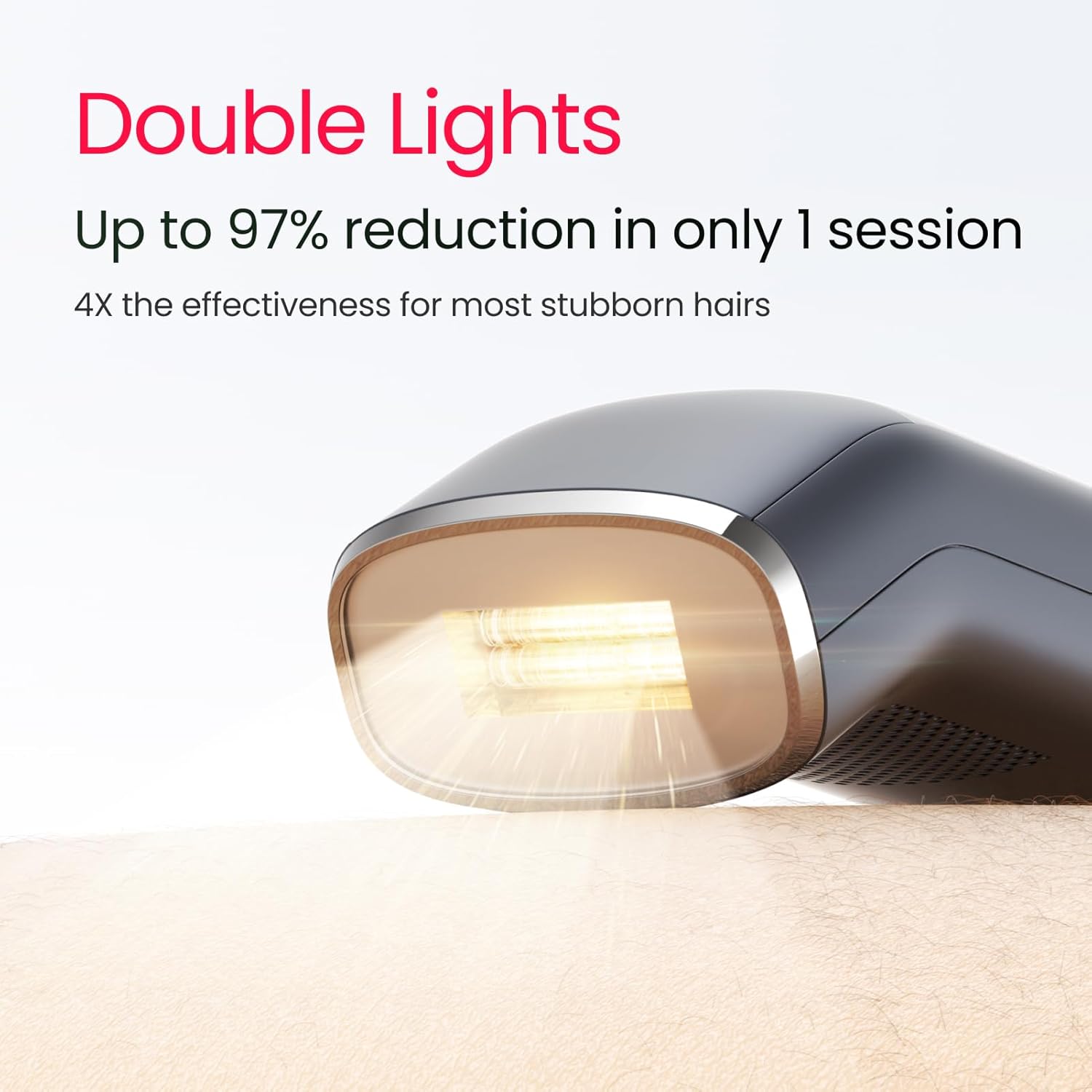
Image: The device features Dual Lights technology for enhanced effectiveness.

Image: PHR Mode with 4-Pulse Burst delivers powerful energy for stubborn hair.

Image: The enlarged Sapphire Ice-cooling Window ensures comfortable treatment.
Smart AI Integration

Image: The AI Coaching APP provides personalized treatments and tutorials.
Comprehensive Treatment

Image: The device is suitable for long-lasting whole body hair removal.

Image: Guide to determine if Trinity i15 Pro is right for your skin tone and hair color.
Performance Comparison
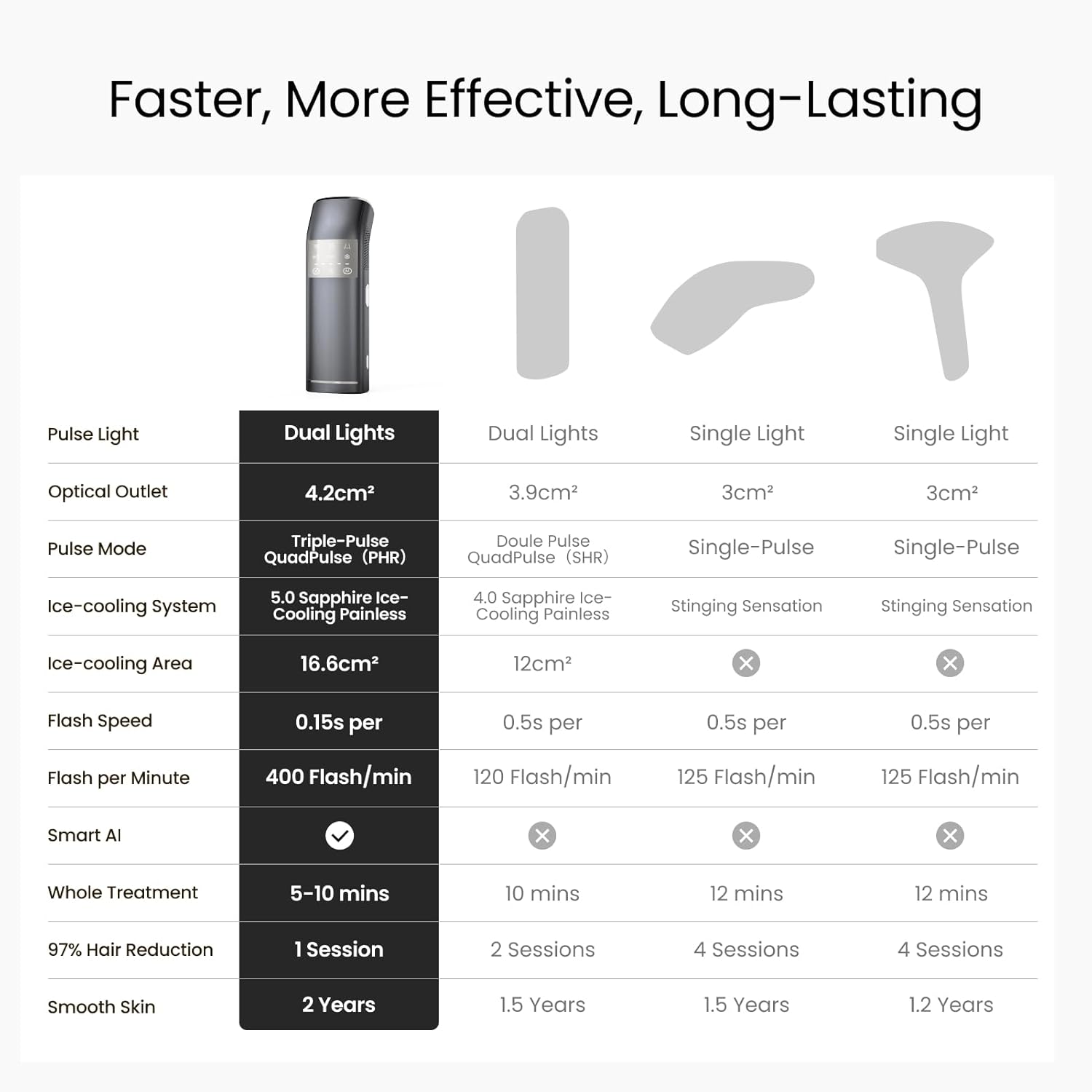
Image: Comparison of Dual Lights vs. Single Light technologies for faster, more effective, and long-lasting results.
Setup and First Use
Before using your SALLOOT IPL device, ensure you follow these important setup steps for safety and optimal performance.
Pre-Treatment Preparation

Image: Essential steps for preparing for hair removal, including shaving and wearing safety goggles.
Device Connection
Connect the device to a power source using the provided adapter.
Powering On
Press and hold the power button to turn on the device.
App Connection (Optional)
The SALLOOT Trinity i15 Pro can be connected to the CTone APP for personalized coaching and progress tracking. Ensure Bluetooth and location services are enabled on your smartphone.

Image: The app provides beginner-friendly step-by-step tutorials for safer and easier treatment.
Official Product Video: How to Use
Video: This official video from SALLOOT US DIRECT demonstrates the complete usage of the IPL laser hair removal device, including preparation, powering on, selecting modes, and proper application techniques. It also covers how to connect and utilize the device with the accompanying mobile application for enhanced tracking and personalized guidance.
Operating the Device
Manual Mode Operation
In Manual Mode, you have full control over the settings. Select your desired mode (Body, Face, Bikini) and intensity level using the device's buttons.
Auto Mode Operation
For larger areas, the Auto Gliding Fast Mode allows for continuous flashing. Long press the light button for 3-5 seconds to switch between Manual and Auto modes.

Image: Auto Gliding Fast Mode is ideal for large areas like legs and arms, while Manual Flash Mode is for smaller, sensitive areas.
Treatment Process and Progress Tracking
Once the device is set up and the mode is selected, place the treatment window firmly against your skin. The device will flash automatically or manually depending on the selected mode. The app allows you to track your progress and view reports.

Image: Experience fast results with consistent use, showing hair reduction after 1 and 4 sessions.

Image: The app provides personalized treatment plans and detailed results tracking with AI reports.
Recommended Usage Frequency

Image: Recommended usage schedule for optimal hair reduction: 3-4 times/week for weeks 1-2, 2-3 times/week for weeks 3-4, and 2 times/month after 4 weeks for long-lasting results.
Maintenance
To ensure the longevity and optimal performance of your SALLOOT IPL device, regular maintenance is recommended. After each use, gently wipe the treatment window with a soft, dry cloth to remove any hair or residue. Store the device in a cool, dry place away from direct sunlight.
Troubleshooting
If your device displays any error codes, please refer to the following guide. If the issue persists, contact customer service promptly.
Error Codes
- Error 1: Main unit boost fails. Level 1 blinks, then shuts down.
- Error 2: Fan failure. Levels 1 and 2 blink, then shuts down.
- Error 3: Adapter boost failure. Levels 1-3 blink, then shuts down.
- Error 4: NTC open/short circuit or airflow over 80°C. Levels 1-4 blink, then shuts down.
For any error not listed or if troubleshooting steps do not resolve the issue, please contact SALLOOT customer support.
Product Specifications
| Specification | Detail |
|---|---|
| Model Number | DT015 Pro |
| Brand | SALLOOT |
| UPC | 642380741311 |
| ASIN | B0DL9FLMH1 |
| Package Dimensions | 10.31 x 6.54 x 4.72 inches |
| Item Weight | 3.62 Pounds |
| Light Window Size | 4.2 cm² |
| Ice-Cooling Window Size | 16.6 cm² |
| Energy Output (PHR Mode) | 27J per 4-pulse burst |
| Flashes per Minute | 400 |
Warranty and Support
SALLOOT is committed to providing high-quality products and excellent customer service. Your SALLOOT IPL device comes with a manufacturer's warranty. For specific warranty details, please refer to the documentation included with your product or contact SALLOOT customer support.
For any questions, technical assistance, or support, you can reach out to SALLOOT customer service. Many users also benefit from joining the SALLOOT community for lifetime 24/7 support and extended warranty options.

Image: SALLOOT products are endorsed by professionals, highlighting their quality and effectiveness.

Image: The app offers smart reminders and direct access to messages and help for seamless support.
Related documentsDT015 Pro

Ask a question about this manual
Ask about setup, troubleshooting, compatibility, parts, safety, or missing instructions. Manuals+ will review the question and use this page’s manual context to help answer it.