
Introduction
This manual provides instructions for the DCH HXE-R02(L) 1000mAh Li-ion battery, designed as a replacement for various Royaltek devices. Please read this manual thoroughly before installation and use to ensure proper function and safety.
Compatibility
This battery is compatible with the following Royaltek models:
- RBT-2010
- RBT-2000
- RBT-2100
- RBT-1100
- RBT-1000
- RBT-2300
- RBT-2110
- RBT-2001
Compatible Battery Part Numbers: HXE-R02(L), HEW-R02-1.
Important: Please verify both your device model and original battery part number match those listed above before installation.
Important Safety Information
Read all instructions and warnings carefully before using this battery. Failure to follow these instructions may result in fire, injury, or damage to the battery and device.
- CAUTION: Warranty is void if the label is removed.
- Do not attempt to disassemble, open, or service the battery pack.
- Replace only with the battery pack designated for this product.
- Do not crush, puncture, short external contacts, or dispose of in fire or water.
- Do not store above 60°C (140°F).
- ATTENTION: New battery packs must be fully charged before use.
- To reduce the risk of fire or burns, read instructions in the operating guide before using the battery.

Close-up view of the DCH battery label, showing model number, part number, rating, and critical safety warnings regarding handling and storage.
Installation Instructions
Follow these steps to safely install your new DCH replacement battery.
- Power Off Device: Ensure your Royaltek device is completely powered off before beginning the installation.
- Remove Old Battery: Locate the battery compartment on your device. Open the compartment cover and carefully remove the old battery. Refer to your device's original manual if you are unsure how to access the battery.
- Insert New Battery: Align the DCH replacement battery with the contacts inside the battery compartment. Gently push the battery into place until it is securely seated. The battery is designed to fit in one specific orientation.
- Close Compartment: Replace the battery compartment cover, ensuring it is latched securely.
- Initial Charge: Connect your device to its charger and allow the new battery to fully charge before its first use. This helps optimize battery performance and lifespan.

The DCH HXE-R02(L) replacement battery, showing its overall shape and design for proper insertion into compatible devices.

Rear view of the DCH HXE-R02(L) battery, displaying the barcode and serial number. This side typically faces inwards during installation.
Operating Your Battery
First Use
As noted in the safety information, it is crucial to fully charge your new battery before its initial use. This "conditioning" charge helps the battery's internal chemistry stabilize and ensures optimal performance from the start.
Charging
Use only the original charger or a certified compatible charger provided with your Royaltek device.
- Connect the charger to your device and a power source.
- The device's charging indicator (if available) should activate.
- Disconnect the charger once the battery is fully charged to prevent overcharging, although modern batteries and chargers have built-in protection.
Battery Maintenance and Care
Proper care extends the life and performance of your DCH battery.
- Storage: If storing the battery for an extended period, keep it in a cool, dry place, ideally at around 50% charge. Avoid extreme temperatures.
- Cleaning: Keep battery contacts clean. If necessary, gently wipe them with a dry, soft cloth.
- Avoid Deep Discharge: While Li-ion batteries do not suffer from "memory effect," frequent deep discharges can reduce overall lifespan. Try to recharge before the battery is completely depleted.
- Disposal: Do not dispose of batteries in household waste. Follow local regulations for proper recycling of Li-ion batteries.
Troubleshooting
If you encounter issues with your DCH replacement battery, consider the following:
| Problem | Possible Cause | Solution |
|---|---|---|
| Battery not charging | Incorrect installation | Re-install the battery, ensuring proper alignment and secure connection. |
| Battery not charging | Faulty charger or cable | Try a different charger or cable known to be working. |
| Battery not charging | Device issue | Test the battery in another compatible device if possible, or consult your device's manual. |
| Short battery life | Not fully charged initially | Ensure the battery is fully charged before first use and subsequent uses. |
| Short battery life | High power consumption | Reduce device usage of power-intensive features (e.g., GPS, backlight). |
| Device not powering on | Battery completely drained | Connect the device to a charger and allow it to charge for at least 30 minutes before attempting to power on. |
| Device not powering on | Incorrect battery type | Verify the battery model and part number match your device's requirements. |
If problems persist, please contact DCH customer support.
Product Specifications
| Feature | Detail |
|---|---|
| Brand | DCH |
| Model Number | CS-XEW01SL |
| Part Numbers | HXE-R02(L), HEW-R02-1 |
| Battery Type | Lithium-Ion (Li-ion) |
| Capacity | 1000mAh |
| Watt-Hours (Wh) | 3.7Wh |
| Voltage | 3.7V |
| Dimensions (L x W x H) | 52.96 x 33.64 x 5.15 mm (2.09 x 1.32 x 0.2 inches) |
| Weight | 47.0 g (1.66 ounces) |
| Recommended Use | Indoor/Outdoor |
| Manufacturer | DCH |
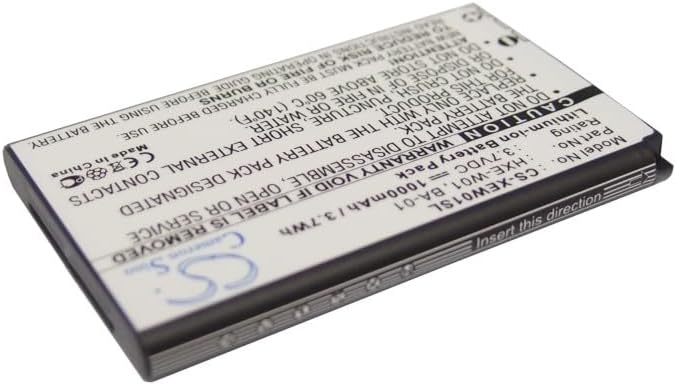
An angled view of the DCH HXE-R02(L) battery, highlighting its compact size and construction.
Warranty and Customer Support
DCH provides quality replacement batteries. For specific warranty terms, please refer to the packaging or contact your retailer.
If you have any questions or require assistance, please contact DCH customer support.
Note: The warranty may be void if the battery label is removed or if the battery is disassembled or serviced by unauthorized personnel.