
1. Introduction
Thank you for choosing the KoolMore 30-inch 1.6 cu. ft. Over the Range Microwave Oven. This manual provides essential information for the safe and efficient operation, installation, and maintenance of your new appliance. Please read it thoroughly before use and retain it for future reference.
This microwave oven features 1000 watts of cooking power, 1.6 cubic feet of interior capacity, sensor cooking functions, and a 300 CFM ventilation system. It is designed for over-the-range installation and includes a dual lighting system for enhanced visibility.
2. Safety Information
Important Safety Instructions:
- Read all instructions before using the appliance.
- Do not attempt to operate this oven with the door open as this can result in harmful exposure to microwave energy.
- Do not heat liquids or other foods in sealed containers as they are liable to explode.
- Only allow children to use the oven without supervision when adequate instructions have been given so that the child is able to use the oven in a safe way and understands the hazards of improper use.
- Do not use corrosive chemicals or vapors in this appliance.
- This appliance must be grounded. Connect only to a properly grounded outlet.
- Maintain the oven and clean the door seals and cavity regularly.
Proposition 65 Warning: This product may contain chemicals known to the State of California to cause cancer and birth defects or other reproductive harm. For more information, visit www.P65Warnings.ca.gov.
3. Product Overview
The KoolMore Over the Range Microwave Oven is designed for convenient and efficient cooking. Below is an overview of its key components and control panel.
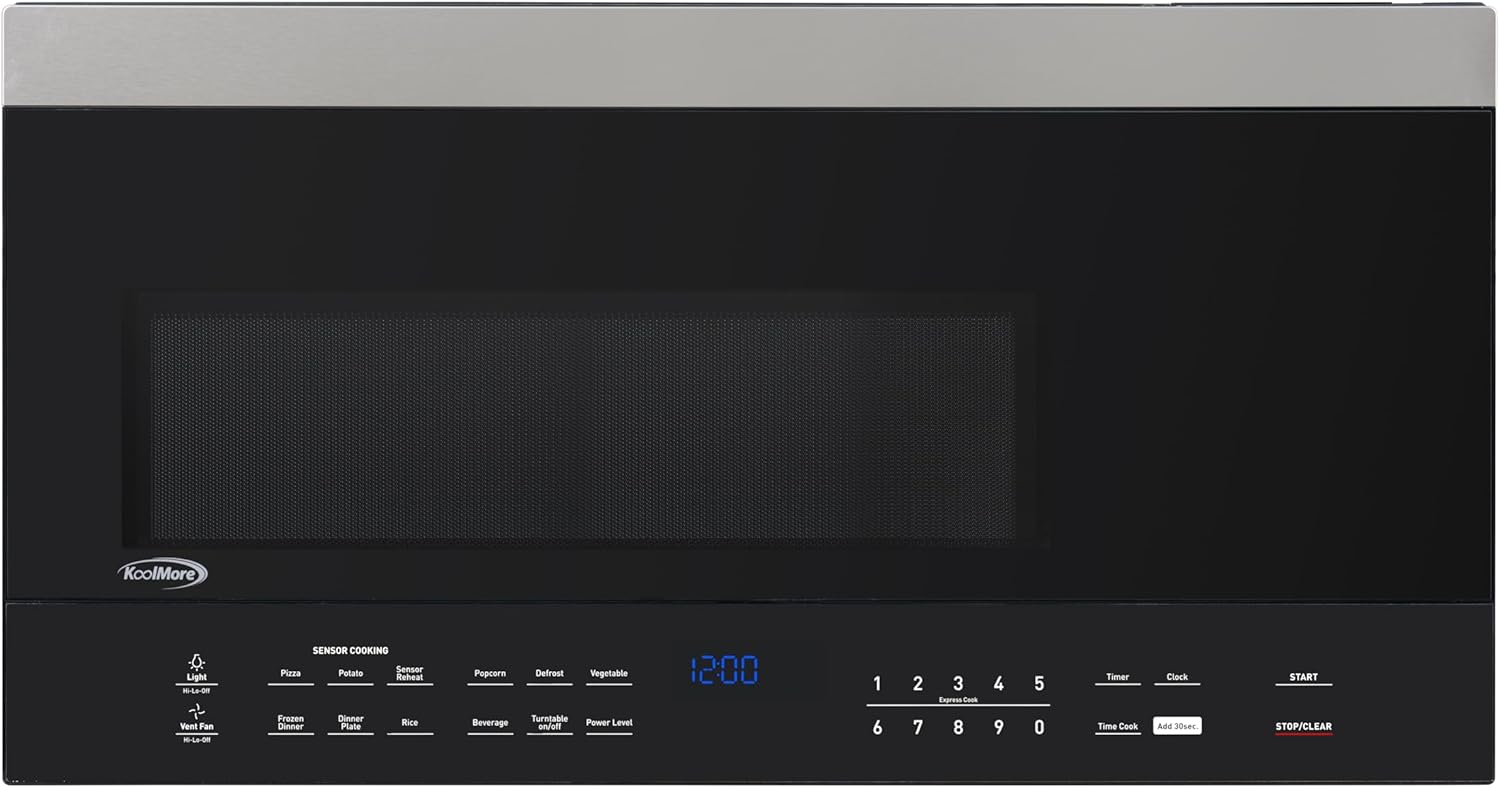
Figure 3.1: Front view of the KoolMore Over the Range Microwave Oven, showing the control panel and door.

Figure 3.2: Interior view of the microwave oven, featuring the removable glass turntable for even cooking.
Control Panel Features:
- Sensor Cooking Options: Pizza, Potato, Sensor Reheat, Popcorn, Defrost, Vegetable, Frozen Dinner, Dinner Plate, Rice, Beverage.
- Express Cook: Quick start cooking for 1-6 minutes.
- Power Levels: 10 adjustable power levels for precise cooking.
- Timer/Clock: Functions for setting cooking time and displaying current time.
- Light (Hi-Lo-Off): Controls the interior and exterior incandescent lights.
- Vent Fan (Hi-Lo-Off): Controls the 300 CFM ventilation system.
- Child Safe Lockout Function: Prevents unintended operation.
4. Setup and Installation
Proper installation is crucial for the safe and efficient operation of your microwave oven. This appliance is designed for over-the-range installation.
Installation Requirements:
- Cabinet Width: Requires a 30-inch cabinet width.
- Cabinet Height Clearance: A minimum of 16.5 inches is required.
- Floor to Top Clearance: Ensure there is at least 66 inches from the floor to the top of the microwave for proper installation.
- Electrical Outlet: A dedicated 115 Volt, 20 Amp grounded outlet is recommended.

Figure 4.1: Side view illustrating the product dimensions: 15.75 inches deep, 29.75 inches wide, and 16 inches high.

Figure 4.2: Bottom view of the microwave oven, showing mounting points and ventilation openings for installation.
Venting Options:
The microwave offers convertible venting, allowing you to choose from top, back, or ductless venting, depending on your kitchen layout. Consult the detailed installation guide provided with the product for specific instructions on converting the ventilation system.

Figure 4.3: The microwave oven installed above a range, demonstrating its intended placement in a kitchen.
5. Operating Instructions
This section details how to use the various functions of your KoolMore microwave oven.

Figure 5.1: Close-up of the microwave oven's control panel, showing buttons for various cooking functions and settings.
Basic Microwave Cooking:
- Place food in a microwave-safe container on the turntable.
- Close the oven door securely.
- Enter desired cooking time using the number pads.
- Press the 'Power Level' button to adjust power if needed (default is 100%). Use number pads to select level (e.g., '5' for 50% power).
- Press 'START' to begin cooking.
Sensor Cooking:
The sensor cooking feature automatically adjusts cooking time based on the humidity detected from the food. Select the desired food type from the sensor cooking options (e.g., 'Pizza', 'Potato', 'Sensor Reheat', 'Popcorn', 'Defrost', 'Vegetable', 'Frozen Dinner', 'Dinner Plate', 'Rice', 'Beverage') and press 'START'. The oven will determine the optimal cooking time.
Express Cook:
For quick heating, press any number from '1' to '6' to instantly start cooking for that many minutes at 100% power.
Light and Vent Fan:
- Press the 'Light' button to cycle through Hi, Lo, and Off settings for the cooktop lighting.
- Press the 'Vent Fan' button to cycle through Hi, Lo, and Off settings for the exhaust fan.
Child Lockout Function:
To activate the child lock, press and hold the 'STOP/CLEAR' button for 3 seconds. An indicator will appear on the display. To deactivate, repeat the process.
6. Maintenance and Cleaning
Regular cleaning and maintenance will ensure the longevity and optimal performance of your microwave oven.
Exterior Cleaning:
- Wipe the exterior with a damp cloth and mild soap. Dry thoroughly.
- The stainless-steel finish is fingerprint-resistant; however, for best results, use a stainless-steel cleaner.
Interior Cleaning:
- Clean the interior cavity with a damp cloth and mild detergent after each use.
- For stubborn food splatters, place a bowl of water with lemon slices inside and microwave for 2-3 minutes. The steam will loosen the residue for easier cleaning.
Turntable Care:
- The glass turntable and roller ring can be removed for cleaning. Wash them in warm, soapy water or in the dishwasher.
- Ensure the turntable and roller ring are properly seated before operating the microwave.
Ventilation Filters:
The microwave is equipped with carbon exhaust filters. Refer to the full installation and user manual for instructions on how to clean or replace these filters to maintain optimal ventilation performance.
7. Troubleshooting
If you encounter issues with your microwave oven, refer to the following common problems and solutions before contacting customer support.
| Problem | Possible Cause | Solution |
|---|---|---|
| Microwave does not start | Door not closed properly; Power cord unplugged; Blown fuse/tripped circuit breaker; Child lock activated. | Ensure door is latched; Check power connection; Reset breaker/replace fuse; Deactivate child lock. |
| Food not heating | Incorrect power level selected; Cooking time too short; Microwave-safe dish not used. | Adjust power level and cooking time; Use appropriate cookware. |
| Turntable not rotating | Turntable or roller ring not positioned correctly; Obstruction. | Reposition turntable and roller ring; Remove any obstructions. |
| Unusual noise during operation | Loose turntable components; Foreign object in cavity. | Check turntable and roller ring; Inspect cavity for foreign objects. |
| Display not working | Power interruption; Appliance malfunction. | Unplug and re-plug the microwave; If issue persists, contact support. |
For issues not listed here or if the problem persists, please contact KoolMore customer support.
8. Specifications
Detailed technical specifications for the KoolMore Over the Range Microwave Oven, Model KM-MOTSC-16BSS.
| Feature | Specification |
|---|---|
| Brand | KoolMore |
| Model Number | KM-MOTSC-16BSS |
| Product Dimensions (D x W x H) | 15.75" x 29.75" x 16" |
| Item Weight | 55.8 Pounds |
| Capacity | 1.6 Cubic Feet |
| Wattage | 1000 watts |
| Voltage | 115 Volts |
| Color | Stainless-Steel |
| Material | Stainless Steel |
| Installation Type | Over-the-Range |
| Ventilation | 300 CFM, Convertible (Top, Back, Ductless) |
| Special Features | Sensor Cook, Child Safe Lockout, Electronic Controls with LED Display, Express Cook 1-6 minutes |
| Included Components | Microwave, Turntable |
| Certifications | UL Listed, DOE Compliant |
9. Warranty and Support
Your KoolMore Over the Range Microwave Oven is backed by a comprehensive warranty and dedicated customer support.
Manufacturer's Warranty:
This product includes a 1-Year Manufacturer's Warranty covering parts and labor. This warranty ensures reliable performance and support should you require assistance due to manufacturing defects.
Customer Support:
For technical assistance, warranty claims, or general inquiries, please contact KoolMore customer support. Refer to the contact information provided in your product packaging or visit the official KoolMore website for the most up-to-date support details.
Please have your model number (KM-MOTSC-16BSS) and purchase date available when contacting support.


