
AWEI KA26
AWEI Portable Bluetooth Speaker User Manual
Model: KA26
Introduction
Thank you for choosing the AWEI Portable Bluetooth Speaker. This speaker is designed to provide high-quality stereo sound with the convenience of wireless Bluetooth 5.0 connectivity. It features a unique rotatable disc for decompression, offering various soothing sounds, and supports multiple play modes including TF card, AUX, and FM radio. Its portable and waterproof design makes it suitable for various environments, from home to outdoor activities.

Image: The AWEI Portable Bluetooth Speaker, showcasing its unique phonograph-style design with a rotatable disc.
What's in the Box
Please check the package contents upon unboxing:
- 1 x AWEI Portable Bluetooth Speaker (Model: KA26)
- 1 x Type-C Charging Cable
- 1 x Quick Start Guide
Product Overview
Familiarize yourself with the speaker's components and controls.

Image: A top-down perspective of the AWEI speaker, highlighting the central rotatable disc and the adjacent control buttons for various functions.
Key Features:
- Rotatable Disc: For accessing 12 soothing sounds and decompression features.
- Control Buttons: Power, Volume Up/Down, Play/Pause, Mode selection.
- Connectivity Ports: TF card slot, 3.5mm AUX jack, Type-C charging port.
- Built-in Microphone: For hands-free calling.
- Speaker Grille: Durable fabric covering the speaker drivers.
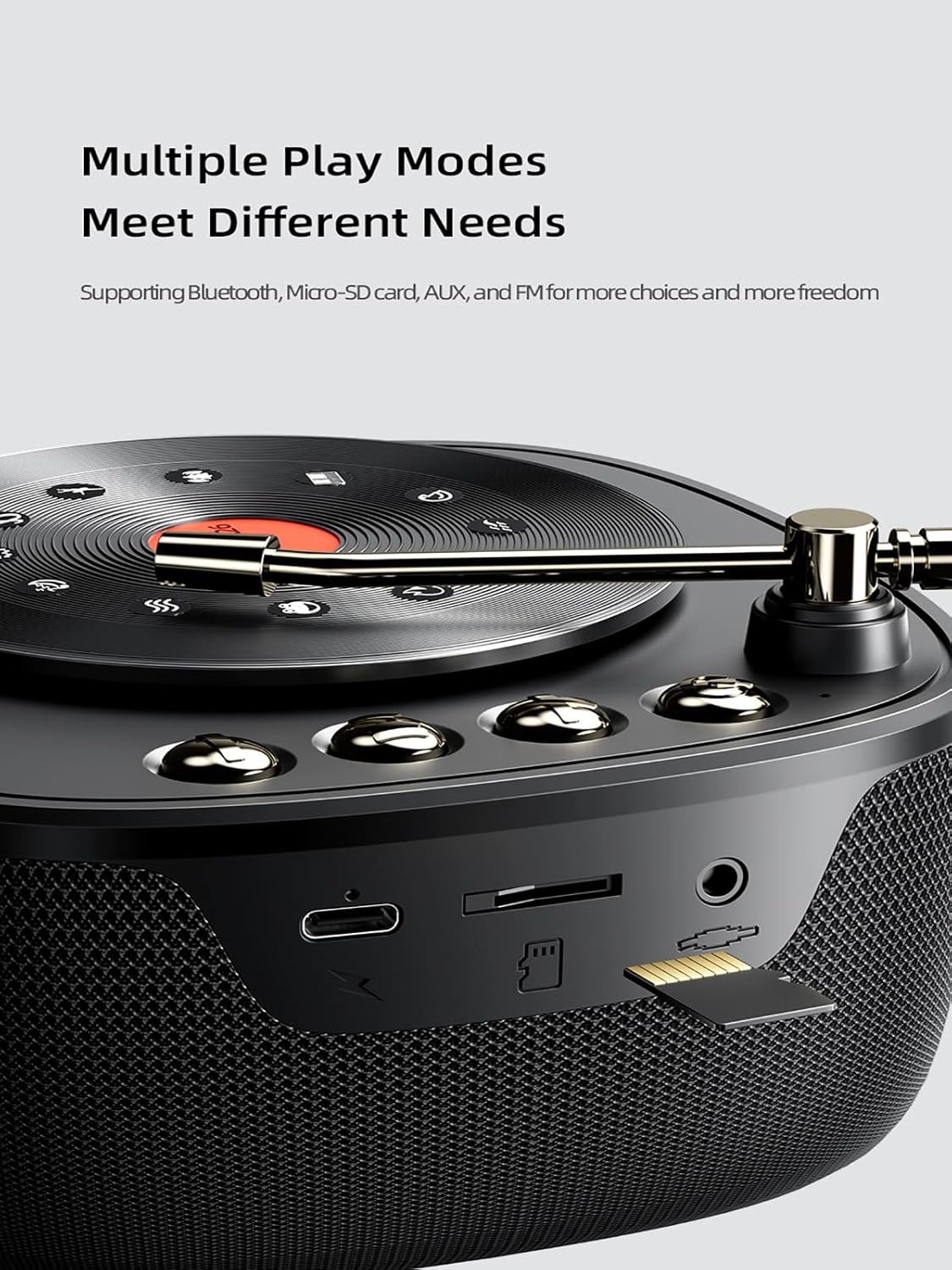
Image: A close-up view of the speaker's side, illustrating the various input ports including the TF card slot, AUX input, and Type-C charging port, indicating its versatile connectivity options.

Image: An internal view of the speaker's diaphragm and horn, emphasizing the components responsible for delivering high-fidelity stereo sound and vigorous bass.
Setup
1. Charging the Speaker
Before first use, fully charge the speaker. Connect the provided Type-C charging cable to the speaker's charging port and the other end to a USB power adapter (not included) or a computer's USB port. The charging indicator light will show charging status and turn off when fully charged.
2. Powering On/Off
- Power On: Press and hold the Power button for approximately 3 seconds until you hear an audible prompt.
- Power Off: Press and hold the Power button for approximately 3 seconds until you hear an audible prompt.
Operating Instructions
1. Bluetooth Pairing
- Ensure the speaker is powered on and in Bluetooth pairing mode (indicated by a flashing LED).
- On your device (smartphone, tablet, computer), enable Bluetooth.
- Search for "AWEI KA26" or similar in the list of available Bluetooth devices.
- Select "AWEI KA26" to connect. Once connected, the LED indicator will stop flashing, and you will hear a confirmation sound.
The speaker will automatically attempt to reconnect to the last paired device when powered on.
2. True Wireless Stereo (TWS) Connection
For an enhanced stereo experience, you can connect two AWEI KA26 speakers together.
- Ensure both speakers are powered on and not connected to any other Bluetooth device.
- On one speaker (this will be the primary speaker), double-press the Power button (or a dedicated TWS button if available, refer to quick start guide). The speaker will enter TWS pairing mode.
- The two speakers will automatically search for and connect to each other. Once connected, you will hear a confirmation sound.
- Now, connect your device to the primary speaker via Bluetooth as described in "Bluetooth Pairing" above. Audio will play through both speakers, creating a stereo soundstage.

Image: A visual representation of two AWEI speakers wirelessly linked to a tablet, demonstrating the True Wireless Stereo (TWS) connection for immersive 3D surround sound.
3. Playing Music
- Bluetooth Mode: After successful pairing, play audio from your connected device. Use the speaker's Play/Pause button to control playback, and Volume Up/Down buttons to adjust volume.
- TF Card Mode: Insert a TF (Micro-SD) card with audio files into the TF card slot. The speaker will automatically switch to TF card mode and begin playback.
- AUX Mode: Connect an audio device using a 3.5mm audio cable (not included) to the AUX input port. The speaker will automatically switch to AUX mode.
- FM Radio Mode: Press the Mode button to cycle through available modes until you reach FM radio. Use the Play/Pause button to auto-scan for stations, and Volume Up/Down buttons to navigate between stations.
4. Rotatable Disc and Soothing Sounds
The unique rotatable disc on top of the speaker provides access to 12 soothing sounds designed for relaxation and decompression.

Image: A detailed view of the speaker's rotatable turntable, displaying icons representing the 12 soothing sounds available for selection, such as Music Box, Alpha Brainwave, Drizzle, Cricket, Rivulet, Frog, Bell, Sea Wave, White Noise, Warble, Piano, and Bonfire.
To activate and select sounds:
- Gently rotate the disc to cycle through the available soothing sounds.
- The speaker will play the selected sound.
- One of the sounds is "White Noise," which can aid in relaxation and sleep.

Image: A person sleeping soundly, with the AWEI speaker placed on a bedside table, illustrating the speaker's function in providing white noise or other soothing sounds to aid in sleep and relaxation.
5. Hands-Free Calling
When connected to a smartphone via Bluetooth, the speaker's built-in microphone allows for hands-free calling.
- Answer Call: Press the Play/Pause button once to answer an incoming call.
- End Call: Press the Play/Pause button once during a call to end it.
- Reject Call: Press and hold the Play/Pause button for 2 seconds to reject an incoming call.
Maintenance
- Cleaning: Use a soft, dry cloth to wipe the speaker's surface. Do not use abrasive cleaners, alcohol, or chemical solvents.
- Storage: Store the speaker in a cool, dry place away from direct sunlight and extreme temperatures.
- Water Resistance: While the speaker is waterproof, avoid submerging it for extended periods or exposing it to high-pressure water jets. Ensure the charging port cover is securely closed when near water.
- Battery Care: To prolong battery life, avoid fully discharging the battery frequently. Charge the speaker regularly, even if not in use for extended periods.
Troubleshooting
| Problem | Possible Solution |
|---|---|
| Speaker does not power on. | Ensure the speaker is charged. Connect to a power source and try again. |
| Cannot pair with Bluetooth device. |
|
| No sound or low volume. |
|
| TWS connection fails. |
|
Specifications
| Feature | Detail |
|---|---|
| Model Name | Bluetooth Speaker KA26 |
| Bluetooth Version | 5.0 |
| Wireless Range | Up to 33 feet (10 meters) |
| Speaker Output Power | 12 Watts |
| Battery Capacity | 1200mAh Li-Polymer |
| Play Time | Up to 7 hours (at 60% volume) |
| Charging Port | Type-C |
| Dimensions (D x W x H) | 4.9" x 7.3" x 4.9" (12.4 cm x 18.5 cm x 12.4 cm) |
| Item Weight | 1.39 pounds (0.63 Kilograms) |
| Water Resistance Level | Waterproof |
| Audio Output Mode | Stereo |
| Connectivity Options | Bluetooth, Micro-SD (TF) Card, AUX, FM Radio |
| Special Feature | Rotatable disc with 12 soothing sounds |

Image: The AWEI speaker on a wooden table, with an overlay indicating its 1200mAh Li-Polymer battery and up to 7 hours of play time, highlighting its long-lasting companionship.
Warranty and Support
The AWEI Portable Bluetooth Speaker comes with a 2-year warranty from the date of purchase, covering manufacturing defects. For warranty claims or technical support, please contact AWEI customer service through their official website or the retailer where the product was purchased. Please retain your proof of purchase for warranty validation.
For further assistance, you may visit the AWEI Store on Amazon: AWEI Official Store
Related documentsKA26


Ask a question about this manual
Ask about setup, troubleshooting, compatibility, parts, safety, or missing instructions. Manuals+ will review the question and use this page’s manual context to help answer it.