
VGR Yasuo-US-930-Red
VGR 930 Professional Beard Trimmer User Manual
Model: Yasuo-US-930-Red | Brand: VGR
1. Introduction
Thank you for choosing the VGR 930 Professional Beard Trimmer. This manual provides essential information for the safe and effective operation, maintenance, and care of your new trimmer. Designed for precision grooming, this cordless trimmer features a high-precision T-blade, a smart LED display, and a powerful long-lasting battery, making it ideal for hair, beard, and body hair trimming.

Image 1.1: The VGR 930 Professional Beard Trimmer with its included accessories, showcasing the device, guide combs, charging cable, cleaning brush, and oil.
2. Package Contents
Please verify that all items are present in your package:
- VGR 930 Hair Clipper (Trimmer)
- USB Charge Cable
- 4 Precision-Guided Combs (1mm, 3mm, 5mm, 7mm)
- Cleaning Brush
- Lubricants Oil
- Comb
- Protective Case
- User Manual (this document)

Image 2.1: All components included in the VGR 930 Professional Beard Trimmer package.
3. Setup and Initial Use
3.1 Initial Charging
Before first use, fully charge the trimmer. Connect the USB-C charging cable to the trimmer's charging port and plug the other end into a compatible USB power adapter (not included). The smart LED display will indicate the battery level during charging. A full charge provides up to 360 minutes of continuous use.

Image 3.1: The VGR 930 Trimmer during charging, highlighting its USB-C port and battery life.
3.2 Attaching Guide Combs
Select the desired guide comb (1mm, 3mm, 5mm, or 7mm) for your preferred hair length. Align the comb with the trimmer blade and push it firmly until it clicks into place. Ensure it is securely attached before use.

Image 3.2: Detail of the ceramic and titanium coating blade and the four included guide combs.
4. Operating Instructions
4.1 Powering On/Off
To turn the trimmer on, slide the power switch located on the side of the device upwards. To turn it off, slide the switch downwards.
4.2 Smart LED Display
The integrated LED display shows the remaining battery percentage. It also provides an oiling reminder, indicating when the blades need lubrication, and a travel lock alert for secure transport.

Image 4.1: The smart LED display on the VGR 930 Trimmer, showing battery level and maintenance alerts.
4.3 Trimming Techniques
The VGR 930 features a precision T-blade for 0-gap trimming, ideal for detailed grooming. For best results, hold the trimmer against the skin and move it slowly against the direction of hair growth. Use for:
- Hairlines: Create sharp, clean edges around the hairline.
- Sideburns: Define and shape sideburns with precision.
- Beard Contours: Achieve crisp lines and detailed shaping for your beard.
- Body Hair: Suitable for general body hair trimming.

Image 4.2: The precision T-blade in action, demonstrating its effectiveness for detailed grooming.
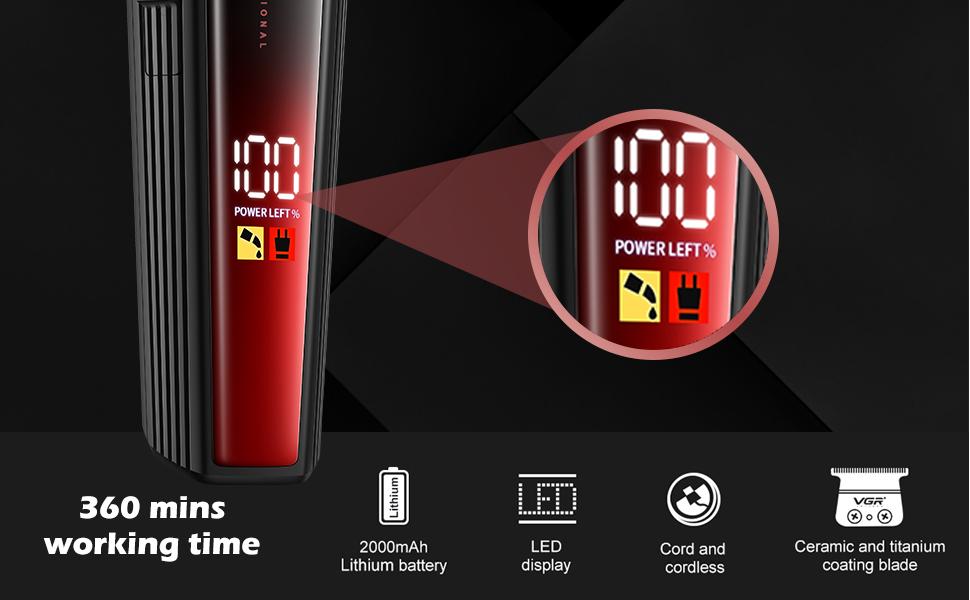
Image 4.3: Visual examples of precise hairlines, sideburns, and beard contours.
5. Maintenance and Care
5.1 Cleaning the Blades
After each use, turn off the trimmer and remove any attached guide comb. Use the provided cleaning brush to remove loose hairs from the blade and the trimmer body. For a more thorough clean, the blade can be carefully detached and rinsed under running water. Ensure the blade is completely dry before reattaching.
5.2 Oiling the Blades
Regular oiling ensures optimal performance and extends blade life. Apply a few drops of the included lubricant oil to the blades after every few uses, or when the LED display indicates an oiling reminder. Turn the trimmer on for a few seconds to distribute the oil evenly.
5.3 Storage
Store the trimmer in its protective case in a cool, dry place, away from direct sunlight and moisture. Keep out of reach of children.
6. Troubleshooting
If you encounter any issues with your VGR 930 Trimmer, please refer to the following common problems and solutions:
| Problem | Possible Cause | Solution |
|---|---|---|
| Trimmer does not turn on. | Battery is depleted. | Charge the trimmer fully using the provided USB-C cable. |
| Poor cutting performance or pulling hair. | Blades are dull, dirty, or not oiled. | Clean the blades thoroughly and apply lubricant oil. If issues persist, consider professional sharpening or blade replacement. |
| Trimmer gets hot during use. | Blades are not properly lubricated or excessive continuous use. | Apply lubricant oil to the blades. Allow the trimmer to cool down if used for extended periods. |
| LED display not working. | Device malfunction. | Ensure the trimmer is charged. If the problem persists, contact customer support. |
7. Specifications
- Model Number: Yasuo-US-930-Red
- Product Dimensions: 6.1 x 1.61 x 1.54 inches
- Item Weight: 5.22 ounces
- Battery: 1 Lithium Ion battery (included)
- Battery Capacity: 2000mAh
- Runtime: Up to 360 minutes (6 hours)
- Charging Port: USB-C
- Blade Material: Ceramic and Titanium Coating
- Power Source: Battery Powered
- Manufacturer: VGR
- Country of Origin: China
8. Warranty and Support
8.1 Warranty Information
The VGR 930 Professional Beard Trimmer comes with a 1-Year Warranty from the date of purchase, covering manufacturing defects. Please retain your proof of purchase for warranty claims. This warranty does not cover damage caused by misuse, accidents, unauthorized repairs, or normal wear and tear.
8.2 Customer Support
For any questions, technical assistance, or warranty claims, please contact VGR customer support. We offer 24-hour support to assist you.
You can visit the official VGR Store on Amazon for more information and contact options: VGR Store

Image 8.1: VGR offers dedicated customer support for product assistance.
Ask a question about this manual
Ask about setup, troubleshooting, compatibility, parts, safety, or missing instructions. Manuals+ will review the question and use this page’s manual context to help answer it.