
Introduction
Thank you for choosing the LUTEC 49W Motion Sensor Outdoor Flood Light. This manual provides essential information for the safe and efficient installation, operation, and maintenance of your new lighting fixture. Please read it thoroughly before use and retain it for future reference.

Image: The LUTEC 49W Motion Sensor Outdoor Flood Light, featuring three adjustable light heads, a motion sensor, and a power cord with a plug.
Product Features
- Super Brightness: Emits 5500 lumens of 5000K white daylight with a 49W output, offering significant energy savings compared to traditional halogen lights.
- Built-in Motion Sensor: Features a 180-degree sensing angle and detects motion up to 69 feet away. The sensor's timer is adjustable to 1, 3, or 10 minutes.
- Three Lighting Modes:
- Motion Sensor Mode: Activates at 100% brightness when motion is detected and turns off when motion stops.
- Dusk to Dawn Mode: Stays on at 20% brightness at dusk and increases to 100% upon motion detection, then automatically turns off at dawn.
- Manual Override Mode: Maintains 100% brightness for 6 hours, regardless of day or night conditions.
- Easy Installation: Designed for plug-in installation with a 4.92 ft cord, eliminating the need for an electrician, hardwiring, or a junction box.
- Durable and Weatherproof: IP65 waterproof rating ensures reliable operation in various weather conditions, including hot, windy, and snowy environments.

Image: The flood light illuminating a house and yard at night, highlighting its 5500 lumens brightness and 5000K daylight color temperature.

Image: Diagram illustrating the 180-degree motion detection angle and up to 69 feet detection distance of the flood light's sensor, showing detection of people, pets, and vehicles.

Image: Visual representation of the three lighting modes: Motion Sensor Mode, Dusk to Dawn Mode, and Manual Override Mode, showing how the light behaves in different scenarios.
Setup and Installation
The LUTEC flood light is designed for straightforward plug-in installation. Follow these steps for optimal performance and safety.
- Choose Location: Select a suitable outdoor location for mounting, such as a garage, yard, or porch. Ensure the area allows for the 4.92 ft power cord to reach a power outlet.
- Mounting: Secure the light's base to a wall or suitable surface using appropriate screws and anchors. The light is wall-mounted.
- Adjust Light Heads: The three light heads are adjustable, allowing you to direct the light where needed. Adjust them to cover the desired area.
- Adjust Motion Sensor: Position the motion sensor to cover the desired detection area (up to 180 degrees and 69 feet).
- Plug In: Once securely mounted and adjusted, plug the 4.92 ft power cord into a standard outdoor electrical outlet. No hardwiring or junction box is required.
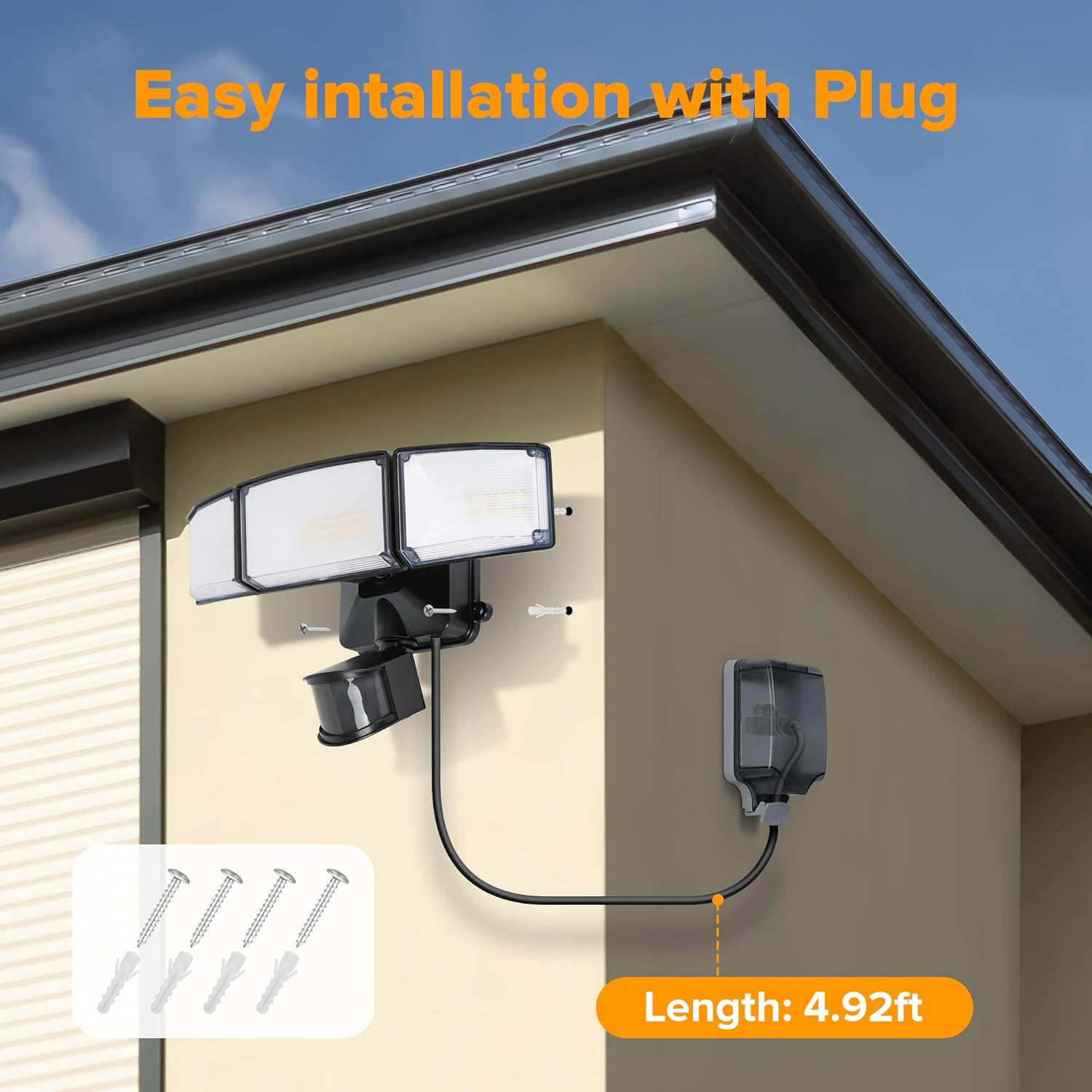
Image: Illustration showing the easy plug-in installation process of the flood light, with the 4.92 ft power cord connected to an outdoor outlet.

Image: Depiction of the adjustable light heads, demonstrating their flexibility to direct illumination over a wider area (210°, 240°, 300° coverage options).
Operating Instructions
Your LUTEC flood light offers three distinct operating modes to suit various needs. Use the control switches on the unit to select your preferred mode.
- Motion Sensor Mode:
In this mode, the light will remain off until motion is detected within its sensing range. Upon detection, it will illuminate at 100% brightness. The light will turn off after a set duration (1, 3, or 10 minutes) if no further motion is detected. This mode is ideal for security and energy saving.
- Dusk to Dawn Mode:
When ambient light levels drop at dusk, the light will automatically turn on at 20% brightness. If motion is detected, the brightness will increase to 100%. It will revert to 20% brightness after motion ceases and automatically turn off at dawn. This mode provides continuous low-level illumination with a boost for activity.
- Manual Override Mode:
This mode allows the light to stay on at 100% brightness for a continuous period of 6 hours, regardless of motion or ambient light. This is useful for extended periods of activity or when constant illumination is desired.
- Timer Adjustment:
Locate the timer switch on the motion sensor. You can set the duration for the light to stay on after motion detection to Test, 1 minute, 3 minutes, or 10 minutes.
Maintenance
Regular maintenance ensures the longevity and optimal performance of your LUTEC flood light.
- Cleaning: Periodically clean the light fixture and motion sensor lens with a soft, damp cloth. Do not use abrasive cleaners or solvents, as they may damage the finish or components.
- Inspection: Regularly inspect the power cord and plug for any signs of damage, fraying, or wear. Ensure all mounting screws remain tight.
- Obstruction Check: Ensure that the motion sensor's field of view is not obstructed by plants, debris, or other objects that could interfere with its detection capabilities.
- Weather Protection: While the light is IP65 waterproof, ensure the electrical outlet it is plugged into is also rated for outdoor use and properly protected from direct water exposure.
Troubleshooting
If you encounter issues with your flood light, refer to the following common problems and solutions:
| Problem | Possible Cause | Solution |
|---|---|---|
| Light does not turn on. | No power; faulty outlet; sensor settings incorrect. | Check power connection and outlet. Verify sensor mode and timer settings. Ensure sufficient ambient darkness for Dusk to Dawn mode. |
| Light stays on continuously. | Manual Override mode active; continuous motion detected; sensor malfunction. | Switch out of Manual Override mode. Check for constant motion in sensor's range. If problem persists, contact support. |
| Light flashes or flickers. | Unstable power supply; loose connection; internal fault. | Ensure stable power. Check plug connection. If issue continues, contact support. |
| Motion sensor not detecting. | Sensor obstructed; incorrect sensitivity setting; sensor angle. | Clear obstructions. Adjust sensor sensitivity. Re-angle sensor for optimal coverage. |
Specifications
| Feature | Detail |
|---|---|
| Brand | LUTEC |
| Model Name | Plug in 3-head (76328180xx) |
| Power Source | Plug-in Electric |
| Wattage | 49 Watts |
| Brightness | 5500 Lumens |
| Color Temperature | 5000 Kelvin (Daylight) |
| Material | Aluminum, Plastic |
| Product Dimensions | 10.63"L x 7.68"W x 6.89"H |
| Item Weight | 2.51 Pounds |
| Water Resistance Level | IP65 Waterproof |
| Motion Sensor Angle | 180 Degrees |
| Motion Detection Distance | Up to 69 Feet |
| Cord Length | 4.92 ft |
| Installation Type | Wall Mount, Plug-in |

Image: Illustration demonstrating the IP65 waterproof rating of the flood light, showing its resilience against water, heat, and frost.
Warranty and Support
LUTEC provides a 3-year warranty for this product. For any quality problems, easy and fast replacement or refund is guaranteed.
For technical assistance, troubleshooting, or warranty claims, please contact LUTEC customer service. They offer 7*24h after-sales service.
You can visit the official LUTEC store for more information and support: LUTEC Official Store


