
PETKIT PUROBOT Ultra
PETKIT PUROBOT Ultra Self-Cleaning Cat Litter Box User Manual
Model: PUROBOT Ultra
1. Introduction
Thank you for choosing the PETKIT PUROBOT Ultra Self-Cleaning Cat Litter Box. This advanced device is designed to provide a convenient and hygienic solution for cat waste management, featuring automatic cleaning, waste packing, app control, and an integrated AI-powered camera for monitoring your cat's health and behavior.
This manual provides detailed instructions for setting up, operating, maintaining, and troubleshooting your PETKIT PUROBOT Ultra to ensure optimal performance and a seamless experience for both you and your feline companion.

Image: The PETKIT PUROBOT Ultra Self-Cleaning Cat Litter Box, showcasing its sleek design, the cat entrance, and the accompanying 5-in-1 mixed clumping litter bags and odor eliminator.
2. Setup Guide
2.1 Unboxing and Placement
- Carefully remove all components from the packaging. Ensure all parts are present: the main unit, power adapter, waste bags, and odor eliminator.
- Place the litter box on a flat, stable, and dry surface. Ensure there is sufficient space around the unit for proper ventilation and access for maintenance. Avoid placing it in direct sunlight or near heat sources.
2.2 Litter Filling
- Open the top lid of the litter box.
- Pour suitable clumping cat litter into the cylinder. The PETKIT PUROBOT Ultra is compatible with various clumping litters, including the included 5-in-1 mixed clumping litter. Ensure the litter level is between the MIN and MAX lines indicated inside the cylinder. Do not overfill.
- Close the top lid securely.

Image: Visual representation of the 3-second quick clumping feature of the compatible litter, highlighting its high water absorption, strong clumping ability, and non-stick characteristics.

Image: A beaker demonstrating the toilet-flushable property of the cat litter, showing it dissolving in water.

Image: A close-up view of the cat litter, emphasizing its composition from 100% natural tofu cat litter and bentonite cat litter.
2.3 Power Connection
Connect the power adapter to the litter box and then plug it into a wall outlet. The unit will power on automatically.
2.4 App Download and Connection
- Download the PETKIT app from your smartphone's app store (iOS or Android).
- Create an account or log in.
- Follow the in-app instructions to add your PETKIT PUROBOT Ultra device. Ensure your Wi-Fi network (compatible with both 2.4GHz and 5G Wi-Fi) is stable during the pairing process.
- The app will guide you through initial calibration and settings.
3. Operating Instructions
3.1 Automatic Cleaning Cycle
The PETKIT PUROBOT Ultra automatically detects when your cat has used the litter box and initiates a cleaning cycle after a set delay (customizable in the app). The internal cylinder rotates to sift clean litter and deposit waste into the sealed waste bin below.
3.2 Manual Cleaning
You can initiate a cleaning cycle manually at any time via the PETKIT app or by pressing the button on the unit (refer to the device's physical button layout for specific controls).
3.3 App Control Features
The PETKIT app provides comprehensive control and monitoring capabilities:
- Remote Control: Start/stop cleaning cycles, empty the waste bin, and customize settings from anywhere.
- Activity Monitoring: Track your cat's litter box usage, including frequency and duration.
- Health Reports: The AI-powered camera monitors your cat's behavior and stool status, providing insights into their health.
- Camera Functions: View live feed, record videos, and capture images of your cat. The 180-degree rotating camera offers 360-degree tracking, and IR night vision ensures visibility in low light.
- Deodorization Settings: Adjust automatic and periodical deodorization schedules.
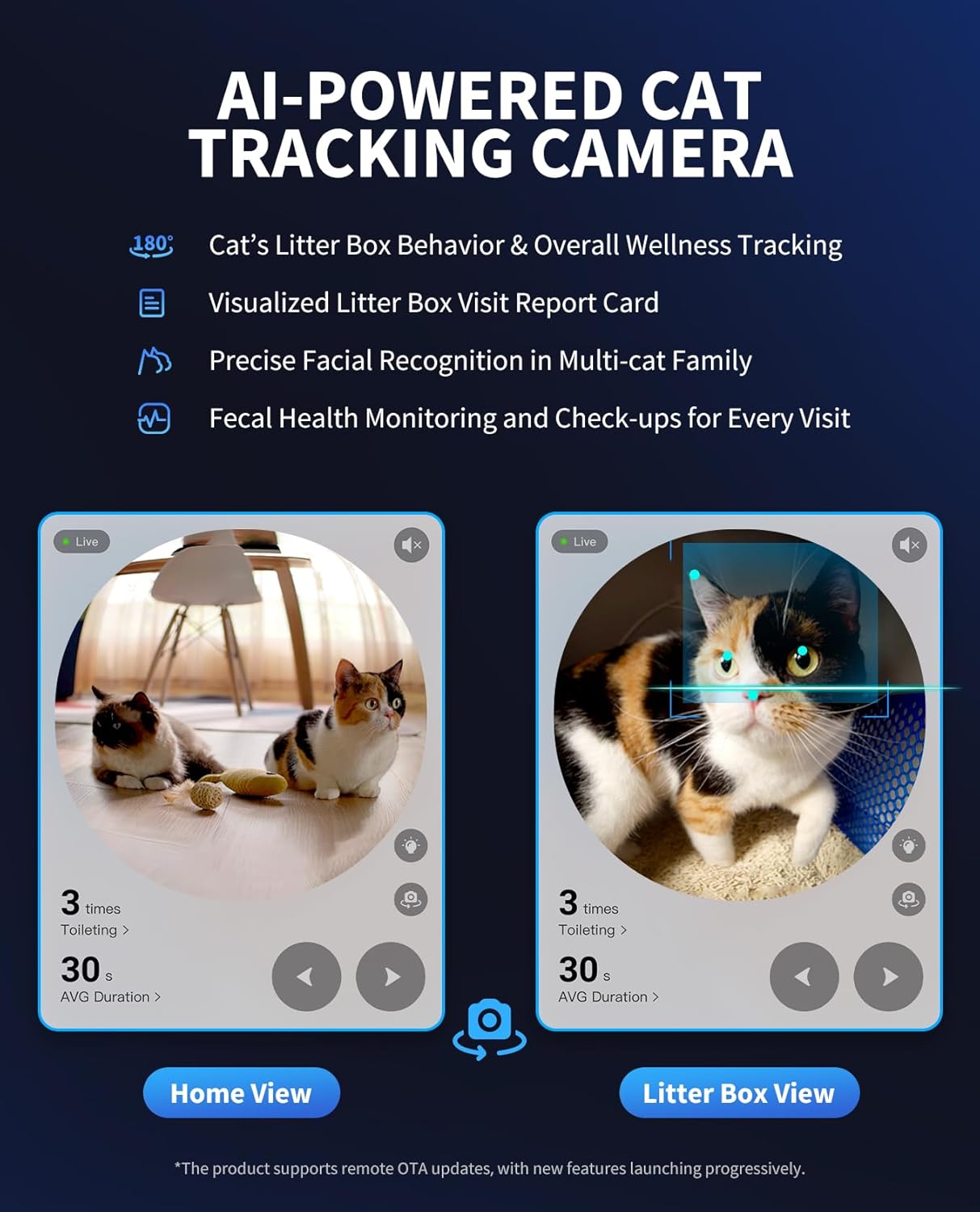
Image: Screenshots from the PETKIT app illustrating the AI-powered cat tracking camera's capabilities, including cat's litter box behavior tracking, visualized visit reports, precise facial recognition for multi-cat families, and fecal health monitoring.

Image: Screenshots from the PETKIT app demonstrating seamless app control, including scooping and deodorization setup, camera angle toggle, privacy protection settings, two-way audio, 24/7 pet livestreaming, and 2.4 GHz & 5 GHz connection options.
3.4 Waste Bag Auto-Packing and Sealing
The PUROBOT Ultra features a touch-free system that automatically packs and seals waste bags. Once a bag is full and removed, a new one is auto-loaded. The 10L waste container can hold waste for up to 20 days for one cat. An overflow secured feature expands the trash bag if the bin is overflowing to ensure packing performance.

Image: A visual guide illustrating the 20-day scoop-free auto waste packing system, detailing auto-sealing, auto-refilling, and overflow-secured packing mechanisms.
3.5 Safety Features
The unit is equipped with 20 high-precision sensors to ensure maximum safety. The cylinder stops immediately upon pet proximity. An anti-pinch structure and side-to-side rotation keep the entrance open at all times, preventing cats from getting stuck.
4. Maintenance
4.1 Waste Bin Emptying
When the waste bin is full, the app will notify you. Simply remove the sealed waste bag and dispose of it. The system will automatically load a new bag.
4.2 Cleaning the Cylinder and Interior
- Periodically, or as needed, power off and unplug the unit.
- Remove the cylinder for thorough cleaning. Use a mild, pet-safe detergent and water. Rinse thoroughly and ensure it is completely dry before reinserting.
- Wipe down the interior and exterior surfaces of the main unit with a damp cloth. Do not use abrasive cleaners or submerge the main unit in water.

Image: A series of images showcasing the superb patented anti-leakage cylinder, including its design to secure all cat urination positions and the process of removing and cleaning the liner.
4.3 Odor Eliminator Replacement
The PETKIT PUROBOT Ultra features a 4-stage odor control system, including an Odor Eliminator N60. Replace the odor eliminator cartridge as indicated by the app or when you notice reduced odor control effectiveness.

Image: A diagram detailing the efficient 4-stage odor control system, which includes a sealed trunk lid, Odor Eliminator N60, auto-sealed waste bin door, and a leak-proof trash bag seal.
5. Troubleshooting
If you encounter issues with your PETKIT PUROBOT Ultra, please refer to the following common solutions:
- Unit Not Responding: Ensure the power adapter is securely connected and the outlet is functional. Try unplugging and re-plugging the unit.
- Cleaning Cycle Not Starting: Check the litter level; it might be too low or too high. Ensure no obstructions are present in the cylinder or waste chute. Verify settings in the PETKIT app.
- App Connection Issues: Ensure your Wi-Fi network is active and stable. Restart your router and the litter box. Re-attempt the pairing process in the PETKIT app. Confirm your phone is connected to the correct Wi-Fi band (2.4GHz or 5GHz).
- Odor Persists: Check if the odor eliminator needs replacement. Ensure the waste bin is emptied regularly and the unit is cleaned as per maintenance instructions.
- Error Messages: Refer to the PETKIT app for specific error code explanations and recommended actions.
For persistent issues or technical support, please contact PETKIT customer service.
6. Specifications
| Feature | Detail |
|---|---|
| Brand | PETKIT |
| Model | PUROBOT Ultra |
| Litter Box Type | Automated Self-Cleaning Litter Box |
| Waste Bin Capacity | 10L (up to 20 days for one cat) |
| Connectivity | 2.4GHz & 5G Wi-Fi |
| Camera | AI-powered, 210-degree wide viewing angle, 180-degree rotating, IR night vision |
| Safety Features | 20 high-precision sensors, anti-pinch structure, immediate stop on pet proximity |
| Odor Control | 4-stage system, Odor Eliminator N60 |
| Compatible Litter | Clumping cat litter (e.g., tofu, bentonite, mixed) |
| ASIN | B0DKJS32XQ |
7. Warranty and Support
The PETKIT PUROBOT Ultra Self-Cleaning Cat Litter Box comes with a standard manufacturer's warranty. Please refer to the warranty card included with your product or visit the official PETKIT website for detailed warranty terms and conditions.
For customer support, technical assistance, or inquiries regarding your product, please contact PETKIT customer service through their official website or the contact information provided in the PETKIT app. When contacting support, please have your product model and purchase information ready.
Official PETKIT Store: Visit the PETKIT Store on Amazon
Related documentsPUROBOT Ultra


Ask a question about this manual
Ask about setup, troubleshooting, compatibility, parts, safety, or missing instructions. Manuals+ will review the question and use this page’s manual context to help answer it.