
iENYRID M4 Pro S+
iENYRID M4 Pro S+ Electric Scooter User Manual
Model: M4 Pro S+ | Brand: iENYRID
1. Introduction
Thank you for choosing the iENYRID M4 Pro S+ Electric Scooter. This manual provides essential information for the safe operation, assembly, maintenance, and troubleshooting of your new electric scooter. Please read this manual thoroughly before your first ride to ensure optimal performance and safety.
Important Safety Information
- Always wear a helmet and appropriate safety gear (knee pads, elbow pads) when riding.
- Familiarize yourself with local laws and regulations regarding electric scooter use.
- Perform a pre-ride check: ensure brakes are functional, tires are properly inflated, and all components are secure.
- Do not ride in heavy rain, on slippery surfaces, or in conditions with poor visibility.
- Avoid riding with passengers or exceeding the maximum weight limit of 330 lbs (recommended under 265 lbs for better experience).
- Children should only operate the scooter under adult supervision.
2. Package Contents
Upon opening the package, please verify that all items listed below are present and in good condition:
- iENYRID Electric Scooter x 1
- User Manual x 1
- Battery Charger x 1
- Tool Kit (for assembly and adjustments)
- Optional Seat (if included with your model)

Image: Contents of the iENYRID M4 Pro S+ Electric Scooter package.
3. Setup and Assembly
Your iENYRID M4 Pro S+ Electric Scooter comes partially assembled. Follow these steps to complete the setup:
3.1 Unboxing and Initial Unfolding
- Carefully open the packaging and remove the scooter and all accessories.
- Place the scooter on a flat, stable surface.
- Locate the folding mechanism on the main stem. Release the latch and carefully lift the handlebar stem until it locks into the upright position. Ensure it is securely locked before proceeding.
Video: Detailed unboxing and initial unfolding process for the iENYRID M4 Pro S+ Electric Scooter.
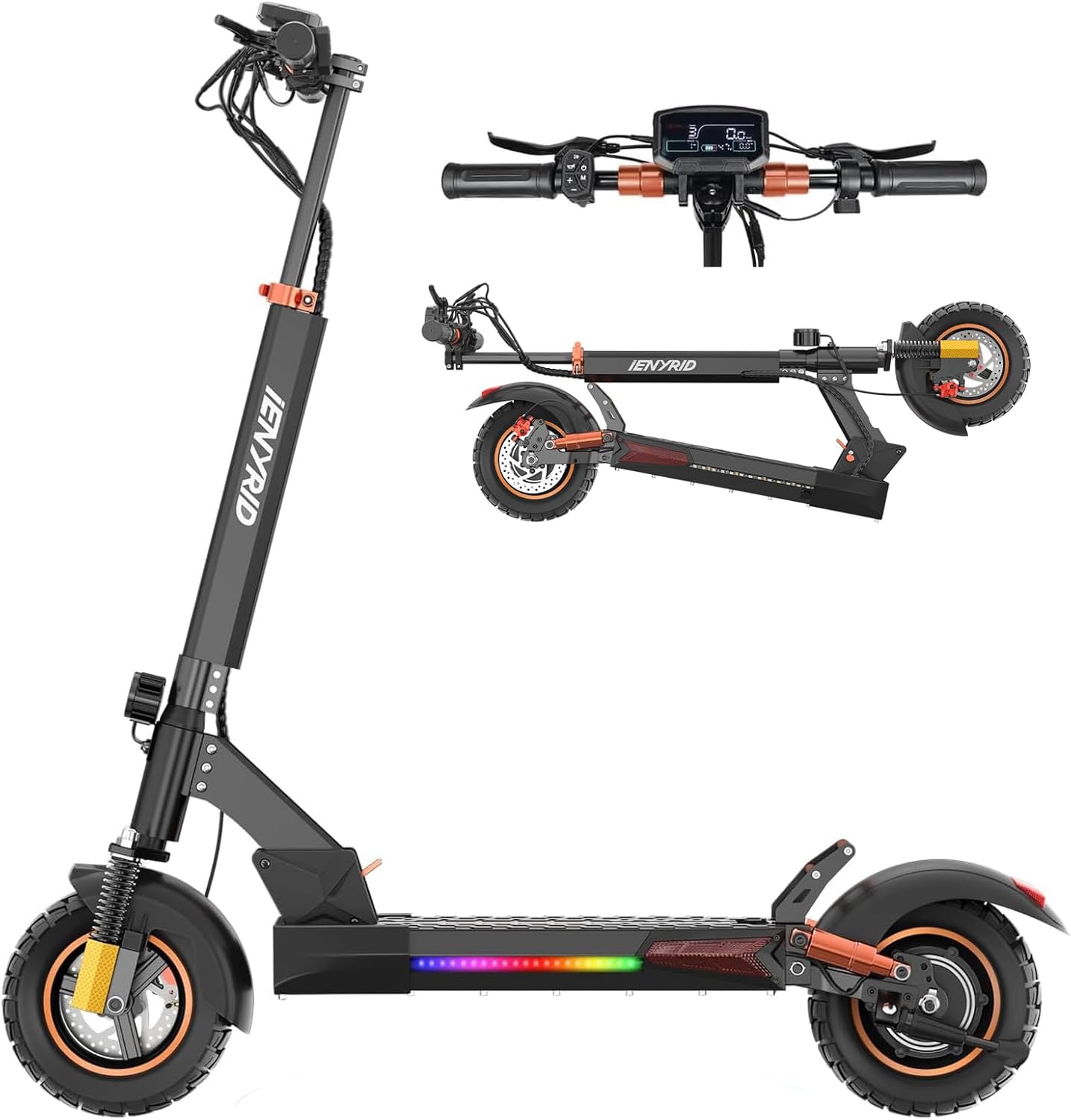
Image: The iENYRID M4 Pro S+ Electric Scooter in its fully unfolded position, ready for use.
3.2 Handlebar and Brake Lever Adjustment
- The handlebars may need to be adjusted or secured. Use the provided tool kit to tighten any loose screws on the handlebar clamps.
- Ensure the brake levers are positioned comfortably for easy access. Adjust their angle by loosening the clamp screws, positioning, and then re-tightening.
3.3 Seat Installation (Optional)
If your model includes a seat, follow these steps for installation:
- Locate the seat post receiver at the rear of the scooter deck.
- Insert the seat post into the receiver.
- Adjust the seat height to your preference and secure it using the quick-release clamp or tightening bolt. Ensure the seat is stable and does not wobble.

Image: The iENYRID M4 Pro S+ Electric Scooter with the optional seat installed, demonstrating both standing and sitting riding positions.
4. Operating Your Scooter
4.1 Powering On and LCD Display
- To power on the scooter, press and hold the power button on the LCD display unit.
- The large LCD display shows key information such as battery life, current speed, speed mode, mileage, and cruise control status.
- Use the mode button to cycle through different speed modes (e.g., Eco, Standard, Sport) and other display settings.

Image: The Smart LED Display of the iENYRID M4 Pro S+, indicating battery life, speed mode, real-time speed, mileage, and coded lock status.
4.2 Riding the Scooter
- To start, kick off gently with one foot while pressing the throttle.
- The 800W motor provides powerful acceleration and can reach speeds up to 28 MPH.
- The 10-inch off-road pneumatic tires and dual suspension system ensure a smooth ride on various terrains.
- Utilize the dual mechanical disc brakes for precise control and swift stops.
Video: Demonstration of the iENYRID M4 Pro S+ Electric Scooter in use, highlighting its features like speed, range, and suspension.

Image: Detailed view of the front and rear dual mechanical disc brakes, designed for secure and confident stopping.
4.3 Folding and Portability
The M4 Pro S+ features a 1-step folding system for easy transport and storage:
- Ensure the scooter is powered off.
- Locate the folding lever at the base of the stem.
- Engage the folding mechanism and carefully fold the stem downwards until it clicks into place.
- The handlebars can also be folded for a more compact size.

Image: The iENYRID M4 Pro S+ Electric Scooter demonstrating its easy portability and compact folded design, suitable for carrying or storing in a car trunk.
5. Maintenance
Regular maintenance ensures the longevity and safe operation of your scooter:
- Tire Pressure: Check tire pressure regularly. Proper inflation (refer to tire sidewall for recommended PSI) is crucial for ride quality and range.
- Brakes: Inspect brake pads and discs periodically for wear. Adjust brake tension as needed to ensure responsive braking.
- Cleaning: Wipe down the scooter with a damp cloth. Do not use high-pressure water jets or immerse the scooter in water.
- Battery Care:
- Charge the battery fully before first use.
- Do not allow the battery to fully discharge. Charge it regularly, even if not in use for extended periods.
- Store the scooter in a cool, dry place away from direct sunlight and extreme temperatures.
- Fasteners: Periodically check and tighten all screws and bolts to ensure they are secure.
6. Troubleshooting
Here are some common issues and their potential solutions:
| Problem | Possible Cause | Solution |
|---|---|---|
| Scooter does not power on | Low battery; loose connections; power button issue. | Charge the battery; check all cable connections; try pressing the power button firmly. |
| Reduced range or speed | Low tire pressure; heavy load; uphill riding; cold weather; aging battery. | Inflate tires to recommended PSI; reduce load; ride on flatter terrain; ensure battery is fully charged. |
| Brakes feel loose or ineffective | Brake cable slack; worn brake pads. | Adjust brake cable tension; inspect and replace brake pads if worn. |
| Unusual noises during operation | Loose components; debris in wheels; motor issue. | Check all fasteners; inspect wheels for obstructions; if noise persists, contact customer support. |
If you encounter issues not listed here or if the suggested solutions do not resolve the problem, please contact iENYRID customer support.
7. Specifications
| Feature | Detail |
|---|---|
| Brand | iENYRID |
| Model Name | iE-M4 PRO (M4 Pro S+) |
| Motor Power | 800W |
| Battery | 48V/12.5Ah |
| Max Speed | Up to 28 MPH (45 km/h) |
| Max Range | Up to 30 Miles (48 km) |
| Tire Size | 10 Inches (Pneumatic Off-Road) |
| Suspension | Dual Suspension |
| Brake Style | Dual Mechanical Disc Brakes |
| Weight Limit | 330 lbs (suggested under 265 lbs) |
| Product Dimensions (LxWxH) | 45"L x 24"W x 47"H |
| Frame Material | Aluminum |
| Special Feature | Folding |
8. Warranty and Support
The iENYRID M4 Pro S+ Electric Scooter comes with a Limited Warranty. Please refer to the warranty card included in your package for specific terms and conditions, including coverage details and duration.
For technical assistance, troubleshooting beyond this manual, or warranty claims, please contact iENYRID customer support through the retailer where you purchased the product or visit the official iENYRID website for contact information.
Customer Support: For assistance, please contact the seller, YLX-Ride, or refer to the contact information provided in your product packaging.
Related documentsM4 Pro S+


Ask a question about this manual
Ask about setup, troubleshooting, compatibility, parts, safety, or missing instructions. Manuals+ will review the question and use this page’s manual context to help answer it.