
1. Safety Information
Please read and understand all safety information before operating the WnewTools MT88A Digital Clamp Meter Multimeter. Failure to follow these instructions may result in electric shock, fire, or damage to the meter or the equipment under test.
- Always ensure the test leads are in good condition and properly connected before making any measurements.
- Do not measure voltages or currents exceeding the specified maximum limits of the meter.
- Exercise extreme caution when working with live electrical circuits. Avoid contact with bare wires or terminals.
- Do not operate the meter if it appears damaged or if the battery cover is not securely closed.
- Always turn off the power to the circuit before connecting or disconnecting test leads for resistance, capacitance, or diode measurements.
- Use the Non-Contact Voltage (NCV) function to verify the presence of AC voltage before touching any conductors.
- Replace batteries promptly when the low battery indicator appears to ensure accurate readings.
2. Product Overview
The WnewTools MT88A is a compact digital clamp meter designed for measuring DC/AC voltage, AC current, resistance, frequency, and capacitance. It also features Non-Contact Voltage (NCV) detection, diode testing, and continuity buzzing.

Figure 2.1: The WnewTools MT88A Digital Clamp Meter, including test leads and the instruction manual.
2.1 Components

Figure 2.2: Detailed view of the MT88A Digital Clamp Meter with key components labeled for identification.
- Clamp Head: Used for non-contact AC current measurement.
- Clamp Wrench: Opens and closes the clamp head.
- NCV/LED Indicator: Illuminates during Non-Contact Voltage detection.
- Data Hold Button: Freezes the current reading on the display.
- NCV Detection Area: Sensor for non-contact voltage detection.
- Function Rotary Switch: Selects measurement modes and powers the device on/off.
- LCD Backlight Button: Activates the display backlight.
- Function Selection Button: Used for specific function selections within a mode (e.g., Diode/Buzzer).
- LCD Monitor: Displays measurement readings and indicators.
- Common Socket (COM): Negative input terminal for test leads.
- Multi-function Jack (VΩ): Positive input terminal for voltage, resistance, capacitance, diode, and continuity measurements.
2.2 Key Features
- Non-contact detection (NCV) for AC voltage.
- Automatic shutdown after 10 minutes of inactivity to conserve battery.
- Green backlit screen for improved visibility in low-light conditions.
- Measures both AC and DC voltage.
- AC Current measurement up to 500A.
- Data Hold function to freeze displayed values.
- Resistance measurement.
- Diode and Continuity (Buzzer) testing.
3. Setup
3.1 Battery Installation
The MT88A requires two AAA batteries for operation. To install or replace batteries:
- Ensure the meter is turned OFF.
- Locate the battery compartment on the back of the meter.
- Use a screwdriver to open the battery compartment cover.
- Insert two AAA batteries, observing the correct polarity (+/-) as indicated inside the compartment.
- Replace the battery compartment cover and secure it with the screw.
3.2 Connecting Test Leads
For voltage, resistance, capacitance, diode, and continuity measurements, connect the test leads as follows:
- Insert the black test lead into the COM (Common) input jack.
- Insert the red test lead into the VΩ (Multi-function) input jack.
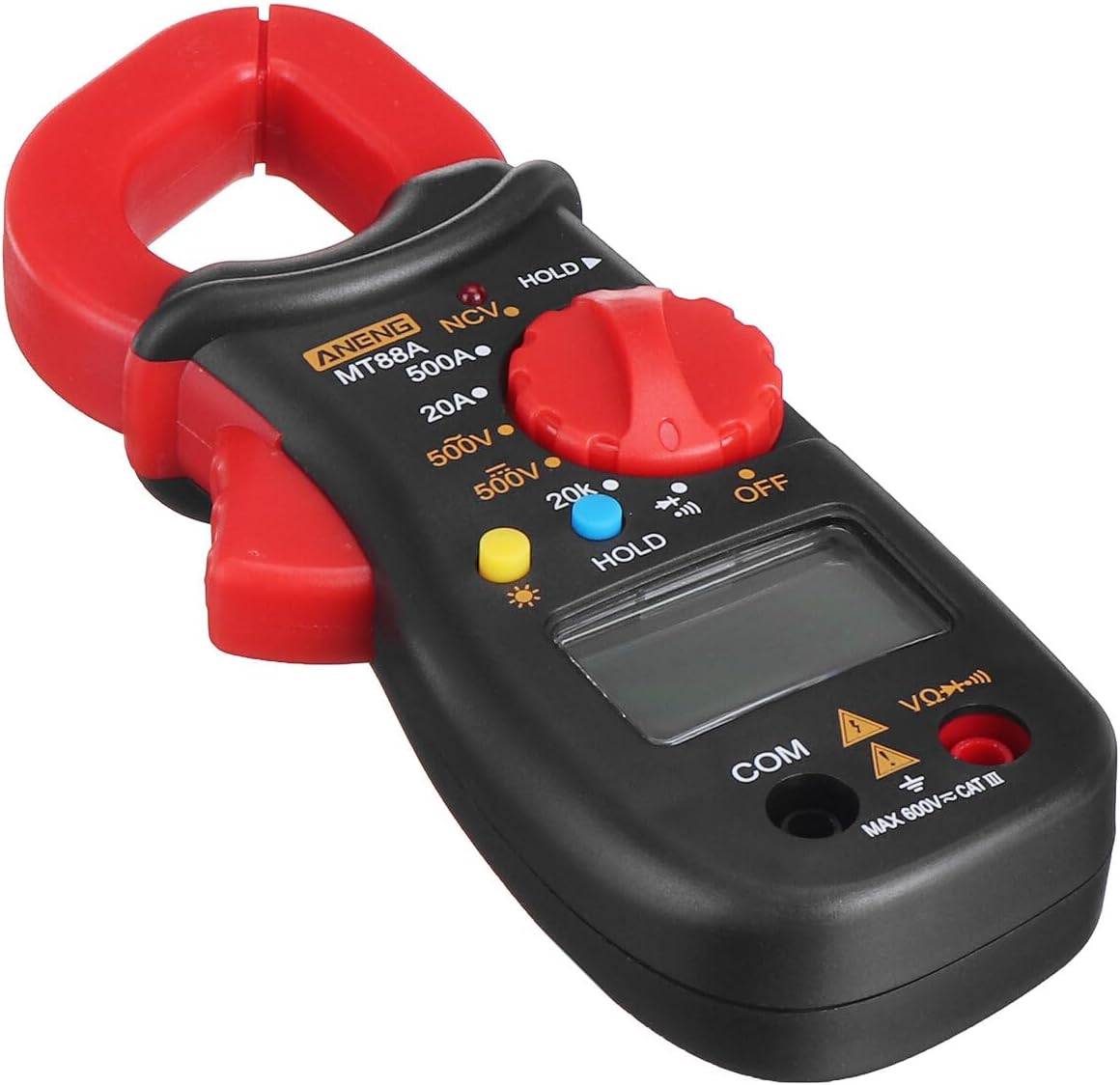
Figure 3.1: The MT88A Clamp Meter with test leads properly connected to the COM and VΩ jacks.
4. Operating Instructions
4.1 Power On/Off and Function Selection
To power on the meter, rotate the Function Rotary Switch from the 'OFF' position to the desired measurement function. To power off, rotate the switch back to 'OFF'.

Figure 4.1: Icons indicating the various measurement functions available on the MT88A, including DC Voltage, AC Voltage, Resistance, Buzzer, Diode, Data Retention, and NCV detection.
4.2 Measuring AC/DC Voltage
- Rotate the Function Rotary Switch to the '500V' or '20V' position for voltage measurement. The meter will automatically detect AC or DC voltage.
- Connect the red test lead to the positive (+) side of the circuit and the black test lead to the negative (-) side or ground.
- Read the voltage value displayed on the LCD.
4.3 Measuring AC Current
The clamp meter allows for non-contact measurement of AC current.
- Rotate the Function Rotary Switch to the '500A' or '20A' position.
- Press the clamp wrench to open the clamp head.
- Enclose only one conductor (wire) of the circuit within the clamp head. Ensure the clamp head is fully closed.
- Read the AC current value displayed on the LCD.
4.4 Measuring Resistance
- Ensure the circuit under test is de-energized.
- Rotate the Function Rotary Switch to the '20kΩ' or '200Ω' position.
- Connect the test leads across the component or circuit where resistance is to be measured.
- Read the resistance value displayed on the LCD.
4.5 Continuity Test (Buzzer)
- Ensure the circuit under test is de-energized.
- Rotate the Function Rotary Switch to the continuity/diode position (often indicated by a speaker icon).
- Connect the test leads across the component or circuit.
- If the resistance is below a certain threshold (typically around 50Ω), the meter will emit an audible beep, indicating continuity.
4.6 Diode Test
- Ensure the circuit under test is de-energized.
- Rotate the Function Rotary Switch to the continuity/diode position.
- Connect the red test lead to the anode of the diode and the black test lead to the cathode.
- The display will show the forward voltage drop. Reverse the leads; the display should show 'OL' (Open Line) for a good diode.
4.7 NCV (Non-Contact Voltage) Detection
The NCV function allows for detection of AC voltage without direct contact.
- Rotate the Function Rotary Switch to the 'NCV' position.
- Bring the NCV detection area of the clamp meter close to the conductor or outlet.
- If AC voltage is detected, the NCV/LED indicator will flash, and an audible buzzer will sound.
4.8 Data Hold
To freeze the current reading on the display:
- While taking a measurement, press the 'HOLD' button. The display will show 'DH' (Data Hold).
- Press the 'HOLD' button again to release the held value and resume live measurement.

Figure 4.2: The 'HOLD' button, used to freeze the current measurement on the display.
4.9 LCD Backlight
To activate the display backlight for better visibility in dim environments:
- Press the 'Backlight' button (often indicated by a sun icon).
- Press the button again to turn off the backlight.

Figure 4.3: The LCD display with its green backlight activated, enhancing readability in low-light conditions.
4.10 Automatic Shutdown
The meter is equipped with an automatic shutdown feature to conserve battery life. If there is no operation for approximately ten minutes, the meter will automatically power off.

Figure 4.4: The automatic shut-down feature helps save battery power by turning off the device after a period of inactivity.
5. Maintenance
5.1 Cleaning
To clean the meter, wipe the case with a damp cloth and a mild detergent. Do not use abrasives or solvents. Ensure the meter is completely dry before use.
5.2 Battery Replacement
When the low battery indicator appears on the display, replace the batteries as described in Section 3.1. Always use two new AAA batteries of the same type.
6. Troubleshooting
If you encounter issues with your MT88A Digital Clamp Meter, refer to the following common problems and solutions:
- No Display:
- Check if the Function Rotary Switch is turned to an ON position.
- Verify that the batteries are correctly installed and not depleted. Replace if necessary.
- Incorrect Readings:
- Ensure test leads are properly connected to the correct input jacks.
- Confirm the correct measurement function is selected for the task.
- For AC current, ensure only one conductor is within the clamp head.
- Check battery level; low batteries can affect accuracy.
- NCV Not Detecting:
- Ensure the meter is in NCV mode.
- Bring the NCV sensor closer to the AC voltage source.
- Meter Shuts Off Unexpectedly:
- This may be due to the automatic shutdown feature after 10 minutes of inactivity. Turn the rotary switch to OFF and then back to the desired function to restart.
- Check battery level.
7. Specifications
The following table outlines the general specifications of the WnewTools MT88A Digital Clamp Meter:
| Specification | Value |
|---|---|
| Model | MT88A |
| Measuring Voltage Range | Up to 500V (AC/DC) |
| Measuring AC Current Range | Up to 500A |
| Measuring Resistance Range | 200Ω - 20kΩ |
| Maximum Count | 1999 |
| Auto Range | Yes |
| Clamp Opening Size | 30.6mm |
| Battery Type | AAA*2 |
| Material | ABS |
| Dimensions (L*W*H) | 150.7*64*34mm (approx. 5.93 x 2.52 x 1.34 inches) |
| Weight | Approx. 400 Grams (14.1 ounces) |
| Safety Rating | MAX 600V CAT III |
8. Warranty and Support
For warranty information or technical support regarding your WnewTools MT88A Digital Clamp Meter, please refer to the documentation provided at the time of purchase or contact WnewTools customer service directly. Keep your purchase receipt as proof of purchase.