
XIAOMI CW500 Dual (MJSXJ08HL)
XIAOMI CW500 Dual Outdoor Camera User Manual
Model: CW500 Dual (MJSXJ08HL)
1. Introduction
Thank you for choosing the XIAOMI CW500 Dual Outdoor Camera. This manual provides essential information for the safe and efficient use of your device. Please read this manual carefully before installation and operation, and retain it for future reference.
Safety Precautions
- Ensure the power supply voltage matches the camera's requirements.
- Do not expose the camera to extreme temperatures or corrosive environments.
- Avoid placing the camera near strong electromagnetic fields.
- Do not attempt to disassemble or modify the camera. Contact qualified personnel for service.
- The provided power adapter is not water-resistant and should only be used indoors.
2. Product Overview
The XIAOMI CW500 Dual Outdoor Camera is an advanced surveillance solution designed for comprehensive outdoor monitoring. It features a unique dual-lens system, offering both a fixed wide-angle view and a Pan-Tilt-Zoom (PTZ) camera for flexible coverage.
Key Features:
- Dual 4MP Lenses: Ultra HD 2.5K image quality with f/1.6 aperture for clear, detailed visuals.
- Comprehensive Surveillance: One fixed camera and one PTZ camera for extensive monitoring.
- AI Detection: Intelligent human and vehicle detection with linked tracking.
- Wi-Fi 6 & Ethernet: Stable and fast connectivity with dual-band Wi-Fi 6 (2.4GHz) and 100Mbps Ethernet port.
- IP66 Weather Resistance: Professional dust and water resistance for outdoor use.
- Full-Color Night Vision: Equipped with white and infrared lights for clear color images at night.
- Two-Way Audio: High-sensitivity microphone and powerful speakers with AI noise cancellation.
- Sound and Light Alarm: Active defense with visual and auditory alerts.
- Multiple Storage Options: Supports microSD card, cloud storage, and NAS.
- Smart Home Integration: Compatible with Alexa and Google Home.

Figure 2.1: The XIAOMI CW500 Dual Outdoor Camera, featuring a robust design suitable for outdoor surveillance.

Figure 2.2: Illustration of the XIAOMI CW500 Dual Camera's two lenses: a fixed camera and a Pan-Tilt-Zoom (PTZ) camera, providing extensive coverage.
3. Package Contents
Please check the package contents upon unboxing. If any items are missing or damaged, contact your retailer.
- XIAOMI CW500 Dual Outdoor Camera Body
- Power Adapter
- Mounting Kit (screws, wall plugs)
- User Manual (this document)
4. Setup
4.1 Pre-installation Considerations
- Choose a suitable outdoor location with a clear view of the area to be monitored.
- Ensure the location is within Wi-Fi range or has access to an Ethernet connection.
- Verify that the power outlet is easily accessible and protected from weather elements (as the adapter is for indoor use).
4.2 Mounting the Camera
The camera supports various mounting options including ceiling, wall, and pole mounting. Use the provided mounting kit for secure installation.
- Mark the drilling positions on the desired surface using the mounting template.
- Drill holes and insert wall plugs if necessary.
- Secure the mounting bracket to the surface with screws.
- Attach the camera body to the mounting bracket.
- Adjust the camera angle as needed.

Figure 4.1: Various installation methods for the camera, including ceiling, wall, and pole mounting.
4.3 Powering On and Network Connection
- Connect the power adapter to the camera and plug it into an indoor power outlet.
- Wait for the camera to power on and indicate readiness (e.g., flashing indicator light).
- For wired connection, connect an Ethernet cable (not included) from your router to the camera's Ethernet port.

Figure 4.2: Connecting an Ethernet cable for stable data transmission, especially useful for long distances or signal interference.
4.4 App Installation and Pairing
Follow these three steps to connect your camera to the Xiaomi Home app:
- Download the Xiaomi Home app on your smartphone from your app store.
- Power on the camera and reset it if necessary (refer to the camera's indicator light status).
- Open the Xiaomi Home app, tap to add a new device, and scan the QR code located on the camera's body. Follow the in-app instructions to complete the pairing process.

Figure 4.3: Visual guide showing the three simple steps to set up the camera: download app, power on/reset, and scan QR code.
The camera supports Wi-Fi 6 for enhanced connectivity:

Figure 4.4: A chart comparing the transmission speed and latency benefits of Wi-Fi 6 over Wi-Fi 4, highlighting improved performance for the camera.
5. Operating Instructions
5.1 Live View and Playback
Access the Xiaomi Home app to view live footage from both the fixed and PTZ cameras. You can switch between views or see them simultaneously. Recorded footage can be accessed and played back from the app's timeline.

Figure 5.1: The Xiaomi Home app interface showing simultaneous live views from both the fixed and rotatable cameras.
5.2 PTZ Control and Linked Tracking
Use the Xiaomi Home app to remotely control the Pan-Tilt-Zoom (PTZ) camera. The PTZ camera can rotate 355° horizontally and 95° vertically. When linked tracking is enabled, the PTZ camera will automatically follow detected human movement identified by the fixed camera.
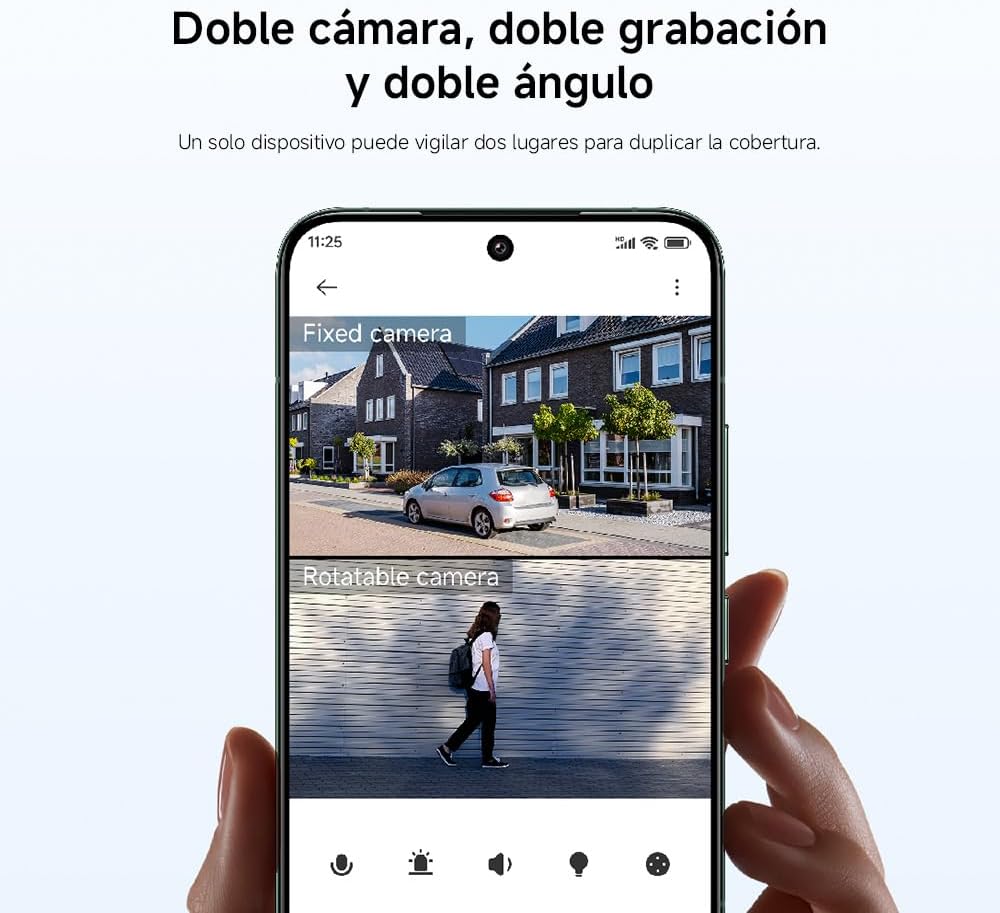
Figure 5.2: Diagram illustrating the Pan-Tilt-Zoom (PTZ) camera's movement capabilities, including 355° horizontal rotation and 95° vertical tilt.
5.3 AI Detection (Human & Vehicle)
The camera utilizes advanced AI algorithms to accurately detect humans and vehicles, reducing false alarms. When a person or vehicle is detected, the camera can send instant alerts to your smartphone via the Xiaomi Home app and record video footage.
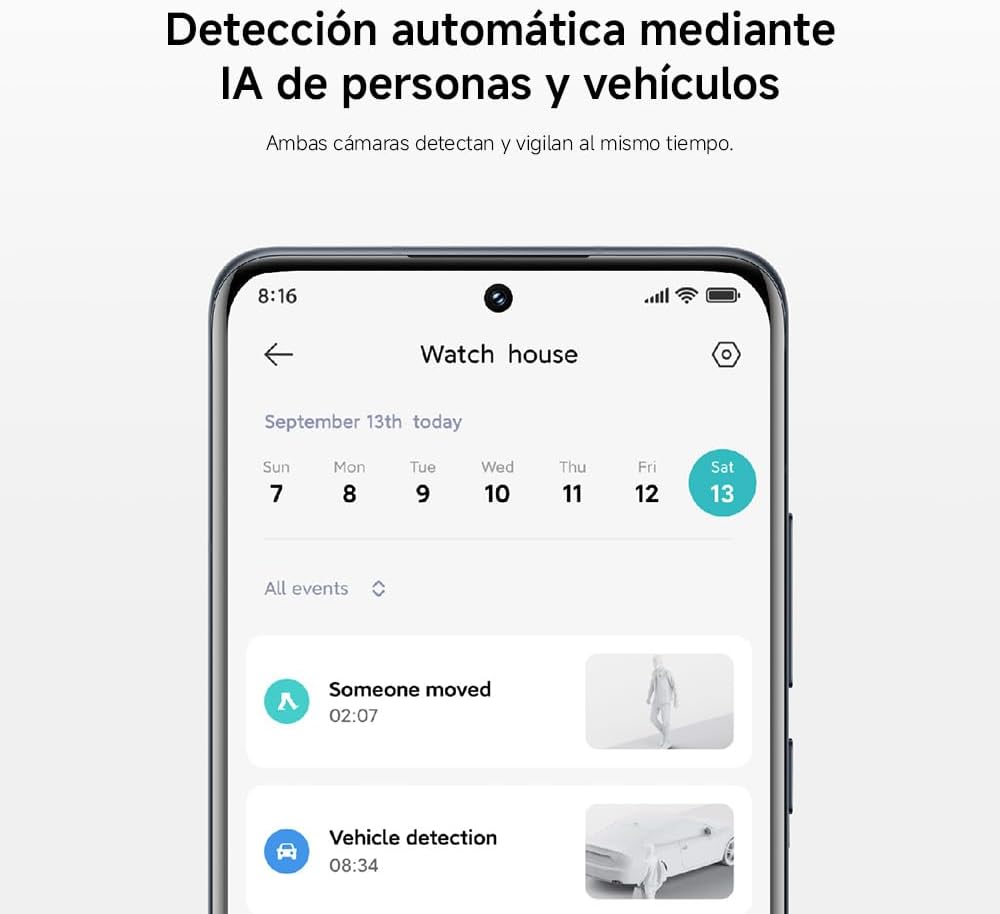
Figure 5.3: Screenshot from the Xiaomi Home app showing notifications for detected human and vehicle events.
5.4 Two-Way Audio
Engage in real-time conversations with visitors or deter intruders using the camera's two-way audio feature. The high-sensitivity microphone and powerful speakers, enhanced with AI noise cancellation, ensure clear communication even in noisy outdoor environments.

Figure 5.4: An illustration of the two-way audio function, allowing communication through the camera.
5.5 Night Vision Modes
Each camera is equipped with two white lights and two infrared night vision lights. In low-light conditions, the camera can automatically switch to infrared mode for black and white footage. When a human is detected at night, the white lights can activate to provide full-color night vision, enhancing detail and identification.

Figure 5.5: The camera's intelligent full-color night vision in action, illuminating the scene with its integrated white lights upon detection.
5.6 Sound and Light Alarm
For active deterrence, the camera can trigger a high-frequency flashing light and an audible alarm when an intruder is detected in the surveillance area. This feature is configurable via the Xiaomi Home app.

Figure 5.6: Illustration of the camera activating its sound and light alarm to deter potential intruders.
5.7 Storage Management
The camera offers flexible storage options for your recordings:
- microSD Card: Insert a microSD card (up to 256GB, not included) into the camera for local storage.
- Xiaomi Cloud Storage: Subscribe to Xiaomi Cloud services for secure, remote storage of your video footage.
- NAS (Network Attached Storage): Connect the camera to a compatible NAS device for network storage.

Figure 5.7: Icons representing the three available storage methods for recorded footage: local microSD card, Xiaomi Cloud, and Network Attached Storage (NAS).
The camera uses H.265 video encoding for efficient storage and transmission:

Figure 5.8: A graphic illustrating the efficiency of H.265 video encoding, which reduces bandwidth and storage space by up to 50% compared to H.264.
5.8 Smart Home Integration
The XIAOMI CW500 Dual Outdoor Camera can be integrated with smart home platforms like Amazon Alexa and Google Home. This allows for voice control to view camera feeds on compatible smart displays or to turn the camera on/off.

Figure 5.9: Image showing the camera alongside smart home devices, indicating its compatibility with Alexa and Google Home for voice control and integrated monitoring.
5.9 Time-Lapse Recording
Utilize the dual cameras to capture time-lapse videos from multiple angles simultaneously. This feature is ideal for observing long-term events like blooming flowers or changing landscapes.

Figure 5.10: Example of dual time-lapse recording, capturing different scenes simultaneously.
5.10 Privacy Protection
The camera incorporates an integrated MJA1 security chip, providing enhanced privacy protection. This chip includes unique keys and certificates to ensure the security of user data and information, offering financial-grade protection.

Figure 5.11: A visual representation of the integrated MJA1 security chip, designed to protect user data and privacy.
6. Maintenance
6.1 Cleaning the Camera
Despite its IP66 rating, regular cleaning helps maintain optimal performance and image clarity. Disconnect power before cleaning.
- Wipe the camera lens and body with a soft, damp cloth.
- Do not use harsh chemicals, solvents, or abrasive cleaners.
- Ensure no moisture enters the ports.

Figure 6.1: The camera shown in an outdoor setting, emphasizing its IP66 rating for professional dust and water resistance.
6.2 Firmware Updates
Periodically check the Xiaomi Home app for available firmware updates. Keeping your camera's firmware up-to-date ensures optimal performance, security, and access to new features.
7. Troubleshooting
If you encounter issues with your camera, refer to the following common problems and solutions:
| Problem | Possible Cause | Solution |
|---|---|---|
| Camera not powering on | No power, faulty adapter, loose connection | Check power outlet, ensure adapter is securely connected, try a different outlet. |
| Unable to connect to Wi-Fi | Incorrect Wi-Fi password, camera too far from router, router issues | Verify Wi-Fi password, move camera closer to router, restart router, ensure 2.4GHz network is used. |
| Poor image quality | Dirty lens, low light, network bandwidth issues | Clean the lens, ensure adequate lighting, check network speed, adjust camera resolution settings. |
| AI detection not working | Detection settings disabled, environmental factors, firmware outdated | Check detection settings in the app, ensure clear line of sight, update firmware. |
| Two-way audio issues | Microphone/speaker blocked, app volume low, network latency | Ensure microphone/speaker are clear, adjust app volume, check network connection. |
8. Specifications
| Feature | Detail |
|---|---|
| Brand | XIAOMI |
| Model Name | Outdoor Camera CW500 Dual |
| Model Number | MJSXJ08HL |
| Connectivity Technology | Wi-Fi 6 (2.4GHz), Ethernet, Bluetooth |
| Video Capture Resolution | 4K |
| Effective Video Resolution | 4 MP (2.5K Ultra HD) |
| Special Features | AI Detection, Two-way voice calls, IP66 Water and Dust Resistance, Sound and Light Alarm |
| Usage Environment | Outdoor |
| Power | 12.0V, 12.0W |
| Dimensions | 9.8 x 17.8 x 19 cm |
| Product Weight | 492 Grams |
| Number of Channels | 2 |
| Video Capture Format | AVI |
| IR LEDs | 3 (plus 2 white lights per camera for full-color night vision) |
| Storage Options | microSD card (up to 256GB), Xiaomi Cloud, NAS |
9. Warranty and Support
9.1 Warranty Information
The XIAOMI CW500 Dual Outdoor Camera comes with a standard manufacturer's warranty. Please refer to the warranty card included in your product packaging or visit the official XIAOMI website for detailed warranty terms and conditions specific to your region. Keep your purchase receipt as proof of purchase.
9.2 Customer Support
For technical assistance, troubleshooting beyond this manual, or service inquiries, please contact XIAOMI customer support through one of the following channels:
- Official XIAOMI Website: Visit www.mi.com for support resources, FAQs, and contact information.
- Xiaomi Home App: Access the support section within the app for in-app assistance.
- Authorized Service Centers: Locate authorized service centers in your area via the official website.
When contacting support, please have your camera's model number (MJSXJ08HL) and serial number ready.
Related documentsCW500 Dual (MJSXJ08HL)


Ask a question about this manual
Ask about setup, troubleshooting, compatibility, parts, safety, or missing instructions. Manuals+ will review the question and use this page’s manual context to help answer it.