
Brilliantool MTM0150-KIT
Brilliantool 150W Low Voltage Transformer Kit User Manual
Model: MTM0150-KIT
Brand: Brilliantool
Introduction
This manual provides essential information for the safe installation, operation, and maintenance of your Brilliantool 150W Low Voltage Transformer Kit. This kit includes a 150W multi-tap transformer and a photocell sensor, designed for outdoor landscape lighting applications. Please read this manual thoroughly before installation and retain it for future reference.
Safety Information and Warnings
WARNING: Risk of Fire. Installation involves running wiring through a building structure. Consult a qualified electrician.
AVERTISSEMENT: Risque d'incendie en cas d'installation consiste à exécuter le câblage à travers une structure de bâtiment. Consultez un électricien qualifié.
CAUTION: For installation in or on non-combustible materials only.
POUR INSTALLATION DANS OU SUR DES MATÉRIAUX INCOMBUSTIBLES SEULEMENT.
SUITABLE FOR INDOOR AND OUTDOOR USE. Read installation instructions before wiring.
CONVIENT POUR UNE UTILISATION INTÉRIEURE ET EXTÉRIEURE. Lisez les instructions d'installation avant le câblage.
Only for use with low voltage landscape lighting fittings and Suitable for Use with Submersible Luminaires or Submersible Pumps.
Uniquement pour une utilisation avec des raccords d'éclairage paysager basse tension et convient pour une utilisation avec des luminaires submersibles ou des pompes submersibles.
NE CONVIENT PAS À DES DÉGRADATEURS.
Unit must be installed with the provided Photocell Sensor. Follow instructions included with sensor.
DOIT ÊTRE INSTALLÉ AVEC LE CAPTEUR PHOTOCELLULE FOURNI. Suivez les instructions incluses avec le capteur.
Always disconnect power before servicing or installing the transformer. Ensure all connections are secure and comply with local electrical codes.
Product Overview
The Brilliantool 150W Low Voltage Transformer Kit is designed to convert 120V AC input to 12V, 13V, 14V, or 15V AC output, suitable for various landscape lighting needs. It features a durable 304 stainless steel housing, built-in circuit protection, and a photocell sensor for automatic dusk-to-dawn operation.
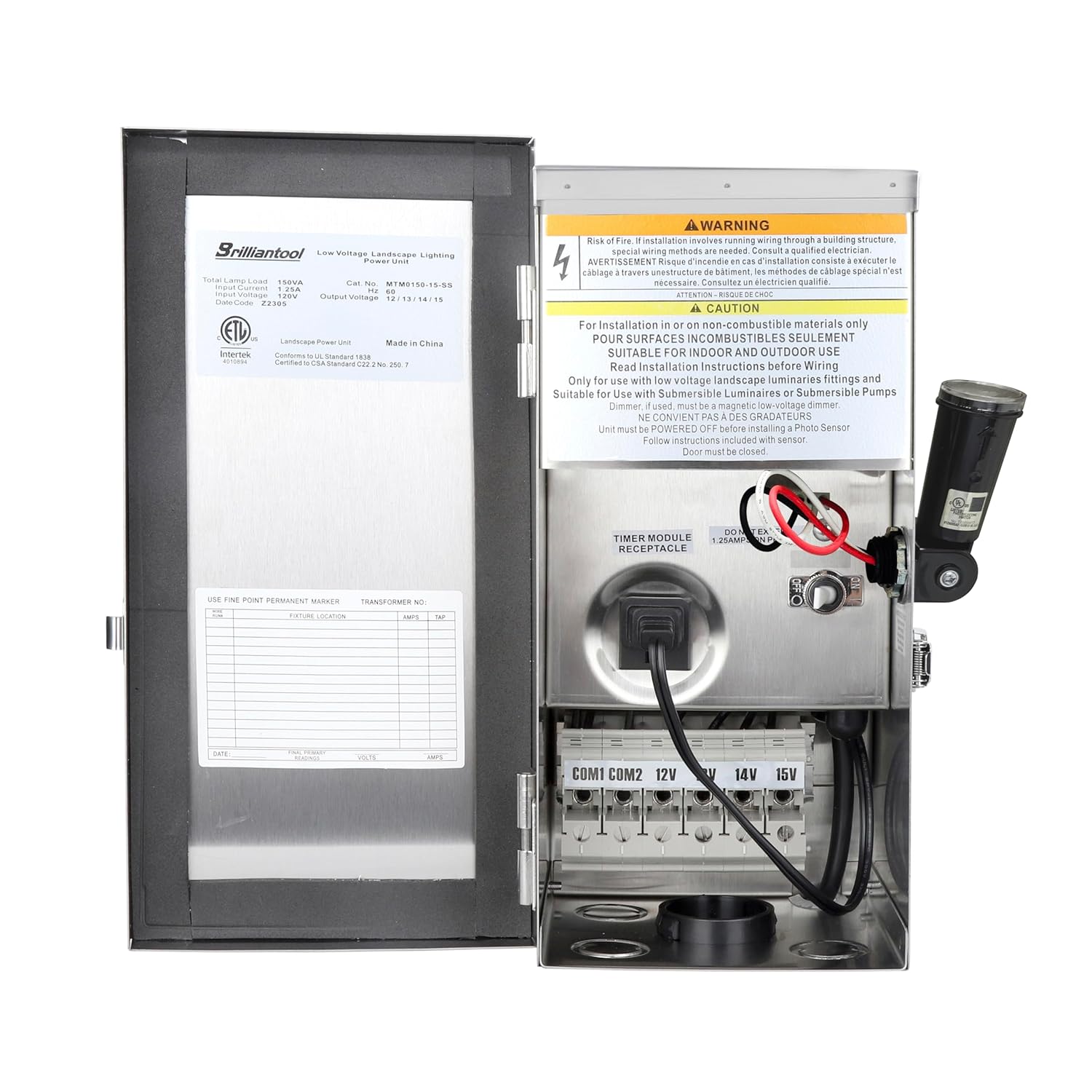
Image: The Brilliantool 150W Low Voltage Transformer Kit, shown open to reveal the internal wiring terminals, warning labels, and the connected photocell sensor. The various voltage output terminals (12V, 13V, 14V, 15V) are clearly visible.

Image: An illustration highlighting key features of the Brilliantool Multi-Tap Low Voltage Transformer, including weatherproof design, overload/short circuit protection, suitability for indoor/outdoor use, and compatibility with halogen and LED lighting, set against a backdrop of a house with landscape lighting.
Key Features:
- 150W Multi-tap transformer with 12V, 13V, 14V, 15V AC output options.
- Integrated photocell sensor for automatic dusk-to-dawn operation.
- Durable 304 stainless steel housing for protection against harsh weather.
- Built-in automatic circuit breaker for overload and short circuit protection.
- 6-foot 18AWG SJTW heavy-duty three-conductor power cord.
- Three knockout holes (1/2", 3/4", 1.5") for convenient wiring.
Specifications
| Specification | Value |
|---|---|
| Product Dimensions | 5.2"D x 5.2"W x 11.4"H |
| Item Model Number | MTM0150-KIT |
| Manufacturer | Brilliantool |
| Power Source | Corded Electric |
| Mounting Type | Wall Mount |
| Current Rating | 1.25 Amps |
| Output Voltage | 12V/13V/14V/15V AC |
| Power Cord Length | 6 feet (18AWG SJTW) |
| Housing Material | 304 Stainless Steel |
What's in the Box:
- 150W Low Voltage Transformer
- Photocell Sensor
- Screws
- Mounting plate
- User Manual (this document)
Setup and Installation
1. Planning Your Landscape Lighting Layout
Before installation, plan the placement of your lights and the transformer. Consider the total wattage of your fixtures to ensure it does not exceed the transformer's 150W capacity. The multi-tap output allows for voltage compensation over longer wire runs.

Image: An aerial view of a house with a proposed landscape lighting layout, accompanied by a hand-drawn diagram illustrating different lighting runs and their respective wattages, aiding in system planning.
2. Mounting the Transformer
The transformer is designed for wall mounting. Select a suitable location that is close to a 120V GFCI-protected outdoor outlet and allows for easy access to your landscape lighting wires. Ensure the mounting surface is sturdy and can support the weight of the transformer.
- Use the provided mounting plate as a template to mark the drilling locations on the wall.
- Drill pilot holes and secure the mounting plate using the supplied screws.
- Hang the transformer securely onto the mounting plate.
3. Wiring the Landscape Lights
Before wiring, ensure the transformer is unplugged from the power source.
- Route your low voltage landscape lighting cables from your fixtures to the transformer. Utilize the knockout holes at the bottom of the transformer for cable entry.
- Determine the appropriate output voltage (12V, 13V, 14V, or 15V) based on the total wattage and length of your cable runs. Higher voltage taps can compensate for voltage drop over longer distances.
- Connect the common wire (typically black or marked "COM") from your landscape lighting cable to the "COM1" or "COM2" terminal on the transformer.
- Connect the positive wire from your landscape lighting cable to the chosen voltage terminal (e.g., "12V", "13V", "14V", or "15V"). Ensure all connections are tight and secure.
4. Connecting the Photocell Sensor
The photocell sensor is pre-wired and designed for dusk-to-dawn operation. Ensure the sensor is positioned where it can receive ambient light without obstruction from artificial light sources, which could interfere with its operation.
- The photocell sensor is already connected to the transformer.
- Mount the sensor in an upward-facing direction, away from direct artificial light sources (e.g., porch lights) that could cause it to turn off prematurely.
5. Power Connection
Once all low voltage wiring is complete and secure, plug the transformer's 6-foot 18AWG SJTW power cord into a GFCI-protected 120V outdoor electrical outlet.

Image: The Brilliantool transformer connected via its 6-foot SJTW 18AWG power cord to a standard electrical outlet, illustrating the final power connection step.
Operating Instructions
Automatic Operation (Dusk-to-Dawn)
The integrated photocell sensor enables automatic operation. The transformer will turn on your landscape lights at dusk and turn them off at dawn, optimizing energy usage and providing security.
- Ensure the photocell sensor is unobstructed and exposed to ambient light.
- The system will automatically activate when light levels drop and deactivate when light levels rise.
Manual ON/OFF
A manual ON/OFF switch is provided for direct control of the transformer, overriding the photocell sensor if needed.

Image: A close-up view of the manual ON/OFF switch located on the transformer's exterior, indicating its position for direct control.
- To turn the lights on manually, switch the control to the "ON" position.
- To turn the lights off manually, switch the control to the "OFF" position.
Maintenance
The Brilliantool transformer is designed for minimal maintenance due to its robust construction.
- Housing: The 304 stainless steel housing provides excellent protection against corrosion and harsh weather conditions. Periodically wipe down the exterior with a damp cloth to remove dirt and debris.
- Photocell Sensor: Ensure the photocell sensor remains clean and free of obstructions (e.g., leaves, dirt) to guarantee proper dusk-to-dawn operation.
- Circuit Breaker: The built-in automatic circuit breaker protects against overload and short circuits. If the lights turn off unexpectedly, check for a tripped breaker. Disconnect power, inspect wiring for shorts, and reset the breaker if necessary.
- Connections: Periodically check all wiring connections to ensure they remain tight and secure.

Image: The robust 304 stainless steel housing of the Brilliantool transformer, shown next to an example of a corroded, older transformer, emphasizing the product's durability and weather resistance.
Troubleshooting
| Problem | Possible Cause | Solution |
|---|---|---|
| Lights do not turn on at dusk. | Photocell sensor obstructed or exposed to artificial light. Transformer unplugged or no power. Circuit breaker tripped. Loose wiring connections. | Clear obstructions from photocell; relocate if necessary. Ensure transformer is plugged into a working GFCI outlet. Check and reset the circuit breaker. Inspect and tighten all low voltage wiring connections. |
| Lights remain on during the day. | Photocell sensor faulty or covered in dirt. Transformer set to manual ON. | Clean photocell sensor; replace if faulty. Ensure the manual switch is not in the "ON" position if automatic operation is desired. |
| Lights are dim or flickering. | Voltage drop due to long wire runs or insufficient wire gauge. Too many lights connected (overload). Loose connections. | Use a higher voltage tap (13V, 14V, or 15V) on the transformer. Consider using thicker gauge wire for longer runs. Reduce the number of lights or use a higher wattage transformer. Check and tighten all wiring connections. |
| Circuit breaker trips repeatedly. | Short circuit in wiring or fixture. Overload (total wattage exceeds 150W). | Inspect all wiring and fixtures for damage or shorts. Disconnect sections to isolate the problem. Calculate total wattage of connected lights; reduce load if necessary. |
Warranty and Support
For warranty information or technical support, please contact Brilliantool customer service. Refer to your purchase documentation for specific warranty terms and contact details.
Manufacturer: Brilliantool
Model: MTM0150-KIT
ASIN: B0DK75RFN1
Related documentsMTM0150-KIT

Ask a question about this manual
Ask about setup, troubleshooting, compatibility, parts, safety, or missing instructions. Manuals+ will review the question and use this page’s manual context to help answer it.