
1. Introduction
The SINOTIMER SVP-916 is an advanced over/under voltage and current protection device designed for single-phase electrical equipment in residential and home usage distribution lines. It features dual LED displays for real-time monitoring of voltage and current, and offers adjustable protection parameters for enhanced safety and equipment longevity. This manual provides essential information for the safe and effective installation, operation, and maintenance of your SVP-916 protector.
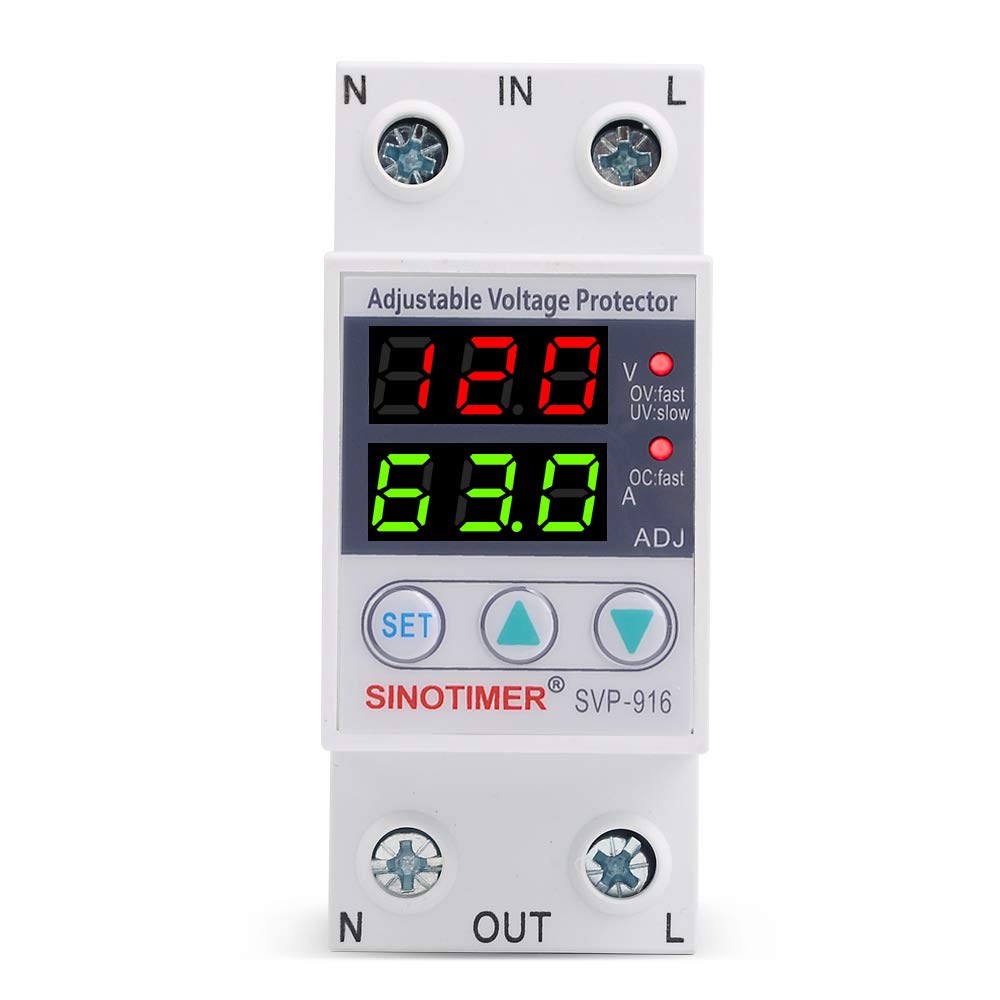
Figure 1: Front view of the SINOTIMER SVP-916 protector, showing dual LED displays and control buttons.
2. Safety Information
WARNING: Electrical shock hazard. Installation and servicing should only be performed by qualified personnel. Always disconnect power before working with electrical equipment.
- Ensure the device is installed in a dry, well-ventilated area, away from flammable materials.
- Verify that the supply voltage and current rating match the device specifications (110VAC/120VAC, 63A).
- The neutral line (N) of the protector is directly connected and does not have a disconnection function. Exercise caution during installation and operation.
- Do not exceed the maximum protection current value of the protector.
- If the undervoltage breaking time is greater than 0.3 seconds, the voltage protector will not open after a power failure.
3. Features
- Home Usage Protection: Specifically designed for residential household box entry or distribution lines for single-phase electrical equipment, offering over-voltage, under-voltage, and over-current protection.
- Automatic Recovery: In case of over-voltage, under-voltage, or over-current, the protector instantaneously cuts off power to prevent damage. It automatically restores power once the circuit voltage returns to normal.
- Adjustable Parameters: Overvoltage value, undervoltage value, overcurrent protection, and fault recovery delay time are all adjustable to suit specific requirements.
- Dual LED Display: Features two red LED displays that show actual measured voltage and current in real-time.
- High-Quality Components: Utilizes STMicroelectronics (ST) main control chips and new electronic raw materials for reliable performance.
4. Installation
The SVP-916 protector is designed for DIN rail installation within a distribution box. Follow these steps carefully:
- Mounting: Securely mount the SVP-916 onto a standard 35mm DIN rail in your electrical distribution box.
- Wiring: Connect the input (IN) and output (OUT) terminals as shown in the wiring diagram below. Ensure correct polarity for Line (L) and Neutral (N) connections.
- Circuit Breaker Integration: It is recommended to install an appropriate circuit breaker (e.g., an Air Circuit Breaker) upstream of the protector for additional safety and isolation.
- Tighten Connections: Ensure all screw connections are tight to prevent loose contacts and overheating.

Figure 2: Wiring diagram showing connections for the SVP-916 protector with a power switch and air circuit breaker.

Figure 3: Example of an electrical panel, illustrating the typical environment for DIN rail device installation.
5. Operation
Once installed and powered on, the SVP-916 will display the real-time voltage and current. Use the 'SET', 'Up', and 'Down' buttons to configure protection parameters.
5.1 Parameter Adjustment
Press the 'SET' button to enter the parameter setting mode. Use the 'Up' and 'Down' buttons to navigate through parameters (P01-P13) and adjust their values. Press 'SET' again to confirm and move to the next parameter or exit the setting mode.
- P01: Overvoltage Protection Value
- P02: Overvoltage Recovery Value
- P03: Overvoltage Action Time
- P04: Undervoltage Protection Value
- P05: Undervoltage Recovery Value
- P06: Undervoltage Action Time
- P07: Overcurrent Protection Value
- P08: Overcurrent Recovery Value
- P09: Overcurrent Action Time
- P10: Recovery Delay Time
- P11: Power-on Delay Time
- P12: Fault History Inquiry (Displays the last 5 fault events)
- P13: Restore Factory Settings
5.2 Protection and Recovery
When an over-voltage, under-voltage, or over-current condition occurs, the device will automatically cut off power to the connected load. The corresponding LED indicator (OV:fast for overvoltage, UV:slow for undervoltage, OC:fast for overcurrent) will flash. Once the voltage or current returns to within the set normal range and the recovery delay time has passed, the device will automatically restore power.
Video 1: Demonstration of the Adjustable Voltage Protector's features and parameter settings.
Video 2: Illustrates the Overcurrent and Undervoltage Protection functionality of the device.
6. Maintenance
The SVP-916 is designed for minimal maintenance. However, regular checks can ensure optimal performance:
- Visual Inspection: Periodically inspect the device for any signs of physical damage, loose connections, or discoloration.
- Cleaning: Keep the device free from dust and debris. Use a soft, dry cloth for cleaning. Do not use liquid cleaners.
- Functionality Check: Occasionally test the protection functions by simulating an over/under voltage or overcurrent condition if safely possible, or by observing its behavior during minor fluctuations.
7. Troubleshooting
If the device is not functioning as expected, consider the following:
- No Display/No Power: Check the input power supply and all wiring connections. Ensure the circuit breaker upstream is ON.
- Frequent Tripping: Review your set protection parameters (P01-P09). They might be set too sensitively for your electrical environment. Also, check for actual voltage/current anomalies in your system.
- Device Not Recovering: Check the recovery delay time (P10) and power-on delay time (P11). Ensure the fault condition has genuinely cleared.
- Incorrect Readings: Verify wiring connections are secure and correct. If readings are consistently inaccurate, the device may require professional inspection.
- Fault History: Use parameter P12 to check the last 5 fault events, which can help diagnose recurring issues.
If problems persist after basic troubleshooting, contact qualified electrical personnel or SINOTIMER customer support.
8. Specifications
| Specification | Value |
|---|---|
| Brand | SINOTIMER |
| Model | SVP-916 |
| Current Rating | 63 Amps |
| Coil Voltage | 120 Volts (AC) |
| Operation Mode | Automatic |
| Mounting Type | DIN Rail Mount |
| Connector Type | Screw |
| Contact Material | Copper |
| Product Dimensions | 3.39 x 1.42 x 2.64 inches |
| Item Weight | 6.7 ounces |

Figure 4: Detailed dimensions of the SVP-916 protector.
9. Warranty and Support
For warranty information and technical support, please refer to the official SINOTIMER website or contact your retailer. Keep your purchase receipt as proof of purchase for any warranty claims.


