
1. Introduction
Thank you for choosing the LIGE Smart Watch FV12-E-XY-US-CJQ. This smart watch is designed to enhance your daily life with its advanced features, including a vibrant AMOLED display, comprehensive health monitoring, and convenient Bluetooth calling. This manual will guide you through the setup, operation, and maintenance of your device to ensure you get the most out of it.

The LIGE Smart Watch FV12-E-XY-US-CJQ, a versatile companion for a healthy lifestyle.
2. What's in the Box
Please check the package contents to ensure all items are present:
- Smart Watch (FV12-E-XY-US-CJQ)
- Metal Strap
- Silicone Strap
- Strap Accessories
- Charger
- Instructions Manual

Illustration of the items included in your LIGE Smart Watch package.
3. Product Overview
The LIGE Smart Watch features a 1.43-inch AMOLED display with 466x466 pixels, offering vibrant colors and clear details. Its ultra-thin design, measuring only 7.9mm thick, ensures a comfortable fit for all-day wear. The watch comes with two strap options to suit various styles and occasions.

The watch features a high-resolution 1.43-inch AMOLED display for clear visuals.

The ultra-thin design ensures a comfortable and delicate fit on the wrist.
4. Setup Guide
Follow these steps to set up your LIGE Smart Watch:
- Charge the Watch: Before first use, fully charge your smart watch using the provided charger.
- Download the App: Scan the QR code below or search for "FitCloudPro" in your phone's app store (compatible with Android 5.0+ and iOS 8.0+).
Download FitCloudPro App - Enable Bluetooth: Turn on Bluetooth on your smartphone.
- Pair the Device: Open the FitCloudPro app, go to the "Device" section, and select "Add Device". Find and select "FV12" from the list of available devices. Confirm the pairing request on both your phone and the watch.
- Configure Notifications: Within the app, customize which app notifications you wish to receive on your watch.
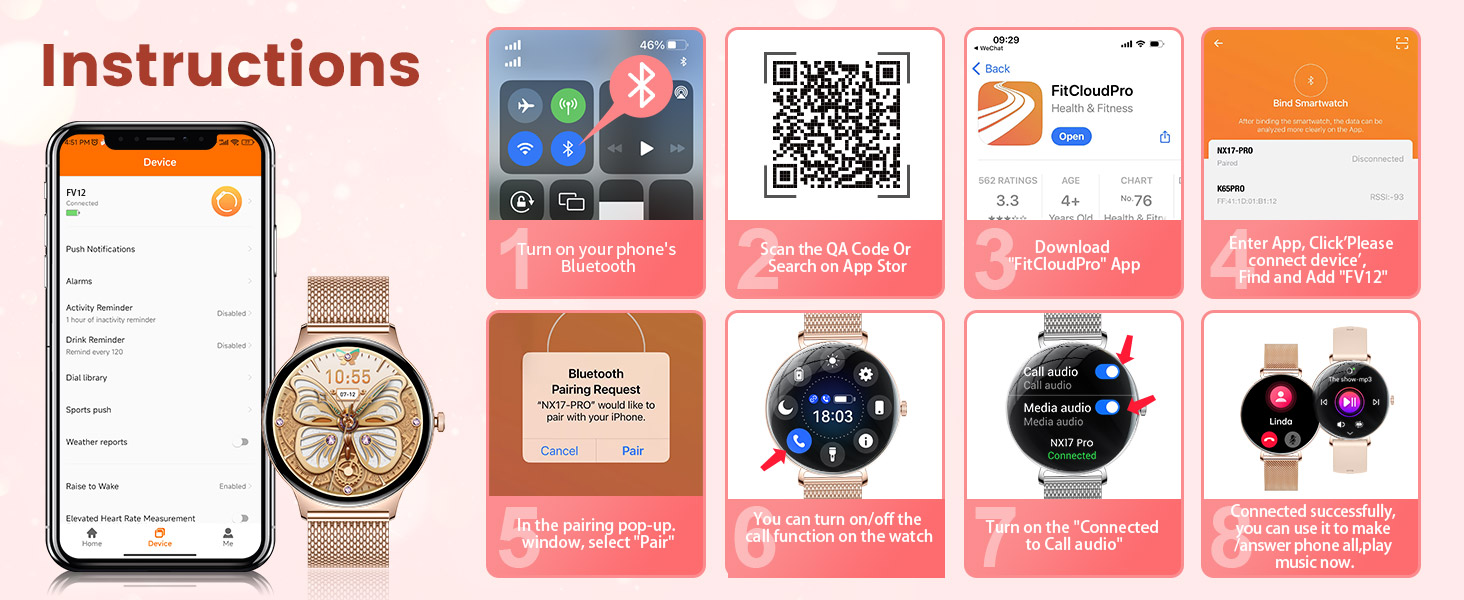
Visual guide for connecting your LIGE Smart Watch to your smartphone via the FitCloudPro app.
5. Operating Instructions
Your LIGE Smart Watch is designed for intuitive use. Here are some basic operations:
- Touch Screen Navigation: Swipe left/right or up/down to navigate through menus and features. Tap to select an option.
- Side Button: Press the side button to return to the home screen or wake the device.
- Customizable Watch Faces: Personalize your watch face by long-pressing the home screen or through the FitCloudPro app. You can choose from various designs or upload your own photos.

The watch offers multiple functions including music control, alarms, weather updates, and remote camera operation.
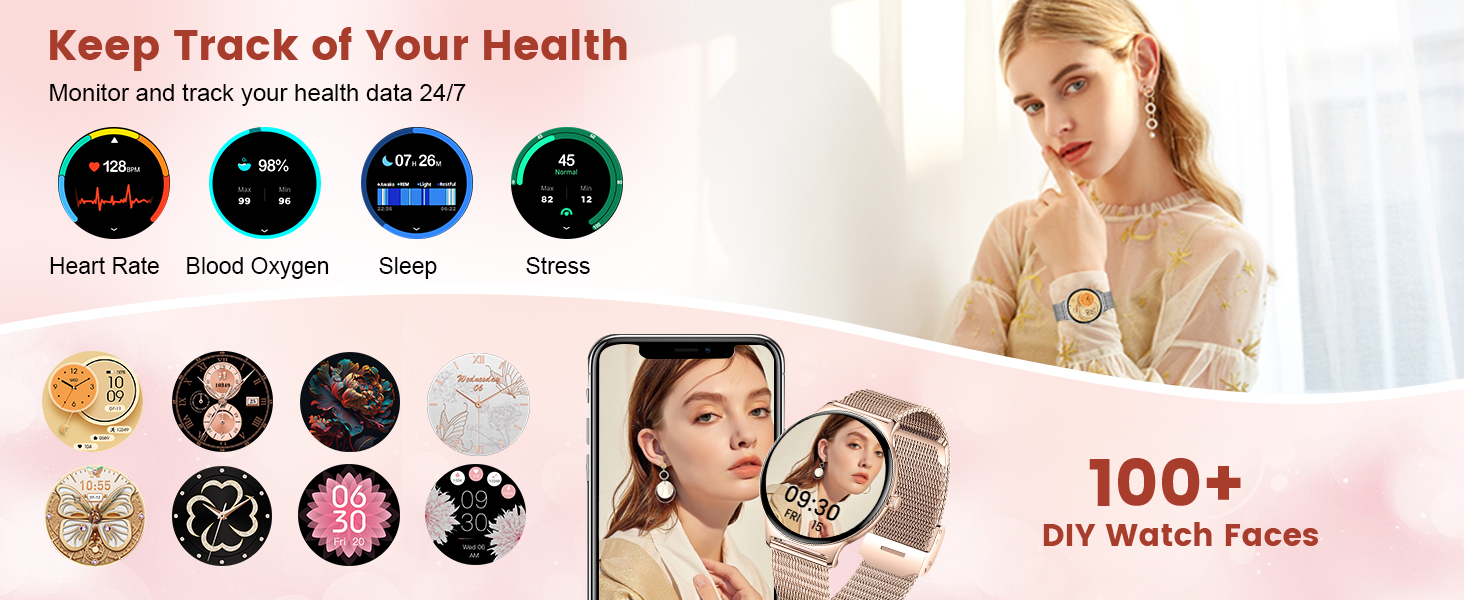
Choose from over 100 DIY watch faces to match your style.
6. Health Monitoring Features
The LIGE Smart Watch provides comprehensive health tracking capabilities:
- Heart Rate Monitoring: Continuously tracks your heart rate throughout the day.
- Blood Oxygen (SpO2) Monitoring: Measures your blood oxygen saturation levels.
- Sleep Tracking: Monitors your sleep patterns, including awake, light sleep, and deep sleep stages.
- Stress Monitoring: Helps you understand and manage your stress levels.
- Female Cycle Tracking: Scientific cycle monitoring to care for women at every stage of their lives.
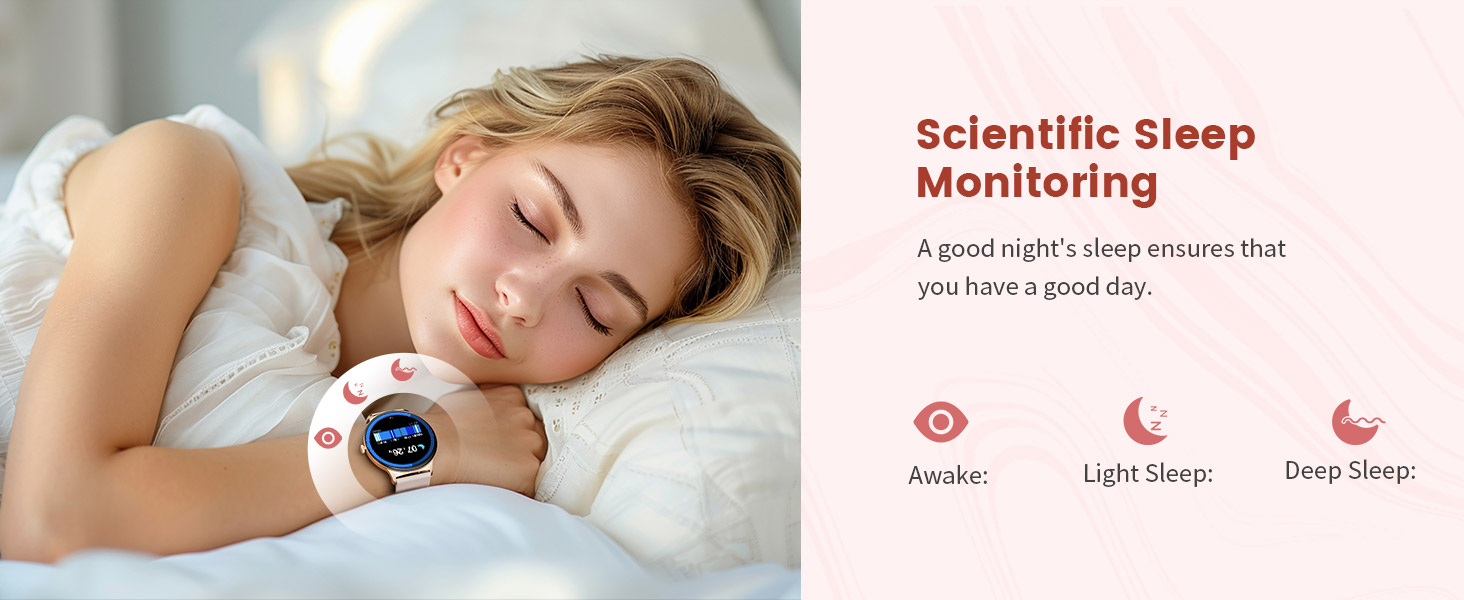
Monitor your sleep quality for a better day ahead.

The watch supports female cycle tracking for comprehensive health management.
Video: Health Tracking and Water Resistance
This video demonstrates the LIGE FV12 smart watch's IP68 waterproof capabilities and its health tracking features, including heart rate monitoring, in various outdoor settings.
7. Sports Modes
With over 100 sports modes, your LIGE Smart Watch is an ideal fitness companion. It accurately records your activity data, including steps, distance, and calories burned, helping you achieve your fitness goals.
- Activity Tracking: Tracks various activities like walking, running, cycling, yoga, and more.
- Data Sync: Syncs data to the FitCloudPro app for detailed analysis and progress tracking.

The watch supports over 100 sports modes to track your diverse physical activities.
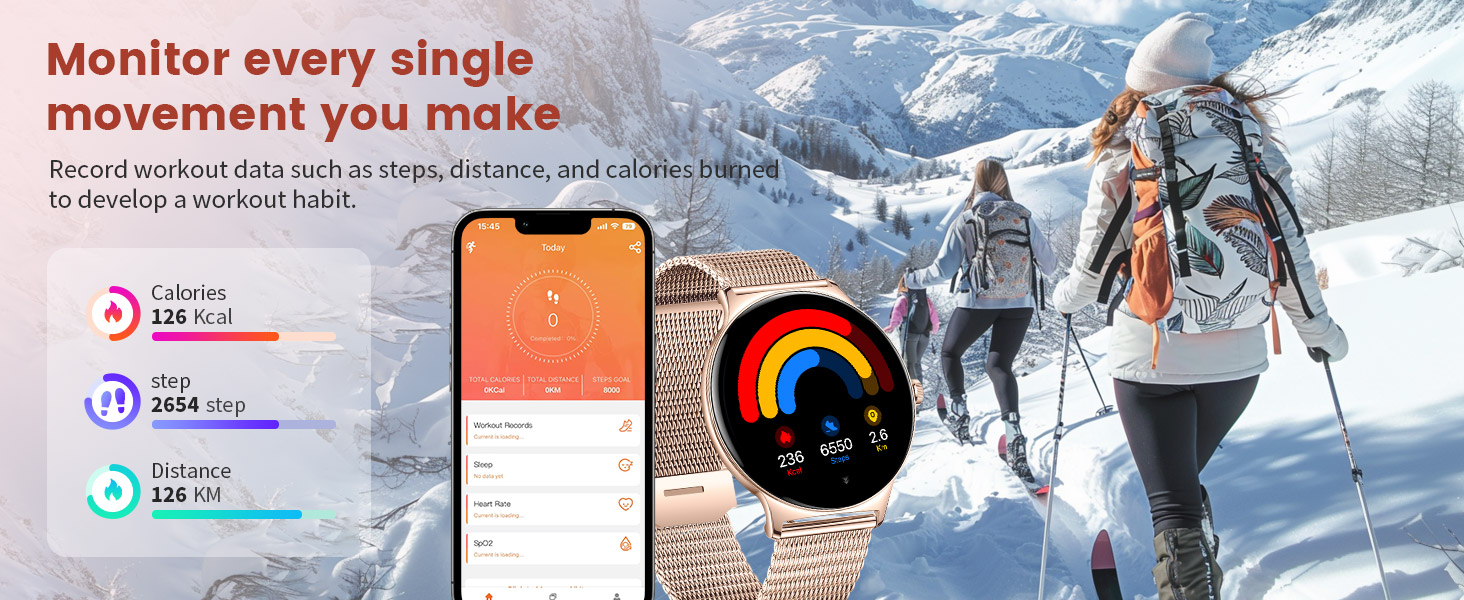
Record your workout data to develop and maintain a healthy exercise habit.
8. Bluetooth Calling & Message Notifications
Stay connected without needing to constantly check your phone:
- Bluetooth Calling: Make and receive calls directly from your watch (requires iOS 13+ for one-touch call function).
- Message Alerts: Receive real-time notifications for texts, calls, emails, and social media apps (e.g., WhatsApp, Facebook, Instagram, YouTube).

Easily manage calls and receive notifications directly on your wrist.
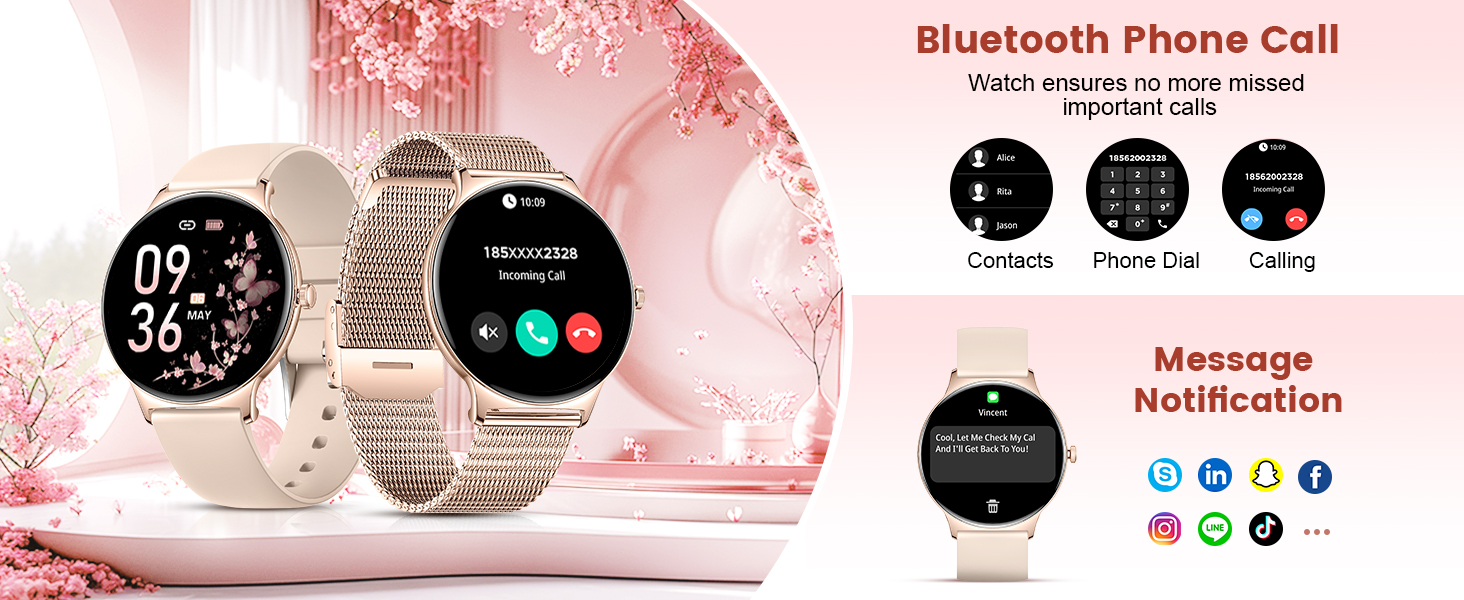
The watch ensures you don't miss important calls or messages.
9. Battery Life & Charging
The LIGE Smart Watch is equipped with a 260mAh high-performance battery, providing extended usage times. A single charge can last for several days, with an intelligent power management system optimizing energy consumption.
- Daily Use: Approximately 4-7 days.
- Standby Time: Up to 15 days.

Enjoy long-lasting battery performance with efficient power management.
10. Water Resistance
The LIGE Smart Watch boasts an IP68 waterproof rating, making it suitable for various daily scenarios, including hand washing, rain, and swimming (avoid hot water or steam).

The watch is designed to withstand water exposure in daily activities.
11. Maintenance
To ensure the longevity and optimal performance of your LIGE Smart Watch, follow these maintenance tips:
- Cleaning: Regularly wipe the watch screen and straps with a soft, dry cloth. If necessary, use a slightly damp cloth for the straps, then dry thoroughly.
- Avoid Chemicals: Do not use harsh chemicals, cleaning solvents, or strong detergents, as they may damage the watch's finish or internal components.
- Charging: Always use the original charger provided with your watch. Ensure the charging contacts are clean and dry before charging.
- Storage: When not in use for extended periods, store the watch in a cool, dry place.
12. Troubleshooting
If you encounter any issues with your LIGE Smart Watch, try the following solutions:
- Watch Not Turning On: Ensure the watch is fully charged. Connect it to the charger and wait a few minutes before attempting to power it on.
- Unable to Pair with Phone:
- Ensure Bluetooth is enabled on your phone and the watch is within range.
- Restart both your phone and the watch.
- Make sure the FitCloudPro app is updated to the latest version.
- If previously paired, try unpairing and re-pairing the device.
- Notifications Not Received:
- Check app notification settings on your phone and within the FitCloudPro app.
- Ensure the watch is connected to your phone via Bluetooth.
- Verify that the app is running in the background and not being restricted by battery optimization settings on your phone.
- Inaccurate Health Data:
- Ensure the watch is worn snugly on your wrist, not too loose or too tight.
- Clean the sensor on the back of the watch.
- Avoid excessive movement during measurements.
If the issue persists, please contact customer support for assistance.
13. Specifications
| Feature | Specification |
|---|---|
| Model Number | FV12-E-XY-US-CJQ |
| Screen Size | 1.43 Inches AMOLED |
| Resolution | 466 x 466 pixels |
| Waterproof Rating | IP68 |
| Battery Capacity | 260 mAh Lithium Polymer |
| Connectivity | Bluetooth |
| Operating System | AsteroidOS |
| Memory Storage Capacity | 256 MB |
| Product Dimensions | 8.11 x 3.78 x 0.87 inches |
| Item Weight | 6.7 ounces |
14. Warranty & Support
LIGE provides excellent after-sales service for your smart watch:
- After-Sales Service: Enjoy 365 days of after-sales service from the date of purchase.
- Customer Support: For any questions, damage issues, usage problems, or concerns about quality assurance, please contact the LIGE customer service team directly. You will receive a satisfactory reply within 24 hours.

LIGE is committed to providing comprehensive customer support.