Introduction
Thank you for choosing the AWEI T90 Wireless Earbuds. This manual provides detailed instructions on how to set up, operate, and maintain your earbuds to ensure optimal performance and longevity. Please read this manual thoroughly before using the product.
Package Contents
Ensure all items are present in the package:
- AWEI T90 Wireless Earbuds (Left and Right)
- Charging Case
- USB Charging Cable
- User Manual (this document)
- Eartips (various sizes)

Image: AWEI T90 Wireless Earbuds and their charging case. The image displays the two white earbuds, one with an ear tip detached, and the open charging case.
Product Overview
The AWEI T90 earbuds are designed for high-fidelity audio and clear communication, featuring Bluetooth 5.3 for stable connectivity and an IPX6 waterproof rating for durability.

Image: An exploded view diagram illustrating the internal components of an AWEI T90 earbud, highlighting the 10mm speaker driver and other acoustic elements responsible for sound production.
Key Features:
- Hi-Fi Sound Quality: Equipped with 10mm speakers for an immersive audio experience.
- ENC Noise Cancellation: Enhances call clarity by reducing environmental noise.
- Bluetooth 5.3: Provides fast, stable, and low-latency wireless connection up to 10 meters.
- Extended Battery Life: Up to 7 hours of playback per charge, with the charging case extending total playtime to 35 hours (dual-ear) or 70 hours (single-ear).
- IPX6 Waterproof: Resistant to dust and strong jets of water, suitable for sports and outdoor activities.
- Smart Touch Control: Intuitive touch sensors for managing music, calls, and volume.
- Dual-Purpose Design: Supports both semi-in-ear and all-in-ear wearing styles with removable ear caps.
Setup
1. Charging the Earbuds and Case
Before first use, fully charge the earbuds and the charging case.
- Place the earbuds into the charging case. Ensure they are correctly seated.
- Connect the USB charging cable to the Type-C port on the charging case and plug the other end into a USB power adapter (not included) or a computer's USB port.
- The indicator light on the charging case will show charging status. A full charge typically takes about 1.5 hours for the case.
- Once fully charged, disconnect the charging cable.
2. Bluetooth Pairing
The earbuds will automatically enter pairing mode when taken out of the case.
- Open the charging case and remove both earbuds. They will automatically power on and attempt to pair with each other.
- On your device (smartphone, tablet, laptop), enable Bluetooth.
- Search for "AWEI T90" in the list of available Bluetooth devices.
- Select "AWEI T90" to connect. Once connected, you will hear a confirmation tone.
- For subsequent uses, the earbuds will automatically connect to the last paired device when removed from the case.

Image: A pair of AWEI T90 earbuds positioned next to a large graphic indicating "Bluetooth 5.3", emphasizing the advanced wireless technology for stable connection.
Operating Instructions
Touch Controls
The AWEI T90 earbuds feature intuitive touch controls on each earbud. The functions are as follows:
| Action | Function |
|---|---|
| Single Tap (Left/Right) | Play/Pause Music, Answer/End Call |
| Double Tap (Right Earbud) | Next Song |
| Double Tap (Left Earbud) | Previous Song |
| Triple Tap (Right Earbud) | Volume Up |
| Triple Tap (Left Earbud) | Volume Down |
| Long Press (2 seconds) | Reject Call, Activate Voice Assistant |
Single and Dual Earbud Mode
The AWEI T90 earbuds support both single and dual earbud usage.
- Dual Earbud Mode: Remove both earbuds from the charging case. They will automatically connect to each other and then to your device, providing stereo sound.
- Single Earbud Mode: You can use either the left or right earbud independently. Simply remove one earbud from the case, and it will connect to your device. The other earbud can remain in the case or be used later.
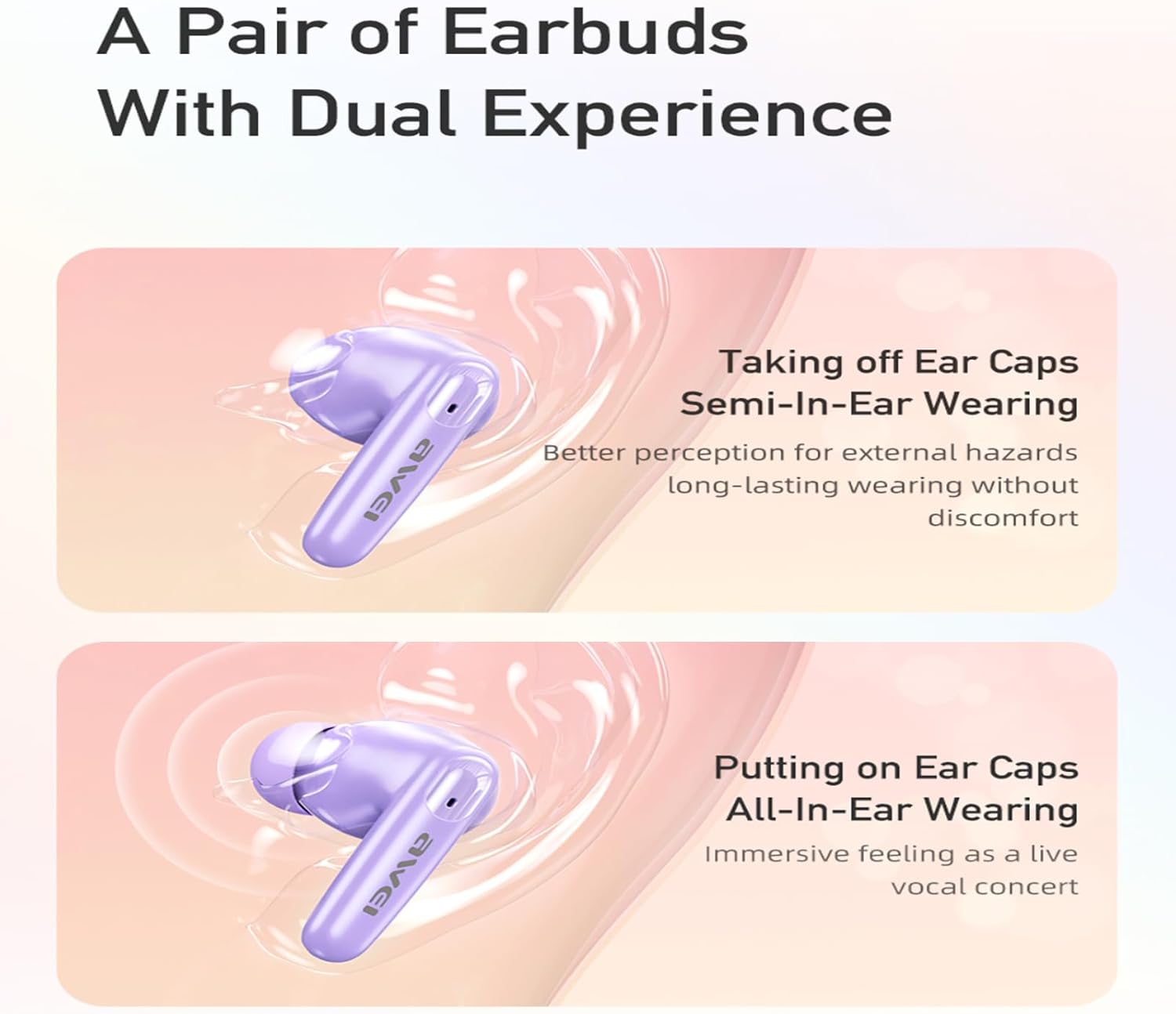
Image: A visual comparison of two wearing styles for the AWEI T90 earbuds. The top image shows a semi-in-ear fit (without ear caps) for environmental awareness, while the bottom image shows an all-in-ear fit (with ear caps) for immersive sound.
The earbuds come with removable ear caps, allowing you to switch between semi-in-ear wearing for better perception of surroundings and all-in-ear wearing for a more immersive audio experience.
Maintenance
Cleaning
- Regularly clean the earbuds and charging case with a soft, dry, lint-free cloth.
- Do not use abrasive cleaners, alcohol, or chemical solvents.
- Gently remove any earwax or debris from the ear tips and speaker mesh using a small, soft brush or cotton swab.
Storage
- When not in use, always store the earbuds in their charging case to protect them and keep them charged.
- Store the device in a cool, dry place, away from extreme temperatures and direct sunlight.
Water Resistance (IPX6)
The AWEI T90 earbuds are rated IPX6 waterproof, meaning they are protected against strong jets of water from any direction. This makes them suitable for workouts and light rain exposure.
- Do not submerge the earbuds in water.
- The charging case is not waterproof. Keep it dry.
- Ensure the earbuds are dry before placing them back into the charging case to prevent damage.
Troubleshooting
If you encounter issues with your AWEI T90 earbuds, please refer to the following common solutions:
| Problem | Possible Solution |
|---|---|
| Earbuds not pairing with device |
|
| Only one earbud working |
|
| Low volume or poor sound quality |
|
| Charging case not charging |
|
Specifications
| Feature | Detail |
|---|---|
| Model Name | T90 |
| Brand | AWEI |
| Connectivity Technology | Wireless (Bluetooth 5.3) |
| Wireless Communication Range | Up to 10 meters (33 feet) |
| Ear Placement | In Ear |
| Control Type | Touch Control |
| Water Resistance Level | IPX6 Waterproof |
| Earbud Playtime (Single Charge) | Up to 7 hours |
| Total Playtime with Charging Case | Up to 35 hours (dual-ear), 70 hours (single-ear) |
| Charging Case Battery Capacity | 300mAh |
| Charging Time (Case) | Approx. 1.5 hours (Type-C) |
| Special Features | Fast Charging, Lightweight, Rechargeable Battery, Touch Control, ENC Noise Cancellation |
| Included Components | Wireless Earbuds, Charging Case, USB Cable, User Manual, Eartips |
Warranty and Support
AWEI products are designed and manufactured to the highest quality standards. For specific warranty information, please refer to the warranty card included in your package or visit the official AWEI website.
If you require further assistance or have questions not covered in this manual, please contact AWEI customer support through their official channels.


