
1. Introduction
Thank you for choosing the SANODESK EL13 L-Shaped Standing Desk. This manual provides essential information for the safe assembly, operation, maintenance, and troubleshooting of your new height-adjustable desk. Please read these instructions carefully before beginning assembly and retain them for future reference.
Safety Information
- Always follow the assembly instructions carefully. Incorrect assembly can lead to instability and potential injury.
- Ensure the desk is stable and properly anchored to the floor to prevent tipping, especially when using it for gaming or other activities that may involve sudden movements.
- Keep the work area clear of obstacles to prevent accidents during height adjustment.
- Do not overload the desk. The maximum weight capacity is 176 lbs (80 kg).
- Keep children and pets away from the desk during operation to prevent injury from moving parts.
- Disconnect power before cleaning or performing any maintenance.

Figure 1: Overview of the SANODESK EL13 L-Shaped Standing Desk.
2. Package Contents
Your SANODESK EL13 L-Shaped Standing Desk is shipped in two separate boxes, which may arrive on different days. Please verify all components are present before beginning assembly. If any parts are missing or damaged, contact customer support.
- Desk Top Panels (L-shaped sections)
- Lifting Columns (Desk Legs)
- Feet/Base Supports
- Control Box
- Smart Control Panel
- Drawer Components (3 sets)
- Monitor Stand Components
- Hardware Kit (screws, bolts, Allen wrenches)
- Power Adapter and Cable
- Instruction Manual

Figure 2: The desk is delivered in two packages. Maximum weight capacity is 176 lbs.
3. Setup and Assembly
Assembly of the SANODESK EL13 requires self-assembly. While some tools are included, additional tools may be required. It is recommended to have a second person assist with assembly due to the size and weight of the components.
Preparation:
- Clear a spacious area for assembly.
- Unpack all components and verify against the package contents list.
- Keep all hardware organized to avoid confusion.
Assembly Steps:
- Assemble the Lifting Columns: Attach the feet/base supports to the bottom of each lifting column using the provided screws. Ensure they are securely fastened.
- Attach Lifting Columns to Desk Panels: Carefully place the desk top panels upside down on a soft, protected surface. Attach the lifting columns to the designated mounting points on the desk panels. Follow the specific screw patterns indicated in the detailed assembly diagram (refer to the separate assembly guide included in the package).
- Install the Control Box: Mount the control box to the underside of the desk in the designated area. Connect the motor cables from the lifting columns to the control box.
- Install the Smart Control Panel: Attach the smart control panel to the front edge of the desk, typically on the right-hand side, and connect its cable to the control box.
- Assemble Drawers: Follow the instructions to assemble the three drawers and install them into their respective slots on the desk.
- Install Monitor Stand: Attach the monitor stand components to the top surface of the desk as per the instructions.
- Cable Management: Use the included cable ties or management clips to organize and secure all power and control cables.
- Flip the Desk: With assistance, carefully flip the assembled desk upright and place it in its desired location.
- Connect Power: Plug the power adapter into the control box and then into a wall outlet.

Figure 3: The integrated drawers provide convenient storage for desktop essentials.
4. Operating Instructions
The SANODESK EL13 features a smart control panel for easy height adjustment and memory presets.
Control Panel Functions:
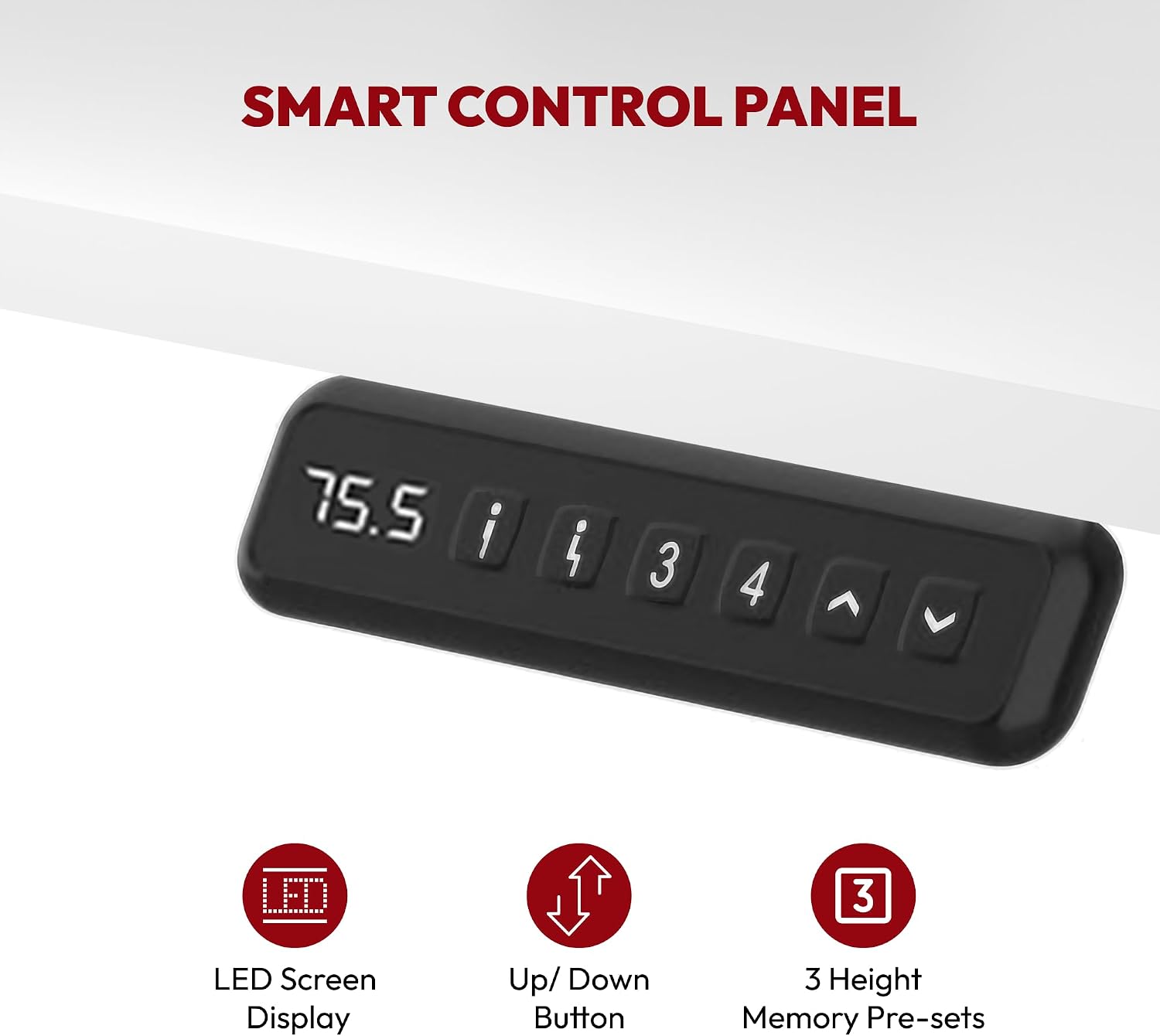
Figure 4: Smart Control Panel with LED display and memory presets.
- LED Screen Display: Shows the current desk height in inches or centimeters.
- Up/Down Buttons (▲ / ▼): Press and hold to adjust the desk height upwards or downwards. Release the button to stop at the desired height.
- Memory Presets (1, 3, 4): The desk has 3 programmable height memory presets.
Setting Memory Presets:
- Adjust the desk to your desired sitting or standing height using the Up/Down buttons.
- Press the 'M' or 'Set' button (often indicated by 'i' or a similar icon) once. The display may flash.
- Immediately press one of the numbered preset buttons (1, 3, or 4) to save the current height to that position. The display will confirm the setting.
Using Memory Presets:
Simply press the desired numbered preset button (1, 3, or 4) once. The desk will automatically move to the saved height.

Figure 5: Smooth height adjustment from sitting (28.9") to standing (46.5").

Figure 6: Ergonomic design promotes better posture and comfort.
5. Maintenance
Regular maintenance ensures the longevity and optimal performance of your SANODESK EL13.
- Cleaning: Wipe the desk surfaces with a soft, damp cloth. Avoid harsh chemicals or abrasive cleaners that could damage the finish. For the carbon steel frame, use a mild cleaner if necessary.
- Cable Management: Periodically check and reorganize cables to prevent tangles and ensure they do not interfere with the desk's movement.
- Fastener Check: Every few months, check all screws and bolts to ensure they are tight. Retighten if necessary.
- Motor Care: The lifting mechanism is designed for durability. Avoid overloading the desk or forcing it to move if obstructed.
- Power Disconnection: Disconnect the power cable from the wall outlet if the desk will not be used for an extended period.
6. Troubleshooting
If you encounter issues with your SANODESK EL13, refer to the following common problems and solutions:
| Problem | Possible Cause | Solution |
|---|---|---|
| Desk does not move. | No power, loose cable connection, overload. | Check power cable connection to outlet and control box. Ensure all motor cables are securely connected. Reduce weight on the desk. |
| Desk moves unevenly or makes unusual noise. | Obstruction, uneven weight distribution, loose fasteners. | Check for obstructions under or around the desk. Redistribute weight evenly. Check and tighten all assembly fasteners. |
| Control panel display shows an error code. | System fault, motor issue. | Refer to the detailed error code list in the full assembly guide. Often, a power cycle (unplug for 30 seconds, then replug) can resolve minor errors. If the issue persists, contact customer support. |
| Memory presets not working. | Presets not saved correctly. | Re-program the memory presets following the instructions in Section 4. |
If these solutions do not resolve the issue, please contact SANODESK customer support for further assistance.
7. Specifications
| Feature | Detail |
|---|---|
| Model Number | EL13 |
| Brand | SANODESK |
| Type | L-Shaped Standing Desk |
| Desk Dimensions (Overall) | 63" x 47" (L-shape) |
| Height Adjustment Range | 28.9" to 46.5" |
| Top Material | Engineered Wood |
| Base Material | Carbon Steel |
| Number of Drawers | 3 |
| Weight Capacity | 176 lbs (80 kg) |
| Color | Rustic Brown |
| Assembly Required | Yes |
| UPC | 840460414883 |

Figure 7: Key dimensions of the SANODESK EL13 L-Shaped Standing Desk.
8. Warranty Information
The SANODESK EL13 L-Shaped Standing Desk comes with a limited warranty. Please refer to the warranty card included in your package for specific terms, conditions, and duration of coverage. The warranty typically covers manufacturing defects and malfunctions under normal use.
Keep your proof of purchase (receipt or order confirmation) as it will be required for any warranty claims.
9. Customer Support
For any questions, assistance with assembly, troubleshooting, or warranty claims, please contact SANODESK customer support:
- Online Support: Visit the official SANODESK website for FAQs and support resources.
- Email: Refer to your warranty card or the SANODESK website for the customer service email address.
- Phone: Refer to your warranty card or the SANODESK website for customer service phone numbers.
When contacting support, please have your model number (EL13) and proof of purchase ready.
