
Introduction
Thank you for choosing the LIGE Smart Watch. This manual provides essential information for setting up, operating, maintaining, and troubleshooting your new device. This elegant smartwatch combines style with advanced functionality, designed to enhance your daily life and fitness journey.
What's in the Box
- Smartwatch
- Changer Cable
- Smartwatch Manuals
- Watch Setting Tools
- Watch Strap (Rose 2 Straps variant includes two straps)

Image: Packaging Display showing all included items.
Setup
1. Charging the Smart Watch
Before first use, fully charge your smartwatch. The built-in 300mAh Li-Polymer battery can be fully recharged in just 2 hours. Connect the changer cable to the watch's charging port and a compatible USB power source.
2. App Installation
Download the 'Dafit' app from your smartphone's app store (compatible with Android 4.4+ and iOS 8.0+). This app is essential for full functionality, including detailed activity tracking and watch customization.
3. Device Pairing
Open the Dafit app on your smartphone and follow the on-screen instructions to pair your smartwatch via Bluetooth. Ensure Bluetooth is enabled on your phone. Once paired, the watch will synchronize time and data with your phone.
4. Strap Installation
The smartwatch comes with interchangeable bands. Use the provided watch setting tools to attach or remove straps. Ensure the strap is securely fastened before wearing.

Image: The LIGE Smart Watch with its elegant rose gold mesh strap.
Operating the Smart Watch
Display and Navigation
The watch features a stunning 1.19-inch AMOLED display with a resolution of 390x390 pixels and up to 600 lumens brightness, ensuring clear visibility in various lighting conditions. Navigate through menus and functions using the full touch screen and the side crown.

Image: Detailed view of the watch's AMOLED screen and its clarity.
Call and Message Notifications
With its built-in microphone and speaker, the smartwatch allows you to answer and make calls directly from your wrist after connecting via Bluetooth. It also vibrates to alert you of incoming messages and app notifications (e.g., Facebook, WhatsApp, Twitter), ensuring you don't miss important updates.

Image: Bluetooth Call and Message Notification features.
Video: Demonstration of the call and message notification features on the LIGE Smart Watch.
Multifunctional Features
The smartwatch offers a range of convenient features:
- Music Control: Play, pause, and skip tracks on your phone.
- Voice Assistant: Access your phone's voice assistant directly from the watch.
- Remote Camera Control: Use your watch as a remote shutter for your phone's camera.
- Find Phone: Locate your misplaced smartphone by making it ring.
- Calculator: Perform basic calculations on your wrist.
- Weather Forecasts: Get real-time weather updates.
- Stopwatch & Timer: Essential tools for timing activities.
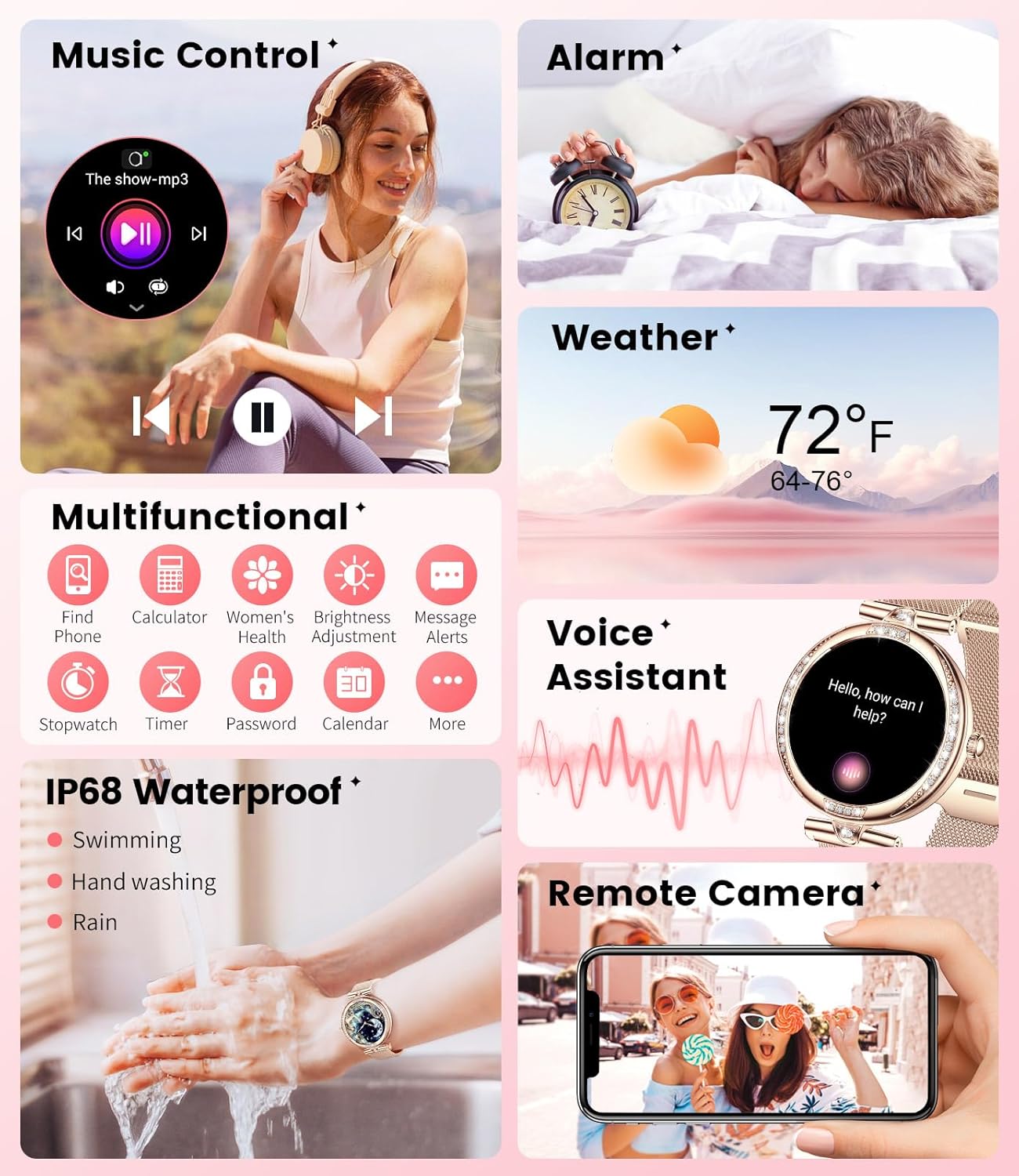
Image: Overview of the watch's diverse multifunctional capabilities.
Customization
Personalize your watch with over 200 unique personality dials. You can also upload your favorite photos or landscapes through the Dafit app to create custom watch faces that reflect your personal style.

Image: Watch face customization options.
Health Monitoring
The LIGE Smart Watch is equipped with cutting-edge sensors to provide comprehensive health insights.
Heart Rate Monitoring
Enjoy precise 24/7 heart rate monitoring, allowing you to keep track of your cardiovascular health throughout the day.
Video: Overview of the LIGE Smart Watch's features, including heart rate monitoring.
Sleep Monitoring
The watch tracks your sleep stages, including deep sleep, light sleep, and wake periods, providing a detailed analysis of your sleep quality to help you maintain optimal health.

Image: Sleep monitoring interface and data.
Blood Pressure and Blood Oxygen (SpO2)
The watch offers blood pressure and blood oxygen level tracking. Please note that these measurements are for reference only and should not be used for medical diagnosis.

Image: Health monitoring features including heart rate, blood pressure, and blood oxygen.
Women's Health Management
The smartwatch includes features for women’s health management, such as menstrual cycle tracking, to help you better understand your body.

Image: Women's health tracking interface.
Breathing Monitoring & Sedentary Reminders
The watch supports breathing monitoring and provides sedentary reminders to encourage you to stay active throughout the day.
Sports Modes
With over 100 sports modes, this pedometer watch allows you to track your steps, distance, calories burned, and active time in real time. Fitness enthusiasts will appreciate the detailed maps of their runs, walks, or routes available through the Dafit app.
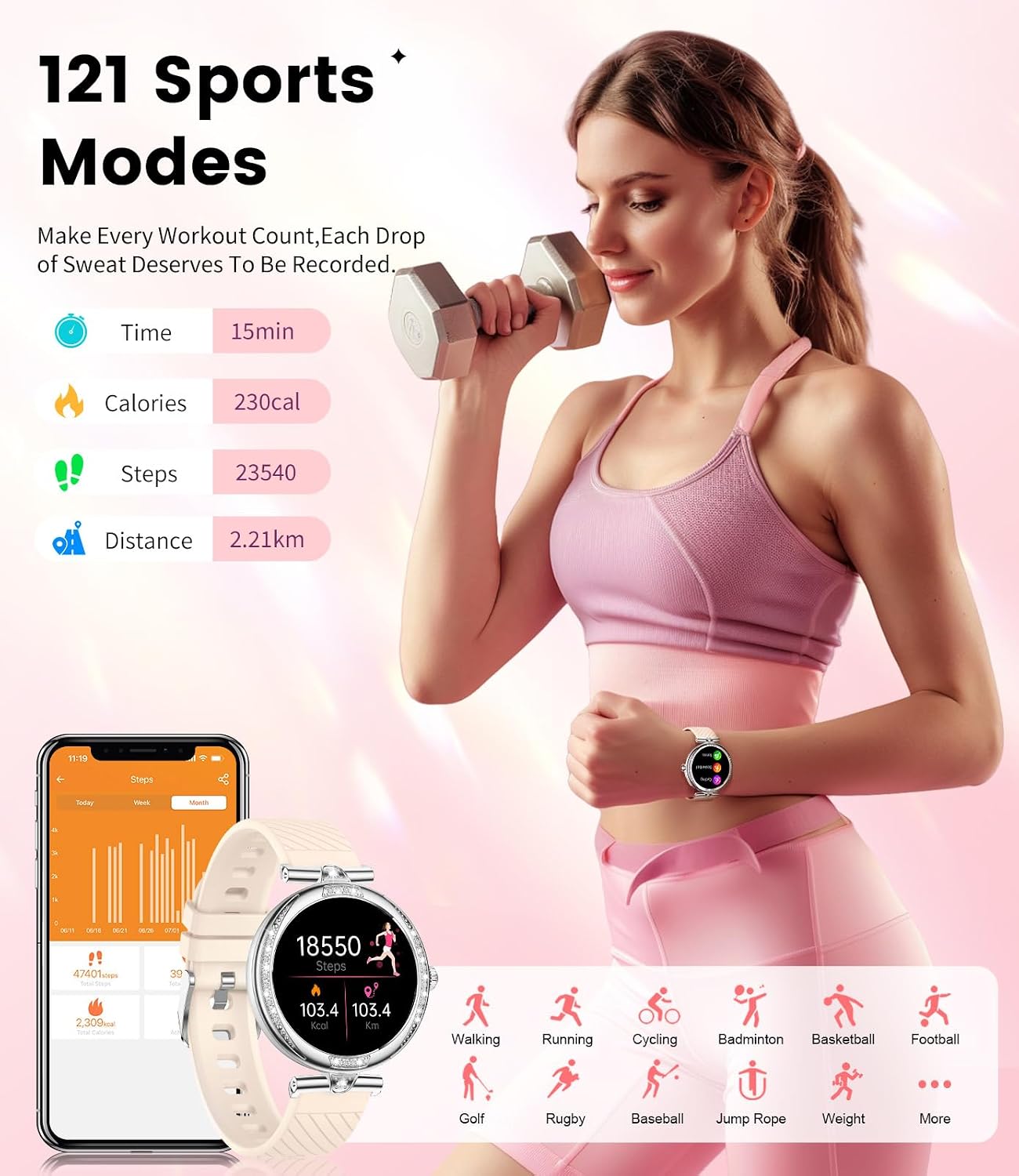
Image: Overview of the 121 sports modes and tracking metrics.
Durability & Battery
The LIGE Smart Watch features an elegant design with a zinc alloy face, IML caseback, and stainless steel band, making it both stylish and sturdy. It is IP68 water-resistant, ensuring it can withstand splashes, hand washing, and even swimming, but it is not recommended for hot water activities or prolonged submersion in deep water.
The built-in 300mAh Li-Polymer battery offers a standby time of up to 30 days and an operating time of about 5 days, making it perfect for your daily needs.

Image: IP68 Waterproof feature, suitable for daily activities like hand washing.
Maintenance
To ensure the longevity and optimal performance of your LIGE Smart Watch, follow these maintenance guidelines:
- Cleaning: Regularly wipe the watch screen and strap with a soft, dry cloth. For stubborn dirt, use a slightly damp cloth and dry thoroughly.
- Avoid Chemicals: Do not use harsh chemicals, cleaning solvents, or strong detergents, as they may damage the watch's finish or internal components.
- Storage: When not in use for extended periods, store the watch in a cool, dry place away from direct sunlight.
- Charging: Use only the provided charging cable. Avoid overcharging or leaving the watch connected to the charger for excessively long periods after it's fully charged.
Troubleshooting
If you encounter issues with your LIGE Smart Watch, refer to the following common solutions:
- Connectivity Issues: If the watch frequently disconnects from your phone, ensure the Dafit app is running in the background and Bluetooth is active. Try restarting both the watch and your phone.
- Battery Draining Quickly: Reduce screen brightness, disable unnecessary notifications, and limit continuous health monitoring (e.g., 24/7 heart rate) to extend battery life. Ensure the watch is fully charged.
- Inaccurate Health Readings: Ensure the watch is worn snugly on your wrist, not too tight or too loose. Clean the sensors regularly. Note that blood pressure and SpO2 readings are for reference only and not for medical use.
- Water Damage: While IP68 water-resistant, avoid exposing the watch to hot water (e.g., hot showers, saunas) or high-pressure water jets. If the watch face goes black after water exposure, allow it to dry completely before attempting to restart.
- Screen Unresponsive: Try restarting the watch. If the issue persists, ensure the screen is clean and dry.
For further assistance, please contact customer support.
Specifications
| Feature | Specification |
|---|---|
| Product Dimensions | 2.36 x 0.79 x 1.18 inches |
| Item Weight | 6.4 ounces |
| Item Model Number | FV4-A |
| Batteries | 1 Lithium Polymer batteries required (included) |
| Operating System Compatibility | Android 4.4+ and iOS 8.0+ |
| Connectivity Technologies | Bluetooth |
| GPS | GPS Via Smartphone |
| Special Features | Activity Tracker, Heart Rate Monitor, Sleep Monitor, Pedometer, Calorie Counter, Call/Message Notifications, Music Control, Voice Assistant, Remote Camera, Women's Health Management |
| Display Features | 1.19" AMOLED Display, Wireless |
| Color | Rose 2 Straps |
| Manufacturer | LIGE |
| Water Resistance | IP68 |
Warranty and Support
Your LIGE Smart Watch is backed by comprehensive support:
- Returns Service: Enjoy a 6-month return service from the date of purchase.
- Guarantee: The product comes with a 2-year guarantee covering manufacturing defects.
- Online Service: 24-hour online customer service is available to assist you with any queries or issues.

Image: LIGE customer support and warranty details.


