
1. Introduction
Thank you for choosing the BAOFENG UV-5RM 10W High Power Ham Radio. This device is designed for reliable long-range communication, offering multi-band functionality, NOAA weather alerts, and convenient USB-C charging. This manual provides essential information for safe and effective use of your radio.
2. Safety Information
- Read all instructions: Before operating the radio, thoroughly read and understand all safety and operating instructions.
- FCC Compliance: This device complies with FCC regulations. Operation is subject to the condition that this device does not cause harmful interference.
- Battery Safety: Use only approved batteries and chargers. Do not short-circuit, incinerate, or disassemble the battery pack.
- Antenna Care: Do not touch the antenna when the radio is transmitting.
- Explosive Environments: Do not operate the radio in potentially explosive atmospheres unless it is certified for such use.
- Water Resistance: The radio features a water-resistant casing, but it is not fully waterproof. Avoid submerging the device.
3. Package Contents
The BAOFENG UV-5RM package typically includes the following items:
- 2 x BAOFENG UV-5RM Ham Radio units
- 2 x 2500mAh Lithium-Ion Batteries
- 2 x Original Antennas (standard)
- 2 x Long Antennas (for extended range)
- 2 x USB-C Charging Cables
- 2 x Desktop Chargers
- 2 x Belt Clips
- 2 x Lanyards
- 2 x User Manuals
4. Product Overview
The BAOFENG UV-5RM is a robust 10W high-power ham radio designed for versatile communication. It features a 1.77-inch color screen, 999 channels, and supports multiple frequency bands including AM/FM/VHF/1.25M/UHF reception.

Figure 4.1: Comparison of BAOFENG UV-5RM with UV-5R, highlighting the 1.77-inch color display and 10W power.
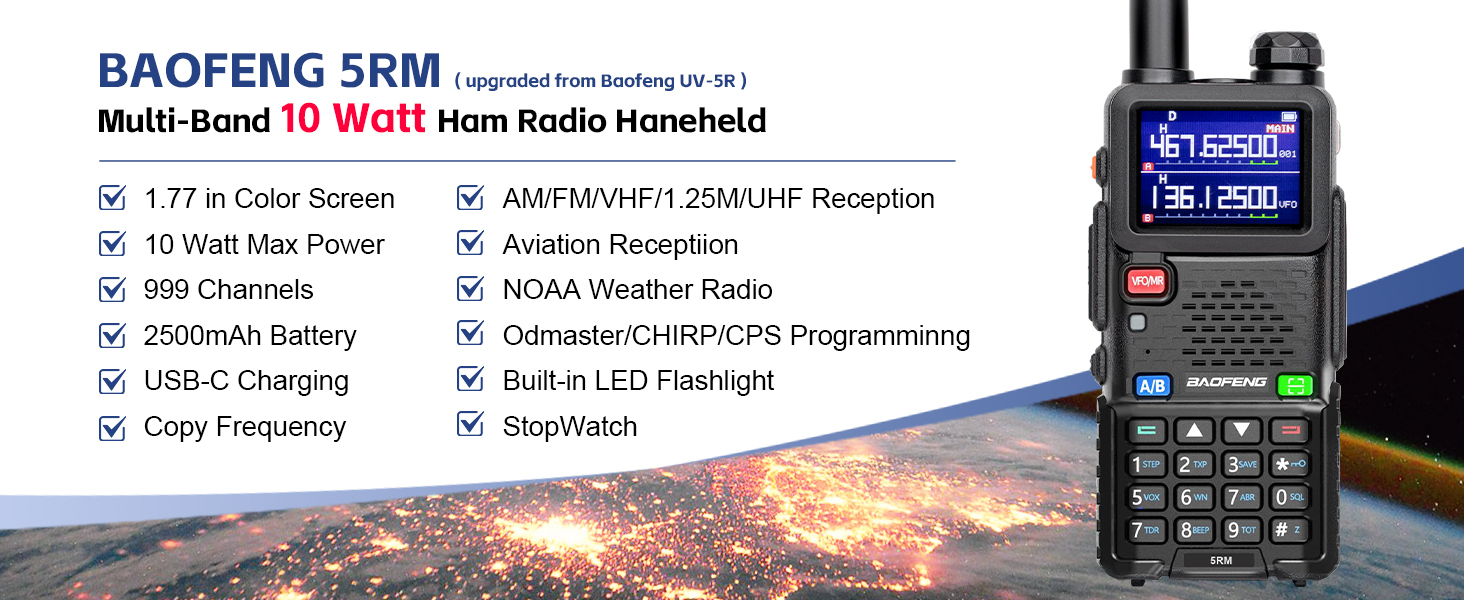
Figure 4.2: Detailed view of the BAOFENG UV-5RM's display and key features, including 10W max power, 999 channels, and USB-C charging.

Figure 4.3: Close-up of the BAOFENG UV-5RM display showing high power settings (High, Middle, Low) for transmission.
5. Setup
5.1. Battery Installation and Charging
The UV-5RM comes with a 2500mAh rechargeable battery. Ensure the battery is fully charged before first use.
- To install the battery, align the battery pack with the grooves on the back of the radio and slide it upwards until it clicks into place.
- To charge, connect the USB-C charging cable to the port on the battery pack or place the radio in the desktop charger.

Figure 5.1: The USB-C charging port located on the battery pack for convenient charging.

Figure 5.2: The 2500mAh battery, offering a significant power upgrade compared to standard batteries.

Figure 5.3: Examples of USB-C charging options, including car charger, power bank, wall adapter, and multi-port charger.
5.2. Antenna Attachment
Attach the desired antenna (standard or long) by screwing it clockwise onto the antenna connector at the top of the radio until it is finger-tight.

Figure 5.4: The BAOFENG UV-5RM with its antenna properly attached, ready for operation.
5.3. Power On/Off
To power on the radio, rotate the volume knob clockwise. To power off, rotate it counter-clockwise until it clicks.
6. Operating Instructions
6.1. Basic Operation
The UV-5RM features an intuitive interface with a large LCD screen and clearly labeled buttons.
- Volume Knob: Controls power on/off and audio volume.
- VFO/MR Button: Toggles between Frequency Mode (VFO) and Channel Mode (MR).
- A/B Button: Selects the upper (A) or lower (B) frequency display for dual-watch operation.
- MENU Button: Accesses the radio's menu settings.
- EXIT Button: Exits menu or cancels current operation.
- Numeric Keypad: Used for direct frequency input and menu navigation.
- PTT Button: Push-To-Talk button for transmitting.
Video 6.1: This video demonstrates various features of the BAOFENG 5RM 10-watt multi-band ham radio, including its display, buttons, and general operation.
6.2. Frequency Mode (VFO) and Channel Mode (MR)
The radio can operate in two primary modes:
- Frequency Mode (VFO): Allows direct input of frequencies for immediate use. Ideal for scanning and finding new frequencies.
- Channel Mode (MR): Accesses pre-programmed memory channels. Useful for frequently used frequencies.
Press the VFO/MR button to switch between these modes.
6.3. Transmitting and Receiving
- Ensure the radio is powered on and an antenna is attached.
- Select the desired frequency or channel.
- To transmit, press and hold the PTT button on the side of the radio. Speak clearly into the microphone.
- Release the PTT button to stop transmitting and listen for a response.
6.4. Multi-Band Functionality
The UV-5RM supports 8 frequency bands, including UHF, VHF, and aviation frequencies, making it suitable for various applications.

Figure 6.2: The radio's display showing multi-band capabilities, including various RX/TX frequencies.

Figure 6.3: The BAOFENG UV-5RM supports Aviation Reception (108-136 MHz AM modulation, 8.33 KHz channel spacing).
6.5. NOAA Weather Radio
Stay informed about weather conditions with the built-in NOAA weather receiver, providing alerts for severe weather.

Figure 6.4: The radio displaying NOAA Weather Mode, indicating its capability to receive severe weather alerts.
6.6. Copy Frequency Function
The UV-5RM features a one-key frequency copy function, allowing you to easily scan and copy frequencies from other radios without a programming cable.
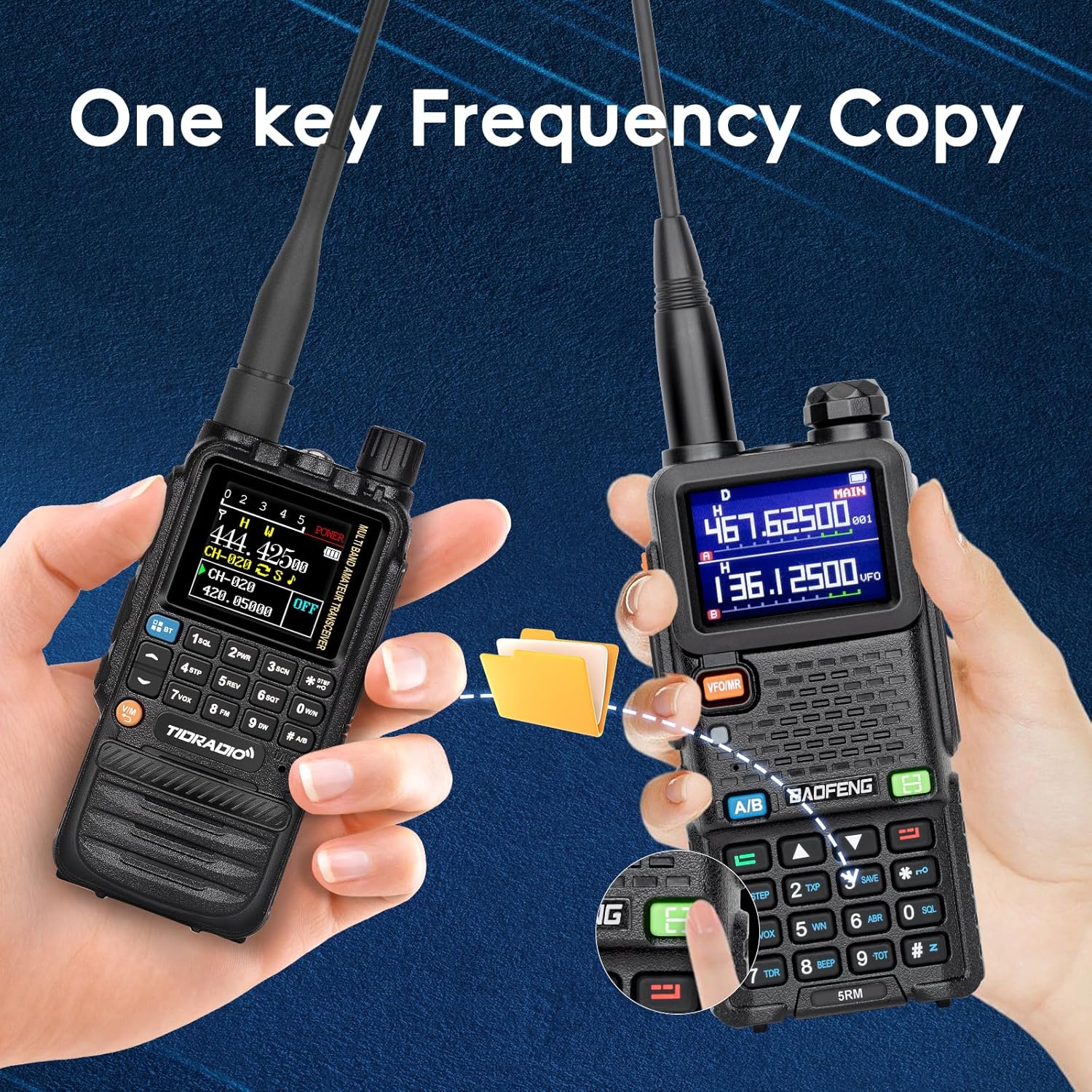
Figure 6.5: Demonstrating the one-key frequency copy function between two radios.

Figure 6.6: Visual representation of the High-Tech Copy Frequency feature, allowing easy frequency scanning.
6.7. 999 Channels
The radio supports up to 999 memory channels for storing your preferred frequencies.

Figure 6.7: The radio's display indicating its capacity for 999 channels.
6.8. Large 1.77-inch Color Screen
The 1.77-inch TFT large color screen provides clear visibility of frequencies, channels, and menu options.

Figure 6.8: Close-up of the 1.77-inch large color screen, enhancing user experience.
6.9. Odmaster/CHIRP/CPS Programming
The UV-5RM supports programming via Odmaster, CHIRP, or CPS software, allowing for advanced customization of channels and settings.

Figure 6.9: Odmaster Program APP logo, indicating support for mobile programming.

Figure 6.10: The BAOFENG UV-5RM connected to a TIDRADIO Bluetooth programmer, showing the mobile app interface for programming.
6.10. Rapid Scan
Utilize the rapid scan feature to quickly sweep through frequencies or channels to find active transmissions.

Figure 6.11: The radio displaying 'FREQUENCY SYNC RAPID SCAN', indicating its fast scanning capability.
6.11. Single Waiting
The single waiting feature allows the radio to monitor a single frequency or channel while in dual-watch mode.

Figure 6.12: The radio's display showing 'Single Waiting' mode, indicating it is monitoring a single frequency.
6.12. Built-in Stopwatch Timer
The radio includes a built-in stopwatch timer for various timing needs.

Figure 6.13: The radio displaying the stopwatch function, useful for timing activities.
7. Maintenance
7.1. Cleaning
Wipe the radio's surface with a soft, damp cloth. Do not use harsh chemicals or abrasive cleaners. Ensure the USB-C port cover is securely closed to maintain water resistance.
7.2. Battery Care
To prolong battery life, avoid fully discharging the battery frequently. Store the radio and battery in a cool, dry place when not in use for extended periods.
8. Troubleshooting
| Problem | Possible Cause | Solution |
|---|---|---|
| Radio does not power on | Low or dead battery; improperly installed battery | Charge the battery; ensure battery is correctly installed. |
| Cannot transmit or receive | Incorrect frequency/channel; antenna not attached; low battery | Verify frequency/channel; attach antenna securely; charge battery. |
| Poor audio quality | Weak signal; incorrect squelch setting; antenna issue | Move closer to other radio; adjust squelch level; check antenna connection. |
| Display is blank or frozen | Software glitch; low battery | Remove and reinsert battery to reset; charge battery. |
9. Specifications
| Feature | Detail |
|---|---|
| Model Number | BAOFENG 5RM |
| Output Power | 10W |
| Frequency Range | VHF, UHF (Multi-Band) |
| Number of Channels | 999 |
| Battery Capacity | 2500mAh Lithium Ion |
| Charging Type | USB-C Fast Charging |
| Display | 1.77" TFT Large Color Screen |
| Special Features | NOAA Weather Radio, DTMF, Copy Frequency, Built-in LED Flashlight, Stopwatch |
| Talking Range Maximum | 10 Kilometers (approx. 6.2 miles) |
| Water Resistance Level | Water Resistant |
| Item Weight | 2.44 pounds (for 2-pack) |
| Package Dimensions | 8.7 x 7.91 x 4.09 inches |
10. Warranty
The BAOFENG UV-5RM typically comes with a 30-day warranty from the date of purchase. Please refer to your purchase documentation for specific warranty terms and conditions. Keep your proof of purchase for any warranty claims.
11. Support
For technical support, troubleshooting assistance, or further inquiries, please visit the official BAOFENG website or contact your retailer. You may also find helpful resources and community forums online for BAOFENG products.
Online Resources:
- BAOFENG Official Website: www.baofengradio.com
- TIDRADIO Store on Amazon: Amazon Store


