
Soundcraft EPM6
Soundcraft EPM6 8-channel Analog Mixer User Manual
Model: EPM6
1. Introduction
The Soundcraft EPM6 is an 8-channel analog mixer designed for various audio applications, including live sound, studio recording, and broadcast. It features Soundcraft's premium GB30 mic preamps, balanced inputs with inserts, and an intuitive control surface. This manual provides essential information for the proper setup, operation, and maintenance of your EPM6 mixer.
2. Important Safety Information
- Power Source: Connect the mixer only to the specified power supply voltage. Ensure the power cord is not damaged or pinched.
- Moisture: Do not expose the unit to rain or moisture. Avoid placing liquid-filled objects on the mixer.
- Ventilation: Ensure adequate ventilation. Do not block ventilation openings.
- Servicing: Refer all servicing to qualified service personnel. Do not attempt to service this product yourself.
- Cleaning: Clean only with a dry cloth.
3. Setup
3.1 Unpacking
Carefully remove the mixer from its packaging. Retain the packaging for future transport or storage. Inspect the unit for any signs of damage. If damage is found, contact your dealer immediately.
3.2 Power Connection
Connect the supplied power adapter to the mixer's power input and then to a suitable AC power outlet. Ensure the mixer is switched off before connecting power.
3.3 Input Connections
The EPM6 features 6 mono input channels and 2 stereo input channels. Each mono channel includes an XLR input for microphones and a 1/4" jack input for line-level sources. Inserts are also provided for external processing.
- Microphones: Connect microphones to the XLR inputs. Phantom power (+48V) can be globally switched on for condenser microphones.
- Line-Level Devices: Connect instruments, keyboards, or other line-level devices to the 1/4" jack inputs.
- Stereo Inputs: Use the stereo channels for devices like CD players or effects returns.
3.4 Output Connections
The mixer provides various output options:
- Main Mix Output: Connect your main speakers or power amplifier to the balanced XLR Main Mix outputs.
- Monitor Output: Use the Monitor outputs to connect to stage monitors or a control room monitoring system.
- Aux Sends: These outputs can be used for external effects processors or additional monitor mixes.
- Headphone Output: Connect headphones to the 1/4" stereo jack for personal monitoring.
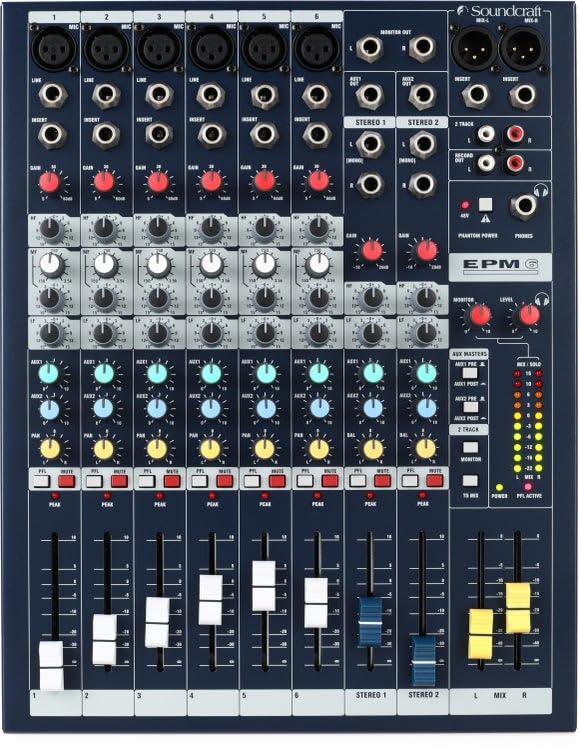
Figure 1: Front view of the Soundcraft EPM6 mixer, showing input/output sections and channel controls.
4. Operating Instructions
4.1 Channel Strip Controls
Each mono input channel features the following controls:
- Gain Control: Adjusts the input sensitivity for the microphone or line input. Set this to achieve a healthy signal level without clipping (indicated by the Peak LED).
- EQ (Equalizer): A 3-band EQ (High, Mid, Low) allows you to shape the tone of the input signal.
- AUX Sends: Controls the amount of signal sent to the auxiliary outputs, typically used for effects or monitor mixes.
- PAN: Positions the channel's signal within the stereo field (left to right).
- Mute/PFL: Mutes the channel or sends its signal to the PFL (Pre-Fader Listen) bus for monitoring through headphones.
- Channel Fader: Controls the overall level of the channel in the main mix.
- Peak LED: Illuminates when the signal level approaches clipping. Adjust the Gain control to prevent this LED from lighting consistently.
4.2 Master Section Controls
The master section provides overall control for the mixer:
- Main Mix Fader: Controls the overall output level of the stereo main mix.
- Headphone Level: Adjusts the volume for the headphone output.
- Aux Master Controls: Individual faders or knobs for controlling the overall level of each auxiliary send.
- Stereo Return: Controls the level of any stereo effects returns.
4.3 Phantom Power
The EPM6 provides +48V phantom power for condenser microphones. This is a global switch, meaning it applies to all mono XLR inputs simultaneously. Ensure dynamic microphones or ribbon microphones are not connected when phantom power is engaged, unless their specifications explicitly state compatibility.
5. Maintenance
5.1 Cleaning
To clean the mixer, use a soft, dry, lint-free cloth. Do not use liquid cleaners, abrasive cleaners, or solvents, as these can damage the finish and internal components. Regularly dust the surface and control knobs.
5.2 Storage
When not in use for extended periods, store the mixer in a cool, dry place, away from direct sunlight and extreme temperatures. It is recommended to use the original packaging for protection during storage or transport.
5.3 Environmental Considerations
Avoid operating the mixer in environments with excessive dust, humidity, or extreme temperature fluctuations. These conditions can negatively impact the performance and lifespan of the unit.
6. Troubleshooting
If you encounter issues with your Soundcraft EPM6 mixer, refer to the following common problems and solutions:
| Problem | Possible Cause | Solution |
|---|---|---|
| No sound output |
|
|
| Distorted sound |
|
|
| Hum or noise |
|
|
If the problem persists after attempting these solutions, contact Soundcraft customer support or a qualified service technician.
7. Specifications
| Brand | Soundcraft |
| Model | EPM6 |
| Number of Channels | 8 (6 mono, 2 stereo) |
| Mic Preamps | GB30 |
| EQ | 3-band per mono channel |
| Output Connector Type | XLR (Main Mix) |
| Item Weight | 11.2 Pounds (approx. 5.08 kg) |
| UPC | 688705007946 |
| Model Number (Manufacturer Part) | SCR-RW5734US |
8. Warranty and Support
8.1 Product Warranty
Soundcraft products are manufactured to high standards and are covered by a limited warranty against defects in materials and workmanship. Please refer to the warranty card included with your product or visit the official Soundcraft website for detailed warranty terms and conditions specific to your region.
8.2 Customer Support
For technical assistance, troubleshooting beyond this manual, or service inquiries, please contact Soundcraft customer support. Contact information can typically be found on the official Soundcraft website or in the documentation accompanying your product.
Online Resources: For additional information, FAQs, and software/firmware updates, visit the official Soundcraft website: www.soundcraft.com
Ask a question about this manual
Ask about setup, troubleshooting, compatibility, parts, safety, or missing instructions. Manuals+ will review the question and use this page’s manual context to help answer it.