
Edision 01-07-0031
EDISION Proton S2 Plus Full HD Satellite Receiver User Manual
Model: 01-07-0031
Introduction
The EDISION Proton S2 Plus is a compact Full HD Satellite Receiver designed for receiving all free-to-air (FTA) TV and radio channels via satellite. It features DVB-S2 compatibility, a 2-in-1 universal remote control, and supports Unicable systems. This manual provides detailed instructions for setting up, operating, and maintaining your receiver to ensure optimal performance.
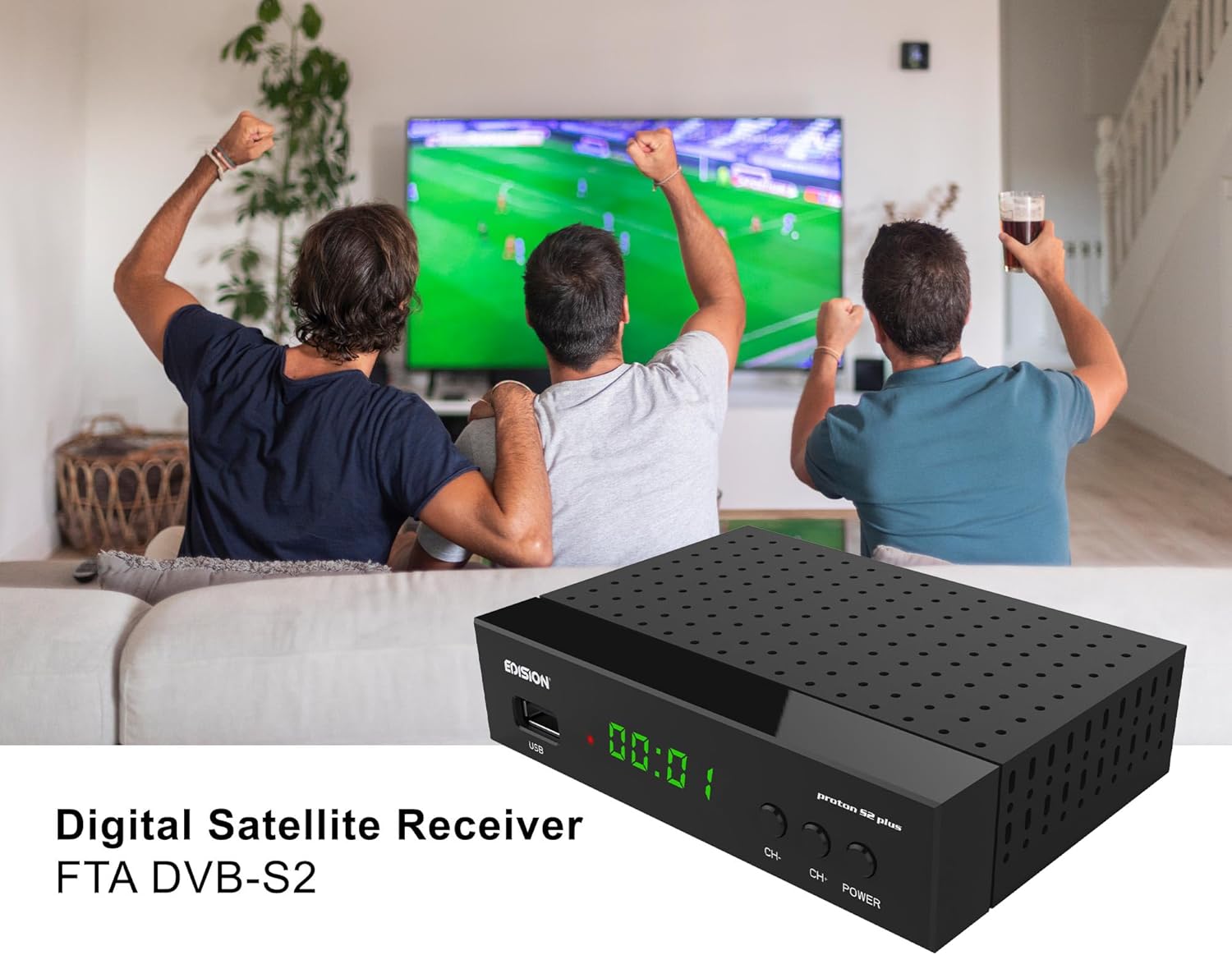
Image: The EDISION Proton S2 Plus receiver, a compact black box, is shown in a living room environment, indicating its use for home entertainment.
Package Contents
Please check the box for the following items:
- EDISION Proton S2 Plus Receiver
- 2-in-1 Universal Remote Control
- 12V 1A Power Supply Unit (PSU)
- 2 x AAA Batteries (LR03)
- Quick User Guide (EN/DE/GR/IT/ES/FR)
- 2 x Self-adhesive pads

Image: A visual representation of all items included in the EDISION Proton S2 Plus product package, laid out clearly for identification.
Product Overview
Front & Side Panel

Image: Detailed diagram showing the front and side view of the receiver, highlighting key features and their corresponding numbers.
- IR IN: Infrared connection port for an external IR sensor (not included).
- S/PDIF: Coaxial audio connection for digital audio output.
- USB: USB port for storage devices (PVR, Timeshift, media playback) or a USB WiFi Antenna.
- LED Display: Shows the current time or program number.
- CH+/CH- Buttons: Buttons for navigating through program lists.
- POWER Button: To turn the receiver on or off.
Connections on the Back Panel
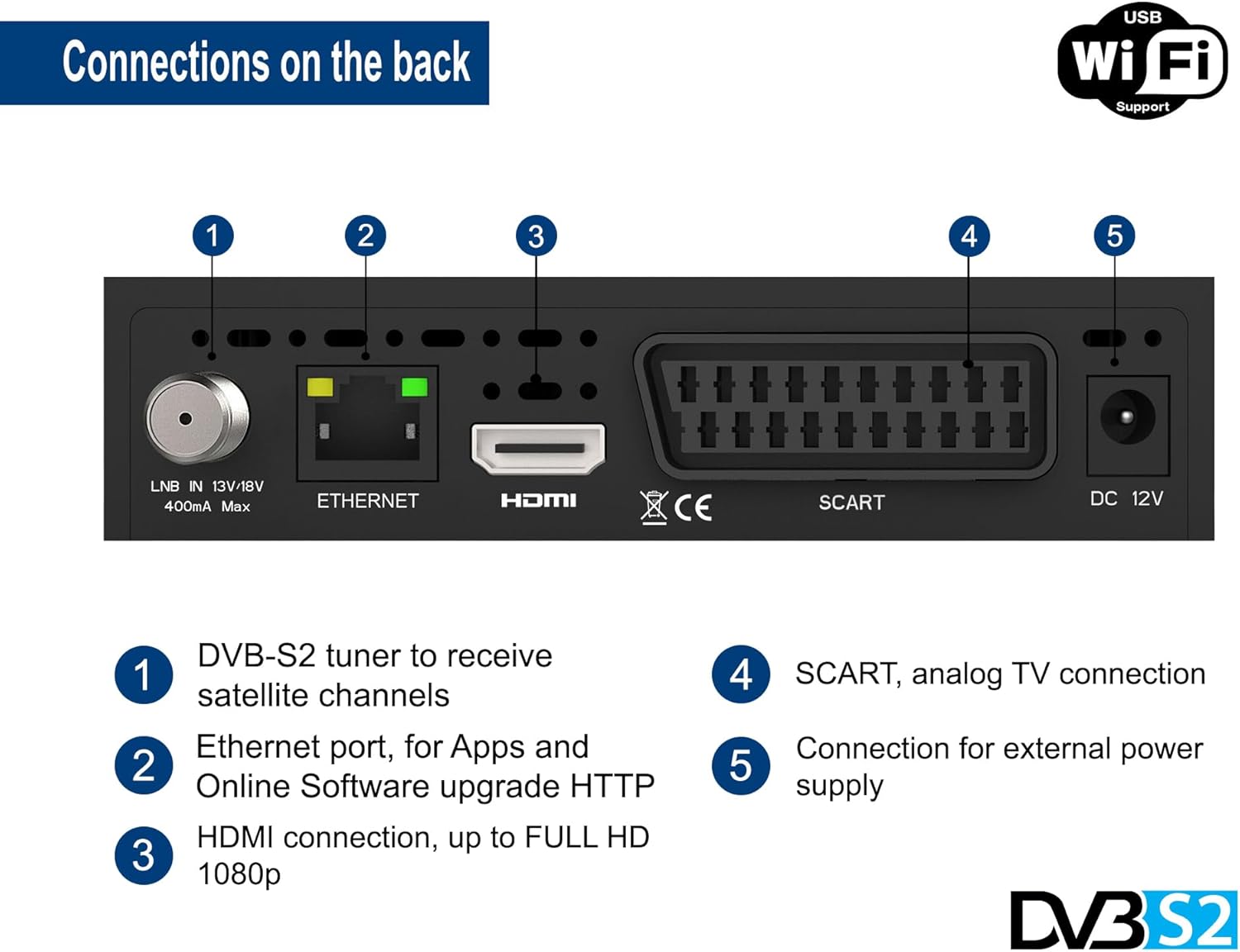
Image: Detailed diagram illustrating the rear panel of the receiver, indicating all available input and output ports.
- LNB IN: DVB-S2 tuner input to receive satellite channels. Supports 13V/18V, 400mA max.
- ETHERNET: Ethernet port for network connection, used for apps (YouTube, Weather) and online software updates.
- HDMI: HDMI connection for digital video and audio output, supporting up to Full HD 1080p.
- SCART: SCART analog TV connection for older televisions.
- DC 12V: Connection for the external 12V power supply.
2-in-1 Universal Remote Control
The EDISION Proton S2 Plus comes with a versatile 2-in-1 remote control (EDI-RCU 4 Learn) that can operate both the receiver and your TV. It is pre-programmed for the four most important functions of SAMSUNG and LG TVs. You can also program these four buttons to control other TV brands as desired.

Image: An illustration of the 2-in-1 remote control, showing its layout and indicating its dual functionality for controlling both the satellite receiver and a television.
Programming TV Functions:
Refer to the included Quick User Guide for detailed instructions on how to program the TV control buttons on your remote.
Setup
Follow these steps for the initial setup of your EDISION Proton S2 Plus receiver:
- Connect to TV: Connect the receiver to your TV using an HDMI cable for the best picture quality. Alternatively, use a SCART cable for older TVs.
- Connect to Satellite Dish: Connect the LNB cable from your satellite dish to the "LNB IN" port on the back of the receiver.
- Connect Power: Insert the 12V 1A power adapter into the "DC 12V" port on the receiver and then plug it into a power outlet.
- Insert Batteries: Open the battery compartment of the remote control and insert the two AAA batteries, ensuring correct polarity.
- Initial Boot-up: Turn on your TV and select the correct HDMI or SCART input. The receiver will power on automatically or can be turned on using the POWER button on the front panel or remote.
- Language Selection: Upon first boot-up, you will be prompted to select your preferred language. Use the remote control to navigate and confirm.
- Channel Scan: The receiver comes with a pre-programmed channel list for Astra 19.2°E. If you need to scan for channels or use a different satellite, navigate to the "Installation" or "Channel Search" menu in the settings. The receiver supports Unicable & SCR Unicable 2.
- Network Connection (Optional): For internet features like YouTube, Weather, and online software updates, connect an Ethernet cable to the "ETHERNET" port or plug in a compatible USB WiFi adapter (MTK7601 support) into the USB port. Configure network settings in the "Network" menu.

Image: An illustrative diagram demonstrating how to connect the satellite receiver to a television using an HDMI cable and the power adapter, along with an optional WiFi dongle.
Operating Instructions
Basic Operation
- Channel Navigation: Use the CH+/CH- buttons on the remote or front panel to change channels. Enter channel numbers directly using the numeric keypad.
- Volume Control: Use the VOL+/VOL- buttons on the remote.
- Menu Access: Press the MENU button to access the main menu for settings, channel management, and other features.
- Electronic Program Guide (EPG): Press the EPG button to view program information for upcoming broadcasts.
- Information Display: Press the INFO button to display current channel information.
Multimedia Playback & PVR
The receiver supports multimedia playback and PVR (Personal Video Recorder) functions via its USB port.
- Connect USB Device: Insert a USB storage device (USB stick or external hard drive) into the USB port.
- PVR (Recording): To record a program, press the REC button on the remote while watching a channel. You can also schedule recordings via the EPG.
- Timeshift: Press the PAUSE button during live TV to activate Timeshift. You can then pause, rewind, or fast-forward live television.
- Media Playback: Access the "Multimedia" or "USB" menu to browse and play various media files, including MP3, AC3, AAC, JPEG, PNG, MP4, MOV, AVI, MKV, MPG, MPEG, Xvid, and DivX.
Internet Features
With an active internet connection (Ethernet or USB WiFi), you can access online applications:
- YouTube: Watch videos from YouTube directly on your TV.
- Weather: Get local weather forecasts.
- Online Software Update: Keep your receiver's firmware up-to-date via the internet.
Maintenance
To ensure the longevity and optimal performance of your EDISION Proton S2 Plus receiver, follow these maintenance guidelines:
- Cleaning: Use a soft, dry cloth to clean the exterior of the receiver. Do not use liquid cleaners, aerosols, or abrasive solvents.
- Ventilation: Ensure proper ventilation around the receiver. Do not block the ventilation holes. Avoid placing the receiver in enclosed spaces or on soft surfaces that may obstruct airflow.
- Power Off: If the receiver will not be used for an extended period, it is recommended to unplug it from the power outlet.
- Software Updates: Regularly check for and install software updates to improve performance and add new features. This can usually be done via the online update function in the menu.
Troubleshooting
If you encounter issues with your receiver, please refer to the following common problems and solutions:
| Problem | Possible Cause | Solution |
|---|---|---|
| No picture or sound | Incorrect TV input selected; Loose HDMI/SCART cable; Receiver not powered on; No satellite signal. | Check TV input source; Ensure cables are securely connected; Power on receiver; Check LNB connection and satellite dish alignment. |
| Remote control not working | Dead batteries; Obstruction between remote and receiver; Remote not pointed correctly. | Replace batteries; Remove obstructions; Point remote directly at the receiver's IR sensor. |
| Cannot find channels | Incorrect satellite settings; LNB cable disconnected; Dish misalignment. | Perform a channel scan; Verify satellite settings (e.g., LNB type, DiSEqC); Check LNB cable connection; Adjust satellite dish. |
| Internet features not working | No network connection; Incorrect network settings; Incompatible USB WiFi adapter. | Check Ethernet cable or USB WiFi adapter connection; Verify network settings (IP address, DNS); Ensure USB WiFi adapter is MTK7601 compatible. |
If the problem persists after trying these solutions, please contact EDISION customer support.
Specifications
| Feature | Detail |
|---|---|
| Model Number | 01-07-0031 |
| Dimensions (L x W x H) | 13 x 9 x 3 cm |
| Weight | 320 Grams |
| Tuner Type | DVB-S2 (Satellite) |
| Video Output | HDMI (up to Full HD 1080p), SCART |
| Audio Output | HDMI, SCART, S/PDIF Coaxial |
| USB Ports | 2 (for PVR, Timeshift, Media Playback, USB WiFi) |
| Network Connectivity | Ethernet, USB WiFi Support (MTK7601) |
| Special Features | 2-in-1 Universal Remote, Unicable & SCR Unicable 2 Support, Pre-programmed German Channel List (Astra 19.2°E), Multimedia Player (MP3/AC3/AAC/JPEG/PNG/MP4/MOV/AVI/MKV/MPG/MPEG/Xvid/DivX), YouTube, Weather App. |
| Power Supply | External 12V 1A DC Adapter |
Warranty and Support
EDISION products are designed for reliability and performance. For warranty information and technical support, please refer to the warranty card included in your package or visit the official EDISION website:
Please have your model number (01-07-0031) and purchase details ready when contacting support.
Related documents01-07-0031


Ask a question about this manual
Ask about setup, troubleshooting, compatibility, parts, safety, or missing instructions. Manuals+ will review the question and use this page’s manual context to help answer it.