
1. Introduction
Thank you for choosing the AWEI T90 Wireless Earbuds. This manual provides essential information for the proper setup, operation, and maintenance of your device. Please read it thoroughly before use to ensure optimal performance and longevity.

Image: AWEI T90 Wireless Earbuds and their charging case.
2. Package Contents
Upon opening the package, verify that all the following items are included:
- AWEI T90 Wireless Earbuds (Left and Right)
- Charging Case
- USB Charging Cable (Type-C)
- User Manual
- Eartips (various sizes)
3. Setup
3.1 Initial Charging
Before first use, fully charge the earbuds and the charging case. Connect the provided USB Type-C cable to the charging port on the case and a compatible USB power source. The charging case requires approximately 1.5 hours for a full charge.
3.2 Bluetooth Pairing
The AWEI T90 earbuds are designed for automatic pairing. Follow these steps:
- Ensure the earbuds are charged.
- Open the charging case. The earbuds will automatically enter pairing mode.
- On your device (smartphone, tablet, laptop), enable Bluetooth.
- Search for available Bluetooth devices and select "AWEI T90".
- Once connected, a confirmation sound will be heard, and the earbuds will be ready for use.
The earbuds utilize Bluetooth 5.3 technology for a stable connection up to 10 meters (33 feet).

Image: Visual representation of Bluetooth 5.3 connectivity.
4. Operating Instructions
4.1 Wearing the Earbuds
The AWEI T90 earbuds offer a versatile wearing experience with removable ear caps, allowing for both semi-in-ear and all-in-ear configurations.
- Semi-In-Ear Wearing (without ear caps): Provides a more open sound experience and increased awareness of surroundings. Ideal for situations requiring environmental perception.
- All-In-Ear Wearing (with ear caps): Offers a more immersive audio experience and better passive noise isolation. Choose the appropriate ear tip size for a secure and comfortable fit.
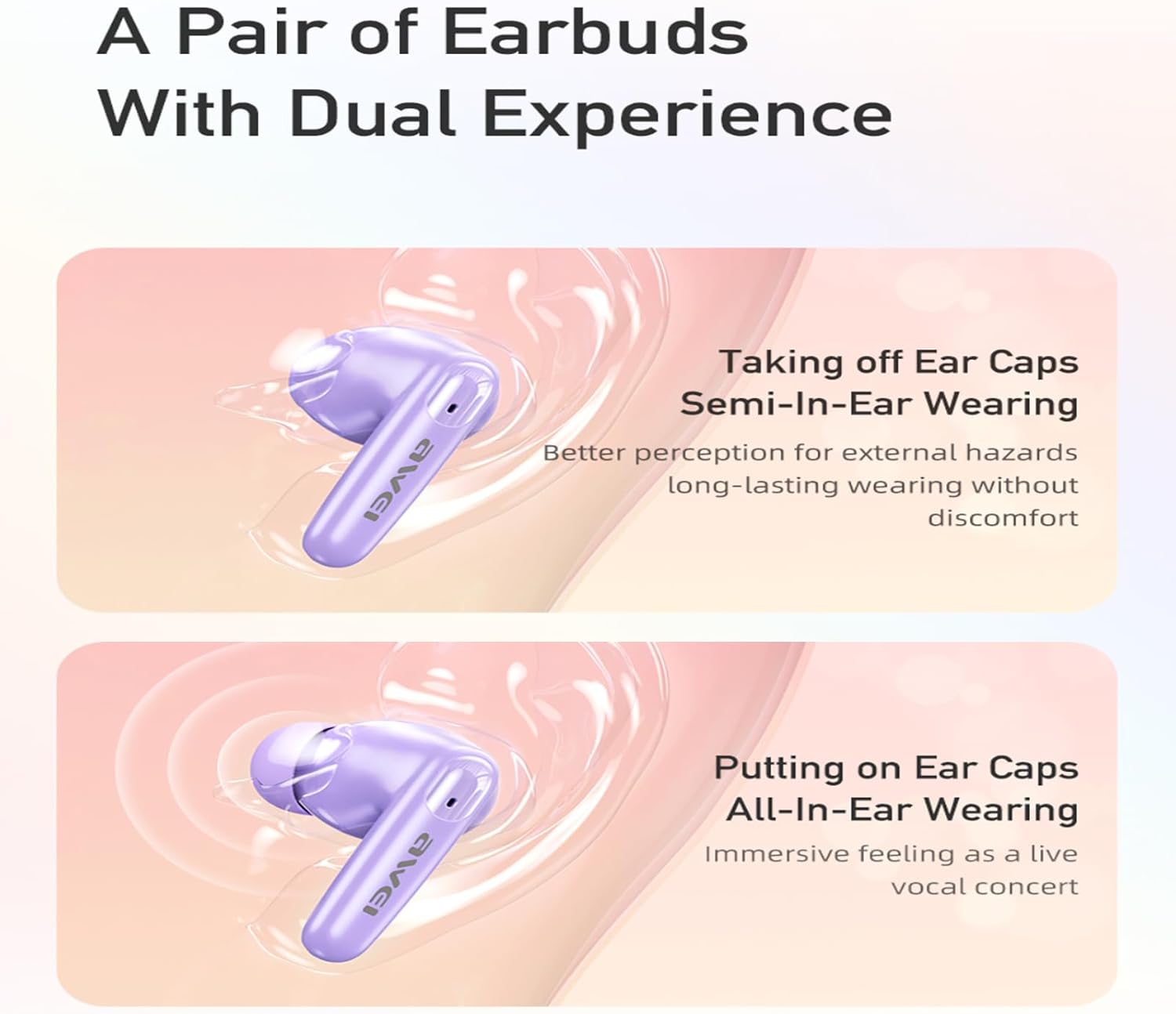
Image: Illustration of dual wearing modes: semi-in-ear and all-in-ear.
4.2 Touch Controls
The earbuds feature intuitive touch controls on both the left and right earbuds. Specific functions may vary slightly depending on your device and application.
- Play/Pause: Single tap on either earbud.
- Next Song: Double tap on the right earbud.
- Previous Song: Double tap on the left earbud.
- Volume Up: Triple tap on the right earbud.
- Volume Down: Triple tap on the left earbud.
- Answer/End Call: Single tap on either earbud during an incoming call.
- Reject Call: Press and hold either earbud for 2 seconds during an incoming call.
- Activate Voice Assistant: Press and hold either earbud for 3 seconds (when not on a call).
4.3 Single/Dual Earbud Mode
You can use either earbud independently or both together. Simply remove one earbud from the case to use it in single mode. To switch to dual mode, remove the other earbud. The earbuds will automatically connect.
4.4 Calling Functionality
The AWEI T90 earbuds incorporate ENC (Environmental Noise Cancellation) technology for clearer call quality, reducing background noise during conversations.
5. Maintenance
5.1 Cleaning
Regularly clean your earbuds and charging case to maintain optimal performance and hygiene. Use a soft, dry, lint-free cloth. For ear tips, remove them and clean with a mild soap solution, then rinse and dry thoroughly before reattaching.
5.2 Water Resistance
The AWEI T90 earbuds are rated IPX6 waterproof, meaning they are protected against high-pressure water jets from any direction. This makes them suitable for use during workouts or in light rain. However, they are not designed for submersion in water. Avoid exposing the charging case to water.
6. Troubleshooting
If you encounter issues with your AWEI T90 earbuds, refer to the following common solutions:
- Earbuds not pairing: Ensure both earbuds are charged and removed from the case. Turn off and on your device's Bluetooth, then try pairing again.
- Only one earbud working: Place both earbuds back into the charging case, close the lid, wait a few seconds, then open the lid and remove them simultaneously. This often re-syncs them.
- No sound: Check the volume level on both your earbuds and your connected device. Ensure the earbuds are properly connected via Bluetooth.
- Charging issues: Verify the charging cable is securely connected to both the case and the power source. Ensure the charging contacts on the earbuds and inside the case are clean and free of debris.
- Poor call quality: Ensure the microphone is not obstructed. Try moving to an area with less background noise.
If the issue persists, try resetting the earbuds (refer to the manufacturer's website for specific reset instructions if not detailed here) or contact customer support.
7. Specifications
| Feature | Specification |
|---|---|
| Brand | AWEI |
| Model Number | T90 |
| Bluetooth Version | 5.3 |
| Wireless Range | Up to 10 meters (33 feet) |
| Earbud Playtime (single charge) | Up to 7 hours |
| Total Playtime (with charging case) | Up to 35 hours (dual-ear mode), 70 hours (single-ear alternating) |
| Charging Case Charge Time | Approx. 1.5 hours (Type-C) |
| Water Resistance Rating | IPX6 |
| Speaker Size | 10mm |
| Impedance | 32 Ohms |
| Noise Control | ENC (Environmental Noise Cancellation) for calls |
| Control Type | Touch Control |
| Compatible Devices | iOS/Android smartphones, PCs, tablets, laptops, TVs |

Image: Summary of key product specifications and features.
8. Warranty and Support
8.1 Warranty Information
The AWEI T90 Wireless Earbuds come with a 1-Year Warranty from the date of purchase. This warranty covers manufacturing defects. It does not cover damage caused by misuse, accidents, unauthorized modifications, or normal wear and tear.
8.2 Customer Support
For technical assistance, warranty claims, or any other inquiries, please contact AWEI customer support through the retailer where the product was purchased or visit the official AWEI website for contact information.
9. Important Safety Information
- Do not disassemble, repair, or modify the product.
- Keep the earbuds and charging case away from extreme temperatures, direct sunlight, and open flames.
- Avoid listening at high volume levels for extended periods to prevent hearing damage.
- Keep out of reach of children and pets.
- Dispose of the product responsibly according to local regulations.