
1. Introduction
The Moondrop Kadenz are high-fidelity in-ear headphones designed for exceptional audio performance. Featuring a 10mm ULT-Gen2 patented super-linear dynamic driver and a TAC Diamond-Coated Dome Composite Diaphragm, these headphones deliver a wide frequency response and ultra-low distortion. The Kadenz offers versatile connectivity and advanced tuning options through the MOONDROP APP, ensuring a personalized listening experience.
2. What's in the Box
Carefully unpack your Moondrop Kadenz package. The following items should be included:
- Moondrop Kadenz In-Ear Monitors
- Ear-tips (Sizes S, M, L)
- Spring tips (Sizes S, M, L)
- High-quality Cable (with 3.5mm single-ended and 4.4mm balanced replaceable plugs)
- Adapter
- Leather Case
- Interchangeable Nozzle (ABC)
- 4.4mm Fully Balanced Type-C Decoding Cable (ECHO-B model)
- User Manual
- Service Card
- Certificate
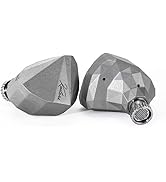
Image: The Moondrop Kadenz in-ear headphones shown with their various included accessories, including different ear tips, cables, and a carrying case.
3. Product Overview
The Moondrop Kadenz features a sophisticated design focused on acoustic precision and user comfort.
Key Components:
- 10mm ULT-Gen2 Patented Dynamic Driver: This advanced driver utilizes FEA finite element simulation and topology optimization for significant performance improvements, delivering outstanding dynamic range and ultra-low nonlinear distortion.
- TAC Diamond-Coated Dome Composite Diaphragm: Ensures precise sound reproduction across the entire frequency spectrum.
- Dome-Shaped Vent: Uniquely designed to suppress treble standing waves within the diaphragm and protect the diaphragm and coil from high dynamic stress.
- Pressure Balance Channels: Integrated for different vibration regions to optimize acoustic performance.
- Detachable Cable Design: Allows for easy replacement and upgrade of cables. The included cable is a high-quality single-crystal copper silver-plated Litz cable.
- Interchangeable Plugs: The cable is equipped with 3.5mm single-ended and 4.4mm balanced replaceable plugs for compatibility with various audio sources.
- ECHO-B USB-C Decoding Cable (Optional/Included with specific models): A universal USB-C plug compatible with smartphones, laptops, computers, and iP15, offering lossless sound quality and interactive DSP features.

Image: A close-up view of the 10mm dynamic driver, highlighting its intricate design and components.

Image: A detailed diagram illustrating the re-modeled internal cavity structure, optimized for balanced sound.

Image: The interchangeable nozzle filters, which allow users to fine-tune the sound profile of the headphones.

Image: An exploded view showing the individual components of the nozzle assembly, including filters and mesh.
4. Setup
4.1 Attaching the Cable
- Identify the left (L) and right (R) earpieces and the corresponding connectors on the cable.
- Align the 2-pin connector on the cable with the socket on the earpiece. Ensure correct orientation to avoid damage.
- Gently push the connector into the socket until it is firmly seated. Do not force it.
- Repeat for the other earpiece.

Image: A close-up of the 2-pin connector securely attached to the earpiece, demonstrating the detachable cable design.
4.2 Selecting Ear Tips
Proper ear tip selection is crucial for sound quality and comfort. Experiment with the included silicone and spring tips (S, M, L sizes) to find the best fit.
- A good seal ensures optimal bass response and passive noise isolation.
- The ear tips should feel comfortable for extended listening sessions.
4.3 Connecting to an Audio Source
The Kadenz offers multiple connection options:
- 3.5mm Single-Ended: Use the standard 3.5mm plug for most smartphones, laptops, and audio players.
- 4.4mm Balanced: Use the 4.4mm balanced plug for compatible high-resolution audio players and DACs to achieve optimal sound quality.
- ECHO-B USB-C Decoding Cable: If using the ECHO-B cable, connect its USB-C end to your smartphone, laptop, or computer. This cable provides a built-in DAC for high-resolution audio decoding.

Image: The Moondrop Kadenz connected to a smartphone using the USB-C ECHO-B decoding cable, demonstrating device compatibility.

Image: The interchangeable 3.5mm single-ended and 4.4mm balanced plugs, offering flexible connectivity options.
5. Operating Instructions
5.1 Basic Playback
- Ensure the Kadenz headphones are properly connected to your audio source.
- Start audio playback on your device.
- Adjust the volume to a comfortable listening level. Avoid excessively high volumes to prevent hearing damage.
5.2 Using the MOONDROP APP (with ECHO-B cable)
The ECHO-B USB-C decoding cable enables advanced tuning features via the MOONDROP APP (available for Android devices).
- Download and install the MOONDROP APP from your device's app store.
- Connect your Kadenz headphones using the ECHO-B USB-C cable to your compatible device.
- Open the MOONDROP APP.
- Built-in Tuning Configurations: Select from five pre-set tuning configurations to instantly change the sound profile.
- Custom Parametric Equalizer (PEQ): Utilize the PEQ feature to create and save your own custom sound tunings.
- Download/Upload Tunings: Explore tuning optimization configurations shared by other users or upload your own custom tunings to the community.
For a visual guide on the MOONDROP APP's tuning capabilities, please refer to the official product video:
Video: This video demonstrates the graphical online DSP and tuning possibilities available through the MOONDROP APP, showcasing how users can select or customize parametric equalizers and share tuning configurations.
5.3 Interchangeable Nozzles
The Kadenz includes interchangeable nozzles (labeled A, B, C) that allow for subtle adjustments to the sound signature. To change a nozzle:
- Gently unscrew the current nozzle from the earpiece.
- Select your desired nozzle.
- Carefully screw the new nozzle onto the earpiece until it is secure. Do not overtighten.
6. Maintenance
6.1 Cleaning the Earpieces and Ear Tips
- Regularly clean the earpieces and ear tips to maintain hygiene and optimal sound quality.
- Remove the ear tips from the earpieces.
- Wipe the earpieces with a soft, dry, lint-free cloth.
- Clean the ear tips with mild soap and water. Rinse thoroughly and allow them to air dry completely before reattaching.
- Use a small brush or cotton swab to gently remove any earwax or debris from the nozzle grilles.
6.2 Cable Care
- Avoid sharp bends or excessive pulling on the cable to prevent internal damage.
- When not in use, store the headphones and cable in the provided leather case to protect them from dust and physical damage.
6.3 Storage
Store your Moondrop Kadenz in a cool, dry place away from direct sunlight and extreme temperatures. The included leather case is ideal for safe storage and transport.
7. Troubleshooting
If you encounter any issues with your Moondrop Kadenz headphones, please refer to the following common solutions:
| Problem | Possible Cause | Solution |
|---|---|---|
| No sound or low volume |
|
|
| Distorted sound |
|
|
| Uncomfortable fit |
|
|
| MOONDROP APP not connecting (ECHO-B) |
|
|
8. Specifications
| Feature | Detail |
|---|---|
| Brand | Moondrop |
| Model Name | Kadenz |
| Model Number | MOONDROP Kadenz |
| Ear Placement | In Ear |
| Form Factor | In Ear |
| Color | Gray |
| Impedance | 350 Ohms |
| Frequency Range | 20 Hz - 20 kHz |
| Audio Driver Type | Dynamic Driver |
| Audio Driver Size | 10 Millimeters |
| Connectivity Technology | Wired |
| Headphone Jack | 3.5 mm, 4.4 mm |
| Compatible Devices | Smartphones, Laptops, Computers, iPads |
| Additional Features | Detachable Cable, Interactive DSP (with ECHO-B cable) |
| Enclosure Material | Stainless Steel |
| Item Weight | 0.57 Kilograms |
9. Warranty & Support
9.1 Warranty Information
The Moondrop Kadenz In-Ear Headphones come with a 1 Year Manufacturer Warranty. Please retain your proof of purchase for warranty claims. The warranty covers defects in materials and workmanship under normal use. It does not cover damage caused by misuse, accidents, unauthorized modifications, or normal wear and tear.
9.2 Customer Support
For technical assistance, warranty claims, or any other inquiries, please contact Moondrop customer support through their official channels. You can often find support information and FAQs on the Moondrop Store Page or their official website.
