
AWEI T75
AWEI T75 Wireless Earbuds User Manual
Model: T75 | Brand: AWEI
1. Important Safety Information
Please read all safety instructions carefully before using this product. Keep this manual for future reference.
- Do not expose the earbuds or charging case to extreme temperatures (above 60°C or below -10°C).
- Avoid dropping, hitting, or disassembling the device.
- Keep away from water and moisture, unless specifically designed for water resistance (IPX6 rated for earbuds only, not charging case).
- Do not use corrosive cleaners or strong chemicals to clean the product.
- Prolonged exposure to high volume levels may cause hearing damage. Adjust volume to a safe level.
- Dispose of the product and its battery responsibly according to local regulations.
2. Package Contents
Ensure all items are present in the package:
- AWEI T75 Wireless Earbuds (Left and Right)
- Charging Case
- USB Type-C Charging Cable
- User Manual (this document)
- Eartips (various sizes)

Image: AWEI T75 Wireless Earbuds and their charging case. The earbuds are black with a sleek design, and the charging case is oval-shaped with a black top and silver base.
3. Product Overview
Familiarize yourself with the components of your AWEI T75 earbuds and charging case.
Earbud Components:
- Touch Control Area: For managing playback, calls, and voice assistant.
- Microphone: For clear call performance.
- Charging Contacts: For charging inside the case.
- LED Indicator: Shows connection and charging status.
- Speaker Driver: 13mm speaker for immersive sound.
Charging Case Components:
- Charging Port: USB Type-C port for charging the case.
- LED Indicator: Shows charging status of the case.
- Earbud Charging Slots: Securely holds and charges the earbuds.

Image: An exploded view of an AWEI T75 earbud, highlighting its internal components such as the speaker driver and various layers contributing to sound quality.
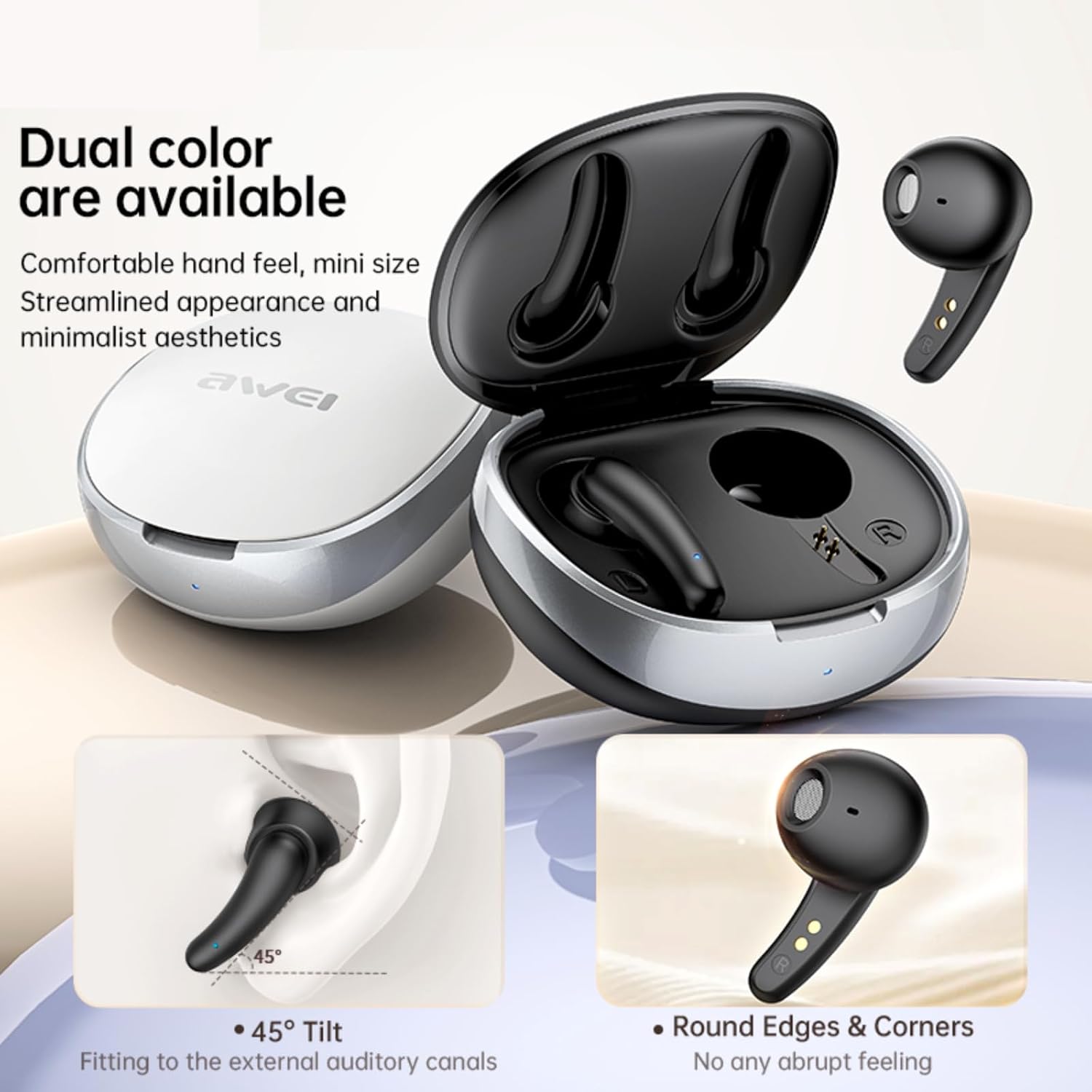
Image: Illustrates the ergonomic design of the AWEI T75 earbuds, showing a 45-degree tilt for comfortable fit and rounded edges for a smooth feel. Also shows the earbuds and case in both black and white color options.
4. Setup
4.1 Initial Charging
Before first use, fully charge the earbuds and the charging case.
- Place both earbuds into the charging case.
- Connect the USB Type-C cable to the charging port on the case and the other end to a USB power source (e.g., computer, wall adapter).
- The LED indicator on the case will show charging status. It typically takes about 1 hour to fully charge the case.
- The earbuds will charge automatically when placed in the case.
4.2 Bluetooth Pairing
The earbuds use Bluetooth 5.4 technology for a stable connection.
- Open the charging case. The earbuds will automatically power on and enter pairing mode. The LED indicator on the earbuds will flash.
- On your device (smartphone, tablet, laptop), enable Bluetooth.
- Search for "AWEI T75" in the list of available Bluetooth devices.
- Select "AWEI T75" to connect. Once connected, the earbud LED indicators will turn off or show a steady light.
- The earbuds will automatically reconnect to the last paired device when taken out of the case, if Bluetooth is enabled on the device.

Image: Depicts the AWEI T75 earbuds and charging case with a large "5.3" (Note: product uses 5.4) indicating Bluetooth version and "Audio & Video Synchronization" text, emphasizing low latency connection.
5. Operating Instructions
5.1 Wearing the Earbuds
Choose the eartips that provide the best fit and seal for optimal sound quality and comfort. Gently insert the earbuds into your ears and rotate them slightly until they feel secure.
5.2 Touch Controls
The AWEI T75 earbuds feature sensitive touch controls on each earbud. Refer to the diagram below for specific functions:

Image: A visual guide to the touch controls on the AWEI T75 earbuds, showing different tap gestures for various functions.
| Action | Function |
|---|---|
| Tap either L/R earbud once | Play/Pause |
| Tap L earbud twice | Previous Song |
| Tap R earbud twice | Next Song |
| Tap L earbud thrice | Voice Assistant |
| Tap R earbud thrice | Game Mode (Low Latency) |
| Touch either L/R earbud for 3s | Reject Call |
| Tap either L/R earbud once during incoming call | Answer/End Call |
5.3 Single Earbud Mode
You can use either the left or right earbud independently. Simply take one earbud out of the charging case, and it will automatically connect to your device. The other earbud can remain in the case or be used later.

Image: Illustrates the low latency feature of the AWEI T75 earbuds, showing a smartphone displaying a game with the earbuds positioned above, indicating synchronized audio and video with less than 0.06s delay.
6. Maintenance
6.1 Cleaning
- Use a soft, dry, lint-free cloth to clean the earbuds and charging case.
- For stubborn dirt, slightly dampen the cloth with water. Do not use harsh chemicals or abrasive materials.
- Regularly clean the earbud mesh and charging contacts to ensure proper function and sound quality.
6.2 Storage
- When not in use, store the earbuds in their charging case to protect them and keep them charged.
- Store the product in a cool, dry place, away from direct sunlight and extreme temperatures.
6.3 Water Resistance (IPX6)
The AWEI T75 earbuds are IPX6 waterproof, meaning they are protected against powerful water jets. This makes them suitable for sports and outdoor activities where they might be exposed to sweat or rain.
- Note: The charging case is NOT waterproof. Do not expose the charging case to water or moisture.
- Ensure earbuds are completely dry before placing them back into the charging case to prevent damage.
7. Troubleshooting
If you encounter issues with your AWEI T75 earbuds, try the following solutions:
| Problem | Solution |
|---|---|
| Earbuds not pairing/connecting |
|
| Only one earbud working |
|
| Low volume or poor sound quality |
|
| Charging case not charging |
|
8. Specifications
| Feature | Detail |
|---|---|
| Model | T75 |
| Bluetooth Version | 5.4 |
| Wireless Range | Up to 10 meters (33 feet) |
| Earbud Playtime | Approx. 5 hours per charge |
| Total Playtime (with charging case) | Up to 35 hours (dual-ear mode), 70 hours (single-ear alternating) |
| Charging Case Battery Capacity | 200mAh |
| Charging Time (Case) | Approx. 1 hour (Type-C) |
| Speaker Driver Size | 13mm |
| Water Resistance | IPX6 (Earbuds only) |
| Control Type | Touch Control |
| Included Components | Earbuds, Charging Case, USB-C Cable, User Manual, Eartips |

Image: Illustrates the battery life of the AWEI T75 earbuds, showing approximately 5.5 hours of play time for earbuds and 30 hours total play time with the charging case (Note: product description states 5 hours and 35 hours respectively, I will use the product description values in the table).
9. Warranty and Support
AWEI products are designed and manufactured to the highest quality standards. For information regarding warranty coverage, technical support, or customer service, please refer to the warranty card included in your package or visit the official AWEI website.
Please retain your proof of purchase for warranty claims.
Related documentsT75


Ask a question about this manual
Ask about setup, troubleshooting, compatibility, parts, safety, or missing instructions. Manuals+ will review the question and use this page’s manual context to help answer it.