
Introduction
Thank you for choosing the Middle Rabbit SW5 Wireless Gaming Earbuds. This manual provides detailed instructions for setup, operation, maintenance, and troubleshooting to ensure optimal performance and longevity of your device. Please read this manual thoroughly before use.
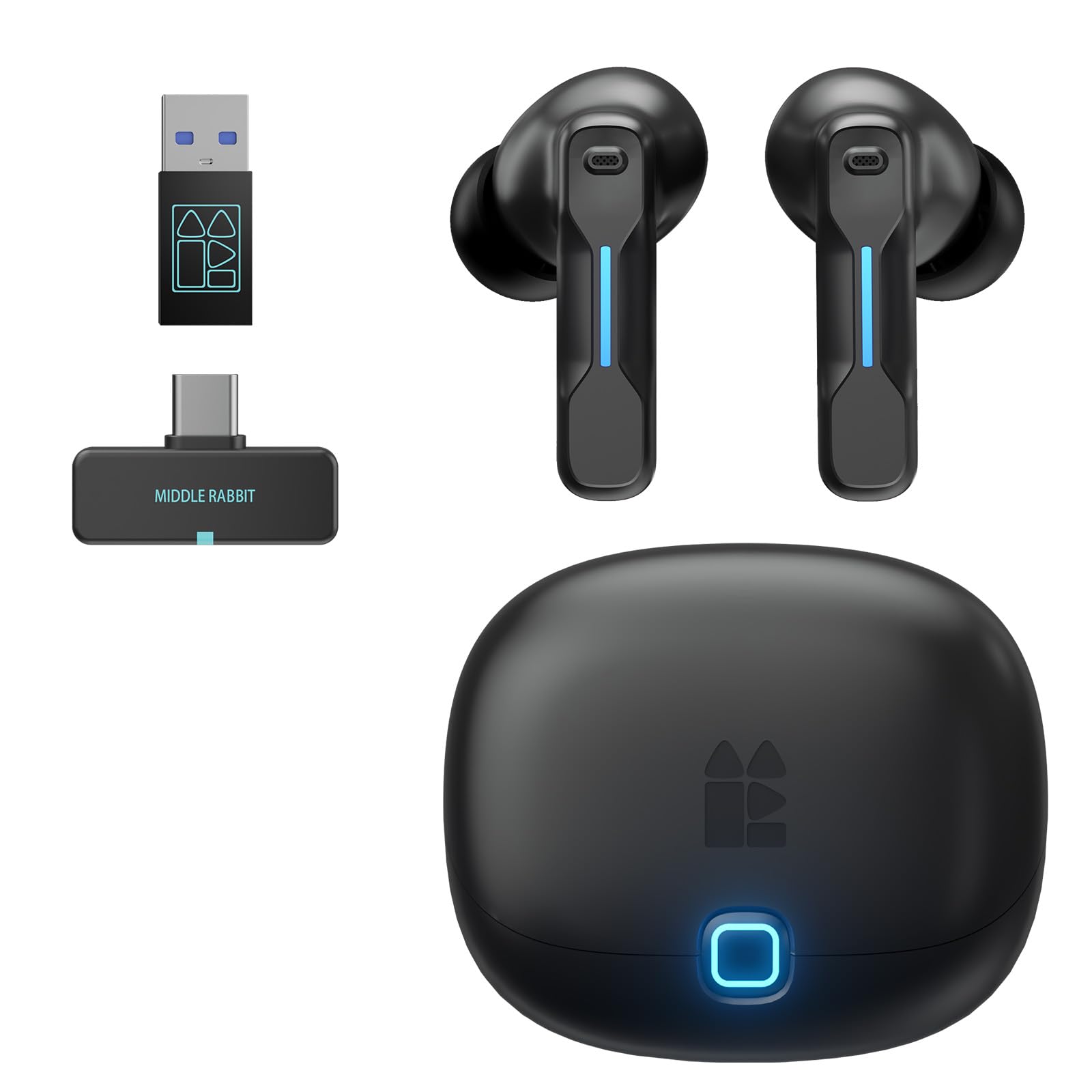
What's in the Box
- Ear tips (S/M/L sizes)
- Charging Cable
- User Manual
- Charging Case
- 2.4GHz USB Dongle (Type-C and USB-A adapter included)
Product Overview and Features
The Middle Rabbit SW5 earbuds are designed for gaming and multimedia, offering versatile connectivity and high-performance audio.
- Multifunctional Connectivity: Connect via 2.4 GHz USB dongle (Type-C and USB-A ports) or Bluetooth 5.4 for flexible use.
- Dual Device Connection: Simultaneously connect to two devices, such as a PS5 via dongle and a smartphone via Bluetooth, for seamless switching between gaming and calls.
- Ultra-Low Latency (20ms): Experience lag-free audio when connected via the dongle, crucial for competitive gaming.
- AI-Controlled Microphone: Integrated AI microphone ensures clear and natural voice reception in various environments for in-game chat and calls.
- Smart Control via App: Use the Middle Rabbit application to monitor battery levels, customize touch controls, adjust the equalizer, and switch modes.
- Comfortable Fit: Includes S/M/L ear tips to suit different ear shapes for optimal comfort.


Setup Instructions
Initial Charging and Preparation
- Remove Insulation Stickers: Before first use, open the charging case and remove any insulating stickers from the charging contacts on the earbuds.
- Charge the Earbuds and Case: Place the earbuds into the charging case. Connect the charging case to a power source using the provided USB cable. Ensure both the earbuds and the case are fully charged before initial use. The charging time for earbuds is approximately 1.5 hours, and for the case, it is 2 hours.
Connecting via 2.4GHz Dongle (for PC, PS5, Switch, VR)
- Insert Dongle: Plug the 2.4GHz USB dongle into an available USB-C port on your device (PC, PS5, Switch, VR). If your device only has USB-A ports, use the included USB-A adapter.
- Power On Earbuds: Take the earbuds out of the charging case. They will automatically enter pairing mode.
- Automatic Connection: The earbuds should automatically connect to the dongle. A successful connection is usually indicated by a solid light on the dongle or an audio prompt from the earbuds.
- Select Audio Output: On your device, ensure "Middle Rabbit SW5" or a similar name is selected as the audio output device.
Connecting via Bluetooth 5.4 (for Mobile, PC, etc.)
- Enable Bluetooth: Ensure Bluetooth is enabled on your smartphone or other Bluetooth-enabled device.
- Enter Pairing Mode: Take the earbuds out of the charging case. If they don't automatically enter Bluetooth pairing mode (e.g., if already connected to dongle), refer to the "Operating Instructions" for manual Bluetooth pairing.
- Select Earbuds: On your device, search for Bluetooth devices and select "Middle Rabbit SW5" from the list.
- Confirm Connection: Once paired, the earbuds will indicate a successful connection, and you can begin using them.

Operating Instructions
Power On/Off
- Power On: Take the earbuds out of the charging case. They will power on automatically.
- Power Off: Place the earbuds back into the charging case. They will power off and begin charging automatically.
Touch Controls
The SW5 earbuds feature customizable touch controls. Default functions are:
- Single Tap: Play/Pause music, Answer/End call.
- Double Tap (Left): Volume Down.
- Double Tap (Right): Volume Up.
- Triple Tap (Left/Right): Next/Previous Track (customizable).
- Long Press (2 seconds): Switch between Dongle Mode and Bluetooth Mode.
- Quadruple Tap: Switch EQ Mode.
For detailed customization of touch controls, use the Middle Rabbit application.

Dual Device Switching
The SW5 supports simultaneous connection to two devices. For example, if connected to a PS5 via dongle and a smartphone via Bluetooth:
- When a call comes in on your smartphone, the earbuds will automatically switch to the phone's Bluetooth connection for the call.
- After the call, the earbuds will automatically switch back to the dongle connection for gaming.
- To manually switch between dongle and Bluetooth modes, perform a 2-second long press on either earbud's touch sensor.
Using the Middle Rabbit App
Download the Middle Rabbit app for enhanced control and customization:
- Battery Monitoring: Check the battery levels of both earbuds and the charging case.
- Customizable Touch Controls: Personalize tap gestures for various functions.
- Equalizer Adjustment: Fine-tune audio settings with a custom equalizer or select from preset modes (Game Mode, Music Mode, Podcast Mode, Footstep Boost).
- Firmware Updates: Receive Over-The-Air (OTA) updates for new features and performance improvements.


Maintenance
- Cleaning: Regularly clean the earbuds, ear tips, and charging contacts with a soft, dry cloth. Avoid using liquids or abrasive cleaners.
- Ear Tip Replacement: If ear tips become worn or damaged, replace them with new ones from the provided S/M/L sizes to maintain optimal sound quality and comfort.
- Storage: When not in use, store the earbuds in their charging case to protect them and ensure they remain charged.
- Water Resistance: The earbuds are rated as waterproof. However, avoid prolonged exposure to water or submersion. Dry them thoroughly if they get wet.
Troubleshooting
| Problem | Possible Cause | Solution |
|---|---|---|
| Earbuds not charging | Insulation stickers still on; dirty charging contacts; faulty cable/charger. | Ensure insulation stickers are removed. Clean charging contacts on earbuds and case. Try a different charging cable or power adapter. |
| No sound or intermittent connection | Not properly paired; out of range; low battery; incorrect audio output selected. | Ensure earbuds are paired correctly (Bluetooth or dongle). Move closer to the connected device. Charge the earbuds. Select "Middle Rabbit SW5" as the audio output on your device. |
| Microphone not working | Microphone muted; incorrect input device selected; dirty microphone port. | Check if the microphone is muted on your device or application. Ensure "Middle Rabbit SW5" is selected as the audio input device. Clean the microphone ports gently. |
| App connection issues | Bluetooth not enabled; app not updated; earbuds not in pairing mode for app. | Ensure Bluetooth is enabled on your phone. Update the Middle Rabbit app to the latest version. Follow app instructions for connecting the case/earbuds. |
| Irregular battery drain (one earbud drains faster) | Potential measurement error or specific usage patterns. | This might be a display anomaly rather than actual battery issue. If it significantly impacts usage time, contact customer support. |
Specifications
| Brand | Middle Rabbit |
| Model Name | SW5 |
| Color | Black |
| Ear Placement | In-Ear |
| Form Factor | In-Ear |
| Impedance | 32 Ohms |
| Noise Control | Passive Noise Reduction |
| Frequency Response | 20 KHz |
| Sensitivity | 105 dB |
| Connectivity Technology | Wireless (2.4GHz Dongle, Bluetooth) |
| Bluetooth Version | 5.4 |
| Bluetooth Range | 10 Meters |
| Audio Latency | 20 Milliseconds |
| Audio Driver Size | 10 Millimeters |
| Earbud Battery Life | 6-8 hours (single charge) |
| Case Battery Life | Up to 32 hours (with charging case) |
| Earbud Charge Time | Approx. 1.5 hours |
| Case Charge Time | Approx. 2 hours |
| Control Type | Touch Control, App Control |
| Water Resistance Level | Waterproof |
| Compatible Devices | PC, Laptop, Mobile Phone, Television (via dongle/Bluetooth) |

Warranty and Support
Warranty: The Middle Rabbit SW5 earbuds come with a 1-year warranty from the date of purchase. This warranty covers manufacturing defects. Please retain your proof of purchase for warranty claims.
Support: If you encounter any issues or have questions regarding your Middle Rabbit SW5 earbuds, please contact Middle Rabbit customer support. Contact information can typically be found on the official Middle Rabbit website or through your purchase platform.
For further assistance, please visit the Middle Rabbit Store.


