
Introduction
The Auraglow solar spotlights provide efficient illumination for outdoor spaces. Utilizing solar energy to charge integrated lithium-ion batteries, these security lights activate with motion, ensuring your property's exterior is well-lit. Each light features a daylight sensor, operating only between dusk and dawn, and a PIR motion detector that activates the light for 30 seconds upon detecting a heat source up to 6 meters away. With 14 6000K daylight white LEDs, each spotlight offers high-intensity illumination for a wide area. The IP54 waterproof rating and durable construction ensure suitability for outdoor use.
Safety Information
- Read all instructions thoroughly before installation and use.
- Ensure the product is installed in a location that receives adequate direct sunlight for optimal charging.
- Do not attempt to disassemble or modify the product. This may void the warranty and pose a safety risk.
- Keep away from flammable materials.
- Dispose of batteries responsibly according to local regulations.
Package Contents
- 2 x Auraglow Solar Security Spotlights
- Mounting hardware (screws, wall plugs)
- Instruction Manual
Product Features
- Eco-friendly Solar Power: Compact solar-powered security spotlights for garden, entryway, driveway, balcony, or patio. No mains power required.
- Motion Detection for Home Security: PIR motion detector provides 30 seconds of floodlight illumination from the last detected heat source up to 6 meters away. Activates upon motion detection.
- Efficient Integrated Rechargeable Battery: High-capacity solar battery provides up to 130 activations per night/per full charge.
- IP54 Waterproof Rating: Equipped with 14 bright LEDs offering 850 lumens of 6000K daylight white high-intensity illumination. Each spotlight is IP54 weather-resistant and durable for outdoor life.
- Easy Installation and Versatile Application: No electrician or wiring needed. Can be wall-mounted, fence-mounted, or used freestanding. Adjustable light and solar panel angles for better control.
Setup and Installation
- Choose Location: Select a mounting location that receives direct sunlight for at least 6-8 hours daily to ensure optimal battery charging. Avoid shaded areas.
- Mounting: Using the provided mounting hardware, mark the desired drill holes on the wall or fence. Drill the holes, insert the wall plugs (if necessary), and securely attach the spotlight using screws.
- Adjust Angles: Adjust the angle of the solar panel to maximize sun exposure throughout the day. Position the light head to direct illumination to your desired area.
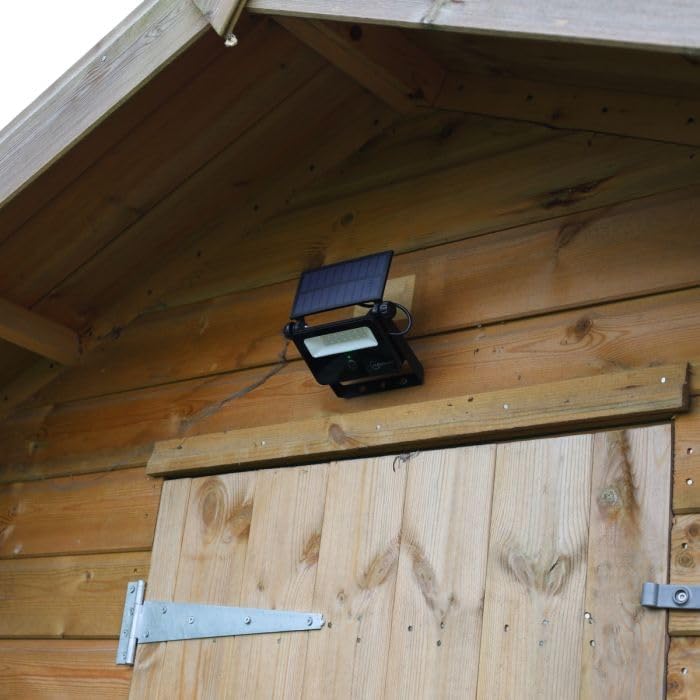
The Auraglow solar security spotlight is mounted on the wooden exterior of a shed, showcasing its suitability for wall or fence installation.

This image shows the Auraglow solar security spotlight installed on a wooden fence. The adjustable solar panel is positioned to capture sunlight, and the main light unit with its LED array is visible below.
Operating Instructions
- Initial Charge: Before first use, allow the spotlights to charge in direct sunlight for at least 24-48 hours to ensure the battery is fully charged.
- Automatic Operation: The integrated daylight sensor automatically detects ambient light levels. The light will only activate between dusk and dawn.
- Motion Activation: When the PIR motion detector senses a heat source within its 4-6 meter range, the spotlight will illuminate. The light will remain on for 30 seconds after the last detected movement.

The spotlight is depicted resting on a low stone wall in a garden, adjacent to a potted plant. This illustrates the compact design and potential for freestanding placement.
Maintenance
- Clean Solar Panel: Regularly clean the solar panel surface with a soft, damp cloth to remove dust, dirt, and debris. A clean panel ensures efficient charging.
- Inspect Mounting: Periodically check the mounting hardware to ensure the spotlights remain securely attached to their surface.
- Winter Performance: During winter months or periods of prolonged cloudy weather, the charging efficiency may be reduced, potentially affecting the light's performance and duration.
Troubleshooting
- Light Does Not Turn On at Night:
- Ensure the solar panel is clean and receiving direct sunlight for at least 6-8 hours daily.
- Verify that the light is not installed in a heavily shaded area.
- Allow sufficient charging time, especially after initial installation or long periods of storage.
- Light Stays On Constantly or Does Not Turn Off:
- The motion sensor might be continuously detecting movement or a heat source.
- Adjust the light's position to avoid constant detection from heat vents, moving branches, or passing traffic.
- Reduced Illumination Time:
- This can be due to insufficient charging (e.g., prolonged cloudy days, shaded location).
- Battery degradation over time can also lead to reduced performance.
Specifications
| Dimensions (L x W x H) | 14.7 x 3.1 x 16.7 cm |
| Material | Glass lens with ABS and steel |
| Light Source | 14 x 1W SMD 2835 LEDs per lamp (Total 28 LEDs) |
| Rechargeable Battery | 1 x 2600 mAh Li-Ion per lamp |
| Activation Time | 30 seconds (from last heat source detection) |
| Detection Distance | 4-6 meters |
| Brightness | 850 lm |
| Color Temperature | 6000K Daylight White |
| Waterproof Rating | IP54 |
| Power Source | Solar Powered |
| Voltage | 3.7 Volts |
| Wattage | 28 Watts |
| Components Included | Mounting hardware |
Warranty and Support
For warranty information and technical support, please refer to the retailer's website where the product was purchased or contact Auraglow customer service directly. Keep your proof of purchase for any warranty claims.