
1. Introduction
Thank you for choosing the AWEI T90 Wireless Earbuds. This manual provides detailed instructions on how to set up, operate, and maintain your earbuds to ensure optimal performance and longevity. Please read this manual thoroughly before using the product.
2. Package Contents
Please check the package for the following items:
- AWEI T90 Wireless Earbuds (Left and Right)
- Charging Case
- USB Type-C Charging Cable
- Eartips (various sizes)
- User Manual
3. Product Overview
The AWEI T90 earbuds are designed for a comfortable and immersive audio experience, featuring Bluetooth 5.3 connectivity and touch controls.

Figure 3.1: AWEI T90 Wireless Earbuds and Charging Case. The image displays the two earbuds and their open charging case, highlighting the sleek design.
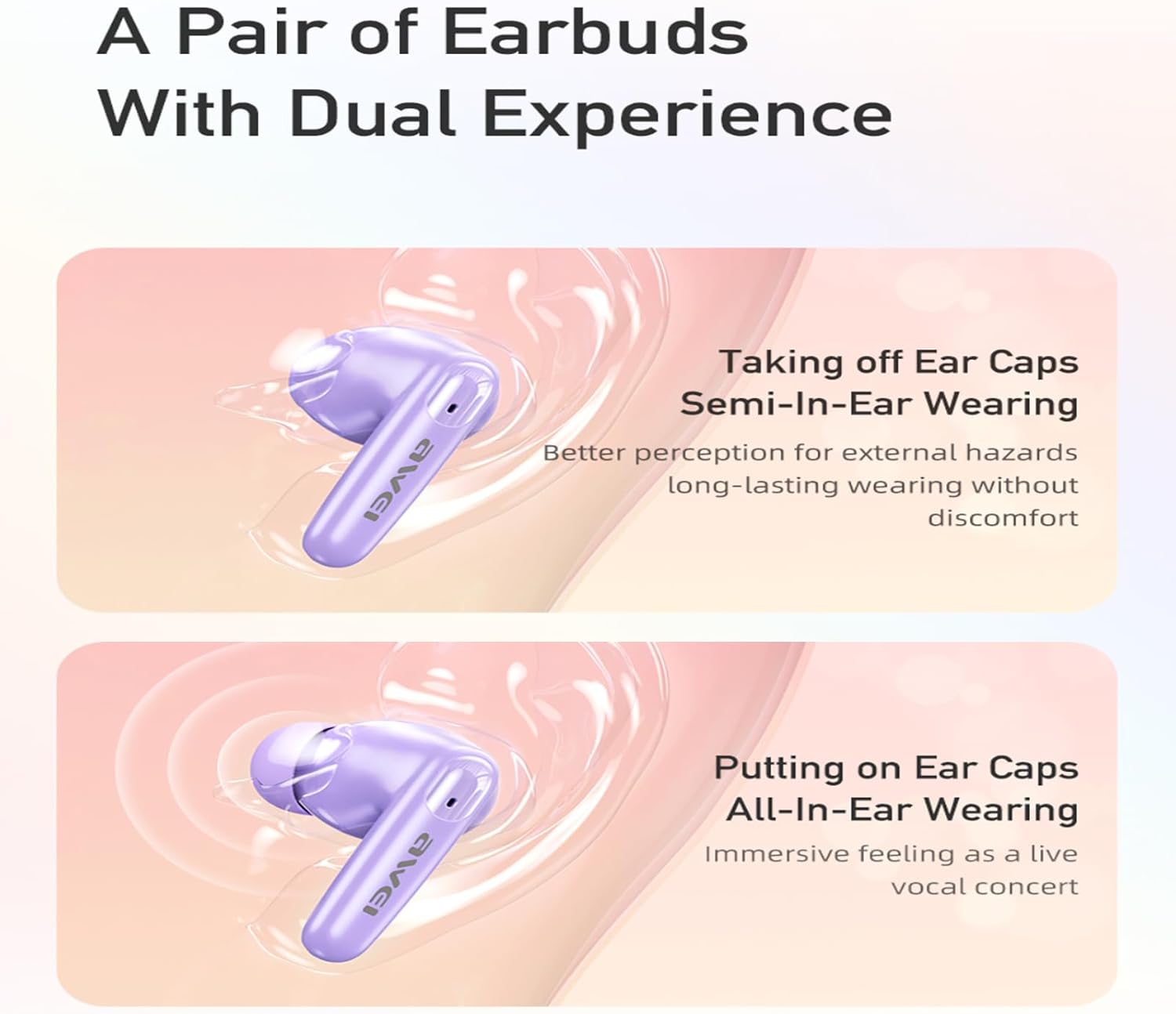
Figure 3.2: AWEI T90 Earbuds with and without ear caps. This image illustrates the dual-purpose design, showing how the earbuds can be used with or without the silicone ear caps for different wearing experiences.
3.1 Key Features
- Bluetooth 5.3: Ensures stable and fast wireless connection.
- 10mm Speaker Drivers: Delivers rich audio quality with enhanced bass.
- ENC Noise Cancellation: Provides clearer call performance.
- IPX6 Waterproof: Resistant to sweat and splashes, suitable for workouts.
- Touch Control: Intuitive control for music playback and calls.
- Long Battery Life: Up to 7 hours of playback per charge, extended with charging case.

Figure 3.3: Internal speaker components of AWEI T90 Earbuds. This image provides a detailed view of the earbud's internal structure, highlighting the 10mm speaker driver responsible for sound output.
4. Setup
4.1 Charging the Earbuds and Case
- Initial Charge: Before first use, fully charge the charging case and earbuds.
- Charging the Case: Connect the provided USB Type-C cable to the charging port on the case and a power source. The case takes approximately 1.5 hours to fully charge.
- Charging the Earbuds: Place the earbuds into the charging case. They will automatically begin charging. The case provides multiple charges for the earbuds.
4.2 Bluetooth Pairing
The AWEI T90 earbuds utilize Bluetooth 5.3 for a stable connection.

Figure 4.1: AWEI T90 Earbuds with Bluetooth 5.3 graphic. This image emphasizes the Bluetooth 5.3 technology, indicating a fast and stable wireless connection.
- First-Time Pairing:
- Open the charging case. The earbuds will automatically enter pairing mode.
- On your device (smartphone, tablet, laptop), enable Bluetooth.
- Search for available devices and select "AWEI T90" from the list.
- Once connected, you will hear a confirmation tone.
- Automatic Reconnection: After the initial pairing, the earbuds will automatically connect to the last paired device when taken out of the charging case, provided Bluetooth is enabled on the device.
- Single Earbud Mode: Either earbud can be used independently. Simply take one earbud out of the case, and it will connect to your device.
5. Operating Instructions
5.1 Touch Controls
The AWEI T90 earbuds feature intuitive touch controls on both earbuds. The functions are as follows:
| Action | Function |
|---|---|
| Single Tap (L/R) | Play/Pause Music, Answer/End Call |
| Double Tap (Right Earbud) | Next Song |
| Double Tap (Left Earbud) | Previous Song |
| Triple Tap (Right Earbud) | Volume Up |
| Triple Tap (Left Earbud) | Volume Down |
| Long Press (2 seconds) | Reject Call, Activate Voice Assistant |
5.2 Wearing the Earbuds
Choose the appropriate ear tip size for a secure and comfortable fit. The earbuds can be used with or without the silicone ear caps depending on your preference for sound isolation and environmental awareness.
6. Maintenance
6.1 Cleaning
- Regularly clean the earbuds and charging case with a soft, dry, lint-free cloth.
- Remove ear tips and clean them with mild soap and water, then dry thoroughly before reattaching.
- Avoid using abrasive materials or harsh chemicals.
6.2 Storage
- When not in use, store the earbuds in their charging case to protect them and keep them charged.
- Store in a cool, dry place away from extreme temperatures and direct sunlight.
6.3 Water Resistance
The earbuds are IPX6 waterproof, meaning they are resistant to strong jets of water. They are suitable for workouts and light rain but should not be submerged in water.
7. Troubleshooting
If you encounter issues with your AWEI T90 earbuds, please refer to the following common solutions:
- No Sound:
- Ensure earbuds are charged.
- Check Bluetooth connection on your device.
- Adjust volume on both earbuds and your device.
- Earbuds Not Pairing:
- Ensure earbuds are out of the charging case and in pairing mode.
- Turn off and on Bluetooth on your device.
- Forget "AWEI T90" from your device's Bluetooth list and re-pair.
- Ensure earbuds are sufficiently charged.
- Charging Issues:
- Check if the charging cable is securely connected.
- Try a different charging cable or power adapter.
- Ensure charging contacts on earbuds and case are clean.
- Poor Sound Quality:
- Ensure earbuds are properly seated in your ears.
- Check for obstructions in the earbud nozzles.
- Move closer to your connected device to avoid interference.
8. Specifications
Detailed technical specifications for the AWEI T90 Wireless Earbuds:

Figure 8.1: AWEI T90 Earbuds highlighting Bluetooth 5.3 and 10mm dynamics. This image visually represents two key technical features: the advanced Bluetooth 5.3 connectivity and the powerful 10mm speaker drivers.
| Feature | Specification |
|---|---|
| Model | T90 |
| Bluetooth Version | 5.3 |
| Speaker Size | 10mm |
| Waterproof Rating | IPX6 |
| Earbud Battery Life | Up to 7 hours (continuous use) |
| Total Playtime (with case) | Up to 35 hours (dual-ear mode), 70 hours (single-ear mode) |
| Charging Case Capacity | 300mAh |
| Charging Time (Case) | Approx. 1.5 hours (Type-C) |
| Wireless Range | Up to 10 meters (33 feet) |
| Control Method | Touch Control |
| Compatible Devices | Laptops, Tablets, Mobile Phones |
9. Warranty and Support
For warranty information and customer support, please refer to the warranty card included with your purchase or visit the official AWEI website. Keep your proof of purchase for any warranty claims.


