Introduction
Thank you for choosing the ACEZUK 5000A Portable Jump Starter. This device is designed to provide a reliable and powerful solution for starting dead vehicle batteries, as well as serving as a portable power bank and emergency light source. Please read this manual thoroughly before use to ensure safe and optimal operation.
Safety Information
Always observe the following safety precautions to prevent injury or damage to the device and vehicle:
- Ensure the jump starter is fully charged before use, especially for jump-starting.
- Do not attempt to jump start a frozen battery.
- Connect the clamps correctly: Red to positive (+), Black to negative (-). Reverse polarity can cause damage.
- Do not allow the red and black clamps to touch each other once connected to the jump starter.
- Remove the clamps from the vehicle battery immediately after the vehicle starts.
- Keep the device away from children.
- Store in a cool, dry place away from direct sunlight and high temperatures.
- This device features 8 smart protections including over temperature, over charge, over discharge, over current, over voltage, short circuit, reverse polarity, and anti-interference protection. However, always follow proper connection procedures.

Figure 1: Illustration of the 8 smart clamp protections for enhanced safety.
What's Included
Your ACEZUK 5000A Portable Jump Starter package includes:
- 1 x ACEZUK Portable Jump Starter
- 1 x Smart Jumper Cables with 12V Display Clip
- 1 x USB-C Charging Cable
- 1 x User Manual (this document)
- 1 x Storage Box/Portable Carry Case
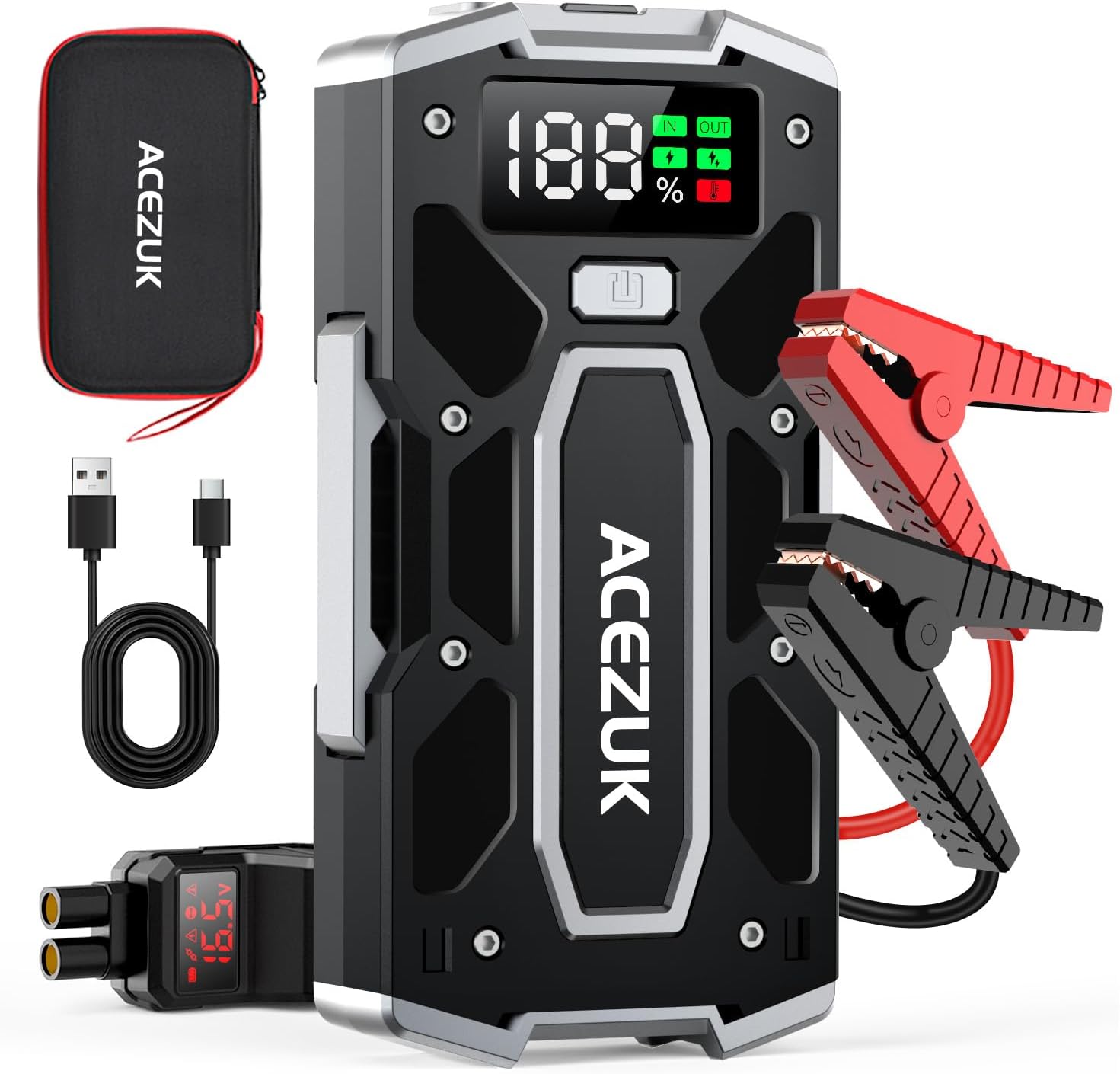
Figure 2: Contents of the ACEZUK Jump Starter package.
Product Features
- Powerful Jump Starting: Delivers 5000A peak current, capable of starting 12V vehicles with up to 10.0L gas or 8.0L diesel engines. Operates effectively in extreme temperatures (-4°F to 140°F).
- Visible LED Display: A large, clear display shows battery percentage and operational status, eliminating guesswork.
- Portable Power Bank: Equipped with multiple USB output ports (USB-Out 1: 5V-3A, 9V-2A, 12V-1.5A; USB-Out 2: 5V-2.4A) and a USB-C input (5V-2A, 9V-2A, 12V-1.5A) for charging various electronic devices.
- Multi-mode LED Emergency Torch: Features a bright LED light with Flashlight, Strobe, SOS, and Warning light modes for various emergency situations.
- Advanced Protection Technology: Incorporates 8 smart protections: reverse polarity, reverse connection, over current, over voltage, overload, over-charge, over-discharge, and short circuit protection. The smart clamps are constructed with all-metal for durability.

Figure 3: 5000A Peak Current capability for different vehicle types.

Figure 4: Clear 2-inch LCD display for easy monitoring.

Figure 5: The jump starter functioning as a portable power bank.

Figure 6: The versatile 400 Lumen LED light modes.
Setup
Charging the Jump Starter
Before first use, fully charge the jump starter. It is recommended to recharge the unit every 3-6 months to maintain battery health, even if not used.
- Connect the provided USB-C charging cable to the USB-C IN port on the jump starter.
- Connect the other end of the USB-C cable to a compatible USB wall adapter (not included).
- The LED display will show the charging progress. The unit is fully charged when the display shows 100%.
Connecting the Smart Jumper Cables
The smart jumper cables connect to the dedicated EC5 output port on the jump starter. Ensure a firm connection.

Figure 7: Visual guide for jump start connection steps.
Operating Instructions
Jump Starting a Vehicle
- Prepare the Jump Starter: Ensure the jump starter has sufficient charge (at least 50% recommended).
- Connect Smart Jumper Cables: Insert the blue plug of the smart jumper cables into the EC5 output port on the jump starter. The display on the smart cable will light up.
- Connect to Vehicle Battery:
- Connect the red (+) clamp to the positive terminal of the vehicle battery.
- Connect the black (-) clamp to the negative terminal of the vehicle battery.
The smart cable display will show the battery voltage. If the connection is correct, the indicator light on the smart cable will turn solid green.
- Start Vehicle: Return to the vehicle and start the engine.
- Remove Clamps: Once the vehicle starts, immediately remove the smart jumper cables from the vehicle battery, then disconnect the blue plug from the jump starter.
Note: If the vehicle does not start on the first attempt, wait at least 30 seconds before trying again. Do not attempt more than 3 consecutive jump starts.
Using as a Portable Power Bank
The jump starter can charge various USB-powered devices.
- Open the rubber cover on the side of the jump starter to reveal the USB output ports.
- Connect your device's charging cable to one of the USB-OUT ports.
- The jump starter will automatically begin charging your device.
Using the LED Emergency Torch
The built-in LED light has multiple modes for different situations.
- Press and hold the power button for 3 seconds to turn on the LED light (Bright mode).
- Press the power button once to cycle through the modes: Bright → Strobe → SOS → Warning Light (Red/Blue flashing).
- Press and hold the power button again for 3 seconds to turn off the LED light.
Maintenance
- Recharging: For optimal battery life, recharge the jump starter every 3-6 months, even if not in use.
- Cleaning: Wipe the unit with a dry, soft cloth. Do not use harsh chemicals or abrasive materials.
- Storage: Store the jump starter in its provided storage case in a cool, dry place. Avoid extreme temperatures.
Troubleshooting
| Problem | Possible Cause | Solution |
|---|---|---|
| Jump starter does not turn on. | Battery is completely drained. | Charge the jump starter fully. |
| Vehicle does not start. | Incorrect clamp connection. | Ensure red clamp is on positive (+), black on negative (-). Check smart cable indicator for solid green. |
| Vehicle does not start. | Jump starter battery too low. | Recharge the jump starter. Ensure it has at least 50% charge. |
| Smart cable indicator flashes red. | Reverse polarity, short circuit, or other error. | Disconnect clamps, check connections, and reconnect correctly. Refer to safety information. |
| USB devices not charging. | USB cable issue or jump starter battery low. | Try a different USB cable. Ensure jump starter has sufficient charge. |
Specifications
| Feature | Detail |
|---|---|
| Model | M02-US |
| Peak Current | 5000 Amps |
| Battery Capacity | 21800mAh (80.66Wh) |
| Start Voltage | 12V |
| Type-C Input | 5V=2A, 9V=2A, 12V=1.5A |
| USB Output 1 | 5V=3A, 9V=2A, 12V=1.5A |
| USB Output 2 | 5V=2.4A |
| Operating Temperature | -4°F to 140°F (-20°C to 60°C) |
| Dimensions | 10.12 x 5.51 x 3.98 inches (Package) |
| Item Weight | 2.33 pounds |
Warranty and Support
For warranty information or technical support, please contact ACEZUK directly.
Contact Email: ACEZUK@outlook.com
Please have your model number (M02-US) and purchase details ready when contacting support.


