
1. Introduction
Thank you for purchasing the HOCO HA1 Portable Party Speaker. This manual provides essential information for the safe and efficient operation of your device. Please read it thoroughly before use and retain it for future reference.
Safety Information
- Do not expose the speaker to water or excessive moisture.
- Avoid placing the speaker near heat sources or in direct sunlight.
- Do not attempt to disassemble or repair the unit yourself. Contact qualified service personnel.
- Keep out of reach of children.
- Use only the specified charging accessories.
2. Package Contents
Please check that all items are present in the package:
- HOCO HA1 Portable Party Speaker
- Wired Microphone
- Charging Cable (USB-A to DC barrel jack, inferred)
- Instruction Manual (this document)

Image: The HOCO HA1 speaker packaging, illustrating the speaker and its accessories, including a wired microphone.
3. Product Overview: Controls and Ports
Familiarize yourself with the various controls and connection ports on your HOCO HA1 speaker.

Image: Top view of the HOCO HA1 speaker, highlighting the control panel with buttons, rotary knob, and integrated carrying handle.
Control Panel (Top)
- Power Button: Press and hold to turn the speaker On/Off.
- Mode Button: Short press to switch between Bluetooth, USB, AUX, and FM radio modes.
- Volume Knob: Rotate to adjust the master volume.
- Play/Pause Button: Press to play or pause audio.
- Previous/Next Track Buttons: Press to skip tracks in Bluetooth/USB mode, or change FM stations.
- Light Mode Button: Press to cycle through different LED light effects or turn them off.

Image: Rear view of the HOCO HA1 speaker, displaying the various input ports for USB, AUX, and microphone connections.
Rear Ports
- USB Port: For playing audio from a USB flash drive.
- AUX Input (3.5mm): For connecting external audio devices via an audio cable.
- Microphone Input (6.35mm): For connecting the wired microphone.
- DC 5V Charging Port: For connecting the charging cable.
4. Setup
4.1 Charging the Speaker
- Connect the charging cable to the DC 5V charging port on the rear of the speaker.
- Connect the other end of the charging cable to a compatible USB power adapter (not included) or a USB port.
- The charging indicator light will illuminate. Allow approximately 3-4 hours for a full charge.
- Disconnect the charging cable once fully charged.
4.2 Connecting the Microphone
- Locate the Microphone Input (6.35mm) port on the rear of the speaker.
- Insert the microphone cable securely into this port.
- The microphone is now ready for use in Karaoke mode.
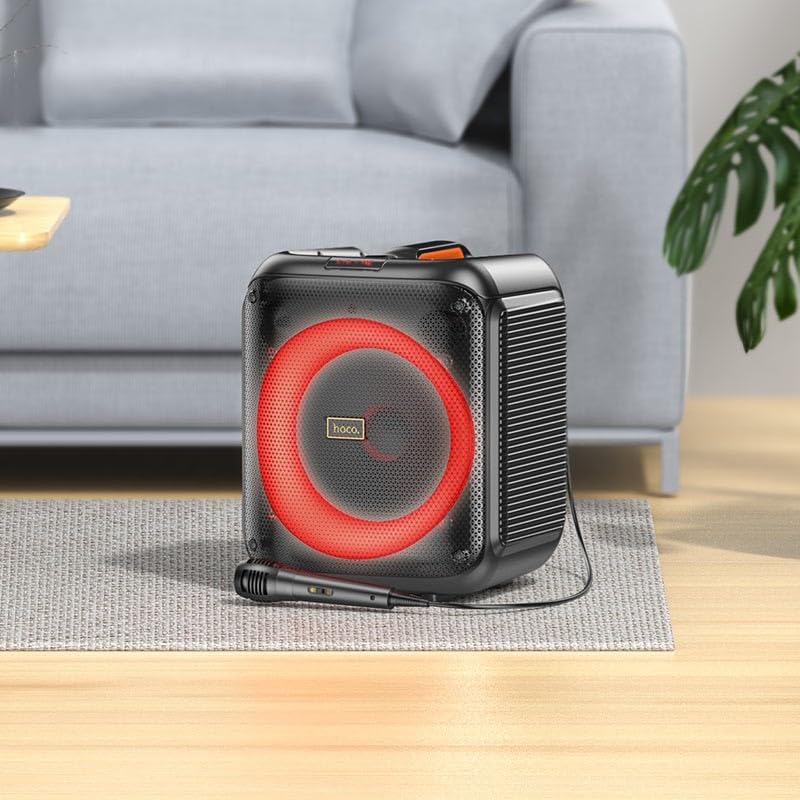
Image: The HOCO HA1 speaker set up with its wired microphone, demonstrating its readiness for karaoke or vocal use.
5. Operating Instructions
5.1 Power On/Off
Press and hold the Power Button on the control panel for approximately 3 seconds to turn the speaker On or Off.
5.2 Bluetooth Pairing
- Turn on the speaker. It will automatically enter Bluetooth pairing mode, indicated by a flashing LED.
- On your mobile device, enable Bluetooth and search for available devices.
- Select "HOCO HA1" from the list of devices.
- Once paired, the speaker will emit a confirmation sound, and the LED will stop flashing.
- You can now play audio from your device through the speaker.
5.3 USB Playback
- Insert a USB flash drive containing MP3 audio files into the USB port on the rear of the speaker.
- Press the Mode Button until "USB" mode is selected.
- The speaker will automatically begin playing audio from the USB drive.
- Use the Play/Pause and Previous/Next Track buttons to control playback.
5.4 AUX Input
- Connect an external audio device (e.g., smartphone, MP3 player) to the AUX Input port using a 3.5mm audio cable (not included).
- Press the Mode Button until "AUX" mode is selected.
- Play audio from your connected device. The speaker will output the sound.
5.5 FM Radio
- Press the Mode Button until "FM" mode is selected.
- To auto-scan and save available stations, press and hold the Play/Pause Button. The speaker will scan and store stations.
- Use the Previous/Next Track Buttons to navigate between saved FM stations.
5.6 Karaoke Function (Microphone Use)
Once the microphone is connected (as described in Section 4.2), simply speak or sing into it. The microphone audio will be mixed with any music playing through the speaker (Bluetooth, USB, AUX). Adjust the master volume using the Volume Knob.
5.7 LED Light Effects
Press the Light Mode Button on the control panel to cycle through various LED light effects. Pressing it repeatedly will change the pattern or turn the lights off.

Image: The HOCO HA1 speaker showcasing its dynamic, multi-colored LED lighting feature, enhancing the party atmosphere.
6. Maintenance
6.1 Cleaning
- Ensure the speaker is turned off and unplugged before cleaning.
- Use a soft, dry cloth to wipe the exterior surfaces.
- Do not use abrasive cleaners, waxes, or solvents.
6.2 Storage
- Store the speaker in a cool, dry place away from direct sunlight and extreme temperatures.
- If storing for an extended period, charge the battery periodically (e.g., every 3 months) to maintain battery health.
7. Troubleshooting
| Problem | Possible Cause | Solution |
|---|---|---|
| Speaker does not turn on. | Battery is depleted. | Charge the speaker for at least 30 minutes. |
| No sound from speaker. | Volume is too low; incorrect mode selected; device not paired (Bluetooth). | Increase volume; press Mode button to select correct input; re-pair Bluetooth device. |
| Bluetooth device cannot pair. | Speaker not in pairing mode; device too far; interference. | Ensure speaker is in Bluetooth mode and flashing; move device closer; turn off other Bluetooth devices. |
| Microphone not working. | Microphone not properly connected; microphone switch off (if applicable). | Ensure microphone is fully plugged into the correct port; check if microphone has an On/Off switch. |
| FM radio reception is poor. | Weak signal; environmental interference. | Relocate the speaker; try auto-scanning again. |
8. Specifications
| Model Number | HA1 (20000463) |
| Brand | HOCO |
| Speaker Output Power | 45 Watts (Max) |
| Connectivity | Bluetooth, USB, AUX (3.5mm), FM Radio |
| Microphone Input | Yes (6.35mm) |
| Battery Type | Lithium Ion (1 included) |
| Item Weight | 3.6 Kilograms |
| Mounting Type | Tabletop Stand |
9. Warranty and Support
The HOCO HA1 Portable Party Speaker comes with a standard manufacturer's warranty. For detailed warranty terms and conditions, please refer to the warranty card included with your purchase or visit the official HOCO website.
For technical support, troubleshooting assistance beyond this manual, or service inquiries, please contact HOCO customer support through their official channels. Contact information can typically be found on the product packaging or the HOCO official website.


