
Introduction
This manual provides detailed instructions for the setup, operation, maintenance, and troubleshooting of your AWEI T98 Wireless Earbuds. Please read this manual carefully before using the product to ensure proper function and longevity.
Package Contents
- Wireless Earbuds (AWEI T98)
- Earbuds Charging Case
- Type-C Cable
- User Manual
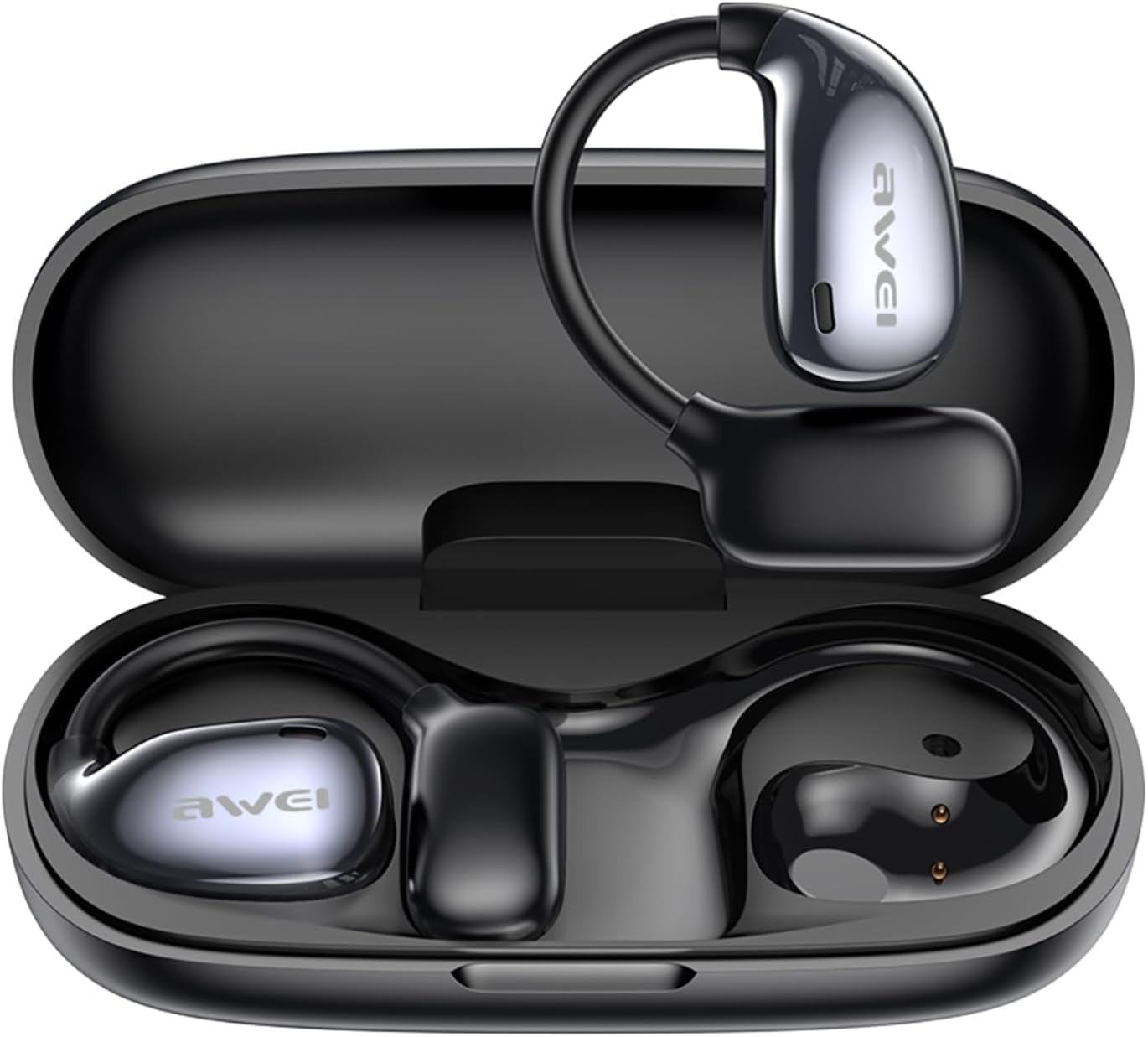
Image: The AWEI T98 wireless earbuds are shown inside their charging case. The earbuds feature an over-ear hook design and a sleek black finish. The charging case is compact and black, designed to protect and recharge the earbuds.
Setup
1. Initial Charging
Before first use, fully charge the earbuds and the charging case. Connect the provided Type-C cable to the charging case and a suitable USB power source. The indicator lights on the case will show the charging status.
2. Powering On and Pairing
- Open the charging case. The earbuds will automatically power on.
- On your device (smartphone, laptop, etc.), enable Bluetooth and search for new devices.
- Select "AWEI T98" from the list of available devices to pair.
- Once paired, the earbuds will automatically connect to this device when taken out of the case in the future.
The earbuds feature Bluetooth 5.4 technology, ensuring a fast and stable connection up to 33 feet (10 meters).
Operating Instructions
Wearing the Earbuds
The AWEI T98 earbuds feature an over-ear design with earhooks for a secure and comfortable fit, especially during physical activities. Gently place the earbud into your ear and adjust the earhook over your ear until it feels stable and comfortable.

Image: A woman is shown wearing the AWEI T98 earbuds, highlighting the skin-friendly silicone ear hooks designed for a secure fit during sports and activities.

Image: This illustration details the ergonomic design of the AWEI T98 earbuds, showing how multi-point support, skin-friendly LSR material, and adaptive rebound contribute to a comfortable and stable fit.

Image: A woman is shown wearing the AWEI T98 earbuds, illustrating their non-in-ear design which provides comfort for extended wear.
Touch Controls
The earbuds are equipped with touch controls for easy management of music and calls. Specific touch gestures for various functions (e.g., play/pause, skip track, answer/end call, volume control) are typically detailed in a quick start guide or on the product packaging. Refer to those for precise commands.
The built-in microphones ensure clear voice transmission during calls.
Sound Features
The AWEI T98 earbuds feature 14.2mm large speakers designed to deliver clear audio with enhanced bass. Their open-ear design utilizes directional sound propagation, allowing you to stay aware of your surroundings while listening to audio, and maintaining privacy during calls in crowded environments.

Image: A diagram illustrates the directional sound propagation technology of the earbuds, showing how sound is directed towards the ear while minimizing leakage, allowing for situational awareness and privacy.
Battery Life and Charging
- Earbud Playback: Up to 5 hours on a single charge.
- With Charging Case (Dual-Ear Mode): Up to 48 hours of total playback.
- With Charging Case (Single-Ear Mode, alternating): Up to 96 hours of total music time.
To charge the earbuds, place them back into the charging case. The earbuds will automatically power off and begin recharging.
Maintenance
- Cleaning: Regularly clean the earbuds and charging case with a soft, dry, lint-free cloth. Avoid using abrasive materials or harsh chemicals.
- Water Resistance: The earbuds are IPX6 waterproof, meaning they are resistant to high-pressure water jets from any direction. They are suitable for sports and exercise where sweat and splashes may occur. Do not submerge the earbuds in water. Ensure the charging port is dry before charging.
- Storage: When not in use, store the earbuds in their charging case to protect them and keep them charged. Store in a cool, dry place away from extreme temperatures.
- Battery Care: To prolong battery life, avoid fully discharging the earbuds and charging case frequently. Charge them regularly, even if not in constant use.
Troubleshooting
| Problem | Possible Solution |
|---|---|
| Earbuds not powering on. | Ensure the earbuds are charged. Place them in the charging case and check the case's battery level. |
| Earbuds not pairing with device. |
|
| Sound is intermittent or cutting out. |
|
| One earbud is not working. |
|
Specifications
| Feature | Detail |
|---|---|
| Model Name | T98 |
| Brand | AWEI |
| Connectivity Technology | Wireless (Bluetooth 5.4) |
| Bluetooth Version | 5.4 |
| Bluetooth Range | Up to 33 feet (10 meters) |
| Ear Placement | Over Ear |
| Form Factor | Over Ear |
| Control Type | Touch Control |
| Controller Type | Volume Control |
| Water Resistance Level | IPX6 Waterproof |
| Earbud Playback Time | Up to 5 hours |
| Total Playback Time (with case) | Up to 48 hours (dual-ear), 96 hours (single-ear alternating) |
| Speaker Size | 14.2mm |
| Impedance | 32 Ohm |
| Frequency Response | 20 KHz (Note: Typically a range, e.g., 20Hz-20kHz) |
| Noise Control | Active Noise Cancellation (as per specifications) |
| Compatible Devices | Cellphones, Desktops, Laptops, Telephones, Television, Tablets, Music Production Equipment, Gaming Consoles, Car Audio Systems, Smart Watches, Smart Speaker, Various Bluetooth enabled devices |
Warranty and Support
For warranty information and customer support, please refer to the official AWEI website or contact their customer service directly. Keep your purchase receipt as proof of purchase for warranty claims.
For further assistance, you may visit the AWEI Store online: AWEI Official Store


