
XSDTS F17
XSDTS Tuya Wifi Electronic Smart Door Lock F17 User Manual
Model: F17
1. Product Overview
The XSDTS Tuya Wifi Electronic Smart Door Lock F17 offers advanced security and convenient access through multiple methods. This smart lock is designed for various door types and is suitable for both residential and commercial applications. It integrates with the Tuya application for remote management and monitoring.

Image 1.1: Overview of the XSDTS Smart Door Lock, showing the front panel with keypad, rear panel with handle, and the mortise lock mechanism. A smartphone displaying the Tuya app interface is also visible.
2. Package Contents
Please verify that all components are present before beginning installation:
- Front Panel (x1)
- Rear Panel (x1)
- Plug-in Lock / Mortise (x1, optional depending on package)
- Smart Card (x4)
- Mechanical Key (x2)
- Screw Kit (x1)
3. Specifications
| Model Number | F17 |
| Lock Type | Biometric Smart Door Lock |
| Material | Aluminum |
| Color | Black |
| Dimensions (L x W x H) | 25 x 6 x 7.5 cm |
| Item Weight | 2 kg |
| Applicable Door Thickness | 35mm to 75mm |
| Fingerprint Capacity | 100 |
| IC Card Capacity | 100 |
| Password Capacity | 100 |
| Power Source | 4 AA Batteries (not included) |
| Emergency Power | Micro-USB |
| Special Features | Fingerprint, One-Touch Lock, Passcode Unlock, Resettable, Scratch-Resistant |

Image 3.1: Detailed product dimensions for the front and rear panels, mortise lock, and applicable door thickness range (35-75mm). Also indicates password, card swiping, and fingerprint areas, along with the USB emergency charge port and keyhole.
4. Setup and Installation
4.1 Door Compatibility
The lock is designed for doors with a thickness ranging from 35mm to 75mm. It is compatible with wooden, anti-theft, stainless steel, and brass doors.

Image 4.1: Diagram illustrating the dimensions of the mortise lock (22x240mm, 45x85mm) and confirming the ideal door thickness range of 35-70mm. The image also shows the universal right/left steering capability.
4.2 Handle Direction Adjustment
The handle direction is universal and can be adjusted for both left and right-handed doors. This feature simplifies the locking and unlocking process.
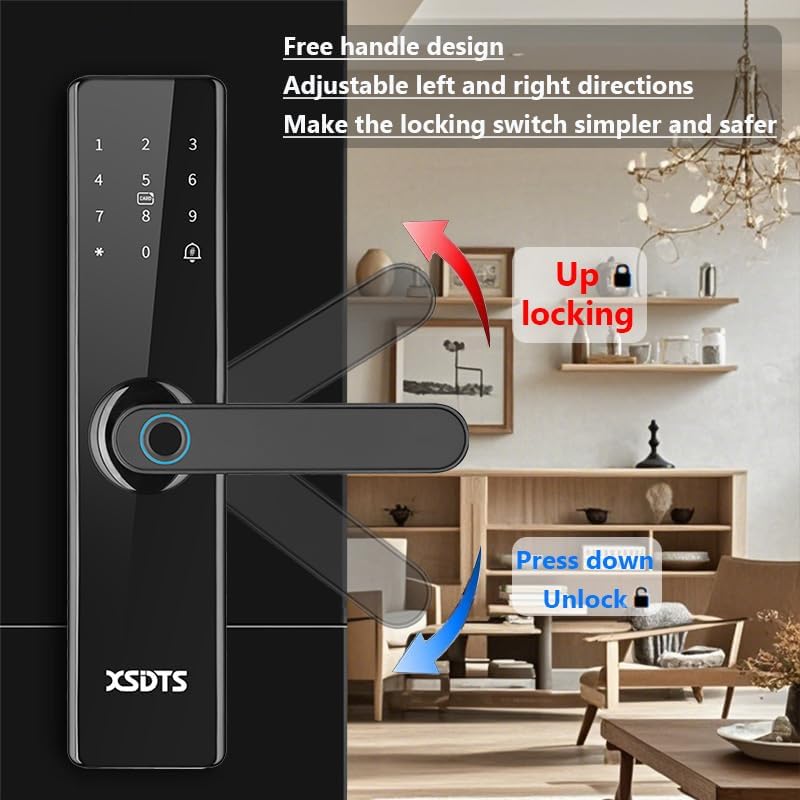
Image 4.2: Illustration demonstrating the adjustable left and right handle directions. Pushing the handle up locks the door, while pressing it down unlocks it.
4.3 Battery Installation
The lock requires 4 AA batteries (not included). Install them in the battery compartment located on the rear panel. Ensure correct polarity.
5. Operating Instructions
5.1 Unlocking Methods
The XSDTS Smart Door Lock offers six primary ways to unlock:
- Fingerprint Unlock: Place your registered fingerprint on the sensor. The lock identifies your fingerprint in less than 0.5 seconds.
- Password Unlock: Enter your registered digital password on the keypad.
- IC Card Unlock: Swipe a registered smart card over the designated card swiping area. The smart cards use dynamic encryption technology for enhanced security.
- Manual Key Unlock: Use one of the provided physical keys as a traditional backup.
- Tuya App Unlock: Use the Tuya Smart application on your mobile phone to unlock the door remotely via Bluetooth or Wi-Fi.
- Temporary Password Unlock: Generate one-time or time-limited passwords through the Tuya app for guests or service providers.

Image 5.1: Visual representation of the six unlocking methods: Temporary Password, IC Card, Password, Fingerprints, Manual Key, and App Unlock.

Image 5.2: Details on fingerprint recognition performance, highlighting an identification speed of less than 0.5 seconds, a false recognition rate of less than 0.001%, and a rejection rate of less than 0.01%.

Image 5.3: Depiction of the smart encrypted IC card being used to unlock the door, emphasizing its dynamic encryption technology to prevent copying.
5.2 Tuya Smart APP Features
The Tuya Smart APP provides comprehensive remote control and management capabilities:
- APP Unlock: Remotely unlock the door from anywhere with an internet connection.
- Scene Linkage: Integrate the lock with other smart home devices for automated scenarios.
- Info Send: Receive real-time notifications and alerts regarding lock activity.
- Records Check: View a history of all lock and unlock events.
- Temporary Passwords: Generate and manage temporary access codes for visitors.

Image 5.4: Screenshot of the Tuya Smart APP interface, illustrating features such as remote unlocking requests, unlocking records, member management, and temporary password generation.
5.3 Silent Mode
The lock features a silent mode to prevent disturbance, particularly useful during quiet hours.

Image 5.5: Depiction of the lock operating in silent mode, indicating that it will not produce loud sounds that might disturb occupants.
6. Maintenance
6.1 Battery Replacement
When the battery level is low, the lock will emit an alert. Replace the 4 AA batteries promptly to ensure continuous operation.
6.2 Emergency Power
If the batteries completely drain, the lock can be temporarily powered using a mobile power source or any power supply with a Micro-USB connector. Connect the Micro-USB cable to the emergency charge port located at the bottom of the front panel.
7. Troubleshooting
7.1 Lock Not Responding
If the lock does not respond to input, check the battery level. If the batteries are low or depleted, use the emergency Micro-USB power option or replace the batteries.
7.2 Fingerprint/Card/Password Not Recognized
Ensure your fingerprint, smart card, or password has been correctly registered. If issues persist, try re-registering the access method. Clean the fingerprint sensor and card reader areas if necessary.
7.3 Remote Unlock Issues
Verify that the lock is connected to your Wi-Fi network and that your mobile device has an active internet connection. Ensure the Tuya app is updated to the latest version.
8. Warranty and Support
The XSDTS Smart Door Lock comes with a 12-month direct warranty. For technical assistance, XSDTS provides unlimited technical consultation via phone, chat, or video calls. Installation, configuration, and solution videos are also available upon purchase.
For support, please contact XSDTS customer service through the contact information provided at the time of purchase.
Related documentsF17


Ask a question about this manual
Ask about setup, troubleshooting, compatibility, parts, safety, or missing instructions. Manuals+ will review the question and use this page’s manual context to help answer it.