
Bryton Bryton Rider 17
Bryton Rider 17 GPS Bike Computer User Manual
Model: Bryton Rider 17
Brand: Bryton
Introduction
The Bryton Rider 17 is a wireless GPS bike/cycling computer designed to provide essential ride data and navigation features for cyclists. It features a 3-inch LCD screen for clear visibility, long battery life, Bluetooth connectivity, and is waterproof. This manual provides detailed instructions for setting up, operating, and maintaining your Rider 17 device.
What's in the Box
Verify that all components are present in the package:
- Rider 17 GPS Bike Computer
- Bike Mount
- Safety Lanyard
- Quick Start Guide
Setup
1. Initial Charging
Before first use, fully charge the Bryton Rider 17. Connect the device to a USB power source using a compatible USB Type-C cable. A full charge provides up to 25 hours of battery life.

Image: The Bryton Rider 17 device showing its USB Type-C compatibility for charging.
2. Mounting the Device
Attach the provided bike mount to your bicycle's handlebars or stem. Secure the Rider 17 onto the mount by aligning the device with the mount and twisting it until it locks into place. Ensure the device is firmly secured before riding.

Image: A Bryton Rider 17 device shown mounted on a bicycle, ready for use.
3. Bryton Active App and Pairing
Download the Bryton Active app from your smartphone's app store. Enable Bluetooth on your smartphone and the Rider 17. Open the Bryton Active app and follow the on-screen instructions to pair your device. This allows for data synchronization and smart notifications.
- Automatic Data Sync: Once paired, ride data automatically syncs to the Bryton Active app via Bluetooth after each ride.
- Third-Party Platform Support: The app supports connection to platforms like Strava, TrainingPeaks, Komoot, and Relive for easy sharing.
4. Sensor Pairing (Optional)
The Rider 17 supports Bryton cycling accessories via Bluetooth, including heart rate sensors, speed sensors, and cadence sensors. To pair a sensor:
- Ensure the sensor is active and within range of the Rider 17.
- Navigate to the sensor pairing menu on your Rider 17.
- Select the sensor from the list of detected devices to pair.

Image: The Bryton Rider 17 displaying data alongside a Bryton Gardia R300L bike radar, indicating compatibility.
Operating Instructions
1. Power On and Basic Navigation
Press and hold the power button (usually on the left side) to turn on the device. The Rider 17 will automatically search for GPS signals. Once acquired, you are ready to start your ride.

Image: A close-up of the Bryton Rider 17's LCD screen showing various data fields like speed, distance, and ride time.
Use the buttons on the side of the device to navigate through menus and data screens. The 3-inch LCD display is designed for effortless viewing of essential data.

Image: The Bryton Rider 17 displaying data with large, clear fonts on its 3-inch segment type HTN LCD screen, emphasizing readability.
2. Data Functions
The Rider 17 provides access to 23 data functions, allowing you to monitor various aspects of your ride. Key metrics include:
- Time
- Speed (Current, Average, Max)
- Distance
- Cadence (with optional sensor)
- Heart Rate (with optional sensor)
- Gradient
- Altitude
- Lap information
3. Live Track Feature
The Live Track feature allows you to share your real-time location, speed, ride time, distance, and latest update with friends and family. Generate a shareable link from the Bryton Active app on your phone and distribute it via any messaging application.
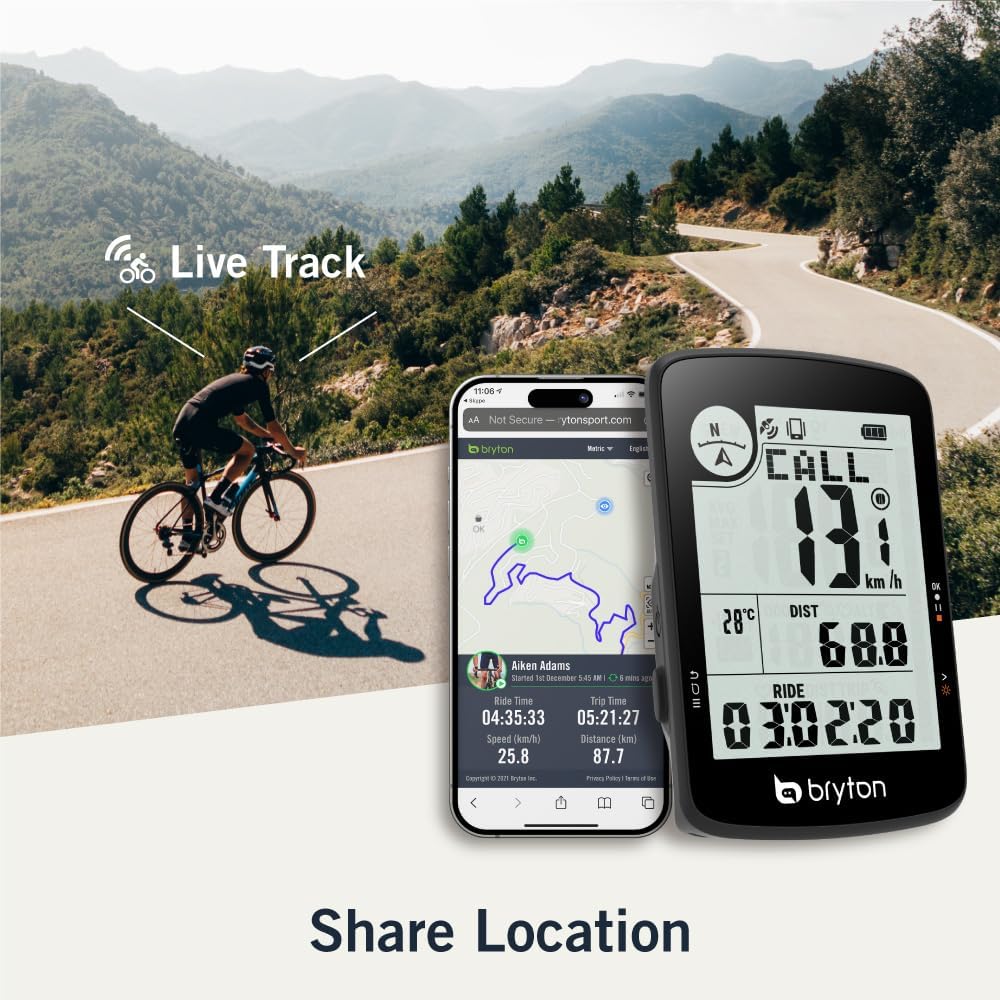
Image: The Bryton Rider 17 next to a smartphone showing the Live Track feature, which allows sharing of real-time location and ride data.
4. Smart Notifications
After simple Bluetooth pairing with your smartphone, the Rider 17 can display notifications for phone calls, emails, or text messages directly on its screen. This ensures you stay connected without needing to check your phone during a ride.
Maintenance
1. Cleaning
Wipe the device with a soft, damp cloth. Avoid using harsh chemicals or abrasive cleaners, as they may damage the screen or casing. Ensure the USB port cover is securely closed to maintain waterproofing.
2. Battery Care
To maximize battery life, avoid exposing the device to extreme temperatures. For long-term storage, charge the battery to approximately 50% and store in a cool, dry place. The Rider 17 supports charging via a power bank during rides.
3. Software Updates
Periodically check for firmware updates via the Bryton Active app. Updates can improve performance, add new features, and fix bugs. Follow the app's instructions for a smooth update process.
Troubleshooting
| Problem | Possible Cause | Solution |
|---|---|---|
| Device does not power on | Low battery; device frozen. | Charge the device. Perform a soft reset by holding the power button for 10-15 seconds. |
| No GPS signal | Obstructed view of sky; device indoors. | Move to an open outdoor area. Wait a few minutes for signal acquisition. |
| Cannot pair with smartphone/sensors | Bluetooth off; device/sensor out of range; interference. | Ensure Bluetooth is on for both devices. Bring devices closer. Restart both devices. |
| Data not syncing to app | Bluetooth connection lost; app not open. | Ensure Bluetooth is connected. Open the Bryton Active app. Manually initiate sync if needed. |
Specifications
| Feature | Detail |
|---|---|
| Brand | Bryton |
| Model | Bryton Rider 17 |
| Screen Size | 3 Inches (7.62 cm) |
| Display Type | LCD |
| Battery Life | Up to 25 Hours |
| Battery Type | Lithium Ion Polymer (included) |
| Connectivity | Bluetooth |
| GPS | Integrated GNSS (Global Navigation Satellite System) |
| Sensor Compatibility | Speed Sensor, Cadence Sensor, Heart Rate Monitor, Gardia R300L bike radar (via Bluetooth) |
| Dimensions (L x W x H) | 2.17" x 0.5" x 3.17" (55mm x 12.8mm x 80.6mm) |
| Weight | 63 Grams (2.22 ounces) |
| Waterproof | Yes |
| Human Interface Input | Buttons |

Image: A diagram illustrating the physical dimensions of the Bryton Rider 17 device.
Warranty and Support
For warranty information and technical support, please refer to the official Bryton website or contact Bryton customer service. The Quick Start Guide included in your package may also contain specific warranty details for your region.
You can also find additional resources and the full user manual (PDF) at: Bryton Rider 17 User Manual (PDF)
Related documentsBryton Rider 17

Ask a question about this manual
Ask about setup, troubleshooting, compatibility, parts, safety, or missing instructions. Manuals+ will review the question and use this page’s manual context to help answer it.