

1. Introduction
Thank you for choosing the Karinear 30 Inch Electric Cooktop. This manual provides comprehensive instructions for the safe installation, operation, and maintenance of your new appliance. Please read this manual thoroughly before using the cooktop and retain it for future reference. Proper use and care will ensure years of reliable service.
2. Important Safety Instructions
To reduce the risk of fire, electric shock, injury to persons, or damage when using the appliance, follow basic precautions, including the following:
- Electrical Safety: This cooktop operates on 220-240V and requires a hard-wired connection. Installation must be performed by a qualified electrician in accordance with all local codes and ordinances. Do not attempt to install or repair the appliance yourself.
- Heat Safety: The cooktop surface and surrounding areas can become hot during use. Use pot holders when handling hot cookware. Do not touch hot surfaces. Allow the cooktop to cool before cleaning.
- Child Safety Lock: Always activate the Child Safety Lock when the cooktop is not in use, especially if children are present. This prevents accidental activation and changes to settings.
- Residual Heat Indicator: The 'H' indicator will flash when a cooking zone is still hot after being turned off. Do not touch the surface until the indicator light extinguishes.
- Proper Cookware: Use only flat-bottomed cookware that is appropriate for electric ceramic cooktops. Ensure cookware size matches the cooking zone to maximize efficiency and prevent spills.
- Ventilation: Ensure adequate ventilation around the cooktop during operation.
- Overheat Protection: The cooktop is equipped with an overheat protection system that will automatically shut down a cooking zone if it detects excessive temperature.
3. Product Overview
The Karinear 30 Inch Electric Cooktop features a sleek black glass surface with four high-efficiency ceramic burners, designed for seamless integration into your kitchen countertop. It offers precise temperature control and various safety features.

Figure 3.1: Top view of the Karinear 30 Inch Electric Cooktop, showing the four ceramic heating zones and touch control panel.
Key Features:
- Four Burners: Includes two 1200W burners, one 1000W/2200W expandable burner, and one 1100W/2000W expandable burner, providing a total power output of 6600W.
- Slide Control: Intuitive touch slide control for easy adjustment of power levels.
- 9 Power Levels: Offers precise heat control from low simmer to rapid boil.
- 99-Minute Timer: Allows for precise cooking duration settings with automatic shut-off.
- Child Safety Lock: Prevents accidental operation.
- Residual Heat Indicator: 'H' display warns when the surface is hot.
- Overheat Protection: Automatic shutdown in case of excessive temperature.
- Expandable Burners: Two burners offer dual heating elements for larger cookware.
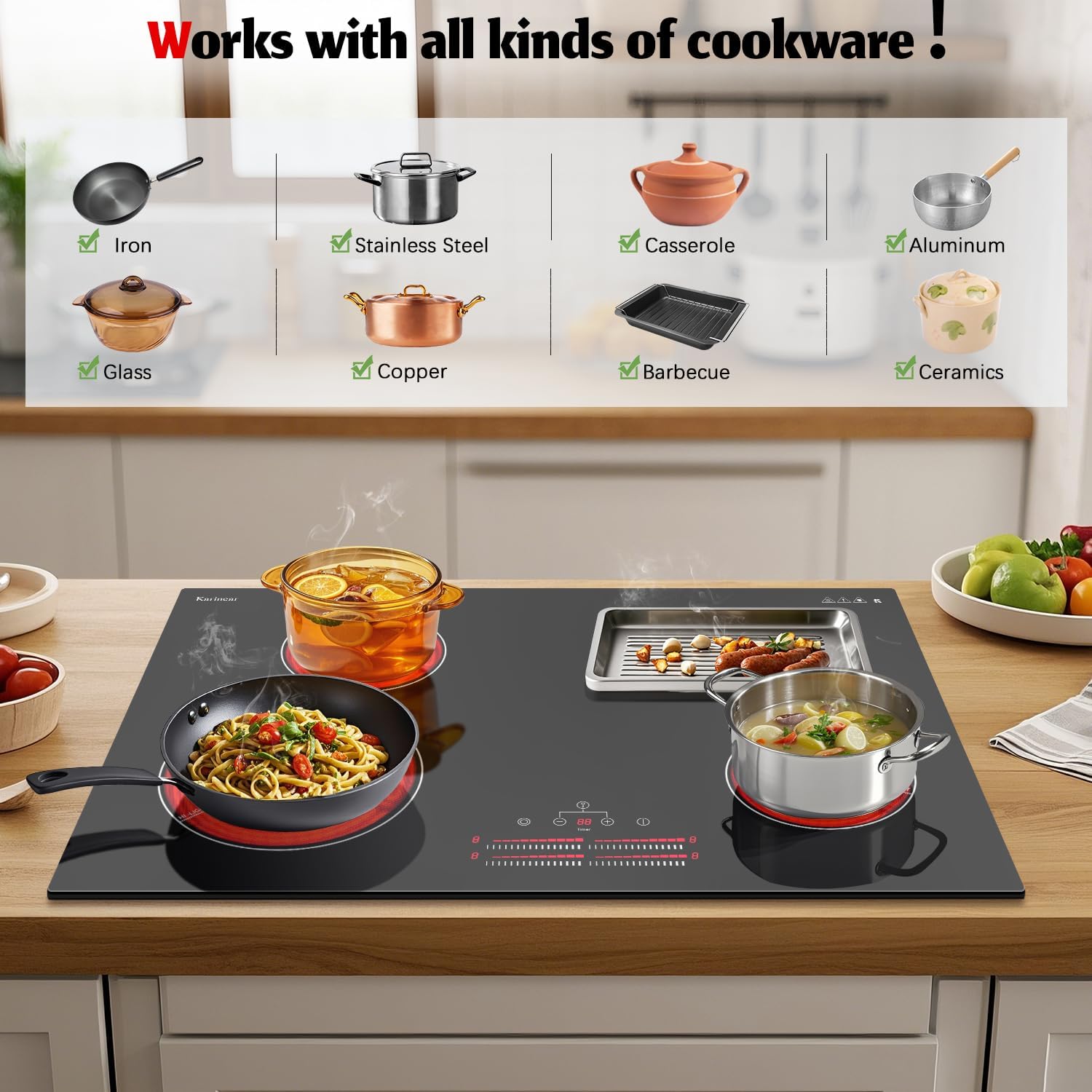
Figure 3.2: Visual representation of the multi-functional features of the electric ceramic cooktop.
4. Setup and Installation
This Karinear Electric Cooktop is designed for built-in, drop-in installation and requires a 220-240V hard-wired electrical connection. Professional installation by a certified electrician is mandatory to ensure safety and compliance with electrical codes.
Installation Steps:
- Prepare the Countertop Cut-out: Ensure your countertop has a cut-out with the dimensions of 29.5 inches (width) x 19.5 inches (depth) x 2.13 inches (height). The cooktop's overall size is 30.2 inches (width) x 20.5 inches (depth).
- Electrical Connection: Connect the cooktop's hard-wire cable to a dedicated 220-240V, 32A circuit. Follow the wiring diagram provided below and ensure all connections are secure and insulated. This appliance does not come with a plug.
- Drop-in Installation: Carefully lower the cooktop into the prepared cut-out, ensuring it sits flush with the countertop surface.
- Secure the Cooktop: Use the provided mounting clips or brackets to secure the cooktop firmly to the underside of the countertop.

Figure 4.1: Cooktop dimensions for installation and electrical wiring diagram.
5. Operating Instructions
The Karinear Electric Cooktop features a touch-sensitive control panel for easy operation.

Figure 5.1: Detailed view of the cooktop's touch control panel.
5.1. Power On/Off:
- To turn on, touch the Power button (O). The display will show '0' for all zones.
- To turn off, touch the Power button (O) again.
5.2. Selecting a Cooking Zone and Adjusting Power Level:
- First, turn on the cooktop.
- Select the desired cooking zone by touching its corresponding zone selection button. The display for that zone will flash.
- Use the slide control or the '+' and '-' buttons to adjust the power level from 1 to 9. Sliding your finger along the control bar will quickly change the power level.

Figure 5.2: The cooktop in use, demonstrating the 9 power levels for versatile cooking.
5.3. Using the Timer Function:
- With a cooking zone active, touch the Timer button. The timer display will flash.
- Use the '+' and '-' buttons to set the desired cooking time, up to 99 minutes.
- The timer will count down, and the selected cooking zone will automatically turn off when the time expires.
5.4. Activating the Child Safety Lock:
- To activate the Child Safety Lock, press and hold both the '+' and '-' buttons simultaneously for a few seconds until the lock indicator light illuminates.
- When the lock is active, the control panel will be unresponsive to touches, preventing accidental changes or activation.
- To deactivate, press and hold both the '+' and '-' buttons simultaneously again until the lock indicator light turns off.
5.5. Using Expandable Burners:
- Two of the cooktop's burners are expandable, allowing for larger cookware.
- To activate the expanded heating area, select the expandable cooking zone and then touch the expansion button (often indicated by a concentric circle icon). The outer ring will illuminate, indicating the expanded area is active.
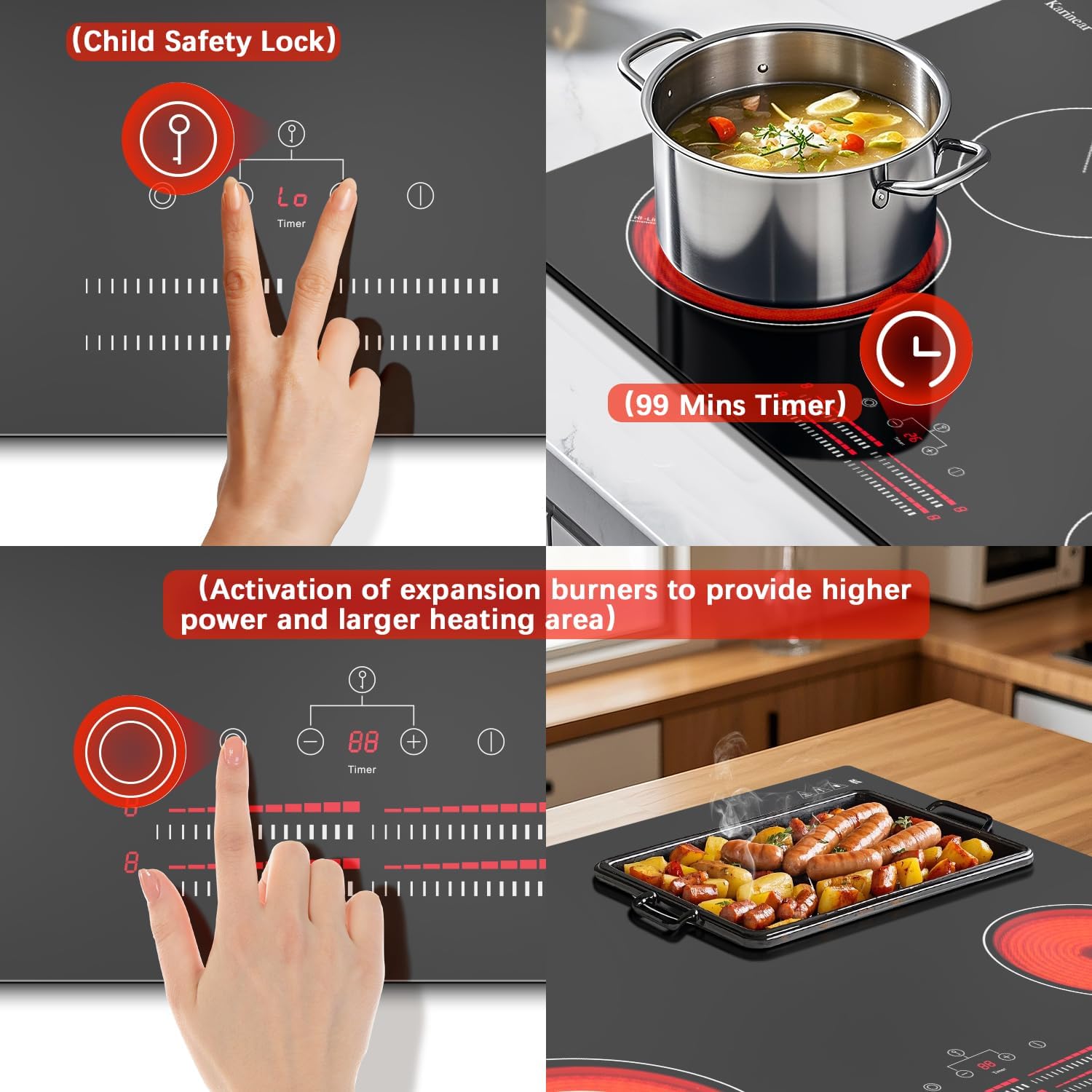
Figure 5.3: Close-up of controls demonstrating Child Safety Lock, Timer, and Expandable Burner activation.
6. Maintenance and Cleaning
Regular cleaning and maintenance will keep your Karinear Electric Cooktop looking new and functioning efficiently.
- Daily Cleaning: After each use, allow the cooktop to cool completely. Wipe the glass surface with a damp cloth and mild dish soap. Rinse with clean water and dry thoroughly with a soft cloth to prevent water spots.
- Stubborn Stains: For burnt-on food or stubborn stains, use a ceramic cooktop cleaner and the included scraper. Apply the cleaner according to its instructions, then gently scrape off residue with the scraper held at a shallow angle.
- Avoid Abrasives: Do not use abrasive cleaners, scouring pads, or harsh chemicals, as these can scratch or damage the glass surface.
- Control Panel: Wipe the control panel with a soft, damp cloth. Ensure it is dry before operating.

Figure 6.1: Cleaning the cooktop surface with the included scraper.
7. Troubleshooting
If you encounter issues with your cooktop, refer to the following common problems and solutions:
| Problem | Possible Cause | Solution |
|---|---|---|
| Cooktop does not turn on. | No power supply; Child Safety Lock active. | Check circuit breaker. Deactivate Child Safety Lock by pressing '+' and '-' simultaneously. |
| 'H' flashes after turning off a zone. | Residual heat indicator. | This is normal. The 'H' indicates the surface is still hot. It will extinguish automatically when the temperature drops. Do not touch the surface until 'H' disappears. |
| Burner turns red cyclically (not at power level 9). | Temperature regulation. | This is normal operation for temperature control. The heating element cycles on and off to maintain the set temperature, except at the highest power level (9) where it maintains continuous heat. |
| Cooktop shuts off unexpectedly. | Overheat protection activated. | Allow the cooktop to cool down. Ensure proper ventilation and that cookware is not empty or overheating. |
| Controls are unresponsive. | Child Safety Lock active; moisture on control panel. | Deactivate Child Safety Lock. Wipe the control panel dry with a clean cloth. |
If the problem persists after attempting these solutions, please contact Karinear customer support for assistance.
8. Specifications
Detailed technical specifications for the Karinear 30 Inch Electric Cooktop:
| Feature | Specification |
|---|---|
| Brand | Karinear |
| Model Number | KNC-D46663-BB |
| Installation Type | Drop-In |
| Voltage | 220-240 Volts (Hard-wired, No Plug) |
| Total Wattage | 6600 Watts |
| Number of Heating Elements | 4 |
| Burner Type | Ceramic |
| Power Levels | 9 |
| Timer | Up to 99 Minutes |
| Special Features | Child Safety Lock, Residual Heat Indicator, Overheat Protection, Expandable Burners |
| Stovetop Dimensions (W x D x H) | 30.2 x 20.5 x 3 inches (approx.) |
| Cut-out Dimensions (W x D x H) | 29.5 x 19.5 x 2.13 inches (approx.) |
| Item Weight | 26.7 pounds |
| Material Type | Glass |
| Included Components | Electric cooktop, User Manual, Scraper |
9. Warranty and Customer Support
For warranty information or if you require assistance with your Karinear Electric Cooktop, please refer to the warranty card included with your product or contact Karinear customer support. Our team is available to help with any questions or concerns you may have regarding your appliance.
Contact Information: Please refer to the Karinear official website or your purchase documentation for the most up-to-date customer support contact details.


