
1. Introduction
This manual provides detailed instructions for the operation and maintenance of your FOXWELL NT604 Elite Car Scanner and BT301 12V Car Battery Tester. The NT604 Elite is an advanced diagnostic tool designed to read and clear fault codes for Engine, ABS, SRS, and Transmission systems, offering comprehensive vehicle health analysis. The BT301 is a dedicated battery analyzer that provides precise results for 6V and 12V battery health, cranking, and charging system tests.
Key features include a vibrant digital screen for enhanced readability, advanced conductivity technology for accurate battery testing, and a user-friendly interface for both diagnostic and battery testing functions. This combined tool is suitable for DIY enthusiasts, home mechanics, and professional technicians.
Package Contents:
- FOXWELL NT604 Elite Diagnostic Scanner
- FOXWELL BT301 Battery Tester
- OBDII Connection Cable
- Battery Clamp Cables (for BT301)
- USB Cable (for updates)
- User Manual (this document)

Image 1.1: The FOXWELL NT604 Elite Car Scanner (left) and BT301 Battery Tester (right) included in the package.
2. Safety Information
Please read all safety instructions carefully before operating the device. Failure to follow these instructions may result in injury or damage to the device or vehicle.
- Always wear eye protection when working near vehicle batteries.
- Ensure the vehicle is in a well-ventilated area.
- Keep the device away from moisture, oil, and grease.
- Do not operate the device if it appears damaged.
- Avoid touching hot engine components during diagnosis.
- When testing batteries, ensure proper polarity connection to prevent short circuits.
- Keep children away from the work area.
3. Setup and Initial Use - FOXWELL NT604 Elite
Follow these steps to set up and begin using your NT604 Elite diagnostic scanner:
- Locate the OBDII Port: The OBDII (On-Board Diagnostics II) port is typically located under the dashboard on the driver's side of the vehicle.
- Connect the Scanner: Plug the OBDII connection cable into the vehicle's OBDII port. Ensure a secure connection.
- Turn on Vehicle Ignition: Turn the vehicle's ignition to the 'ON' position (do not start the engine unless instructed by a specific test). The scanner will power on automatically.
- Select Menu: Use the navigation buttons on the scanner to select the desired diagnostic function from the main menu.

Image 3.1: Visual guide for connecting the NT604 Elite to the vehicle's OBDII port, turning on ignition, and selecting a menu option.
4. Operating the FOXWELL NT604 Elite - Diagnostic Functions
The NT604 Elite provides comprehensive diagnostic capabilities for various vehicle systems.
4.1. Enhanced 4-System Diagnosis (Engine, ABS, SRS, Transmission)
This function allows you to access and diagnose the four main electronic control systems in your vehicle:
- Engine: Reads and clears engine fault codes, views live data, and performs various engine-related tests.
- ABS (Anti-lock Braking System): Diagnoses issues related to the ABS system, including sensor readings and fault codes.
- SRS (Supplemental Restraint System - Airbag): Checks for faults in the airbag system to ensure proper safety functionality.
- Transmission: Monitors transmission performance, reads codes, and identifies potential issues with the vehicle's gearbox.

Image 4.1: The NT604 Elite's main menu displaying options for Engine, Transmission, SRS, and ABS system diagnosis.
4.2. Reading and Clearing Fault Codes
The scanner can read Diagnostic Trouble Codes (DTCs) to identify specific issues and clear them after repairs are made.
- From the main menu, select the desired system (e.g., Engine, ABS).
- Choose 'Read Codes' to display current, pending, and historic DTCs.
- After addressing the underlying issue, select 'Clear Codes' to turn off warning lights (e.g., Check Engine Light, ABS light, Airbag light).

Image 4.2: The NT604 Elite interface showing the ability to quickly locate root causes and clear fault codes for ABS, Airbag, Check Engine, and AT lights.
4.3. Professional OBDII Code Reader Functions
Beyond the 4-system diagnosis, the NT604 Elite offers standard OBDII functions:
- Read Codes: Retrieves generic (P0, P2, P3, and U0) and manufacturer specific (P1, P3, and U1) codes.
- Clear Codes: Turns off Check Engine Light (MIL), clears codes and resets monitors.
- View Live Data: Displays real-time data stream from the vehicle's sensors in text or graph format.
- Freeze Frame: Stores a snapshot of operating conditions at the time an emission-related fault occurs.
- I/M Readiness: Checks the readiness of the emission monitoring system.
- On-Board Monitor Test: Retrieves test results for emission-related powertrain components and systems.
- Component Test: Allows testing of specific components or systems.
- Retrieve Vehicle Info: Displays the Vehicle Identification Number (VIN), Calibration ID (CALID), and Calibration Verification Number (CVN).
- DTC Lookup: Provides definitions for diagnostic trouble codes.

Image 4.3: The NT604 Elite displaying various professional OBDII code reader functions, including reading codes, clearing codes, viewing live data, and component tests.
5. Operating the FOXWELL BT301 Battery Tester
The BT301 is designed for quick and accurate testing of 6V and 12V automotive batteries and charging systems.
5.1. Connecting the BT301
- Ensure the vehicle's ignition is off and all accessories are turned off.
- Connect the red clamp to the positive (+) terminal of the battery.
- Connect the black clamp to the negative (-) terminal of the battery.
- The BT301 will power on automatically.
5.2. Battery Test Functions
The BT301 provides several tests to assess battery health and performance:
- Battery Health Check: Analyzes the overall condition of the battery, including State of Charge (SOC) and State of Health (SOH).
- Cranking Test: Measures the battery's ability to provide sufficient current to start the engine.
- Charging System Test: Evaluates the alternator's performance and the vehicle's charging system.
- Starter Test: Checks the starter motor's current draw and voltage drop during engine cranking.
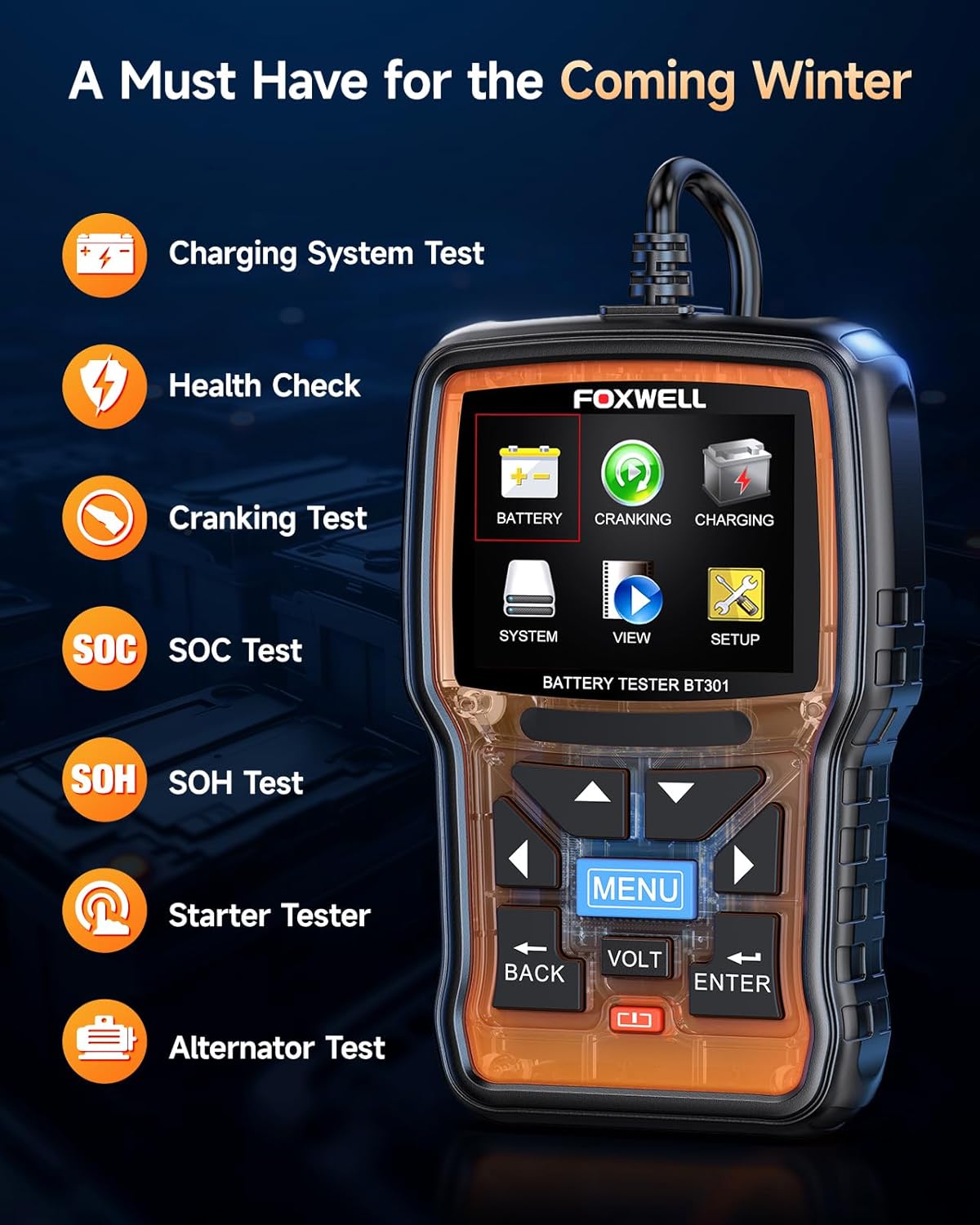
Image 5.1: The BT301 Battery Tester displaying its main functions: Battery, Cranking, Charging, SOC Test, SOH Test, Starter Tester, and Alternator Test.
5.3. Interpreting Test Results
The BT301 provides clear, actionable results:
- GOOD BATTERY: Battery is in good condition.
- CHARGE BATTERY: Battery needs to be recharged.
- REPLACE BATTERY: Battery is failing and should be replaced.
- CRANKING NORMAL: Cranking system is functioning correctly.
- LOW OUTPUT: Charging system or alternator may have issues.

Image 5.2: The BT301 display showing various test results such as 'GOOD BATTERY', 'CHARGE BATTERY', 'REPLACE BATTERY', 'CRANKING NORMAL', and 'LOW OUTPUT'.
5.4. Supported Battery Types
The BT301 is compatible with a wide range of 6V and 12V lead-acid batteries, including:
- AGM Flat Plate
- AGM Spiral
- Regular Flooded
- GEL
- EFB (Enhanced Flooded Battery)
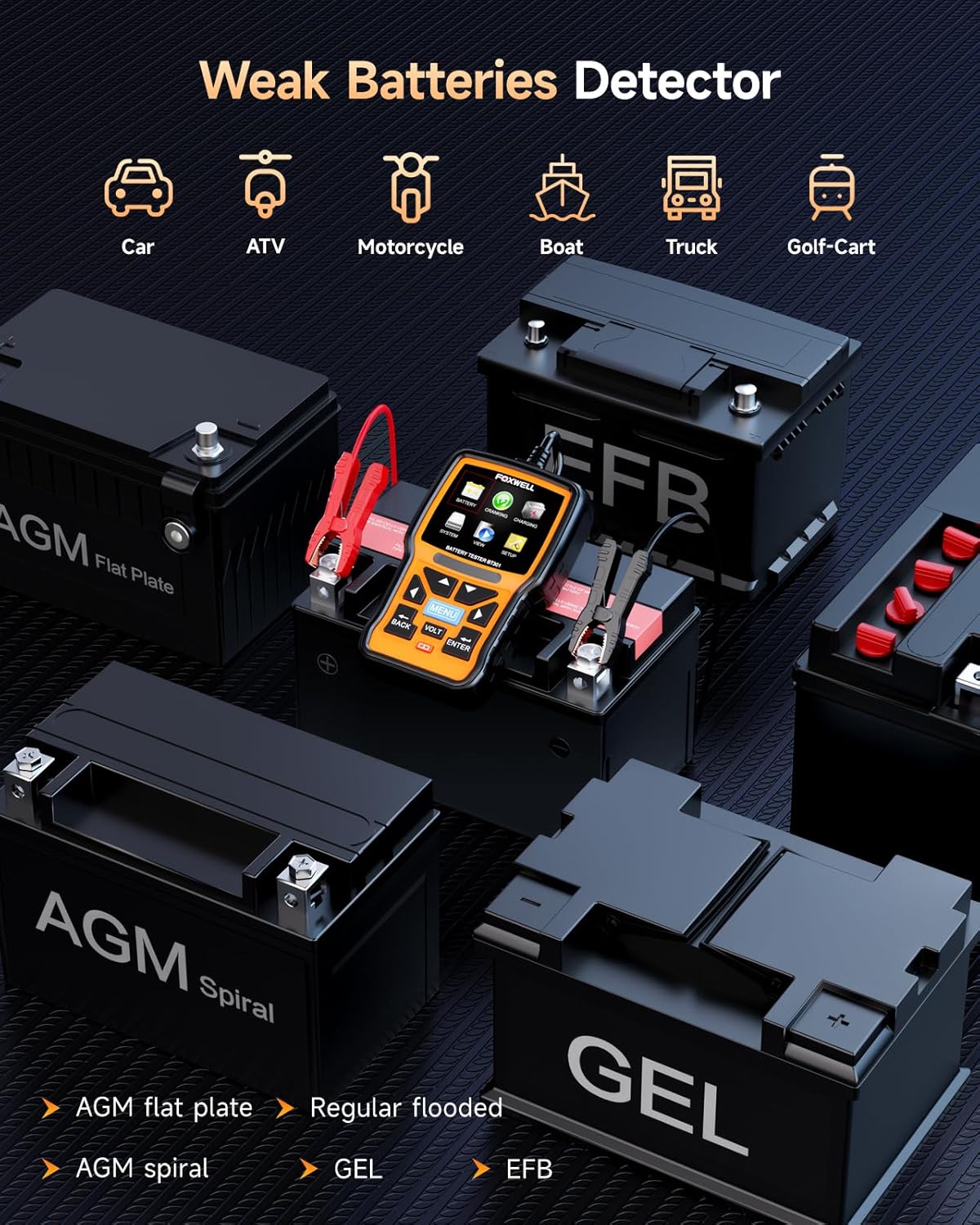
Image 5.3: The BT301 Battery Tester connected to various battery types, including AGM Flat Plate, AGM Spiral, Regular Flooded, GEL, and EFB batteries.

Image 5.4: Close-up of the BT301 Battery Tester highlighting its 99.9% accuracy and ease of use for fast, professional-level testing.
6. Maintenance
Proper maintenance ensures the longevity and accuracy of your FOXWELL devices.
- Cleaning: Use a soft, damp cloth to clean the device's exterior. Do not use abrasive cleaners or solvents.
- Storage: Store the devices in a dry, cool environment, away from direct sunlight and extreme temperatures.
- Software Updates: Regularly check the FOXWELL official website for software updates. Connect the NT604 Elite to a computer via USB and follow the update instructions provided on the website to ensure optimal performance and compatibility with new vehicle models.
- Cable Inspection: Periodically inspect all cables for signs of wear, cuts, or damage. Replace damaged cables immediately.
7. Troubleshooting
If you encounter issues with your FOXWELL devices, refer to the following common troubleshooting steps:
| Problem | Possible Cause | Solution |
|---|---|---|
| NT604 Elite does not power on. | Loose OBDII connection; vehicle ignition off; vehicle battery low. | Ensure cable is securely connected. Turn ignition to 'ON'. Check vehicle battery. |
| BT301 does not power on. | Incorrect battery clamp connection; battery completely dead. | Verify correct polarity (+ to +, - to -). Try testing a known good battery. |
| Cannot establish communication with vehicle (NT604 Elite). | Faulty OBDII port; incorrect protocol selection; vehicle not OBDII compliant. | Check vehicle's OBDII port with another device. Ensure vehicle is OBDII compliant (most vehicles 1996 and newer). |
| Inaccurate battery test results (BT301). | Loose connections; dirty battery terminals; incorrect battery type selected. | Clean battery terminals. Ensure clamps are secure. Verify correct battery type and CCA input. |
| Device freezes or responds slowly. | Software glitch; low internal memory. | Restart the device. Perform a software update. |
8. Specifications
FOXWELL NT604 Elite:
- Display: Color LCD
- Operating Voltage: 9-18V (via OBDII)
- Connectivity: OBDII cable, USB
- Supported Protocols: OBDII/EOBD
- Operating Temperature: 0 to 60°C (32 to 140°F)
- Storage Temperature: -20 to 70°C (-4 to 158°F)
FOXWELL BT301:
- Display: Digital Screen
- Operating Voltage: 6V - 12V
- Min. Operating Voltage: 6 Volts
- Test Range: 100-2000 CCA
- Supported Battery Types: AGM Flat Plate, AGM Spiral, Regular Flooded, GEL, EFB
- Power Source: Battery Powered (from vehicle battery)
- Color: Orange
9. Warranty and Support
FOXWELL products are designed for reliability and performance. This product comes with a standard manufacturer's warranty against defects in materials and workmanship. For specific warranty terms and conditions, please refer to the warranty card included with your product or visit the official FOXWELL website.
For technical support, product inquiries, or service requests, please contact FOXWELL customer support through their official website or the contact information provided in your product packaging. Please have your product model number (NT604 Elite, BT301) and purchase details ready when contacting support.


