
Introduction
This manual provides essential information for the proper setup, operation, maintenance, and troubleshooting of your Elite Screens Spectrum Swift-RC1 105-inch motorized projector screen. Please read this manual thoroughly before installation and use to ensure optimal performance and longevity of your product.
The Elite Screens Spectrum Series is a versatile electric motorized screen designed for both residential and commercial wall/ceiling applications. It features MaxWhite 2 material, which is ISF (Image Science Foundation) certified for accurate color reproduction, color contrast, and black-white dynamic range.

Figure 1: Elite Screens Spectrum Swift-RC1 motorized projector screen in a modern living room, showcasing its integration and vibrant display capabilities.
Setup
The Spectrum Swift-RC1 is designed for easy installation and is fully assembled for plug-and-play readiness. It can be installed on a wall or ceiling using the included installation kit.
Mounting
The durable casing allows for easy installation. Ensure you have a suitable wall plug for power. For detailed step-by-step instructions on mounting, refer to the video below.
Video 1: Step-by-step guide on how to properly install a projector screen, provided by Elite Screens Inc.
Optimal Viewing Distance
To ensure an immersive viewing experience and minimize eye fatigue, consider the optimal seating distance from your screen. The Society of Motion Picture and Television Engineers (SMPTE) recommends a minimum viewing angle of 30 degrees for movie theaters. For home use, this translates to a seating distance that allows for comfortable viewing without distortion.
Video 2: Information on choosing the right sized projector screen and determining optimal viewing distances, provided by Elite Screens Inc.
Operating Instructions
The Spectrum Swift-RC1 offers multiple control options for convenient operation.
Control Systems
- Infrared (IR) & Radio Frequency (RF) Remotes: Use the included remotes for wireless control of the screen's up/down/stop functions.
- Wall Box Controller: A detachable wall box controller with a built-in IR sensor is provided for direct control.
- Wired 12-Volt Trigger: The RJ50 Port allows for a wired 12-volt trigger feature, enabling synchronization with your projector's power cycle.
- Wireless 12-Volt Trigger: Utilize the RF remote for wireless 12-volt trigger functionality.
- Programmable Vertical Drop: The screen features a user-friendly programmable vertical drop position for easy installation and customized viewing heights.
- Selectable Channels: Built-in selectable channels allow programming different RF remote codes for controlling multiple screens and reducing electrical interference.
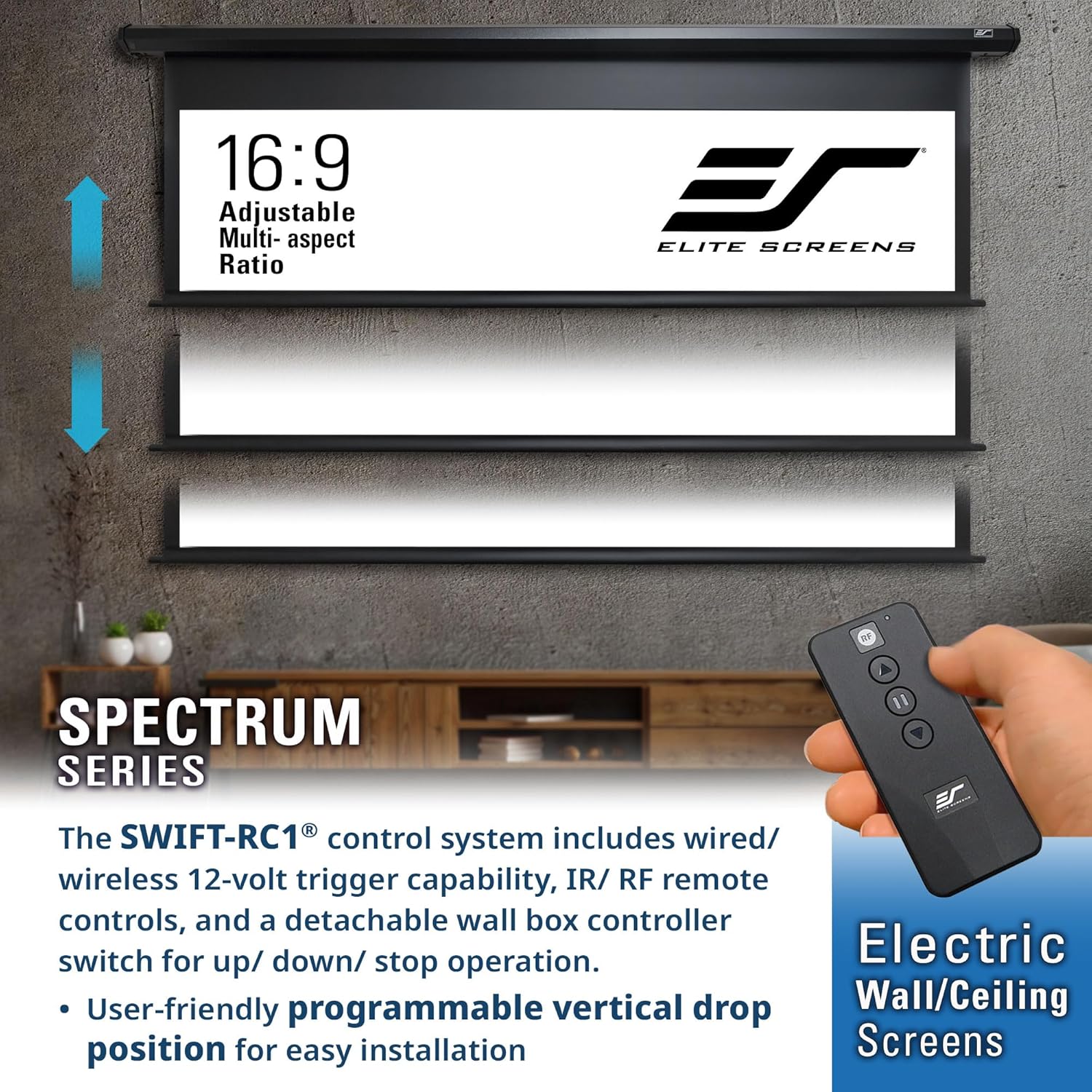
Figure 2: The included remote controls and wall box controller for the Spectrum Swift-RC1 projector screen.
Maintenance
Proper maintenance ensures the longevity and optimal performance of your projector screen.
- Cleaning the Screen Material: The MaxWhite 2 screen material is easy to clean with mild soap and water. Use a soft, damp cloth and avoid abrasive cleaners or harsh chemicals.
- General Care: When not in use, retract the screen into its casing to protect the material from dust and damage. Avoid touching the screen surface directly with your hands.
Troubleshooting
If you encounter any issues with your Spectrum Swift-RC1 projector screen, consider the following:
- Screen Not Responding to Remote: Check the batteries in your remote controls. Ensure there are no obstructions between the remote and the screen's IR sensor.
- Screen Not Extending/Retracting: Verify that the screen is properly plugged into a working power outlet. Check for any physical obstructions preventing movement.
- Image Quality Issues: Ensure your projector is compatible with the screen. Note: This screen is NOT compatible with Short-Throw / Ultra Short-Throw Projectors. Adjust projector settings for optimal focus and alignment.
- Electrical Interference: Utilize the built-in selectable channels to program different RF remote codes if you experience interference with other devices.
For further assistance, please contact Elite Screens technical support.
Specifications
| Feature | Detail |
|---|---|
| Model Number | ELECTRIC105H2 |
| Diagonal Size | 105-inch |
| Aspect Ratio | 16:9 |
| View Size (H x W) | 51.5" H x 91.5" W |
| Overall Size (H x W) | 64.7" H x 103.1" W |
| Casing Color | Black |
| Mounting Type | Wall / Ceiling Mount |
| Screen Material | MaxWhite 2 |
| Gain | 1.1 |
| Viewing Angle | 180 Degrees |
| Projection Readiness | 4K Ultra HD and Active 3D Ready |
| Backing | Fully black backed (prevents light penetration) |
| Operation Mode | Automatic (Motorized) |
| Item Weight | 21.9 Pounds |
| UPC | 848448024604 |

Figure 3: Dimensional specifications for the Elite Screens Spectrum Swift-RC1 105-inch screen.

Figure 4: MaxWhite 2 screen material with ISF and GREENGUARD certifications, indicating high-fidelity and indoor air safety standards.
Warranty and Support
Elite Screens provides comprehensive support for its products.
- Manufacturer's Warranty: A 2-Year/3-Year ENR-G Manufacturer's Warranty is provided by Elite Screens for products purchased NEW. Elite Screens is an ISO9001 manufacturer since 2004.
- Technical Support: Lifetime Technical Support is available by Email or Phone Call from Elite Screens' Professional Service Team.

Figure 5: Elite Screens highlights its US-based operations, 2-year warranty, and lifetime technical support.


