
Important Safety Information
Please read all instructions carefully before assembly and use. Keep this manual for future reference.
- Be cautious when adjusting the legs to avoid tripping.
- Keep the wireless remote and under-bed lighting away from water to prevent electrical shock.
- Ensure all electrical connections are secure and follow local electrical codes.
- Do not allow children or pets to play on or under the adjustable bed frame.
- Do not operate the bed frame if any part is damaged or malfunctioning. Contact customer support immediately.
- Keep the area around the bed clear of obstructions during operation.
Package Contents
Verify that all components are present before beginning assembly.
- Adjustable Bed Frame (Queen Size)
- Wireless Remote Control
- Adjustable Legs (2 heights: 8 inches and 11.4 inches)
- Mattress Retaining Bar
- Power Cord and Adapter
- User Manual

Figure 1: Key components of the ESHINE Adjustable Bed Frame.
Setup Instructions
Assembly typically takes approximately 10 minutes. Two people are recommended for easier setup.
- Unpack Components: Carefully remove all parts from the packaging and place them on a clean, flat surface.
- Attach Legs: Screw the adjustable legs into the designated holes on the underside of the bed frame. Choose your preferred height (8 inches or 11.4 inches). Ensure all legs are securely tightened.
- Install Mattress Retaining Bar: Insert the mattress retaining bar into the slots at the foot of the bed frame. This prevents the mattress from sliding during adjustments.
- Connect Power: Plug the power cord into the bed frame's control box, then plug the adapter into a grounded electrical outlet.
- Place Mattress: Carefully place your mattress onto the adjustable bed frame.

Figure 2: Overview of the adjustable bed frame features and components.
Operating Instructions
Wireless Remote Control
The wireless remote provides convenient control over all bed frame functions. Ensure the remote has fresh batteries and is paired with the control box (refer to pairing instructions if needed).

Figure 3: Wireless Remote Control layout and functions.
- Head Up/Down: Adjusts the head section incline.
- Foot Up/Down: Adjusts the foot section incline.
- Pillow Tilt Up/Down: Adjusts the pillow-tilt section for neck support.
- Zero-G Preset: Activates the Zero Gravity position, which elevates the head and feet to promote circulation and reduce pressure.
- Flat Button: Returns the bed to a flat position.
- Anti Snore: Activates a preset position designed to reduce snoring.
- Memory Positions: Save and recall your favorite positions.
- Massage ON/OFF: Turns the massage function on or off.
- Massage Modes: Select from Wave, Pulse, or Full Body Vibration modes.
- Massage Intensity: Adjust between three intensity levels.
- Massage Timer: Set the massage duration for 10, 20, or 30 minutes.
- Under Bed LED ON/OFF: Controls the under-bed lighting.
- Flash Light ON/OFF: Activates a flashlight feature on the remote.
- Child Lock: Locks the remote to prevent accidental adjustments.
Smart App Control
The ESHINE adjustable bed frame can also be controlled via a smartphone application. Download the official ESHINE app from your device's app store.

Figure 4: ESHINE Mobile App interface for bed control.
- Download App: Search for 'ESHINE' in your smartphone's app store and install.
- Pair Device: Follow the in-app instructions to pair your smartphone with the bed frame via Bluetooth.
- Control Functions: Use the app to adjust positions, activate massage, control lighting, and set alarms.
Dual USB Charging Ports
Two USB ports (Type-A and Type-C) are located on the side of the bed frame for convenient charging of your electronic devices.

Figure 5: Illustration of various bed functions including USB ports.
Maintenance
Regular maintenance ensures the longevity and optimal performance of your adjustable bed frame.
- Cleaning: Wipe the frame with a damp cloth. Avoid harsh chemicals or abrasive cleaners.
- Motor Care: The OKIN motors are designed for durability and generally require no maintenance. Keep the motor area free from dust and debris.
- Remote Batteries: Replace batteries in the wireless remote when the signal weakens or the flashlight dims.
- Cable Management: Ensure all cables are neatly routed and not pinched or tangled.
Troubleshooting
If you encounter issues, refer to the following common troubleshooting steps. If the problem persists, contact ESHINE customer support.
| Problem | Possible Cause | Solution |
|---|---|---|
| Bed frame does not respond to remote/app. | No power, remote batteries low, remote not paired. | Check power connection. Replace remote batteries. Re-pair remote (refer to pairing instructions in the full manual). |
| Motor makes unusual noise. | Obstruction, loose component. | Inspect for obstructions under the bed. Ensure all bolts are tightened. |
| Massage function not working. | Power issue, motor malfunction. | Check power connection. Ensure massage is turned on via remote/app. |
| USB ports not charging. | Power issue, device compatibility. | Ensure bed frame is powered on. Try a different device or cable. |
Specifications
| Feature | Detail |
|---|---|
| Size | Queen |
| Product Dimensions | 78.7"L x 59"W x 13.7"H |
| Brand | ESHINE |
| Model Series | 5000 Series |
| Special Features | Adjustable head, foot, and pillow-tilt, Massage (3 intensity, 3 modes), Smart APP Control, Zero Gravity, Dual USB Ports (Type-A & Type-C), Under-Bed Lighting, Wireless Remote |
| Adjustable Leg Heights | 8 inches, 11.4 inches |
| Frame Material | Metal |
| Manufacturer | Eshine Sleep |
| Warranty Type | Limited |
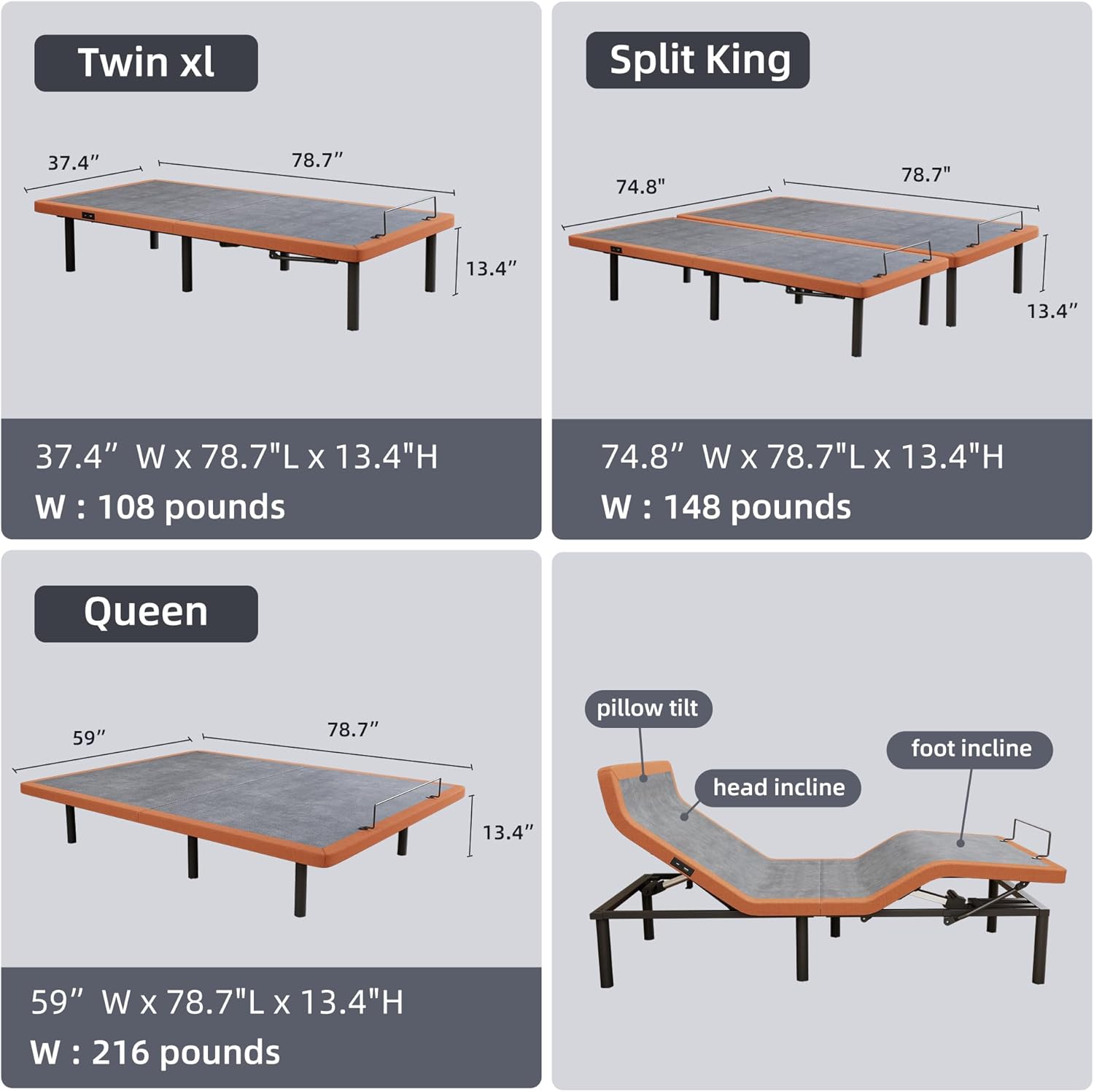
Figure 6: Queen size dimensions: 59"W x 78.7"L x 13.4"H, Weight: 216 pounds.
Warranty and Support
The ESHINE Adjustable Bed Frame comes with a limited warranty. For specific warranty details, claims, or technical support, please contact ESHINE customer service.
Customer Service: Refer to the contact information provided with your purchase or visit the official ESHINE website.


