
Introduction
This manual provides essential instructions for the safe and efficient operation, maintenance, and troubleshooting of your RYOBI ONE+ HP 18V Brushless Cordless Advanced Whisper Series Stick Vacuum Kit. This powerful and quiet stick vacuum is designed for versatile cleaning tasks, leveraging ONE+ HP Technology for strong suction and WHISPER Series Technology for reduced noise.
The kit includes the vacuum, a 4.0 Ah battery, and a charger, all compatible with the RYOBI ONE+ 18V battery system.
Important Safety Information
Always read and understand all instructions before using this product. Failure to follow all instructions listed below may result in electric shock, fire, and/or serious personal injury.
- Do not use the vacuum cleaner outdoors or on wet surfaces.
- Do not allow to be used as a toy. Close attention is necessary when used by or near children.
- Use only as described in this manual. Use only manufacturer’s recommended attachments.
- Do not use with damaged cord or plug. If appliance is not working as it should, has been dropped, damaged, left outdoors, or dropped into water, return it to a service center.
- Do not pull or carry by cord, use cord as a handle, close a door on cord, or pull cord around sharp edges or corners. Do not run appliance over cord. Keep cord away from heated surfaces.
- Do not unplug by pulling on cord. To unplug, grasp the plug, not the cord.
- Do not handle plug or appliance with wet hands.
- Do not put any object into openings. Do not use with any opening blocked; keep free of dust, lint, hair, and anything that may reduce air flow.
- Keep hair, loose clothing, fingers, and all parts of body away from openings and moving parts.
- Do not pick up anything that is burning or smoking, such as cigarettes, matches, or hot ashes.
- Do not use to pick up flammable or combustible liquids, such as gasoline, or use in areas where they may be present.
- Do not pick up toxic material, such as chlorine bleach, ammonia, or drain cleaner.
- Do not use without dust bag and/or filters in place.
- Turn off all controls before unplugging.
- Use extra care when cleaning on stairs.
- Do not use to pick up hard or sharp objects such as glass, nails, screws, coins, etc.
- Prevent unintentional starting. Ensure the switch is in the off-position before connecting to battery pack, picking up or carrying the appliance.
- Recharge only with the charger specified by the manufacturer. A charger that is suitable for one type of battery pack may create a risk of fire when used with another battery pack.
- Use appliances only with specifically designated battery packs. Use of any other battery packs may create a risk of injury and fire.
Package Contents
Verify that all items listed below are included in your package. If any parts are missing or damaged, contact RYOBI customer service.

Image: All components of the RYOBI ONE+ HP 18V Brushless Cordless Advanced Whisper Series Stick Vacuum Kit, including the vacuum, various attachments, battery, and charging station.
- RYOBI ONE+ HP Advanced Stick Vacuum
- 4.0 Ah High Performance Battery
- Charging Docking Station
- Mini-Motorized Beater Bar
- Crevice Tool
- Dust Brush
- Micro Crevice Tool
- Accessory Holder
- Vacuum Maintenance Tool
Setup
1. Battery Charging
- Insert the 4.0 Ah battery into the charging docking station.
- Plug the charging docking station into a standard electrical outlet.
- Allow the battery to fully charge before first use. Refer to the charger's indicator lights for charging status.
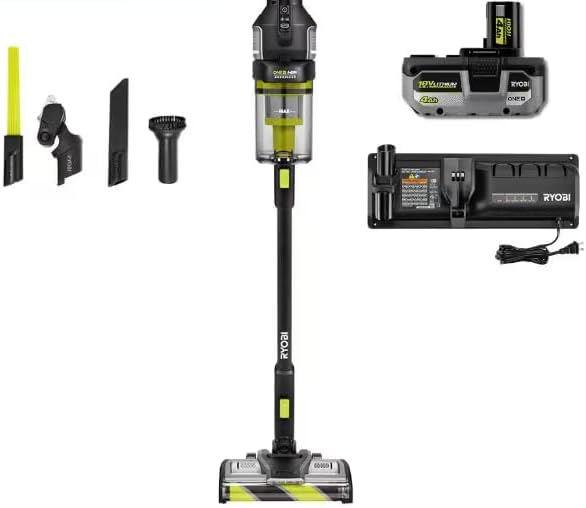
Image: The RYOBI ONE+ HP Stick Vacuum, its 4.0 Ah battery, and the charging station, illustrating the components ready for assembly and charging.
2. Vacuum Assembly
- Attach the extension wand to the main vacuum body until it clicks securely into place.
- Attach the desired cleaning head (e.g., floor nozzle) to the end of the extension wand.
- Insert the charged battery into the battery port on the main vacuum body until it locks.
3. Accessory Holder Installation
The included accessory holder can be mounted to a wall for convenient storage of the vacuum and its attachments.

Image: The RYOBI ONE+ HP Stick Vacuum stored vertically on its wall-mounted charging docking station, with accessories organized on the side.
- Select a suitable wall location near an electrical outlet.
- Use appropriate hardware (not included) to securely mount the docking station and accessory holder to the wall.
- Place the vacuum and its accessories into the designated slots.
Operating Instructions
1. Powering On/Off and Power Modes
- To turn the vacuum on, press the power button located on the handle.
- The vacuum features 3 power modes. Press the mode selection button to cycle through the available power settings (e.g., Low, Medium, High) to suit your cleaning needs.
- To turn the vacuum off, press the power button again.

Image: Diagram highlighting key features of the RYOBI ONE+ HP Stick Vacuum, including roller bar on/off, 3 power modes, HEPA filter, 1-liter dust cup, removable extension wand, LED light, Wrap Defense roller bar, and self-standing design.
2. Using Attachments and Handheld Mode
- Floor Cleaning: Use the main floor nozzle for general floor cleaning on carpets and hard surfaces. The roller bar can be turned on or off as needed.
- Handheld Conversion: The removable extension wand allows the vacuum to convert into a handheld unit for cleaning furniture, stairs, or vehicle interiors.
- Specialized Cleaning:
- Mini-Motorized Beater Bar: Ideal for pet hair and deep cleaning upholstery.
- Crevice Tool: For narrow spaces, corners, and edges.
- Dust Brush: For delicate surfaces, blinds, and vents.
- Micro Crevice Tool: For extremely tight spaces.

Image: A collage demonstrating the versatility of the RYOBI ONE+ HP Stick Vacuum, showing it used as a handheld vacuum for upholstery, with a crevice tool for tight spots, and for cleaning high surfaces.

Image: The RYOBI ONE+ HP Stick Vacuum's floor head with LED lights illuminating a hard floor, effectively cleaning up scattered cereal, demonstrating its capability for everyday cleaning from dust to large debris.
Maintenance
1. Emptying the Dust Cup
The vacuum features a 1-liter dust cup capacity. Empty the dust cup regularly to maintain optimal suction performance.
- Ensure the vacuum is turned off and the battery is removed.
- Locate the dust cup release button and press it to detach the dust cup from the main body.
- Hold the dust cup over a trash receptacle and open the bottom flap to empty contents.
- Close the flap and reattach the dust cup to the vacuum until it clicks.
2. Cleaning Filters
The HEPA filter traps up to 99.97% of particles. Regular cleaning is crucial for maintaining air quality and vacuum performance.
- With the dust cup removed, carefully extract the HEPA filter.
- Tap the filter gently over a trash can to remove loose dust and debris.
- If necessary, rinse the filter under cool running water. Ensure it is completely dry before reinserting. Do not use detergents or hot water.
- Reinsert the dry filter into the dust cup and reattach the dust cup to the vacuum.
3. Cleaning the Roller Bar
The roller bar design minimizes hair wrap. However, periodic cleaning may be necessary.
- Ensure the vacuum is off and the battery is removed.
- Locate the tool-free removable roller bars on the floor nozzle.
- Remove the roller bar and use the included vacuum maintenance tool or scissors to cut and remove any tangled hair or debris.
- Reinsert the clean roller bar until it clicks into place.
Troubleshooting
This section addresses common issues you might encounter with your RYOBI stick vacuum. If you experience problems not listed here, contact customer support.
| Problem | Possible Cause | Solution |
|---|---|---|
| Vacuum does not turn on. | Battery not charged or not properly inserted. | Ensure battery is fully charged and securely inserted. |
| Loss of suction. | Dust cup full, filter clogged, or blockage in nozzle/hose. | Empty dust cup. Clean or replace filter. Check for and remove any blockages. |
| Roller bar not spinning. | Hair/debris tangled in roller bar, or roller bar switch is off. | Clean roller bar. Ensure roller bar function is activated (if applicable). |
| Vacuum is unusually loud. | Blockage in air path or damaged component. | Check for and remove any blockages. If noise persists, contact customer service. |
Specifications
| Feature | Detail |
|---|---|
| Brand | RYOBI |
| Model Number | PBLSV719K |
| Special Feature | Bagless |
| Filter Type | HEPA Filter |
| Cordless | Yes |
| Maximum Suction | 89 Inches |
| Battery Type | Lithium-Ion (18V ONE+ HP) |
| Control Method | Touch |
| Portable | Yes |
| Number of Power Levels | 3 |
| Indoor/Outdoor Usage | Indoor |
| Product Dimensions | 11 x 8.5 x 46 inches |
| Item Weight | 16.96 pounds |
| UPC | 033287218516 |
Warranty and Support
RYOBI products are manufactured to high-quality standards and are rigorously tested. For specific warranty information, please refer to the warranty card included with your product or visit the official RYOBI website.
For technical assistance, replacement parts, or service, please contact RYOBI customer support. Have your model number (PBLSV719K) and serial number ready when contacting support.
Online Support: Visit the official RYOBI website for FAQs, product registration, and service center locations.
Telephone Support: Refer to your product documentation for the customer service phone number specific to your region.


