
Tengsen W1
Tengsen Portable MP3/MP4 Player
User Manual
Introduction
Thank you for choosing the Tengsen Portable MP3/MP4 Player. This device is designed to provide a versatile multimedia experience, offering HiFi lossless audio playback, video capabilities, FM radio, voice recording, e-book reading, photo viewing, and more. This manual will guide you through the setup, operation, and maintenance of your new player to ensure optimal performance and enjoyment.
What's Included
- 1 x MP3 Player with Bluetooth
- 1 x USB Micro Cable
- 1 x Earphones
- 1 x User Manual
Getting Started (Setup)
Charging the Device
Before first use, fully charge the MP3 player. Connect the included USB micro cable to the player's charging port and the other end to a USB power adapter (not included) or a computer's USB port. The device provides up to 50 hours of continuous music playback and approximately 8 hours of video playback on a full charge.
Adding Music and Files
To transfer files, connect the MP3 player to your computer using the provided USB cable. The device will appear as a removable disk. You can then drag and drop music, video, photo, and e-book files directly into the appropriate folders on the player.
Expanding Storage
The MP3 player comes with 64GB of internal storage. If more space is needed, you can expand the storage capacity by inserting a Micro SD card (not included) into the dedicated slot. The device supports Micro SD cards up to 128GB.

The MP3 player supports up to 128GB Micro SD card expansion for extensive storage.
Operating Instructions
Basic Navigation
The player features a 1.8-inch HD color screen and classic button design for easy navigation. Use the central button and surrounding directional buttons to browse menus, select options, and control playback.
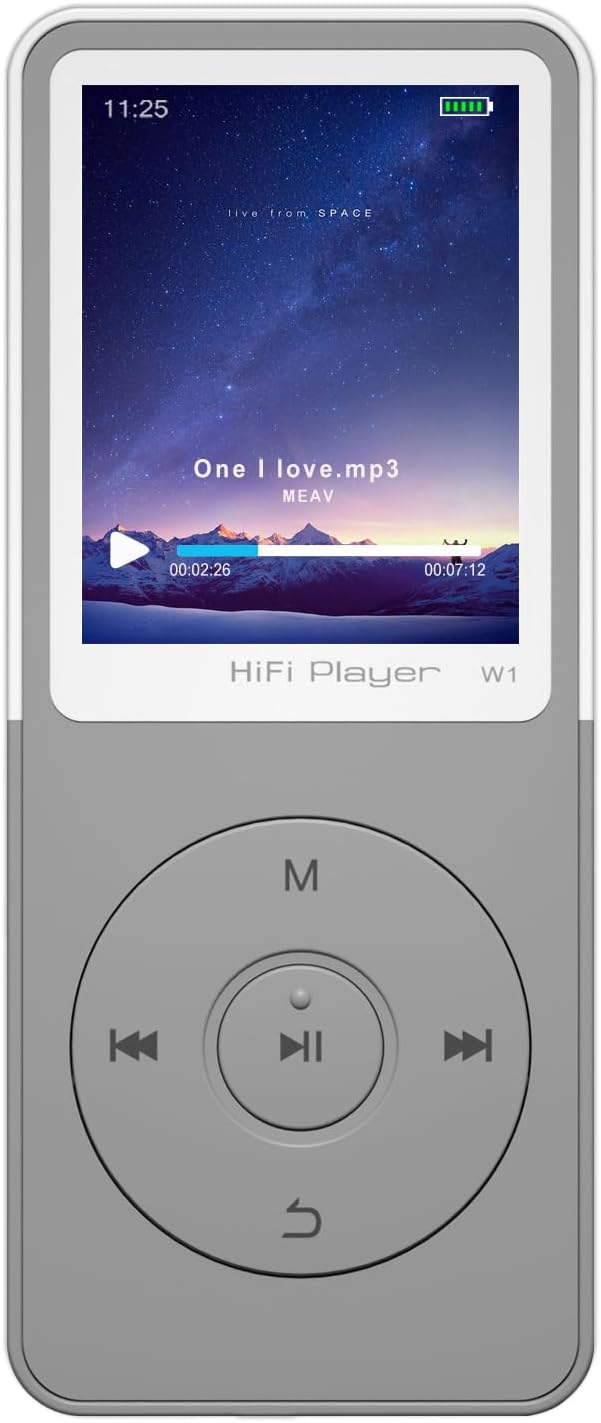
Front view of the MP3 player, highlighting the screen and intuitive button layout.
Music Playback
The device delivers HiFi lossless sound quality and supports a wide range of music formats including MP3, WMA, OGG, APE, FLAC, and WAV. Navigate to the 'Music' section to browse your audio library and select tracks for playback.

The player supports various music formats and features a built-in DAC audio chip for high-fidelity sound.
Bluetooth Connectivity
The MP3 player features upgraded Bluetooth technology for stable and efficient wireless connections. To connect to Bluetooth headphones or speakers, go to the Bluetooth settings, enable Bluetooth, and pair with your desired device. Note: This player does not support connection with phones or tablets.

Connect your MP3 player wirelessly to Bluetooth headphones, earbuds, or speakers for enhanced audio experience.
FM Radio
Enjoy your favorite radio stations with the built-in FM radio function. To use the FM radio, you must plug in wired headphones, as they serve as the antenna. The radio supports a normal range of 87.5-108.0 MHz.

Wired headphones are required to use the FM radio function, acting as the antenna.
Video Playback and Other Functions
The MP3/MP4 player supports video playback in AMV and AVI formats (note: conversion tools may be required for some AVI files). Beyond music and video, the device offers a suite of useful features including:
- E-book Reader: Supports TXT format.
- Photo Viewer: Supports JPEG, BMP, GIF formats.
- Voice Recorder: Records in WAV and MP3 formats.
- Alarm Clock: Set alarms for daily reminders.
- Calendar: Keep track of dates.
- Folder Management: Organize your files efficiently.
- Screen Savers: Customize your display.

The MP3 player offers a variety of functions beyond music, including video, FM radio, recording, and e-books.
Product Overview Video
Watch this video for a visual overview of the MP3 player's design and key features.
Official product video showcasing the Tengsen MP3 Player's design and features.
Care and Maintenance
To ensure the longevity of your MP3 player, follow these guidelines:
- Keep the device dry. Moisture can damage internal circuits.
- Avoid extreme temperatures. Do not expose to direct sunlight or very cold environments.
- Clean the device with a soft, dry cloth. Do not use harsh chemicals or abrasive cleaners.
- Handle with care to prevent drops or impacts.
- Store in a clean, dust-free environment when not in use.
Troubleshooting Guide
If you encounter issues with your MP3 player, please refer to the following common solutions:
| Problem | Possible Solution |
|---|---|
| Device does not turn on | Ensure the battery is charged. Connect to a power source and try again. |
| Cannot transfer files | Check USB cable connection. Ensure the device is recognized by your computer. Try a different USB port or cable. |
| No sound during playback | Check volume level. Ensure headphones are properly connected or Bluetooth device is paired and connected. Verify audio file format is supported. |
| FM Radio not working | Ensure wired headphones are plugged in, as they act as the antenna. Check for strong signal in your area. |
| Bluetooth connection unstable | Ensure the player and Bluetooth device are within range. Disconnect and re-pair the devices. Avoid interference from other electronic devices. |
For further assistance, please contact customer support.
Product Specifications
| Feature | Detail |
|---|---|
| Model Name | W1 |
| Product Dimensions | 0.3 x 1.6 x 3.7 inches |
| Item Weight | 1.11 ounces |
| Screen Size | 1.8 Inches |
| Memory Storage Capacity | 64 GB (expandable up to 128GB via Micro SD card) |
| Connectivity Technology | Aux, Bluetooth, USB |
| Supported Music Formats | MP3, WMA, OGG, APE, FLAC, WAV (does not support audiobooks/iTunes) |
| Supported Video Formats | AMV, AVI (conversion tool required) |
| Supported E-book Format | TXT |
| Supported Recording Formats | WAV, MP3 |
| Supported Picture Formats | JPEG, BMP, GIF |
| Battery Life (Music) | Up to 50 hours |
| Battery Life (Video) | Approximately 8 hours |
| Special Features | Equalizer, FM Radio, Hi-Res Audio, Voice Recorder |
Warranty and Customer Support
Your Tengsen MP3/MP4 Player comes with a 12-month after-sales warranty. For any technical support or assistance, please feel free to communicate with our professional after-sales team. We are committed to ensuring your satisfaction with our product.
Related documentsW1

Ask a question about this manual
Ask about setup, troubleshooting, compatibility, parts, safety, or missing instructions. Manuals+ will review the question and use this page’s manual context to help answer it.