
SJOYBRING 7-Inch Double Din Car Stereo
SJoyBring 7-Inch Double Din Car Stereo User Manual
Model: 7-Inch Double Din Car Stereo
Introduction
Thank you for choosing the SJoyBring 7-Inch Double Din Car Stereo. This manual provides essential information for the proper installation, operation, and maintenance of your new car stereo. Please read it thoroughly before use to ensure optimal performance and safety.
Product Features
- Wireless CarPlay & Android Auto: Seamless smartphone integration for navigation, music, and calls without cables.
- 4.2-Channel Audio Output: Supports 4 channels RCA audio out for aftermarket amplifiers and 2 separate subwoofer outputs for enhanced sound.
- Upgraded Bluetooth 5.3: Independent Bluetooth module and antenna ensure stable, fast, and clear wireless streaming and hands-free calling.
- HD QLED Touchscreen: 7-inch screen with 1280x720 resolution, supporting 1920x1080P video playback and MirrorLink functionality.
- Rear and Front View Camera Support: Automatically displays camera feed when reversing, includes an HD night vision rear view camera.
- AM/FM Car Radio: Built-in tuner for radio reception.
- Physical Buttons & Rotary Volume Control: For easy and safe operation while driving.
- Smart Voice Control: Utilize intelligent voice assistants for calls, navigation, and music playback.
- Steering Wheel Control Support: Integrate with your vehicle's steering wheel controls for convenience.
What's in the Box
Upon opening the package, please verify that all components are present and in good condition:
- SJoyBring 7-Inch Double Din Car Stereo Unit
- HD Night Vision Rear View Camera
- Necessary Wiring Harnesses and Connectors
- Mounting Hardware
- User Manual (this document)
If any items are missing or damaged, please contact SJoyBring customer support.
Setup and Installation
Proper installation is crucial for the performance and longevity of your car stereo. It is highly recommended to have this unit installed by a professional car audio technician.
- Check Dash Opening Size: Before installation, ensure your vehicle's dashboard opening size is compatible with the double din stereo. An additional dash kit may be required for a proper fit.
- Wiring Connections: Carefully follow the wiring diagram provided. Ensure all connections are secure to prevent electrical issues. Some vehicles may require a wire harness adapter and a radio antenna adapter.
- Mounting: Utilize the plentiful mounting holes on the unit for secure installation and optimal cooling.
- Camera Installation: Install the included rear view camera according to the instructions. Ensure proper routing of cables and secure mounting for a clear view.

Image: Detailed diagram showing the dimensions of the car stereo and various wiring connections for power, speakers, cameras, and external amplifiers. It also highlights the mounting holes for installation.
Operating Instructions
1. Power On/Off and Basic Controls
- Power Button: Press and hold to turn the unit on or off. A short press may mute/unmute audio.
- Volume Knob: Rotate clockwise to increase volume, counter-clockwise to decrease.
- Home Button: Returns to the main menu.
- Reset Button (RST): A small pinhole button for factory reset if the unit malfunctions. Use a thin object to press.
2. Wireless CarPlay and Android Auto
Connect your compatible smartphone wirelessly to access navigation, music, calls, and messages directly on the stereo's display.
- Ensure Bluetooth and Wi-Fi are enabled on your smartphone.
- On the car stereo, select the "CarPlay" or "Android Auto" icon.
- Follow the on-screen prompts to pair your phone.
- Once connected, your phone's interface will be mirrored on the stereo, allowing for voice control and touch interaction.

Image: The car stereo screen showing both Apple CarPlay and Android Auto interfaces, demonstrating wireless connectivity for navigation, music, and voice commands.
3. Bluetooth Connectivity
The upgraded Bluetooth 5.3 ensures stable connections for hands-free calls and audio streaming.
- Go to the "Bluetooth" menu on the stereo.
- Enable Bluetooth on your phone and search for available devices.
- Select "SJoyBring" from the list and confirm pairing.
- You can now make/receive calls and stream music wirelessly.

Image: A visual representation of the car stereo's Bluetooth system, showing a phone call interface on the screen and a smartphone connected via Bluetooth, emphasizing stable and clear communication.
4. Audio Output and Equalizer
The unit features 4.2-channel audio output and a 10-band equalizer for customized sound.
- Access the "EQ Setup" menu to adjust frequency bands (30Hz to 16KHz).
- Select preset modes (Jazz, Classic, Rock, Pop, Soft) or create a custom "User" profile.
- Adjust subwoofer output and sound field balance for optimal listening experience.
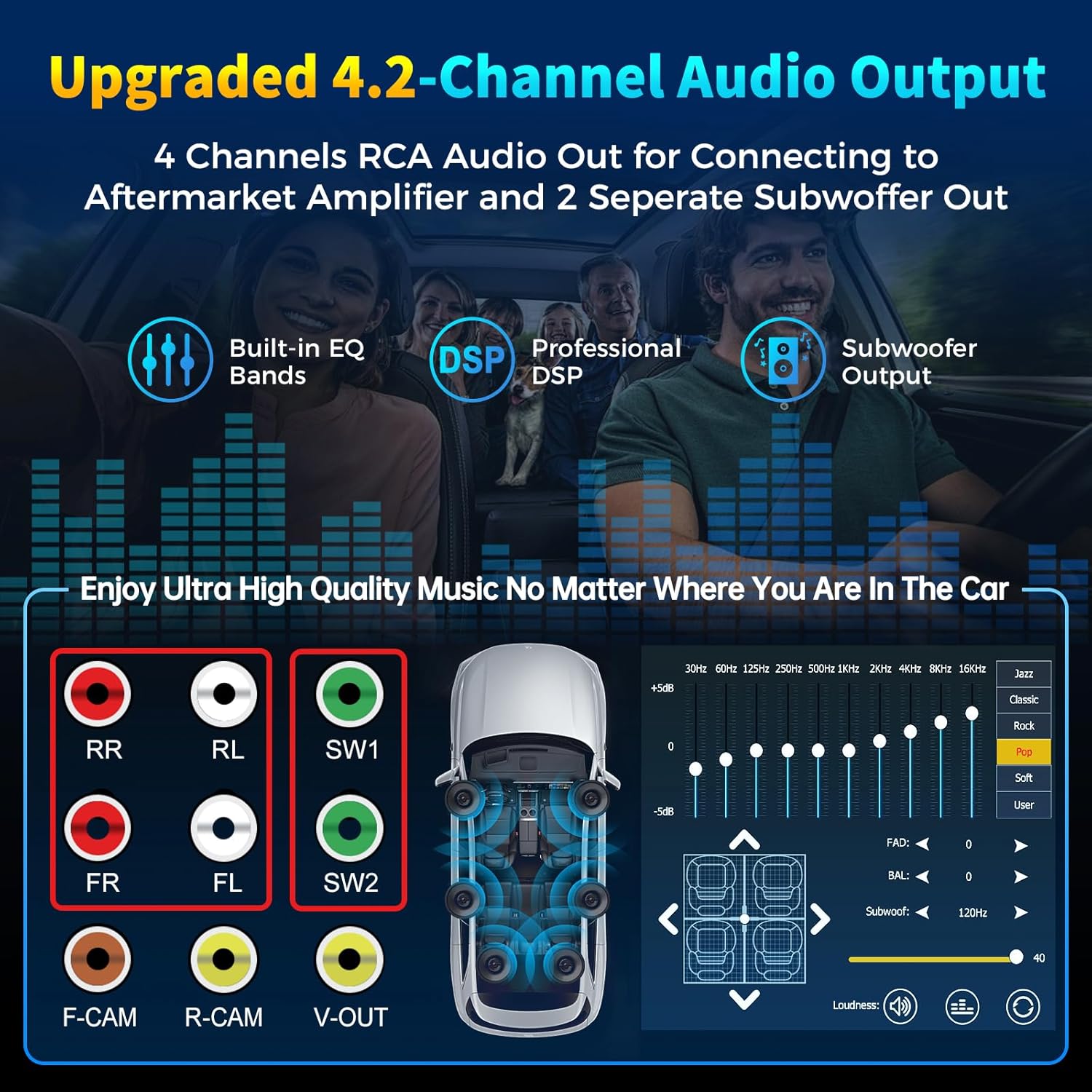
Image: Diagram illustrating the 4-channel RCA audio outputs and 2 subwoofer outputs on the back of the stereo, alongside a screen capture of the 10-band equalizer settings for sound customization.
5. HD QLED Touchscreen and MirrorLink
The 7-inch QLED screen offers high-definition visuals and supports MirrorLink for screen mirroring.
- Touchscreen Operation: Navigate menus and control functions by touching the screen.
- MirrorLink: Connect your iOS or Android phone via USB to mirror its screen content (e.g., Google Maps, Spotify, YouTube) onto the stereo display.

Image: An illustration detailing the layers of the QLED HD screen, emphasizing its 1280x720 resolution and touch capabilities, comparing it to other screens.
6. Camera Functionality (Rear and Front View)
The stereo supports both rear and front view cameras, automatically switching to the rear view when reversing.
- When the vehicle is shifted into reverse, the screen will automatically display the rear camera feed with parking guidelines.
- The included HD night vision camera provides a 170° ultra-wide viewing angle and is waterproof.
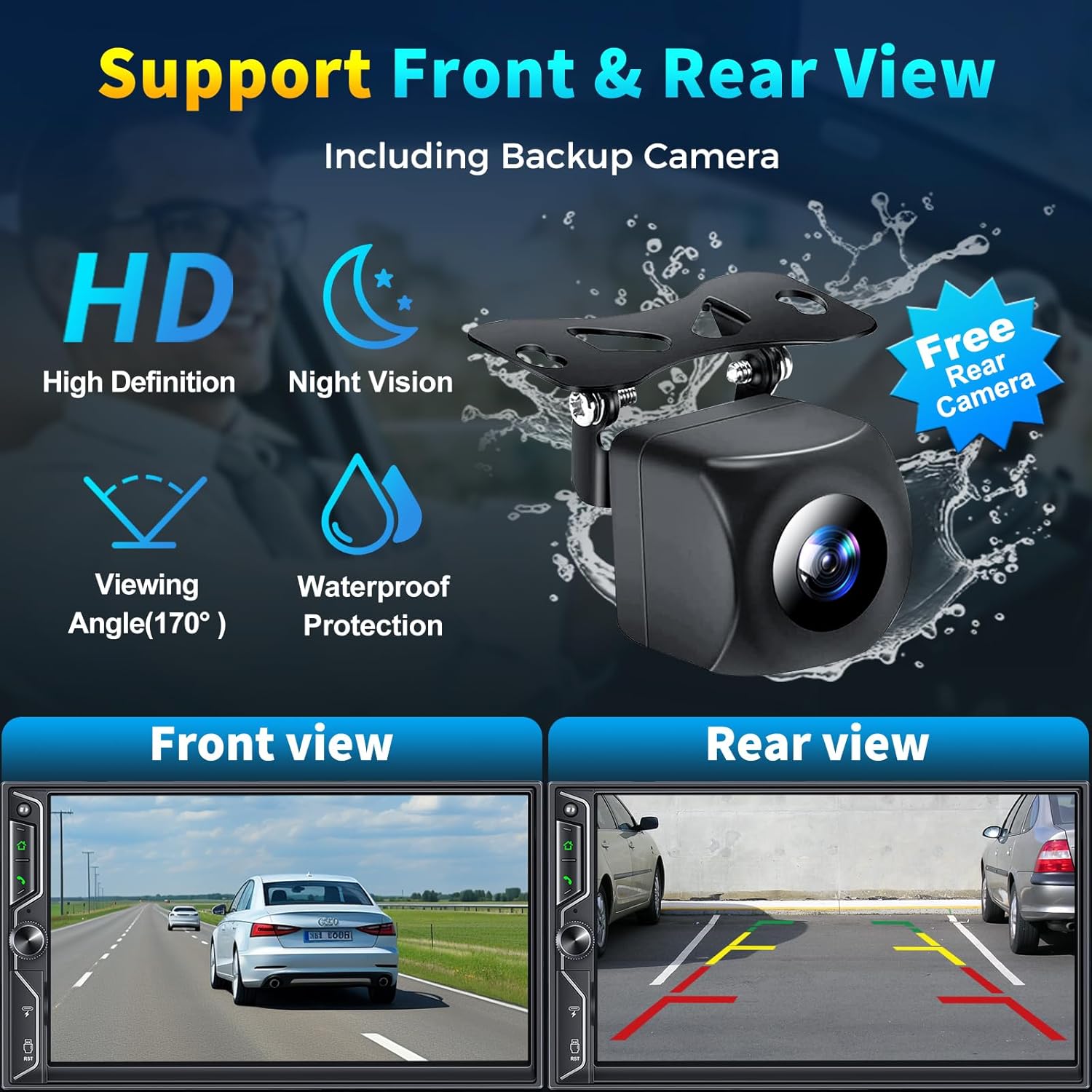
Image: A graphic demonstrating the car stereo's support for front and rear view cameras, showing example views from both perspectives and an image of the included HD night vision backup camera.
7. AM/FM Radio
Access the "Radio" application to tune into your favorite AM/FM stations.
- Use the scan function to find available stations.
- Save preferred stations to presets for quick access.
8. Smart Voice Control
Utilize your smartphone's voice assistant (Siri, Google Assistant) through the car stereo for hands-free operation.
- Activate your voice assistant via the stereo's interface or a dedicated button (if available).
- Issue commands for navigation, making calls, playing music, and more.
9. Steering Wheel Control
If your vehicle supports it, you can connect the stereo to your steering wheel controls for convenient operation without taking your hands off the wheel.
- Refer to your vehicle's manual and the stereo's wiring diagram for proper connection.
- Configuration may be required in the stereo's settings menu to map steering wheel buttons.
10. USB Playback and Charging
The unit includes USB ports for media playback and charging your devices.
- Insert a USB flash drive into the designated port to play audio or video files.
- The USB port can also be used to charge compatible smartphones.
Official Product Video
Video: An official product video demonstrating the SJoyBring Double Din Car Stereo's features, including its design, smart chip, independent Bluetooth module, audio outputs, QLED screen, CarPlay, Android Auto, voice control, steering wheel control, radio, charging, and MirrorLink capabilities.
Maintenance
- Screen Cleaning: Use a soft, lint-free cloth to gently wipe the QLED touchscreen. Avoid abrasive cleaners or solvents.
- General Cleaning: Keep the unit free from dust and debris. Use a dry cloth for exterior cleaning.
- Software Updates: Periodically check the SJoyBring official website or contact customer support for any available software or firmware updates to ensure optimal performance and compatibility.
- Cable Inspection: Regularly inspect all connected cables for any signs of wear or damage.
Troubleshooting
| Problem | Possible Cause | Solution |
|---|---|---|
| No Power | Incorrect wiring; Blown fuse; Vehicle power issue. | Check power connections (ACC, B+); Inspect vehicle fuses; Consult a professional installer. |
| No Sound | Speaker wiring incorrect; Volume too low; Mute function active; Amplifier issue. | Verify speaker connections; Increase volume; Check mute status; Ensure external amplifier is powered (if applicable). |
| Bluetooth Not Connecting | Bluetooth off on phone/stereo; Incorrect pairing; Interference. | Ensure Bluetooth is on; Delete previous pairings and re-pair; Move phone closer to unit. |
| CarPlay/Android Auto Not Working | Phone not compatible; Incorrect connection; Software glitch. | Ensure phone is compatible and updated; Reconnect wirelessly or via USB (for MirrorLink); Restart phone and stereo. |
| Rear Camera Not Displaying | Camera wiring incorrect; Reverse trigger wire not connected. | Check camera power and video input connections; Verify reverse trigger wire connection. |
| Touchscreen Unresponsive | Temporary software issue; Screen damage. | Perform a soft reset using the RST button; If issue persists, contact support. |
If you encounter issues not listed here or if the suggested solutions do not resolve the problem, please contact SJoyBring customer support for further assistance.
Specifications
| Feature | Detail |
|---|---|
| Brand | SJOYBRING |
| Model Number | 7-Inch Double Din Car Stereo |
| Screen Size | 7-Inch QLED HD Touchscreen |
| Screen Resolution | 1280 x 720 |
| Video Playback Support | Up to 1920 x 1080P |
| Connectivity Technology | Auxiliary, Bluetooth, Wi-Fi, USB |
| Bluetooth Version | 5.3 |
| Audio Output Channels | 4.2 (4 Channels RCA Audio Out, 2 Subwoofer Out) |
| Output Power | 240 Watts |
| Compatible Devices | Smartphone (iOS & Android) |
| Control Method | App, Remote, Touch, Steering Wheel Control |
| Built-In Media | Car stereo, Backup camera |
| Item Weight | 2.64 Pounds |
Warranty and Support
The SJoyBring 7-Inch Double Din Car Stereo comes with a 1-Year Warranty from the date of purchase.
For warranty claims, technical assistance, or any inquiries, please contact SJoyBring customer support. You can also visit the official SJoyBring store for more information and resources:
Related documents7-Inch Double Din Car Stereo


Ask a question about this manual
Ask about setup, troubleshooting, compatibility, parts, safety, or missing instructions. Manuals+ will review the question and use this page’s manual context to help answer it.